
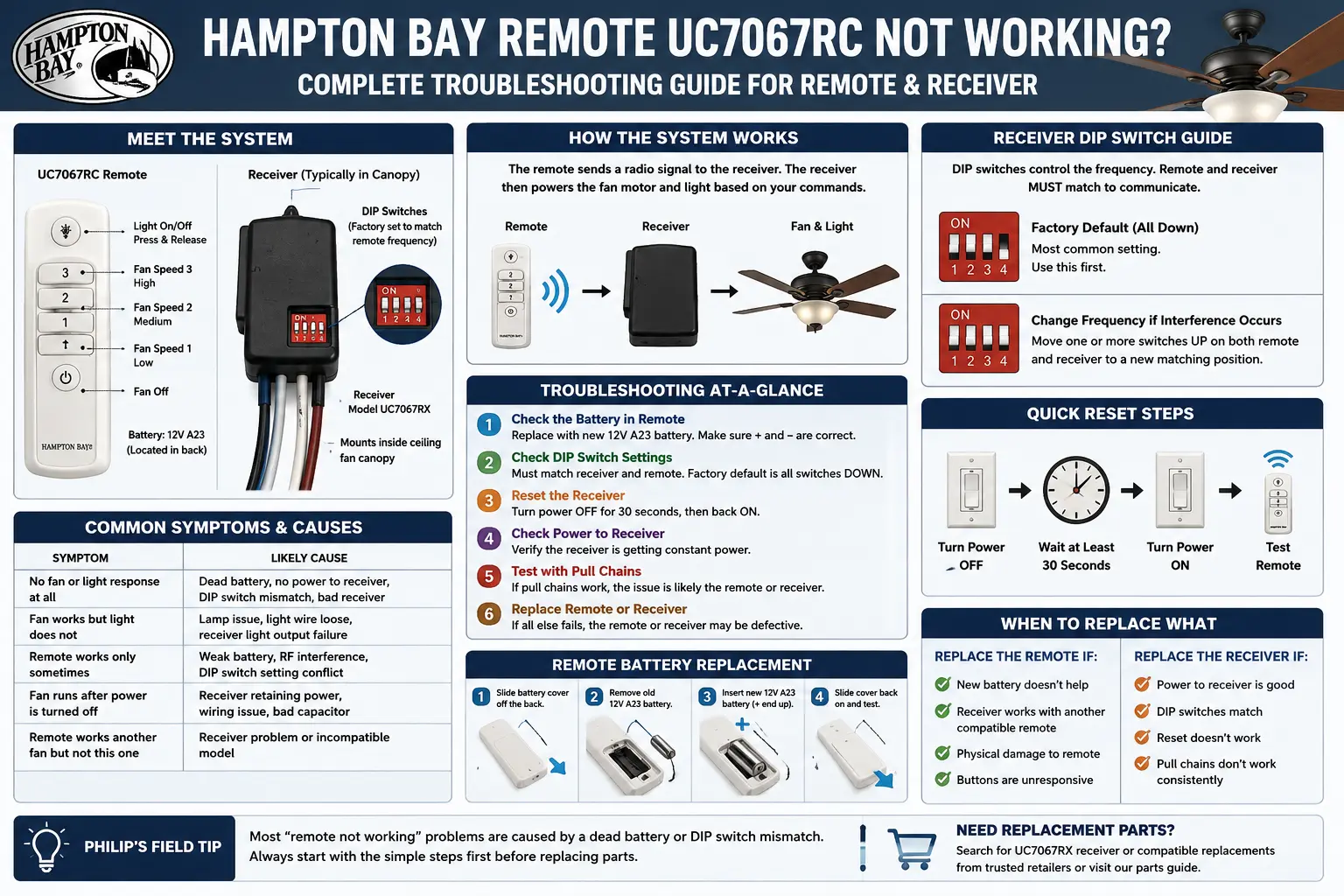
When a Hampton Bay UC7067RC remote stops working, the visible remote is only one part of the system. The button you press sends a radio signal, the receiver hidden in the ceiling canopy interprets it, and the receiver then feeds power to the fan motor and light kit. A failure anywhere in that chain can look like “the remote is dead.”
The easiest mistake is ordering a replacement handheld remote because it is the part you can see. That sometimes works, but it often wastes money. A remote with fresh batteries cannot control a receiver that has failed. A receiver cannot respond if the wall switch is off. A perfectly good remote will not operate the fan if the DIP switches do not match. And a working receiver cannot fix a bad light socket, failed LED board, or pull chain set in the wrong position.
Use this guide to narrow the problem before buying anything. The goal is to separate remote failure, receiver failure, wiring failure, light kit failure, and setup mistakes with simple checks that make sense.
First Checks Before Replacing a UC7067RC Remote
A UC7067RC-style remote can fail, but the first checks should be simple and physical. Start with the wall switch. Many Hampton Bay fans use the wall switch as the power feed for the receiver. If that switch is off, the remote cannot wake the receiver because the receiver has no power.
Next, remove the battery from the handheld remote and inspect the contacts. A battery that looks fine on a shelf can be weak under load, and a remote stored in a drawer can develop a thin layer of oxidation on the spring or contact plate. If the remote uses a 9V battery, press the connector firmly onto the new battery. If it uses coin cells or smaller batteries, confirm polarity and spring tension.
Step 1: Verify wall power
Leave the wall switch ON during testing. If the fan has a light and it can be turned on from a wall control, confirm that power is reaching the fan before diagnosing the remote.
Step 2: Replace the battery
Do not test with an old battery from another remote. Use a fresh battery and confirm that the terminals are clean and tight.
Step 3: Check the pull chains
If the fan has pull chains, set the fan chain to high speed and the light chain to ON. The remote receiver can only control what the fan circuit allows it to control.
Step 4: Listen for receiver response
Stand close to the fan and press a remote button. A click from the canopy often means the remote signal is reaching the receiver, even if the fan or light does not respond.
UC7067RC Symptom Diagnosis Table
| Symptom | Most Likely Cause | What to Test | Best Next Step |
|---|---|---|---|
| Remote does nothing | Dead battery, dirty contacts, no wall power, DIP mismatch, failed receiver | Battery voltage, wall switch, DIP switch settings | Match DIP switches and test receiver response |
| Light works but fan does not | Fan pull chain off, receiver fan output failed, motor capacitor issue | Pull chain position and fan output wire | Set chain to high; test whether receiver sends fan power |
| Fan works but light does not | Bulb, LED board, light limiter, light kit wiring, receiver light output | Bulb/LED, light chain, receiver light output | Confirm light kit before replacing remote |
| Only one fan speed works | Receiver speed circuit or capacitor problem | Speed buttons and motor behavior | Compare receiver failure vs capacitor failure |
| Remote works intermittently | Weak battery, loose battery clip, RF interference, failing receiver | Distance, angle, battery contact, canopy heat | Clean contacts; test close to fan |
| New remote will not work | DIP switches not matched or incompatible frequency | Remote and receiver DIP switch pattern | Match switches or replace remote/receiver as a kit |
How UC7067RC DIP Switches Cause “Remote Not Working” Problems
Many UC7067RC-style Hampton Bay remotes do not pair like modern Bluetooth devices. They use small DIP switches. These tiny switches set the radio code for the remote and receiver. The remote and receiver must use the same pattern. If even one switch is different, the receiver ignores the remote.
The remote DIP switches are usually behind the battery cover. The receiver DIP switches are usually hidden inside the fan canopy near the ceiling. That is why a replacement handheld remote can arrive, look correct, light up, and still do nothing. It is talking on the wrong code.
When matching DIP switches, do not rely on memory. Take a photo of the receiver switch pattern, then match the handheld remote exactly. A switch that is halfway between positions should be moved firmly into one side. Dust and age can make the small plastic levers feel loose, so use a small nonmetallic tool and good lighting.
Why a replacement UC7067RC remote may not work even when it looks identical
Two remotes can share the same shell shape and button layout but use different frequency, coding, or internal board versions. If the replacement listing says UC7067RC-compatible, still confirm the DIP switch style and frequency information. If the original receiver is failed, no compatible handheld will solve the problem by itself.
How to Tell Whether the Canopy Receiver Failed
The receiver is the hidden box inside the fan canopy. It receives the remote signal and switches power to the fan motor and light kit. Receiver failure is extremely common because the receiver lives in a warm, enclosed canopy and handles electrical load every time the fan or light changes state.
A failed receiver may be completely dead, partially dead, or unstable. Completely dead means no response from fan or light. Partially dead means the light output works but fan speeds do not, or the fan works but the light does not. Unstable means the fan works after a power reset, then stops responding again.
Receiver failure clue: no click, no fan, no light
If the remote battery is new, DIP switches match, wall power is on, and the receiver never clicks or responds, the receiver is a prime suspect.
Receiver failure clue: one function works
If the light responds but fan speeds do not, the receiver may have lost one output channel. The handheld remote is still transmitting.
Receiver failure clue: works after breaker reset
A receiver that temporarily recovers after power cycling may have a failing internal relay, capacitor, or control board.
For broader Hampton Bay part matching, use the Hampton Bay lighting replacement parts guide and the Hampton Bay transformer replacement guide.
Why the UC7067RC Light Button Works but the Fan Does Not
If the light button works, the handheld remote is sending a usable signal and the receiver is receiving at least part of it. That does not mean the receiver is fully healthy. The fan speed circuit inside the receiver can fail separately from the light relay.
Before replacing the receiver, check the fan pull chain. Many ceiling fans need the pull chain set to high speed so the receiver can regulate speeds electronically. If the pull chain is set to OFF, the receiver may click or send power, but the motor circuit is open.
If the pull chain is set correctly and the fan still does not move, the next split is receiver output vs motor/capacitor problem. A hum with no spin can point to a motor capacitor or seized motor. No sound at all can point back toward the receiver or wiring.
Why the UC7067RC Fan Buttons Work but the Light Does Not
If fan speeds work but the light does not, the remote signal and receiver fan channel are alive. The failure is usually in the bulb, LED board, light kit wiring, light output channel, or a separate light pull chain.
Start with the obvious: replace the bulb with a known working bulb if the fixture uses replaceable lamps. If the fan uses an integrated LED board, look for a separate LED driver or module. Some light kits fail in a way that makes the remote look guilty even though the receiver is still sending power.
If the light kit uses dimming, make sure the replacement bulb is dimmable. Non-dimmable LED bulbs can flicker, flash, or fail to respond correctly when controlled by older fan receivers.
Why the Remote Works Only Sometimes
Intermittent UC7067RC problems are frustrating because they make every part look suspicious. The first thing to check is battery contact pressure. A loose 9V connector or weak spring can open the circuit when the remote is tilted. Clean the contacts and gently increase spring pressure if needed.
Next, test distance. Stand directly under the fan and press the buttons. If the remote works close to the fan but not from across the room, the battery may be weak, the receiver antenna may be tucked behind metal, or interference may be reducing range. The receiver antenna is often a small loose wire inside the canopy. It should not be cut, capped, or wrapped tightly around metal parts.
Heat can also create intermittent receiver behavior. A receiver packed tightly into a small canopy with old wiring and insulation can fail after the light has been on for a while, then recover after cooling. That pattern usually points to the receiver rather than the handheld remote.
Remote vs Receiver vs Fan Motor: Which Part Is Actually Bad?
| Test Result | Remote Likely? | Receiver Likely? | Fan/Light Kit Likely? | What It Means |
|---|---|---|---|---|
| No functions work, no click | Possible | Likely | Possible only if no power | Check battery, DIP switches, wall power, then receiver |
| Remote LED lights but fan ignores it | Possible if wrong code | Likely if DIP matches | Less likely | Signal may not reach a working receiver |
| Light works, fan does not | Unlikely | Possible fan channel failure | Possible capacitor/motor issue | Remote is probably transmitting |
| Fan works, light does not | Unlikely | Possible light channel failure | Likely bulb/LED/light kit issue | Test light kit before replacing remote |
| Works after breaker reset, then fails again | Unlikely | Likely | Possible heat-related motor issue | Receiver electronics may be unstable |
Replacement Options for a UC7067RC Remote That Still Will Not Work
Once the simple checks are done, there are three replacement paths. The right path depends on what failed.
Replace only the handheld remote
Choose this when the receiver still responds to a known compatible remote or when the original handheld is physically damaged, missing, or has failed buttons. Match frequency and DIP switch style.
Replace the receiver only
Choose this when the handheld is likely working but the canopy receiver no longer responds or has lost one output channel. Make sure the receiver is rated for the fan motor and light load.
Replace remote and receiver as a matched kit
This is often the cleanest solution when compatibility is uncertain. A matched kit avoids the problem of a new remote trying to talk to an old or failed receiver.
When choosing a kit, check whether the fan has separate light dimming, reverse control, speed control, and any special functions. A basic universal kit may control fan speed and light on/off but may not preserve every original feature.
Wiring Checks Inside the Canopy
Inside the canopy, the receiver usually sits between the house wiring and the fan wiring. The house hot and neutral feed the receiver. The receiver then sends switched output to the fan motor and light kit. If the receiver is replaced, the wire colors and labels matter more than the old physical layout.
Do not assume wire colors are universal across every fan. Read the labels on the receiver leads. Typical labels may identify AC IN, motor output, light output, and neutral. Take photos before removing the old receiver. If wire nuts are brittle, loose, burned, or overcrowded, replace them properly.
Why the Fan Turns On by Itself or Responds to Another Remote
If the fan turns on by itself, changes speed unexpectedly, or responds when a neighbor uses a remote, the DIP switch code may be shared with another nearby fan or remote device. Change the DIP switch pattern in both the handheld remote and receiver to a less common combination.
Do not change only the handheld remote. The receiver must match. After changing the code, restore power and test every function. If the behavior continues after a code change, the receiver may be electrically unstable.
What Not to Buy Until You Know the Failure
- Do not buy a handheld remote only because the old one looks worn.
- Do not buy a receiver without checking fan motor and light wattage ratings.
- Do not buy a universal kit if you need a special reverse, dimming, or color-temperature feature.
- Do not assume a remote with the same button layout uses the same frequency or DIP switch system.
- Do not replace the fan until you have separated receiver failure from motor failure.
Hampton Bay UC7067RC Remote FAQ
Why did my UC7067RC remote stop working suddenly?
Sudden failure is commonly caused by a dead battery, dirty contacts, a wall switch being turned off, a failed canopy receiver, or a receiver that lost power. Start with power and battery checks before buying parts.
Where are the DIP switches on a UC7067RC remote?
The handheld remote DIP switches are usually behind the battery cover. The receiver DIP switches are usually inside the ceiling canopy. Both patterns must match.
Can I use a universal Hampton Bay remote?
Often yes, but it must be compatible with the receiver frequency and code system. If the receiver is bad, a universal handheld remote alone will not fix the fan.
Why does the receiver click but the fan does not move?
A click means the receiver is hearing the remote command. If the fan does not move, check the pull chain setting, receiver motor output, fan capacitor, and motor condition.
Should I replace the fan or just the receiver?
If the fan motor and light kit are still good, replacing the receiver or remote/receiver kit is usually cheaper than replacing the whole fan. Replace the fan only when the motor, housing, blades, or light kit make repair impractical.
Independent Troubleshooting Note
PortfolioLighting.net is an independent reference site. Hampton Bay is a Home Depot brand. Always turn power off at the breaker before opening a ceiling fan canopy or working around household wiring.