
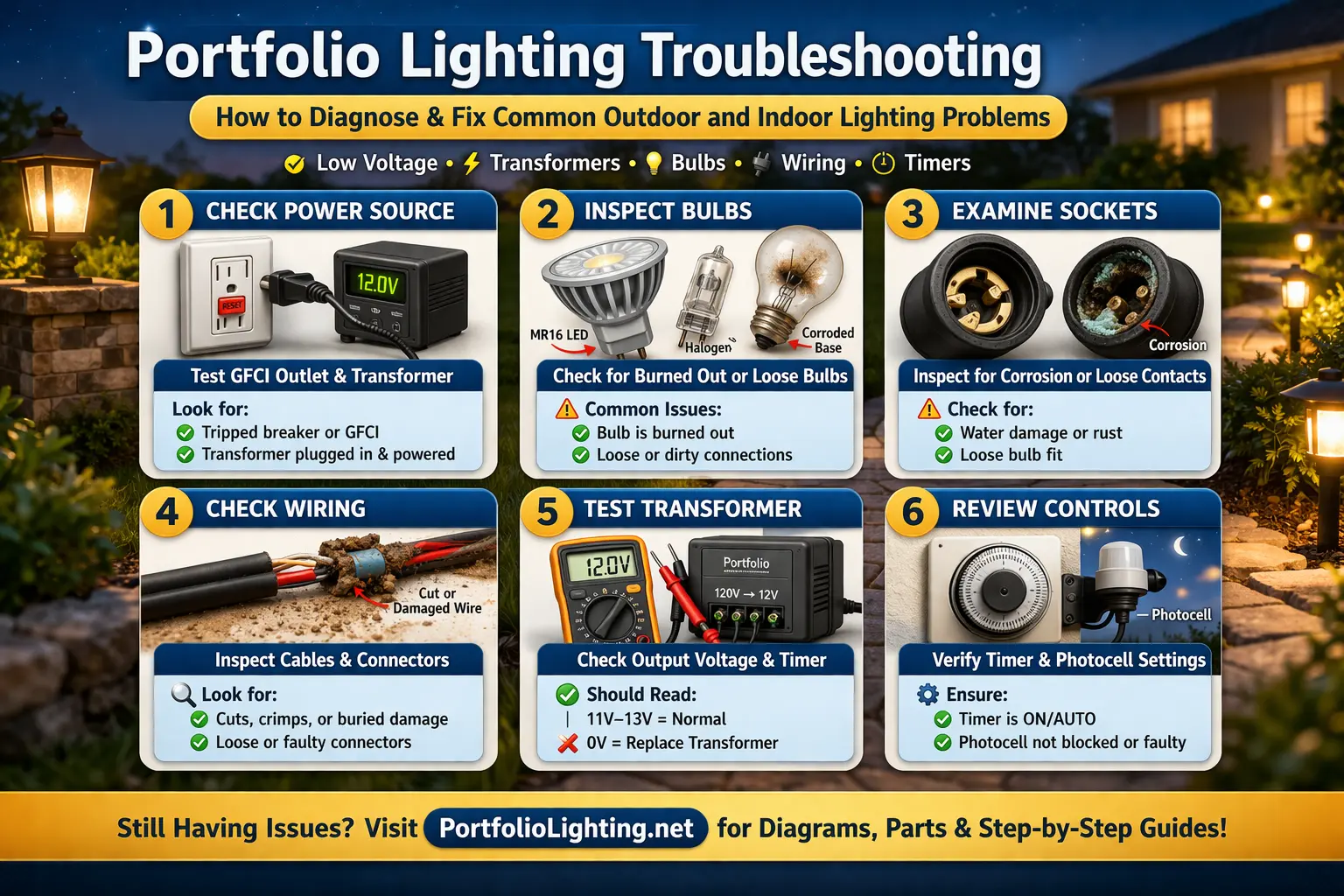
Portfolio Troubleshooting Desk
Start with the symptom, then isolate the failed part
Do not start by buying a transformer, photocell, bulb or fixture. First identify whether the problem affects the entire Portfolio system, one cable run, one fixture, or only a timer/photocell function. That distinction usually tells you where to test next.
Transformer & power problems
Timer & photocell problems
Fixture & LED problems
Wiring & connection problems
Model-specific troubleshooting
Match this repair to your Portfolio Lighting model
If you are working with an older Portfolio fixture, use the Portfolio Lights Not Working? Fix No Power, Dim, Flickering, or Partial Lighting Issues information to identify the part or repair method—but confirm the exact model, dimensions, lamp type and electrical rating first. Similar-looking Portfolio and third-party components are not automatically interchangeable.
Portfolio owner’s first step: Photograph the fixture and model label, compare measurements, then use the Portfolio parts and repair guides to narrow the replacement.
Quick Answer: Why Your Portfolio Lights Are Not Working
Most Portfolio landscape lighting failures track back to a specific diagnostic fault line. Before spending money on replacement fixtures, cross-reference your exact system symptoms against the troubleshooting options below:
- No lights working across entire run: Check outlet power, main GFCI trip, transformer secondary terminals, and internal timer fuses.
- Only a single section goes dark: Points directly to a severed low-voltage direct burial line or a failed line tap connector.
- Fixtures are visibly dim or yellowing: Severe voltage drop caused by incorrect wire gauge size or exceeding the transformer's 80% load capacity.
- Entire loop is rapidly flickering: Internal driver harmonic distortion (THD), failing electronic transformer rectifiers, or loose master terminal lugs.
- Lights stay active during daylight hours: Malfunctioning or shaded photo eye control lens bypassing the programming logic.
- Transformer hums loudly or trips repeatedly: Inductive core magnetostriction or a localized short circuit from direct copper-to-soil exposure.
- Individual fixture blinks intermittently: Corroded bi-pin bulb socket contact points or heat-induced expansion failure in the bulb housing.
⚠️ CRITICAL NOTE: Attempting to fix a voltage drop or structural flickering by simply swapping in higher wattage bulbs will instantly overload older circuit boards, triggering three specific, permanent hardware failures detailed in our diagnostic sections below.
Use the diagnostic navigation links below to jump directly to the field testing protocols and multi-meter values required to safely isolate and repair each specific fault code.
After you identify the likely failure point, the next question is whether the repair is worth the cost. A single dark fixture may only need a low-cost bulb or connector, while repeated transformer shutdowns or multiple failed fixtures may point to a larger system problem. Use the Portfolio Lighting repair cost guide to compare repair costs before replacing parts unnecessarily.
If you need to identify your exact model before troubleshooting, use the Portfolio Lighting model library and repair index to match your fixture, transformer, or part.
Based on my testing, most lighting failures fall into the same pattern. I’ve noticed that power issues, wiring problems, and transformer faults show up again and again, even though they look different on the surface.
I’ve tried jumping straight to replacing fixtures before, and it rarely worked. In practice, when I follow a step-by-step check—power first, then bulbs, then wiring—I almost always find the real problem faster and avoid unnecessary costs.
Older Portfolio fixtures often fail for reasons that differ from newer LED products. Heat-aged wiring, worn sockets, deteriorated insulation, weathered seals, and decades of corrosion all require a different troubleshooting approach. The Portfolio Vintage Lighting guide explains these age-related failure patterns and how to determine whether restoration is practical before replacing the fixture.
Portfolio lighting problems usually feel bigger at first than they really are. A light that will not turn on, a dim section of path lights, or an indoor fixture that flickers can often be narrowed down quickly if you check the basics in the right order.
I’ve worked on a lot of lighting systems that looked completely broken at first, and in my experience, most of them were not. I remember one setup where nothing turned on, and I initially thought the transformer had failed, but after testing, I discovered it was just a tripped GFCI upstream.
What I learned early on is that troubleshooting is about slowing down and checking things in order. I’ve seen people replace perfectly good parts because they skipped basic checks, and surprisingly, the simplest issue is often the one causing the whole system to fail.
This page is designed as the main troubleshooting hub for Portfolio lighting. Start with the quick issue finder below, then use the step-by-step checks to confirm whether your problem is related to the transformer, timer, wiring, bulb, socket, ground wire, or low-voltage system layout.
If you are troubleshooting an indoor fixture and are not completely sure which lighting category it falls under, visit our Portfolio indoor lighting guide. It organizes the main indoor lighting types across the site and can help you quickly move to the most relevant page for recessed lighting, pendant fixtures, wall lighting, bathroom lighting, track systems, floor lamps, and other common indoor setups.
If you are not sure whether the issue is the transformer, wiring, or fixtures, start with the Portfolio lighting transformer master guide to identify your unit, diagnose common problems, and choose the correct fix before replacing parts.
Start With Your Exact Problem
Start With the Full Portfolio Lighting System Guide
If you are new to Portfolio lighting or trying to understand how all the parts of your system work together, this Portfolio Lighting guide is the best place to start. It covers fixtures, transformers, wiring, troubleshooting, and replacement parts in one place.
Match the replacement to the actual Portfolio model
For Portfolio Lighting Troubleshooting: Fix No Power, Dim, Flickering & Transformer Problems, start with evidence from the installed power equipment rather than a visually similar replacement. Record the exact model label, input/output ratings shown on the unit, terminal arrangement, control method, outgoing cable runs, and which runs still operate. That information separates a supply/control problem from a downstream cable, connector, or fixture fault and gives you a defensible replacement specification if repair is not practical. Use Portfolio Parts for the next model- or symptom-specific step.
Portfolio Lighting Troubleshooting Topics
This troubleshooting hub connects to detailed guides that diagnose specific lighting problems. If you already know the symptom your lights are showing, jump directly to the guide that explains how to fix it.
My approach has always been to isolate one section at a time. I’ve handled systems where only half the lights worked, and instead of guessing, I tested each segment until I found exactly where the failure started.
- Landscape lights not turning on
- Portfolio lights blinking
- Portfolio lights too dim
- Transformer troubleshooting
- Transformer tripping breaker
- Timer not working
- Photocell not working
- Landscape lights not working
I’ve seen firsthand that once you identify where power stops flowing, the fix becomes obvious. Whether it’s a damaged cable, bad connector, or failed fixture, narrowing it down is what makes troubleshooting actually work.
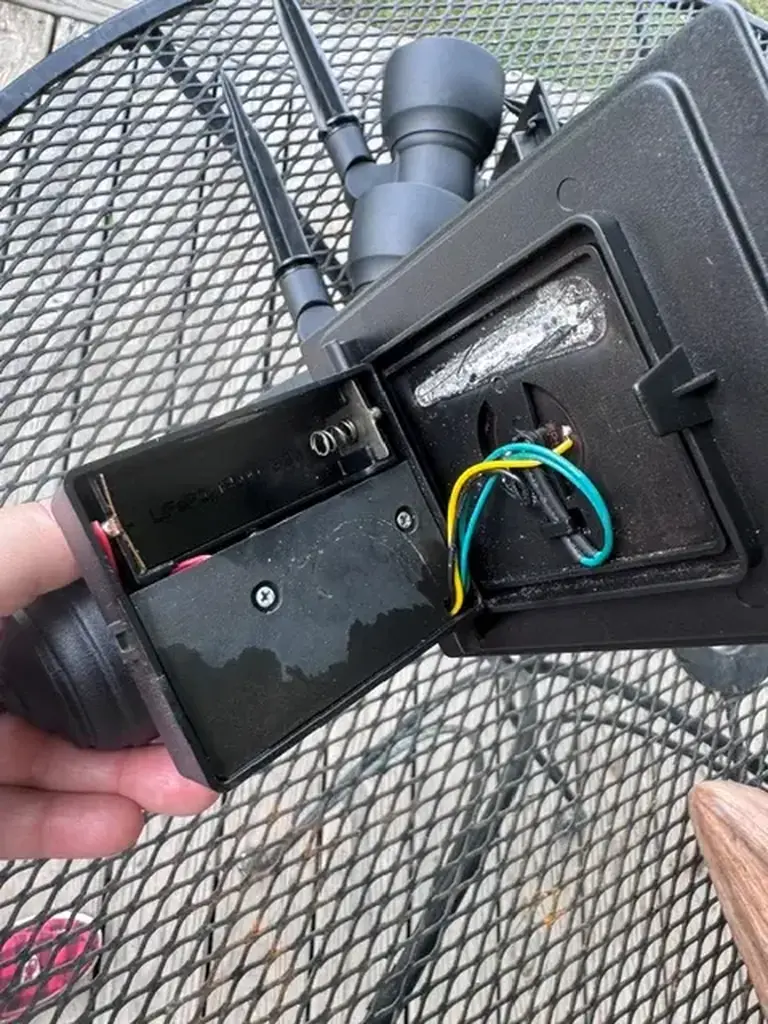
Opening the housing also makes it possible to identify whether the fixture uses replaceable rechargeable cells, a serviceable LED driver board, or an integrated design where replacing the complete fixture is more practical than attempting a component-level repair.
When the Fixture Is Fine but the Bulbs Are the Problem
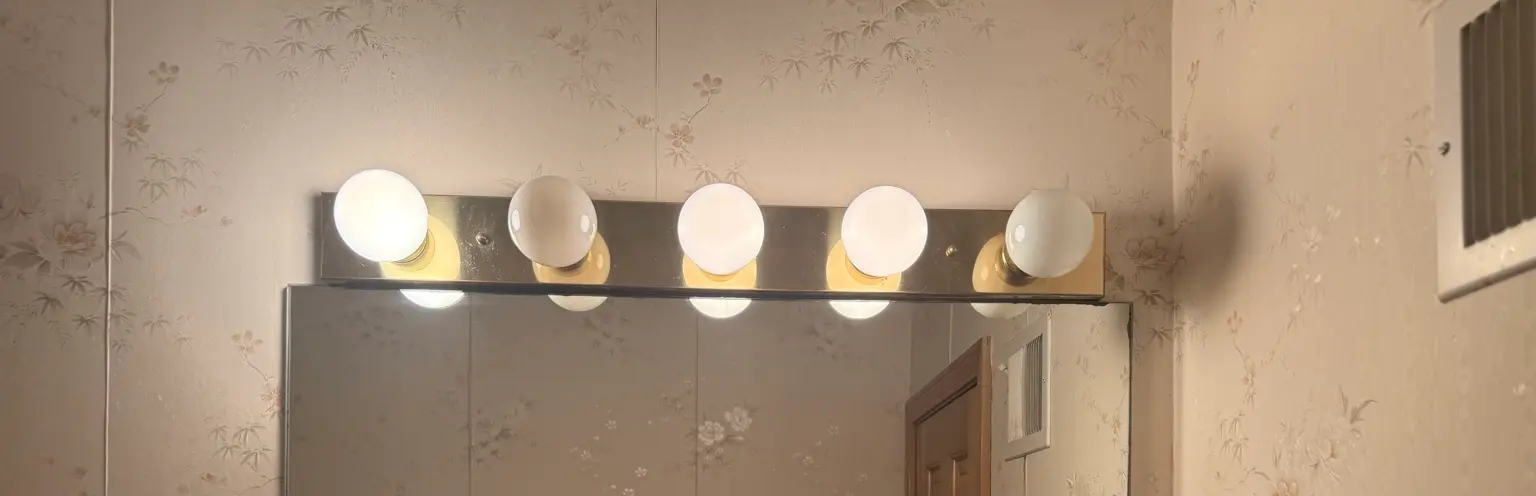
If a Portfolio light fixture looks uneven, start with the simple checks before assuming the fixture, wiring, or switch is bad. Mixed bulbs can create different colors, different brightness levels, and inconsistent reflections on nearby surfaces.
A good troubleshooting step is to remove all bulbs, confirm the socket ratings, and reinstall a matching set of bulbs with the same wattage equivalent, color temperature, base type, and dimmer compatibility. If the problem disappears, the fixture was not the issue.
Find Your Exact Portfolio Lighting Problem
Wanting to go straight to your troubleshooting issue? Below are specific issues with your lighting system.
Many landscape lighting problems become easier to diagnose once you understand how power flows through the system. Reviewing a low voltage landscape lighting system diagram can help you identify whether a problem is likely at the transformer, wiring, connectors, or the fixture itself.
Lighting problems often happen because several parts of a system work together. Fixtures, transformers, wiring, timers, and LED components can all affect how lighting operates. If you want a broader overview of how lighting systems function before diagnosing a problem, visit the complete lighting guide. It explains indoor lighting, outdoor lighting, landscape lighting systems, installation basics, and common troubleshooting scenarios that affect residential lighting systems.
If your Portfolio landscape lighting system is no longer working or parts are difficult to find, it may be time to upgrade to a newer system. This best replacement for Portfolio landscape lighting guide explains the most compatible and reliable alternatives.
Some transformers display error codes instead of shutting down completely. If you see an “E” on your display, use this Hampton Bay error code troubleshooting guide to identify the problem and fix it without guessing.
Not all lighting problems come from failed fixtures. Some come from how the system reacts at night. The AI security and ambient lighting guide explains how better control can reduce false triggers and improve visibility.
Not every lighting problem comes from wiring, transformers, or fixtures. In some systems, the issue is actually in the control layer that interprets schedules, scenes, and spoken requests. If you are trying to understand how voice-based scene control fits into a modern lighting setup, see AI voice lighting logic.
Some lighting problems are easy to see but harder to locate. Flickering, dimming, or half the yard going dark can all point to deeper wiring or connection issues that are not obvious from the surface. For the system-logic side of narrowing those problems down, visit AI fault isolation logic for landscape lighting.
If your lights shut off after running for a while and then come back on later, overheating may be the real problem. See thermal throttling protection for outdoor lighting systems to understand how heat buildup affects transformers and why staged dimming is better than a full thermal shutdown.
If your system still works but keeps having issues, you may not need a full replacement. Our Portfolio lighting upgrade guide shows how to improve performance, fix common problems, and add smarter control without replacing everything.
If your system uses a larger transformer or you are dealing with long wire runs and uneven brightness, a multi-tap unit requires a different setup. This Portfolio 200W multi-tap transformer wiring and troubleshooting guide explains how to use the COM terminal correctly, choose the right voltage tap, and fix dim or inconsistent lights across your system.
Transformer Problems
Best for full-system outages, buzzing transformers, overload issues, reset questions, and breaker trips.
Some transformer problems are easy to miss because the fixtures themselves appear to be the issue when the real problem is hidden inside the power supply or protection circuitry. This transformer error code lookup and troubleshooting guide explains common warning indicators, overload conditions, timer faults and shutdown behavior across many low-voltage lighting systems so you can diagnose the actual source of the failure faster.
Timer and Control Problems
Best for lights that do not turn on at the expected time, stay on too long, or ignore control settings.
Power and Wiring Problems
Best for dead sections of lights, damaged cable, missing ground wires, or systems that lost power suddenly.
Brightness and Performance Problems
Best for flickering, dim output, voltage drop, weak LED performance, or uneven lighting across the run.
Landscape lighting that works only part of the time usually points to a loose connection, moisture intrusion, overloaded transformer, or failing photocell rather than a completely dead system. The landscape lighting intermittent failure guide explains the most common causes of lights that randomly turn on and off.
Start Here: Troubleshooting Portfolio Lighting Problems
If your Portfolio lights are not turning on, flickering, or only part of the system is working, the issue is usually easier to fix than expected. Most problems come down to power, bulbs, wiring, timers, or the transformer, and you can narrow it down quickly with the right steps.
The best approach is to start broad, then move to the exact problem that matches what your lights are doing. This page helps you quickly identify the issue so you don’t waste time replacing working parts or chasing the wrong fix.
Below you’ll find a step-by-step troubleshooting process, a quick problem finder, and direct links to the most helpful guides for transformers, timers, wiring, dim lights, and full system repairs.
Every lighting problem has an underlying failure pattern. While this troubleshooting guide explains how to diagnose a symptom, our Portfolio Lighting Failure Database explains why components fail, how often each failure occurs, typical service life, repair difficulty, expected costs, and the most effective long-term solution. It combines failure timelines, repair success rates, transformer failures, connector corrosion, voltage-drop problems, LED failures, and real-world maintenance data into one engineering-style reference guide.
- Check power at the outlet or transformer
- Inspect bulbs and fixtures for obvious damage
- Look for loose or corroded wire connections
- Confirm timer and photocell settings
If you want a full overview of how your system works, start with Portfolio Lighting to understand how fixtures, wiring, and transformers connect together.
Tip: Keep the problem-specific pages open while troubleshooting so you can follow each step as you test your system.
If troubleshooting shows the issue is a failed transformer, bad bulb, broken connector, damaged stake, or missing part, the fastest next step is to check available replacements before replacing the entire system.
If your system still has power but isn’t performing correctly, the issue may be outdated controls rather than failed hardware. See how to upgrade a legacy landscape lighting system for ways to improve performance without replacing everything.
If your system still has power but isn’t performing correctly, the problem may be outdated controls. See how to upgrade a legacy transformer to improve performance without replacing everything.
Find Replacement PartsDiagnose the Lighting Problem Before Replacing Parts
Many homeowners replace bulbs, fixtures, or transformers before confirming the real cause of a lighting problem. A better approach is to diagnose the symptom first. For example, lights that blink usually indicate wiring or voltage issues, while lights that stay dark often point to power supply problems, timers, or failed bulbs.
If your system stays on all night or will not shut off during the day, this guide on landscape lights not turning off walks through the most common causes, including timer settings, photocell failures, and wiring issues.
Many homeowners assume that all track lighting systems are universal, but that is not the case. Variations in track design, voltage systems, and connector types mean that mixing brands or models can quickly lead to frustration. If you are unsure which track lighting systems work together, taking a few minutes to identify your setup can save time and money while ensuring your lighting performs the way it should.
Use the troubleshooting guides on this page to match the exact behavior your lights are showing. Once you understand whether the issue is related to power, wiring, transformer output, or fixture failure, fixing the system becomes much easier.
If your lighting looks too harsh, uneven, or is shining into areas it should not, the issue is often related to beam direction or fixture design. For a focused fix, use our complete light trespass troubleshooting guide to correct glare and spillover quickly.
Sometimes the problem is not wiring or the transformer at all. The light may simply be the wrong color temperature. The Landscape Lighting Color Temperature Guide can help if your outdoor lighting feels too harsh, too blue, or visually uncomfortable at night.
Fixing lighting problems after installation can add unexpected costs. This landscape lighting cost guide helps you plan ahead so you can avoid unnecessary expenses.
If your system suddenly stopped working, start with our full transformer troubleshooting guide.
If your lights stopped working after you mixed fixtures or connectors from different brands, the issue may be compatibility rather than a bad transformer or fixture. Use this Portfolio connector compatibility guide to check wire fit, connector type, and common mixed-brand failure points.
Many outdoor lighting problems come from outdated control rather than failed fixtures. Instead of adjusting timers repeatedly, review the AI outdoor lighting systems guide to see how modern systems improve reliability, and the AI automated lighting guide for practical examples of how these upgrades work.
If your outdoor lighting problems keep leading back to weak fixture quality instead of wiring or controls, review the best VOLT landscape lighting fixtures guide for a higher-grade upgrade path.
Landscape Lighting Maintenance Matters More Than Most Homeowners Realize
Landscape lighting systems perform best when they are maintained on a regular schedule. Dirt on lenses, loose wire connections, worn bulbs, damaged fixtures, corroded terminals, and shifting soil can all reduce light output and shorten system life. Our landscape lighting maintenance guide explains the practical upkeep steps that help outdoor lighting stay brighter, safer, and more reliable through changing seasons. For homeowners trying to protect existing fixtures instead of replacing the whole system, this page gives useful maintenance advice that supports long-term performance and better troubleshooting decisions.
Some Portfolio lighting problems that look like timer trouble or transformer failure are actually caused by a bad photocell. If your lights no longer turn on automatically at dusk, stay on all day, or behave inconsistently, see our Portfolio Lighting Replacement Photocell guide. It explains when the photocell is likely the failed part and how to choose the right replacement before replacing more of the system than necessary.
If your system uses model 0312384, see our 0312384 replacement parts guide to identify which component needs to be replaced and how to fix it.
If your lighting system needs more secure and dependable control, our voice biometrics guide explains how identity-based commands can improve both security and personalization.
Most Common Portfolio Lighting Problems
Many Portfolio lighting issues come from a short list of repeat problems. Worn bulbs, loose sockets, damaged low-voltage cable, timer settings, bad transformer connections, and outlet power problems account for a large share of failures in both indoor and outdoor systems.
If your lights are turning on or off at the wrong times, the issue may be the timer or control system. The Smart Outdoor Lighting Controls Guide explains how to upgrade and fix common control problems.
If your outdoor lighting system hums, buzzes, or vibrates after switching to LEDs, the landscape lighting buzzing and hum comparison explains which fixtures and transformers are most likely to create audible noise.
| Problem | Likely Cause | What to Check First | Detailed Fix Guide |
|---|---|---|---|
| Lights will not turn on | No outlet power, bad bulb, transformer issue, loose connection | Power source, GFCI, bulb, transformer, timer mode | Lights not turning on guide |
| Only one section is out | Damaged wire, bad connector, failed fixture | First fixture in the dead section and nearby cable | Landscape troubleshooting guide |
| Lights are dim | Loose bulb, poor socket contact, voltage drop, worn fixture | Bulb fit, socket condition, wire connections | Dim lights fix guide |
| Timer is not working correctly | Wrong settings, manual override, photocell issue | Timer programming and control mode | Timer troubleshooting guide |
| Transformer buzzes or shuts down | Overload, loose wiring, aging transformer | Connected wattage and terminal connections | Transformer troubleshooting guide |
| Breaker keeps tripping | Short circuit, overload, damaged transformer, wet wiring | Breaker reset, transformer disconnect, cable damage | Breaker trip guide |
Most Common Portfolio Lighting Problems
Many Portfolio lighting issues come from a small number of common problems. If your lights stop working, flicker, or become dim, the cause is usually related to power supply, bulbs, wiring, or transformer output.
Many outdoor lighting problems start long before a fixture fails. Poor spacing, the wrong fixture in the wrong location, or a lack of planning can make an entire setup feel uneven or underperforming. This outdoor lighting plan guide helps you avoid those mistakes by showing how to design the system correctly from the beginning.
If your lighting feels too harsh, creates glare, or is shining into nearby windows, the issue is usually related to fixture aiming or lack of shielding. To correct this without reducing safety, follow a structured approach to beam control and fixture selection in our Dark Sky Compliance Guide.
Not every lighting problem starts with wiring or bulbs. In some cases, the housing itself may be cracked, loose, corroded, or letting moisture into the fixture. This Portfolio landscape light housings guide explains how housing damage can affect performance and what your replacement options may be.
Some lighting issues are not caused by wiring or fixtures, but by how the system is set up to run at night. Lighting that feels too bright, too harsh, or inconsistent can often be improved by adjusting how it changes over time. For that type of system setup, see circadian outdoor lighting.
If the issue appears to be at the transformer itself, especially with flickering or partial power, review our terminal block and lug troubleshooting guide to inspect the output connections.
If troubleshooting depends on the exact model number, check the Portfolio technical archive for older manuals, part families, and model-specific repair notes.
If your smart lighting feels slow or stops responding during outages, the issue may be how the system is built rather than the fixture itself. Our edge vs cloud lighting guide explains why local processing is often more reliable than cloud-based control.
If your lights flicker, go out completely, or only work when you move the wire, the issue is often a damaged cable rather than the fixture. Follow our Portfolio lighting wire replacement guide to identify broken wiring, repair pigtails, and prevent repeat failures.
- Lights not turning on – Often caused by a tripped GFCI outlet, unplugged transformer, burned-out bulb, or timer setting issue.
- Only one section of lights working – Usually a damaged wire, loose connector, or failed fixture interrupting power to the rest of the run.
- Lights are dim – Common causes include voltage drop, loose bulb connections, aging fixtures, or overloaded transformers.
- Lights flicker or blink – Often caused by loose wiring connections, failing bulbs, transformer overload, or moisture in connectors.
- Lights turn on at the wrong time – Typically a timer programming issue, photocell problem, or transformer control setting error.
If your lights turn on at the wrong time or your timer is unreliable, upgrading to smart control can solve the problem. Learn how to connect your lighting system to smart control for better scheduling and automation.
If lights work at first and fail after running for a while, heat may be the real problem. The LED driver overheating comparison explains how heat buildup causes flicker, shutdown, and early driver failure.
Motion-sensing fixtures introduce a different set of troubleshooting challenges than standard porch lights. Sensor range, detection angle, mounting height, photocell settings, environmental interference, and wiring conditions can all affect performance. If you are working with the popular Portfolio PF-4300-BK security fixture, our PF-4300-BK motion-sensing porch light guide explains common operating behaviors, adjustment settings, troubleshooting procedures, and replacement considerations for this model.
Step-by-Step Portfolio Lighting Troubleshooting
Use the troubleshooting flowchart below to quickly diagnose the most common Portfolio lighting problems before replacing bulbs, fixtures, or transformers.
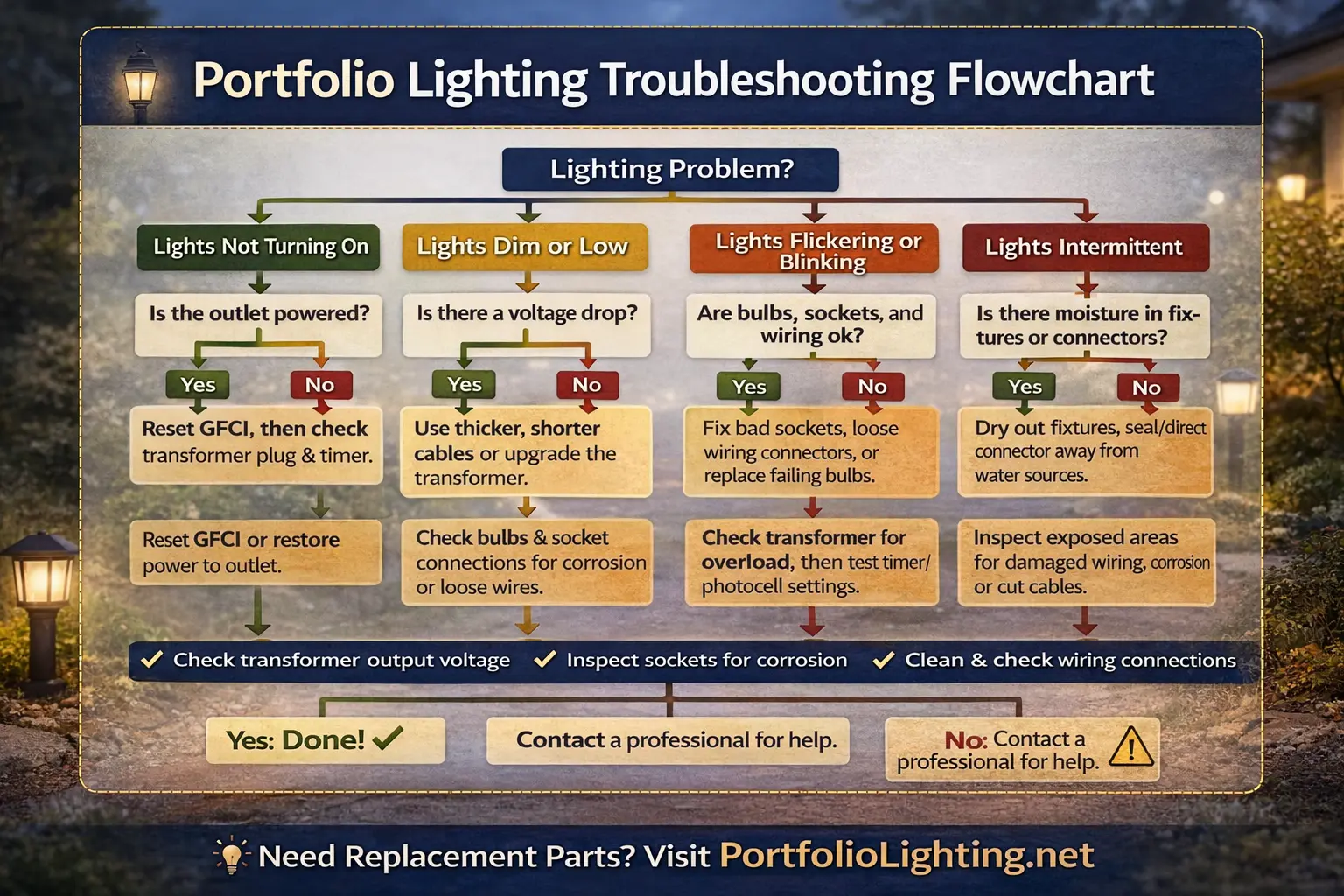
Portfolio Lighting Troubleshooting Flowchart: This diagnostic chart shows the most common landscape lighting problems and the recommended troubleshooting steps, including checking power sources, bulbs, wiring connections, transformer output, and timer settings.
Tip: You may want to bookmark this page so you can refer back to it while troubleshooting your lighting system.
1. Start with the power source
If lights are not coming on at all, check whether the outlet or power source is actually supplying electricity. Plug in a small device to confirm the outlet works. For outdoor systems, make sure the GFCI outlet has not tripped and that the transformer is plugged in securely.
2. Check bulbs first
A bad bulb is still one of the easiest and most common fixes. If a single light is out, swap the bulb with one you know works or inspect it closely for visible failure. Also make sure the bulb is seated correctly in the socket.
3. Inspect sockets and fixture connections
Loose or corroded sockets can keep a fixture from working even when the bulb itself is fine. Look for signs of burning, moisture, poor contact, or a bulb that is not tightening fully into place.
4. Look for damaged or frayed wire
Wiring problems are common in outdoor lighting, especially after weather, landscaping work, or years of exposure. Look for frayed cable, loose connectors, charred wire, or sections where the wire may have been cut or pinched.
5. Inspect the transformer and controls
If part of the system or the whole system is out, check the transformer. A transformer may be switched off, overloaded, buzzing, or no longer providing steady output. Also check the timer, photocell, or manual mode settings if your transformer uses them.
6. Test one light at a time when needed
One bad fixture or bad connection can sometimes make an entire section stop working. If you suspect one problem area, isolate the first fixture in the dead section and test from there.
If a landscape light still operates but produces less useful light than it once did, do not limit the diagnosis to voltage, wiring, bulbs, or LEDs. The lens itself can become part of the failure path as outdoor exposure creates haze, discoloration, deposits, or surface deterioration. Our landscape lighting lens transmittance degradation benchmarks provide a technical reference for identifying optical transmission loss in aging fixtures.
Outdoor lighting systems can develop problems over time due to moisture, corrosion, wiring damage, or failing components. If you are diagnosing a fixture problem that goes beyond the housing itself, the Portfolio lighting troubleshooting guide covers many of the most common system issues and practical ways homeowners can solve them.
If your outdoor lighting feels too bright, stays on longer than needed, or creates glare late at night, the fix may be better control rather than new fixtures. See how to reduce light pollution with smart outdoor lighting control for practical ways to improve timing, dimming, and nighttime behavior.
Some lighting problems only become obvious after the system has already started to fail. Predictive monitoring helps catch those problems earlier by watching for subtle electrical changes before the lights stop working. If you want to understand how AI can forecast failures before they become visible troubleshooting issues, see AI predictive maintenance for outdoor lighting.
If your issue involves models 284369, TC001, or 284357, use the model-specific troubleshooting and parts guide to narrow down the exact problem.
Why Landscape Lights Get Dim Over Time
Dim landscape lights are often a sign of voltage drop, aging bulbs, weak transformer output, dirty lenses, bad wire connections, or fixture wear. Our landscape lights dim troubleshooting guide walks through the most common causes and helps homeowners figure out whether the problem is isolated to one fixture or affecting the whole system. This page is useful for people who want to restore brighter output without replacing every part, and it fits naturally within a complete landscape lighting troubleshooting process.
Before replacing a failed outdoor lighting component, it helps to understand normal service expectations. Our outdoor lighting component life expectancy guide explains how long transformers, fixtures, wiring, connectors, bulbs, and other system components typically last and what warning signs indicate aging equipment.
Check the Portfolio power system before replacing a fixture
For Portfolio Lighting Troubleshooting: Fix No Power, Dim, Flickering & Transformer Problems, start with evidence from the installed power equipment rather than a visually similar replacement. Record the exact model label, input/output ratings shown on the unit, terminal arrangement, control method, outgoing cable runs, and which runs still operate. That information separates a supply/control problem from a downstream cable, connector, or fixture fault and gives you a defensible replacement specification if repair is not practical. Use Portfolio Parts for the next model- or symptom-specific step.
Advanced Troubleshooting Paths for Hard-to-Diagnose Problems
Some Portfolio Lighting problems require more than a basic bulb or transformer check because one symptom can point to several different causes. If a visitor is unsure whether the issue is a failed part, wiring problem, transformer behavior, or discontinued model confusion, send them to the free Portfolio Lighting AI troubleshooting assistant for guided diagnosis. If the failure involves green powder, weak connections, dim fixtures, or moisture-damaged wiring, the green dust connector corrosion repair guide explains how copper oxidation creates resistance and voltage loss. For outdoor systems causing glare, neighbor complaints, or boundary-line brightness issues, the property-line foot-candle and light trespass guide helps connect troubleshooting with responsible fixture aiming and code-aware lighting control.
Advanced Portfolio Lighting Diagnostics
Many Portfolio Lighting failures are misdiagnosed because multiple problems can produce identical symptoms. A fixture that appears dead may actually have a failed LED driver, hidden voltage drop, moisture intrusion, transformer overload, surge damage, or a deteriorated connection buried somewhere in the low-voltage system. Before replacing expensive components, review the warning signs of landscape lighting transformer failure symptoms, learn how to perform integrated LED fixture bypass testing to isolate fixture-level problems, and use Portfolio Lighting AI troubleshooting assistance to walk through a model-specific diagnostic process that can help identify discontinued parts, compatibility issues, and repair options based on your exact system configuration.
Outdoor Portfolio Lighting Problems
Outdoor lighting systems deal with moisture, temperature changes, landscaping activity, and direct exposure to the elements. That makes outdoor Portfolio fixtures more likely to develop connection problems, worn wiring, timer issues, and transformer failures over time.
Many outdoor lighting problems are not caused by the fixtures themselves, but by poor cable routing, overloaded runs, or voltage drop across the system. If you need help understanding the wiring side of the problem, our landscape lighting wiring guide walks through common layout methods and shows how proper low voltage wiring can improve performance.
If your landscape lights turn on normally but then shut off a few minutes later, the issue is usually not the bulbs or fixtures. This pattern often points to transformer overload, timer or photocell problems, loose wiring, or voltage drop across the system. Instead of replacing parts blindly, start with a symptom-based diagnosis by reading why landscape lights turn on then off, which walks through the exact causes and what to check first based on how your system behaves.
If your landscape lights stop working after a storm or show random failures, the cause may be surge damage rather than wiring or fixtures. Follow our landscape lighting surge protection guide to understand how to prevent future damage and protect your system.
- check for moisture around sockets and connectors
- look for damaged low voltage cable in mulch, dirt, edging, or trench areas
- inspect the transformer for overload, buzzing, shutdown, or no-output issues
- confirm the timer or photocell is set correctly
- test whether the outdoor outlet and GFCI are working
Outdoor path lights, spotlights, and deck lights often fail because of simple connection issues rather than full system failure. One loose connector or damaged section of cable can affect everything after that point in the run.
Landscape Lighting
Explore Portfolio outdoor lighting layouts and system types that often depend on low-voltage transformers and clean wiring runs.
Not every Portfolio lighting problem is electrical. If a path light still illuminates but will not remain upright, inspect the stake and threaded mounting hardware before investigating the transformer, cable, or lamp. Our Portfolio landscape lighting stake replacement guide covers broken and corroded ground stakes, stripped threads, broken pieces left inside the fixture, replacement measurements, and the warning signs that indicate the fixture base—not the stake—has actually failed.
View landscape lightingLandscape Troubleshooting
Best for path lights, spotlights, and sections of outdoor lights that fail unexpectedly.
View troubleshootingOutdoor Transformer Lighting
Helpful if your troubleshooting is pointing toward power-pack or transformer-related outdoor issues.
View transformer lightingIf your entire low-voltage lighting system went dark and the transformer is an older Malibu unit, check the Malibu 8100-9120-01 troubleshooting guide. It walks through blank-screen problems, mode-setting confusion, photocell testing, and the most common reasons this 120W power pack stops working.
In my experience, transformers get blamed more than they should. I’ve tested units that people thought were dead, only to find they were overloaded or shut down due to a wiring issue.
If you are working with a smaller 60W transformer, many issues are caused by overload or incorrect timer settings. This Portfolio 0805279 troubleshooting guide walks through reset steps, clicking problems, and how to fix common timer and sensor issues for that specific model.
I remember one case where the transformer kept cycling on and off. I initially suspected failure, but what I discovered was a short in the line that was triggering protection mode. Once I fixed the wiring, the transformer worked perfectly again.
Many outdoor lighting failures start with small mechanical or electrical problems that homeowners overlook at first, especially broken ground stakes, unstable fixtures, overloaded transformers and hidden low-voltage faults. This Portfolio landscape lighting broken stake repair guide explains practical ways to stabilize leaning fixtures, repair stripped stakes and extend the life of older landscape lights, while this landscape lighting transformer error code guide for all major brands helps decode overload warnings, shutdown behavior, voltage faults and blinking transformer conditions before replacing the wrong component.
Low Voltage Lighting
Useful when you are diagnosing cable runs, connectors, dim output, or power loss across multiple fixtures.
View low voltage lightingIndoor Portfolio Lighting Problems
Indoor Portfolio lighting issues are often more closely tied to bulbs, switches, sockets, grounding, or compatibility problems. If an indoor fixture flickers, stays dim, or does not turn on, inspect the bulb type, the condition of the socket, and whether the switch and fixture are still making a solid connection.
Indoor troubleshooting may also involve recessed fixtures, downlights, task lighting, or surface-mounted lighting systems. In those situations, it helps to confirm whether the issue is isolated to one fixture or related to the circuit, dimmer, or bulb type being used.
Many lighting problems come from poor planning rather than faulty fixtures. If you want to avoid common issues before they start, this room-by-room lighting plan guide shows how to design each space properly so you are not troubleshooting layout mistakes later.
If a room feels too dark or unevenly lit, the issue may be an incorrect number of fixtures rather than a faulty light. This lighting calculator guide helps you determine the correct number of lights for proper coverage.
If your fixture cannot be repaired or the cost of parts is too high, it may be better to replace it entirely. This Portfolio lighting fixtures and parts guide explains where to buy replacements and how to choose the right option.
For fan-specific control problems such as a remote that does nothing, a light that works but the blades will not spin, or pairing issues after a power reset, use the Portfolio ceiling fan remote replacement and troubleshooting guide.
Signs One Bad Light or Connection Is Causing Bigger Problems
One of the easiest mistakes is assuming a whole section must be replaced when only one connection is actually bad. A single failed fixture, damaged bulb, very dim light, or loose wire can sometimes interrupt the flow of power to lights farther down the run.
For seasonal string-light problems where only one section of the strand works, see our troubleshooting guide for Christmas lights half out.
I’ve encountered a lot of partial failures where some lights work and others don’t. In my experience, this almost always points to a connection issue or a break in the line rather than multiple fixtures failing at once.
- one fixture is the first point where the run goes dark
- earlier lights work but later ones do not
- one connector looks loose, corroded, or damaged
- a bulb or socket appears burned out or partially connected
Common Dim or Flickering Lighting Causes
If some Portfolio lights still come on but seem dim or unstable, the problem may be simpler than it looks. A bulb may not be tightened fully, the socket may have poor contact, or the wiring may be weakening the output enough to reduce brightness. In low-voltage systems, flickering or dim lights can also point to transformer performance problems or voltage drop.
I’ve learned to look closely at connectors and splice points. I’ve seen small corrosion spots or loose pins cause entire sections to go dark, even though everything else in the system was fine.
If several fixtures seem weaker than normal at the same time, move beyond the bulb and inspect the cable runs, connections, and transformer output. This is especially common in older landscape lighting systems with weather exposure.
If your Portfolio fixtures are flashing on and off instead of staying steadily lit as well as just a simple flicker, the problem is often tied to loose wiring connections, a failing transformer, or an overloaded low-voltage system. Homeowners also run into blinking lights after heavy rain, aging bulb failure, or connector issues. For a full step-by-step fix, read our guide on why Portfolio lights are blinking and how to stabilize your landscape or indoor lighting system.
I once struggled with a flickering setup that would randomly stabilize. What I finally figured out was a loose connection inside a splice, and once I tightened it, the flicker disappeared completely.
If your issue involves a recessed or integrated LED fixture, review the Portfolio LD6C lighting guide for specific troubleshooting steps and replacement considerations.
If smart outdoor lighting devices seem inconsistent, the issue may not be the fixture or transformer alone. See Matter and Thread connectivity for outdoor lighting to understand how network design affects responsiveness, stability, and local control.
If your lighting system has issues, start by reviewing landscape lighting electrical code and safety guide to rule out installation and wiring problems.
Many outdoor lighting problems are repairable if the fixture design allows access to the failed component. The 2026 LED Fixture Repairability Guide explains which fixtures are worth repairing and which sealed designs usually require full replacement.
Many “dead” landscape lighting systems are actually compatibility problems between older transformers, connectors, lamps, and modern LED upgrades. The legacy landscape lighting troubleshooting and compatibility guide explains the most common crossover issues in older systems.
Quick Troubleshooting Decision Guide
If your Portfolio lighting system is not working, use this quick guide to narrow down the problem.
If your system is using more power than expected or feels inefficient, see our Portfolio energy efficient lighting guide for simple ways to reduce energy use and improve overall performance.
If your fixture will not mount flush or the hardware does not line up, see our mounting hardware and bracket replacement guide to identify missing or incorrect components.
- No lights turn on: Check outlet power, GFCI, transformer, and timer settings.
- Only one section is out: Inspect wiring and connectors in that run.
- Lights are dim: Check bulb condition, voltage drop, and cable length.
- Lights blink or flicker: Inspect loose wiring, connectors, or transformer load.
- Lights turn on at wrong times: Check timer programming or photocell settings.
When Portfolio Lighting Problems Are More Than a Bad Bulb
Some Portfolio Lighting failures are not caused by the bulb, transformer, or fixture alone; they come from the interaction between older wiring, smart controls, and weather exposure. If the system has been upgraded with smart modules, sensors, wireless controllers, or low-voltage control leads, the smart lighting control and Class 2 circuit guide can help explain which wires are power, control, or communication. If the installation is old and you are unsure whether it can remain as-is, the outdoor lighting code grandfathering guide explains why unsafe or modified systems may still require correction. If the fixture lens is cloudy, sweating, or holding droplets inside, the Portfolio foggy lens moisture repair guide helps diagnose whether the fixture can be dried and resealed or should be replaced.
Next-Generation AI Troubleshooting & Maintenance
Modernize your landscape lighting diagnostics with AI-driven logic. Learn how smart systems predict and isolate electrical failures before they become permanent issues.
Electrical Intelligence
Fix the Cause Before Replacing Portfolio Lighting Parts
Many Portfolio Lighting problems are caused by hidden field conditions instead of a failed fixture. A dark or flickering light may be tied to a corroded Portfolio light socket that needs cleaning or repair, while repeated transformer failures can point to missing surge protection or exposed equipment that should be reviewed with this Portfolio transformer surge protector installation guide. If the repair also involves outdoor fixture placement, glare control or responsible nighttime lighting, compare the difference between dark-sky compliance and IDA certification before choosing replacement fixtures.
More Portfolio Lighting Troubleshooting Guides
Portfolio Lighting Transformer Troubleshooting
Check outlet power, timer settings, photocells, wiring connections, overload problems, and other common transformer failures.
Read the guidePortfolio Transformer Not Powering Lights
Learn why a transformer may stop sending power to landscape lights and how to test the output safely.
Read the guidePortfolio Transformer Tripping Breaker
Diagnose overloaded transformers, damaged wiring, moisture issues, and other causes of breaker trips.
Read the guidePortfolio Transformer Getting Hot
Overheating transformers can indicate overloads, poor ventilation, or internal failure.
Read the guidePortfolio Lighting Photocell Not Working
Fix automatic light sensors that no longer respond to daylight changes.
Read the guidePortfolio Light Fixture Not Grounded
Understand grounding issues and what to do if a fixture or ceiling box does not have proper electrical grounding.
Read the guidePortfolio Lights Blinking
Find out why landscape or indoor lights blink, flicker, or flash and how to stabilize the electrical connection.
Read the guidePortfolio Landscape Lights Not Turning On
Use this guide when outdoor lights will not turn on at all and you need to diagnose bulbs, wiring, or transformer issues.
Read the guidePortfolio Landscape Lights Not Working
Step-by-step troubleshooting for outdoor lighting systems that suddenly stop working.
Read the guideLandscape Lights Flickering
Find out why landscape lights flicker, pulse, or flash and learn how to check for loose wiring, bad connectors, voltage drop, or failing transformers.
Read the guideLandscape Lights Not Working
Use this guide when part or all of your outdoor lighting system stops working. It covers transformers, wiring faults, connectors, bulbs, and common power problems.
Read the guideLandscape Lights Not Working After Rain
Track down moisture-related lighting failures caused by wet connectors, damaged cable, water intrusion, or corroded fixtures.
Read the guideTroubleshooting Owns the Symptom Question
Use this hub when the problem is known but the failed component is not. A whole system out, one branch out, one fixture out, flicker, repeated trips or intermittent operation should be diagnosed here first. Once the failed component is isolated, move to Parts & Accessories. If the model number is the starting clue instead of the symptom, use Model Lookup. This separation keeps diagnosis from turning into premature parts shopping.
Preserve usable Portfolio components during an upgrade
For Portfolio Lighting Troubleshooting: Fix No Power, Dim, Flickering & Transformer Problems, start with evidence from the installed power equipment rather than a visually similar replacement. Record the exact model label, input/output ratings shown on the unit, terminal arrangement, control method, outgoing cable runs, and which runs still operate. That information separates a supply/control problem from a downstream cable, connector, or fixture fault and gives you a defensible replacement specification if repair is not practical. Use Portfolio Parts for the next model- or symptom-specific step.
Portfolio Lighting Troubleshooting FAQ
Why are my Portfolio lights not coming on at all?
Start by checking the outlet power, GFCI, transformer, timer settings, and bulb condition. A no-power issue is often tied to one of those basic causes.
Why is only one section of my outdoor lighting out?
That usually points to a damaged wire, bad connector, or failed fixture somewhere in that specific run.
Why are my Portfolio lights dim or flickering?
Common causes include a loose bulb, poor socket contact, voltage drop, damaged wiring, or transformer output problems.
Can one bad fixture make several lights stop working?
Yes. One bad light or connection can sometimes interrupt power to additional lights farther down the same section.
Final Thoughts on Portfolio Lighting Troubleshooting
Portfolio lighting troubleshooting is most effective when you keep it simple and move in a clear order. Start with the power source, bulbs, sockets, wires, timer settings, and transformer before assuming the system needs major replacement. Many problems can be fixed quickly once the real source is identified.
Whether the issue is a single dead bulb, a timer problem, a transformer failure, a breaker trip, or a damaged outdoor wire, careful troubleshooting can help restore your lighting and avoid unnecessary replacement costs. Use this hub page to narrow the issue, then move to the specific guide that matches your exact symptom.
If you recently discovered that many Portfolio fixtures are no longer sold in stores, you may be wondering what happened to the brand. Our guide explains why Portfolio lighting was discontinued, what replaced it at Lowe’s, and how homeowners can still repair or replace many existing Portfolio lighting systems.
If your transformer is still working but difficult to control, you may not need to replace it. The smart hub compatibility guide explains how to connect existing systems to smart controls for easier operation.
General Landscape Lighting Troubleshooting
Some lighting problems are not specific to Portfolio fixtures and can happen in nearly any low-voltage landscape lighting system. Issues like lights not turning on, transformers failing, wiring damage, and voltage problems can affect many outdoor lighting brands.
If your path light is flickering, dim, or completely dead and uses an integrated LED, see Portfolio 0688503 troubleshooting and replacement parts for a real example of how connector issues, voltage drop, and LED failure affect this type of fixture.
My overall recommendation if you've made it this far down the page is to avoid replacing parts until you know exactly what failed. I’ve seen too many cases where people replaced fixtures, bulbs, and transformers without solving the real issue.
If you are diagnosing a broader outdoor lighting problem, these landscape lighting troubleshooting guides explain the most common system failures and how homeowners typically repair them.
- Landscape lights not working – Step-by-step checks for power supply issues, damaged wiring, bad connectors, and failed fixtures.
- Landscape transformer not working – Troubleshoot power packs that stop sending voltage to outdoor lighting systems.
- Landscape lighting troubleshooting guide – A complete guide to diagnosing outdoor lighting problems including dim lights, flickering fixtures, broken cable runs, and timer failures.
Portfolio Lighting Master Model & Replacement Handbook
For Portfolio Lighting Troubleshooting: Fix No Power, Dim, Flickering & Transformer Problems, start with evidence from the installed power equipment rather than a visually similar replacement. Record the exact model label, input/output ratings shown on the unit, terminal arrangement, control method, outgoing cable runs, and which runs still operate. That information separates a supply/control problem from a downstream cable, connector, or fixture fault and gives you a defensible replacement specification if repair is not practical. Use Portfolio Parts for the next model- or symptom-specific step.
Inside the PDF:
- 100+ model breakdown pages
- Transformer, path light, spotlight, and wall lantern specs
- Common failure patterns for discontinued models
- Compatible replacement brands and parts strategy
- What to check before buying the wrong part
If one wrong part costs you $20–$80, this $9.99 handbook can pay for itself before you make your first replacement purchase.
Portfolio Lighting Troubleshooting, Transformer Problems, Timer Issues, Dim Lights, and Wiring Help
This page is the main troubleshooting hub on PortfolioLighting.net and is designed to help readers move from the symptom to the right fix faster. Use the grouped links above to narrow down your exact problem before replacing more parts than necessary.
If you are troubleshooting a Portfolio lighting fixture and are not sure which model you have, the fastest way to narrow the problem is by identifying the model number. Our Portfolio lighting model number lookup guide helps homeowners match transformers, path lights, spotlights, and LED fixtures to the correct product family so it is easier to diagnose wiring problems, power issues, or failing components.
Expert-Verified Troubleshooting
Every technical guide on PortfolioLighting.net is bench-tested in our Specialist Workshop. Our troubleshooting procedures are based on 25+ years of field experience and are published by PortfolioLighting.net to ensure accuracy and electrical safety compliance.
Diagnose Portfolio Lighting by Failure Scope Before Buying Parts
The number of affected fixtures is useful evidence. A whole-system outage, one failed branch and one failed fixture should not begin with the same replacement assumption. Work from the broadest shared component toward the individual fixture.
Entire system affected
Check the protected supply, controls and transformer/power pack, then the common low-voltage output. Use the Transformer Master Guide when the system is low voltage.
One cable run affected
Compare that run with working branches. Inspect its terminal connection, first splice and cable route before replacing the transformer.
One fixture affected
Inspect its connection, socket/light source, stake or mounting hardware and moisture condition. Use the model lookup if the fixture needs a model-specific part.
Intermittent or weather-related
Record when the failure occurs. Movement, rain, control timing or load changes can narrow the fault before parts are disturbed.
Once the failure point is established, move to Portfolio Parts & Accessories, the Model Parts Directory, or the manual library. Diagnose first; shop second.