
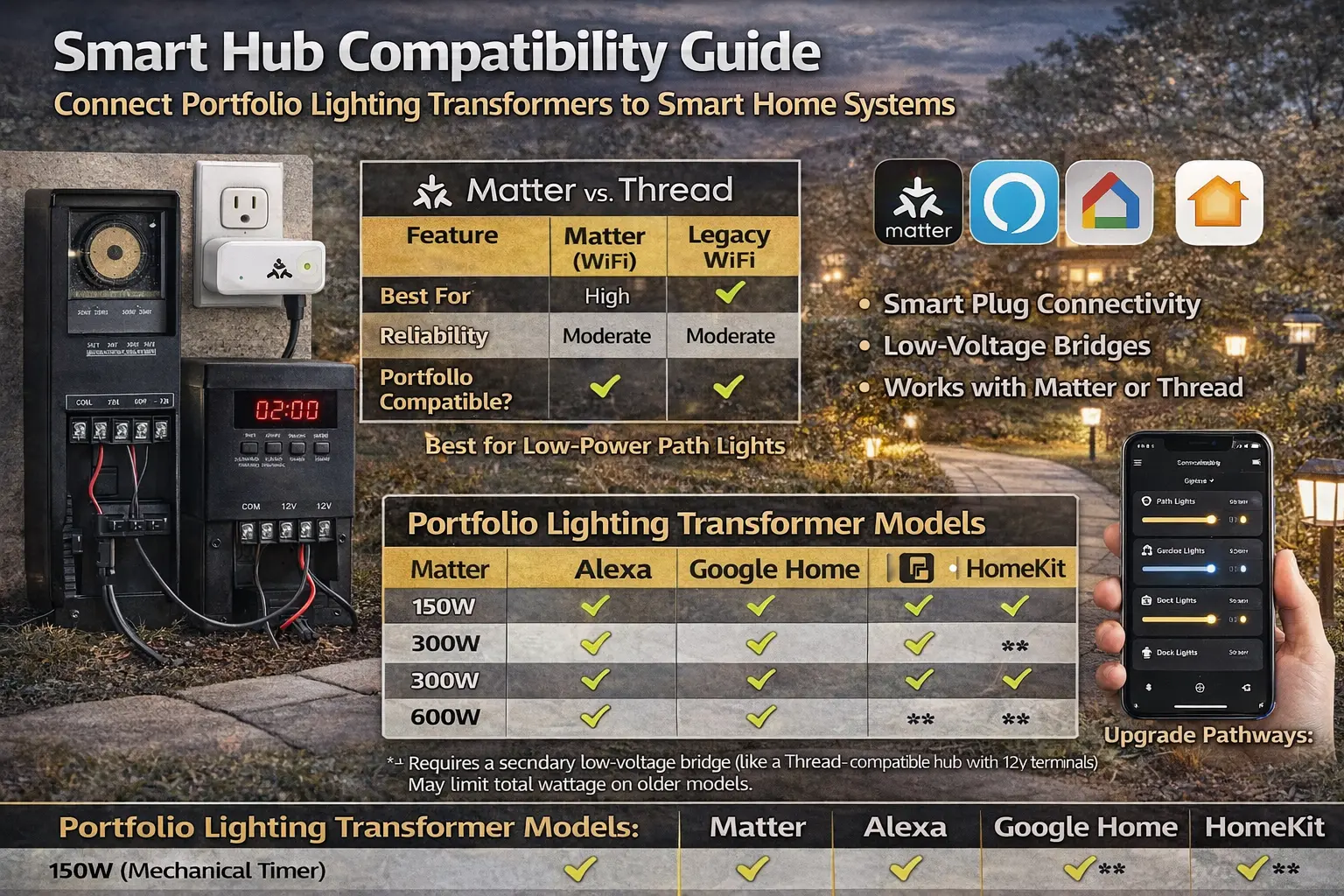
Yes, most Portfolio lighting systems can be made smart by adding a smart plug or controller before the transformer, without replacing the fixtures.
Can I make my Portfolio Lighting transformer smart?
Yes. The most effective way to automate Portfolio landscape lighting in 2026 is by connecting a Matter-certified outdoor smart plug between your power outlet and the transformer. Ensure the transformer is set to Always On or Manual mode. For multi-zone control, AI-driven low-voltage controllers can be wired into the output side of many 150W, 300W, and 600W Portfolio models.
Quick Answer
Most Portfolio Lighting transformers can be made AI-compatible using a Matter-enabled outdoor smart plug, a compatible smart hub, or a secondary low-voltage bridge. The best path depends on the transformer’s timer style, total load, and whether you want simple on/off control or deeper multi-zone automation.
- Manual or Always On transformers are the easiest to automate
- Mechanical timer transformers often work well with smart plugs
- Digital timer transformers may need their internal mode checked first
- Multi-zone control usually needs more than a plug
- Legacy low-voltage systems can often be upgraded without replacing every fixture
What Is the Best Way to Make Portfolio Lighting Smart?
For most homeowners, the easiest and most reliable upgrade is an outdoor-rated smart plug with the transformer set to Manual or Always On.
- Best for simple control → smart plug
- Best for advanced systems → low-voltage controller
- Best upgrade point → before the transformer
Compatibility matters because most homeowners want their outdoor lighting to work with the same system they already use inside the house. The real question is not about brands—it is whether your existing lights can be controlled in a simpler and more reliable way.
Many setups use different types of smart controls, and each one works a little differently. Some systems focus on easy plug-in control, while others offer more reliable connections and better device coordination. The right choice depends on your transformer, how stable you want the system to be, and how much control you need beyond basic on-and-off scheduling.
If you want a full breakdown of how modern outdoor lighting systems are designed and upgraded, see the AI outdoor lighting systems guide. It explains how control, sensors, and system layout come together to improve performance and efficiency.
Similar issues show up in other systems as well. See the Malibu 8100-9120-01 troubleshooting guide for another example of how older transformers behave and how to upgrade them.
Compatibility matters most when you want the lighting system to do more than basic automation. Our predictive arrival lighting behavior patterns guide shows how smart hubs, presence data, and AI logic can work together to anticipate homeowner arrivals instead of waiting for a motion event.
Smart Hub Compatibility Logic Summary
A smart hub should do more than connect devices. It should support the type of lighting control you actually want to run, including dependable local control, clear zone management, and room for future expansion.
- Compatibility is about function, not just connection
- The right hub should support stable control during normal use and outages
- Local processing is often more dependable than cloud-only control
- A good hub should match both the lighting system and the homeowner’s long-term goals
Smart Hub Compatibility Table: Portfolio Lighting and Common Hub Paths
If your transformer is not working correctly or causing inconsistent behavior, start with Portfolio lighting transformer troubleshooting. Fixing power or control issues first makes any upgrade much more reliable.
Once your system is connected, the next step is improving how it behaves. The AI security and ambient lighting guide explains how to reduce false alerts and create better lighting balance at night.
Hub compatibility matters even more when voice control becomes part of the lighting system. A good hub should not just connect devices. It should also support fast scene execution, clear zone naming, and dependable spoken control. To understand how that voice layer works inside the system, read AI voice lighting logic.
Compatibility allows different lighting components to work together, but design determines how natural the result feels. Our biophilic outdoor lighting design patterns guide explains how timing and brightness changes can create more realistic lighting behavior.
Compatibility is only part of the story. Devices also need a reliable way to communicate outdoors. Our Matter and Thread connectivity guide explains how Border Routers, local control, and self-healing mesh networking help keep outdoor lighting systems connected.
| Hub / Control Path | Best Use | Works Best With | Portfolio Compatibility |
|---|---|---|---|
| Matter smart plug | Simple cross-platform on/off and scheduling | Manual or Always On transformers | Usually strong, especially for basic automation |
| Alexa ecosystem | Voice control, routines, and easy consumer setup | Outdoor smart plugs and hub-linked schedules | Strong when the transformer can stay powered |
| Google Home | Routine control and cross-device automation | Matter or compatible WiFi plug paths | Strong for simple scheduling and app control |
| HomeKit / Apple Home | Privacy-focused control with compatible devices | Matter-ready devices or approved bridge paths | Good if the smart device already supports the Apple ecosystem |
| Low-voltage smart bridge | Advanced zone control and deeper automation | Larger transformers and multi-zone upgrades | Best for more advanced system control |
The biggest takeaway is that most compatibility problems do not start with the hub. They start with the transformer mode. If the transformer is fighting the smart control by running its own timer logic, the automation becomes unreliable. That is why Manual or Always On is such a big deal on a page like this.
Smart Compatibility Also Depends on Power Quality and Fixture Placement
A smart hub may be compatible in software, but the lighting system can still fail if the wiring, power, location, or nighttime light behavior is poorly planned. If smart lights, controllers, cameras, or communication wiring behave unpredictably, the NEC 800 low-voltage EMI interference guide explains how lighting drivers and cable routes can disrupt signals. If the smart system controls spa-area lighting, the hot tub lighting layout and safety guide helps separate relaxation scenes from wet-location and glare risks. If a smart-controlled fixture fails and the installer or manufacturer questions the system, the voltage drop documentation for warranty compliance guide explains how to prove the electrical conditions at the fixture. If late-night scenes affect bedrooms, the dark-sky bedroom exterior light control guide shows how to dim, shield, and schedule lighting so automation supports sleep instead of disrupting it.
Visual Wiring Diagram for Smart Conversion
The easiest way to make many older Portfolio lighting systems smarter is to leave the transformer in Manual or Always On mode and place the automation device before the transformer. That way, you do not have to cut low-voltage wires just to gain better control.
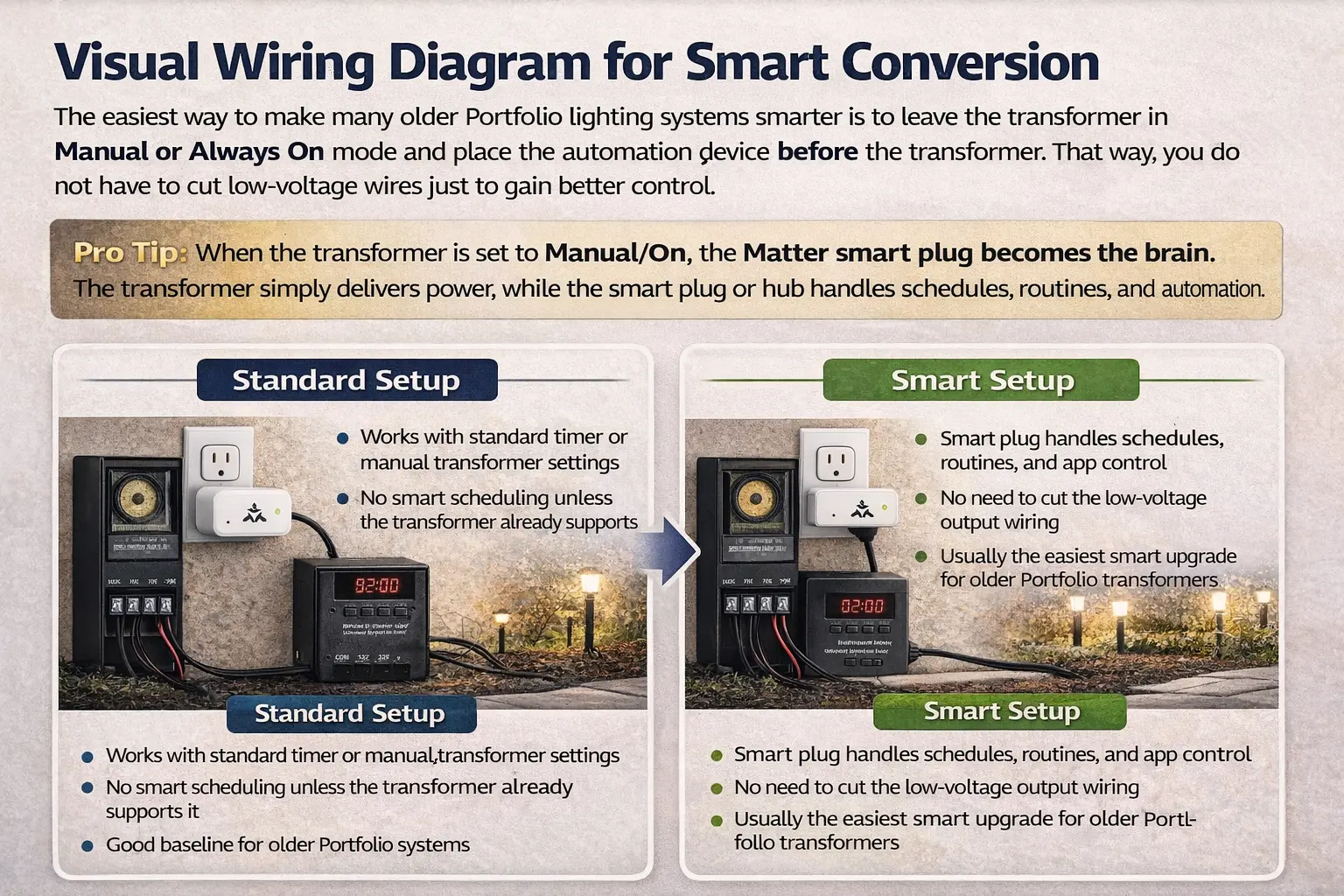
Standard Setup vs Smart Setup (Simple Explanation)
Standard Setup
Wall Outlet → Transformer → Lights
- Uses built-in timer or manual control
- No automation or smart routines
- Entire system turns on/off together
Smart Setup
Wall Outlet → Smart Plug → Transformer → Lights
- App + voice + automation control
- No need to cut low-voltage wiring
- Works with Alexa, Google Home, and Matter systems
Why This Upgrade Works
This method moves control to the 120V side instead of the low-voltage wiring. That means:
- No cutting wires
- No re-running cable
- No risk to existing fixtures
- Instant smart upgrade capability
Smart Hub Compatibility Also Depends on Wiring and Existing Conditions
A smart hub may be compatible in the app, but the physical lighting system still has to be safe, dry, and correctly wired. If the upgrade uses control conductors, power-limited wiring, smart relays, dimming leads, or sensor circuits, the smart lighting control NEC Article 725 guide explains why Class 2 control wiring should be treated differently from fixture power wiring. If the hub is being added to an older outdoor lighting system, the outdoor lighting grandfather clause guide explains when existing installations may lose protection because of modifications or safety defects. If fixture lenses are foggy or wet inside, the Portfolio lens condensation repair guide should be used before assuming the smart hub, app, or controller is responsible for dim output or intermittent behavior.
Smart Plug vs Low-Voltage Bridge: Which One Should You Use?
This is where most homeowners get stuck. A smart plug works great — but only for certain types of control. If you want more advanced lighting behavior, you may need a low-voltage controller instead.
If you are planning to automate hidden LED strips under steps or masonry caps, this hardscape and linear step lighting guide shows how those systems are wired, powered, and integrated into a low-voltage outdoor setup before smart control is added.
| Feature | Smart Plug (Matter / Alexa / Google) | Low-Voltage Bridge / Controller |
|---|---|---|
| Installation | Plug-and-play (no wiring changes) | Requires wiring into transformer output |
| Control Level | Whole system ON/OFF | Multi-zone control |
| Best For | Simple upgrades | Advanced lighting systems |
| Automation | Schedules, voice, routines | Zone-based AI control, dimming, sensors |
| Cost | Low | Moderate to high |
Use a smart plug if you want easy control.
Use a bridge/controller if you want a true AI lighting system.
When a Smart Plug Is Enough
- You just want scheduling and app control
- You don’t need separate lighting zones
- Your transformer is working properly
When You Need a Bridge or Controller
- You want different zones (path vs patio vs security)
- You want dimming or adaptive lighting
- You are building a full AI outdoor lighting system
If you are planning a full upgrade, connect this section with your main system guide here: AI outdoor lighting systems so users move from compatibility → full system design.
Compatibility matters even more when systems use multiple power sources. See solar hybrid lighting optimization to understand how smart controls coordinate solar input, battery storage, and transformer power for reliable outdoor lighting.
Smart hubs can connect devices, but dimming quality still depends on transformer type, driver behavior, wire length, and startup load. Use the smart landscape lighting dimming compatibility guide to check hum, latency, inrush current, voltage drop, and connector pin-out issues before building an outdoor smart lighting system.
Matter vs Thread vs Legacy WiFi: Which “Language” Should Outdoor Lighting Speak?
| Feature | Matter (WiFi / Platform Layer) | Thread (Mesh Network) | Legacy WiFi |
|---|---|---|---|
| Best For | Cross-platform control and easier interoperability | Low-power devices, mesh stability, and resilient sensor paths | Basic plug-in timers and simple smart switches |
| Reliability | High when the network and device support are strong | Extremely high for compatible mesh environments | Moderate and more router-dependent |
| Portfolio Compatible? | Yes, usually through a smart plug or controller layer | Yes, often through a Thread bridge or border-router-supported path | Yes, through standard outdoor smart plug control |
This chart matters because homeowners often treat Matter and Thread as if they are competing versions of the same thing. They are not. For this page, the practical point is simpler: Matter helps device ecosystems work together more smoothly, while Thread is often the stronger network path for low-power connected devices that need mesh-style reliability.
If you only need basic control over a transformer that stays in Manual mode, a solid outdoor smart plug can still be enough. If you want stronger reliability, more sensors, and better zone logic, then the Thread-style path and controller-based approach become more attractive.
Visual Wiring Logic: Standard Setup vs Smart Setup
Standard Setup
Wall Outlet > Portfolio Transformer > Landscape Lights
Smart Setup
Wall Outlet > Matter Outdoor Smart Plug > Portfolio Transformer > Landscape Lights
That basic conversion is what unlocks smart control for many older systems. The key is to leave the transformer in Manual or Always On mode so it stops trying to be the brain. Once that happens, the smart plug becomes the control point for schedules, app triggers, and hub automation.
Smart Plug vs Low-Voltage Bridge: Which One Do You Actually Need?
A smart plug is the right tool when your goal is simple: automate the whole transformer as one controlled load. It is fast, affordable, and perfect for homeowners who want app scheduling, voice commands, and routines without rewiring the low-voltage side.
A low-voltage bridge or controller is the better choice when you want separate zones, more advanced automation, or lighting behavior that changes by area. That might include a brighter driveway zone, a dimmer patio late at night, or motion-based response only in selected security areas.
- Choose a smart plug if: you want whole-transformer control
- Choose a bridge if: you want zone-based control and smarter output behavior
- Choose a transformer upgrade if: the old transformer is already unreliable or too limited
Older Portfolio Transformer Compatibility Rules
Hub compatibility matters even more when you move beyond simple automation and into system health monitoring. A strong edge-capable hub can support local alerts for voltage drop, thermal spikes, and resistance changes before lighting performance actually fails. To see how that predictive layer works, visit AI predictive maintenance for outdoor lighting.
Legacy systems are where this guide becomes most useful. Older Portfolio transformers often fall into one of three buckets:
- mechanical timer units that can often be bypassed into smart-plug control
- digital timer units that need their mode checked carefully before automation
- manual-capable units that are excellent candidates for hub control
The easiest upgrade path is almost always a healthy transformer with a clear manual-on setting. If your current transformer is already unstable, buzzing, tripping, or failing to power lights reliably, start with Portfolio lighting transformer troubleshooting, Portfolio lighting transformer not working, and Portfolio transformer not powering lights before you build smart control around a weak base.
Before choosing a system for smart-home integration, compare your options in our permanent vs temporary holiday lights guide.
If you are identifying an older unit first, use Portfolio Lighting model number lookup and Portfolio Lighting catalog. Compatibility starts with knowing what you actually have.
Ambient Sensors and Smarter Lighting Control
Modern outdoor lighting is moving beyond simple timers. Systems now use ambient light sensors and better control settings to adjust how lights behave throughout the night, helping save energy without leaving areas too dark.
With the right setup, lighting can respond to real conditions instead of running the same way every night. For example:
- lights can run at a lower level on brighter nights
- zones can increase brightness during darker or cloudy conditions
- late-night lighting can dim instead of shutting off suddenly
- less-used areas can stay at low output until needed
This approach improves both efficiency and appearance. Instead of wasting power, the system uses light where and when it is needed, while keeping the property well-lit and comfortable after dark.
If you are dealing with an older handheld fan control before adding any smart upgrade, first work through the Portfolio ceiling fan remote replacement guide to identify the receiver type and restore basic remote operation.
When a Smart Plug Is Enough — and When You Need Multi-Zone Control
A smart plug is enough for many homeowners. If all you want is better scheduling, app control, routines, and voice activation for one transformer feeding one general lighting scheme, that simple path works extremely well.
But once you want different behavior by area, the system needs more than one “on or off” brain. A driveway, front entry, path, and patio do not all need the same behavior. That is where multi-zone logic becomes important.
- single-transformer, whole-yard control = smart plug often works
- separate path, accent, and security behavior = bridge or zone controller is better
- older overloaded transformer + smarter control goals = consider a full transformer upgrade
If your lighting plan is growing into a true system instead of a simple timer replacement, compare this page with AI outdoor lighting systems, Portfolio low-voltage lighting, and Portfolio landscape lighting so the design and control sides stay aligned.
Compatibility matters even more when the goal is live electrical correction instead of basic automation. See AI transformer voltage load balancing for a technical explanation of how smart hubs, AI-ready transformers, and inline controllers can work together to report load conditions and balance outdoor lighting performance in real time.
Common Smart Hub Compatibility Problems
Most failures do not happen because the hub is “bad.” They happen because the control chain is fighting itself. These are the problems that show up most often:
- the transformer timer is still active while the smart plug is also trying to control power
- the transformer load is already too high, so smarter control only exposes a deeper issue
- digital timer logic resets after power interruption and behaves unpredictably
- the outdoor smart device is not truly rated for the environment or current draw
That is why compatibility is not just a list of logos. It is a system behavior question. The hub, plug, transformer, and lighting load all have to cooperate.
For a common example, see the Portfolio Lighting model 121408 transformer guide, which shows how older transformers can be tested, repaired, or upgraded.
How This Page Fits Into Your Outdoor Lighting Setup
This guide is most useful when used with your troubleshooting, model, and replacement pages. Together, they help you identify problems, choose the right parts, and improve how your lighting system runs over time.
To see how these systems work in real-world setups, visit the AI automated landscape lighting guide. It shows how smart controllers, zones, and sensors work together to improve everyday lighting performance.
If your current system is failing or difficult to upgrade, review Portfolio lighting alternatives to compare newer systems that offer better control and long-term reliability.
For a complete look at how smart controls fit into seasonal decorating, see the holiday lighting guide for year-round ideas, permanent systems, and holiday lighting setup tips.
If your smart hub controls outdoor RGBW lighting, the Patriotic July 4th Outdoor Lighting Guide shows how to turn those fixtures into a cleaner July 4th scene with true white, saturated red, royal blue, and smart scheduling.
Need the Big Automation Picture?
Start with the system-level hub page for smarter outdoor lighting design and upgrades.
Open the Main AI Systems GuideNeed Transformer Help First?
Make sure the transformer is healthy before layering smart control on top of it.
Check Transformer HealthNeed Replacement Paths?
Compare alternatives if the current transformer is too limited or too unreliable.
See AlternativesSmart Hub Compatibility FAQ
Can I make my Portfolio Lighting transformer smart?
Yes. The easiest 2026 path is usually a Matter-certified outdoor smart plug placed between the outlet and transformer, with the transformer left in Manual or Always On mode.
Do Portfolio transformers work with Alexa, Google Home, or HomeKit?
Many do when the transformer is controlled through a compatible smart plug, hub, or low-voltage controller path instead of relying only on the transformer’s original timer logic.
What is the easiest way to automate older Portfolio lighting?
The easiest path is usually an outdoor-rated Matter smart plug and a transformer set to Manual or Always On so the smart control layer becomes the main brain.
Is Matter or Thread better for outdoor lighting control?
It depends on the job. Matter is excellent for broader cross-platform compatibility, while Thread is especially useful for strong low-power mesh reliability when the device ecosystem supports it.
Can I add multi-zone smart control to a Portfolio system?
Yes, but multi-zone control usually needs more than a plug. It often requires a low-voltage controller, bridge, or transformer upgrade that can manage separate lighting areas more intelligently.
Final Note
The smartest outdoor lighting upgrade is not always the most complicated one. In many cases, better control starts with one clean decision: let the transformer deliver power, and let the smart system handle the timing, automation, and intelligence. That approach is what turns older low-voltage lighting into a system that still feels current in 2026.