
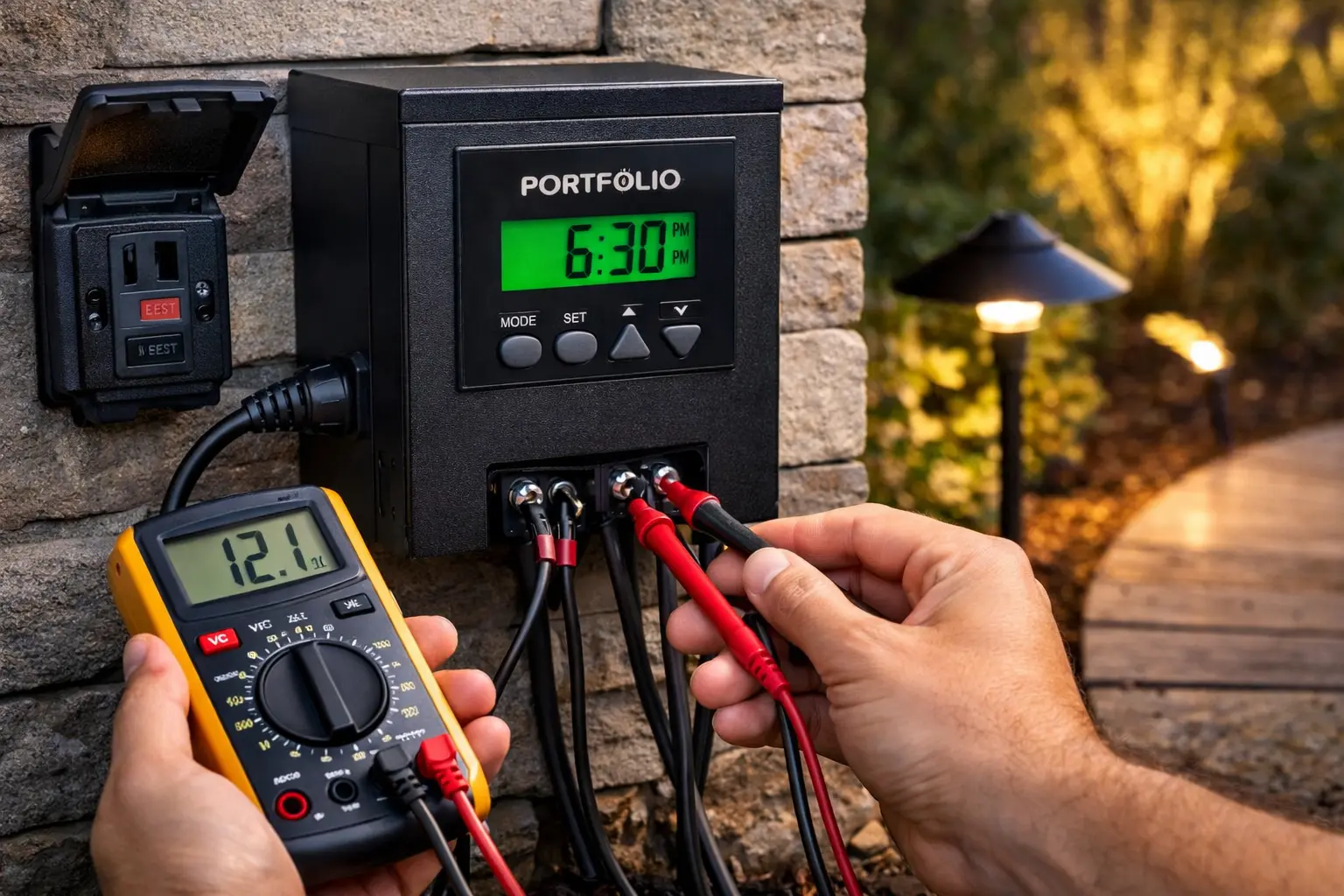
Quick Answer: Troubleshooting a Failed Portfolio Transformer
A dead low-voltage power pack rarely requires full structural replacement. Before buying a new unit, you must isolate whether the failure sits on the 120V line-side input, the internal control logic board, or the 12V low-voltage secondary terminal lugs.
To safely determine why your transformer has lost secondary power output, cross-reference your system's exact physical indicators against the seven electrical fault scenarios below:
- Complete Loss of Display Panel Power: Typically indicates a tripped upstream GFCI outdoor outlet or a blown internal glass cartridge fuse on the transformer's main circuit board.
- Transformer Hums but Output is Zero: Points to an internal inductive core short-circuit or a localized copper-to-soil short across your direct-burial cable lines.
- Breaker Tripping Instantly Upon Start: Severe system overload caused by cumulative fixture wattage exceeding 80% of the transformer's maximum magnetic core capacity.
- Lights Active Only in Manual "ON" Mode: Confirms a failed ambient photocell sensor eye, a shaded light-sensing lens, or a corrupted internal digital timer configuration loop.
- Rapid System Flickering or Voltage Drop: Caused by loose secondary terminal block lugs or running excessive cable lengths that push terminal voltage below 10.8V.
- Intermittent Shutoffs on Hot Afternoons: Internal thermal overload switch activating due to poor housing ventilation, direct solar heat radiation, or a failing cooling diode.
- Photocell Bypassing Programmed Timing Offsets: Infrared or ambient light pollution from nearby streetlamps or security floods tricking the automation logic board.
⚠️ CRITICAL TESTING TRAP: Forcing a reset on a transformer that is actively short-circuiting without checking your secondary multi-meter values first will permanently fuse the interior relay contacts, destroying the motherboard beyond repair.
Fastest Field Test: Manually flip the power pack into continuous ON mode. If your terminal loop engages, your transformer core is operational—the failure sits entirely within your photo eye or timer pins.
Need help identifying your exact transformer model? Use the model number lookup tool or go back to the main troubleshooting guide.
For model-specific reset instructions, wiring layouts, and control panel details, see Portfolio outdoor transformer manuals before replacing your transformer.
Before you assume the transformer has completely failed, start with the basics. Many transformer problems come from smaller issues like a tripped GFCI, lost timer settings, overloaded wattage, a dirty photocell, or loose low voltage wire connections.
A step-by-step troubleshooting approach saves time and helps you avoid replacing parts that are still perfectly fine. If every light is out, start at the transformer and power source. If only one section is dark, the problem is more likely somewhere in the wire run, connector, or fixture downstream.
First Things First
Before you continue, check these issues first to speed up your troubleshooting:
- Verify the outlet has power
- Check the GFCI outlet has not tripped
- Confirm the transformer timer settings
- Check for overloaded wattage
- Inspect wire connections
- Test one light directly from the transformer
If you are unsure which Portfolio transformer you own, compare your unit against the Portfolio Lighting Master Model Technical Database for wattage ratings, housing styles, terminal layouts, and known failure patterns.
Do Not Skip the Breaker Panel When Troubleshooting
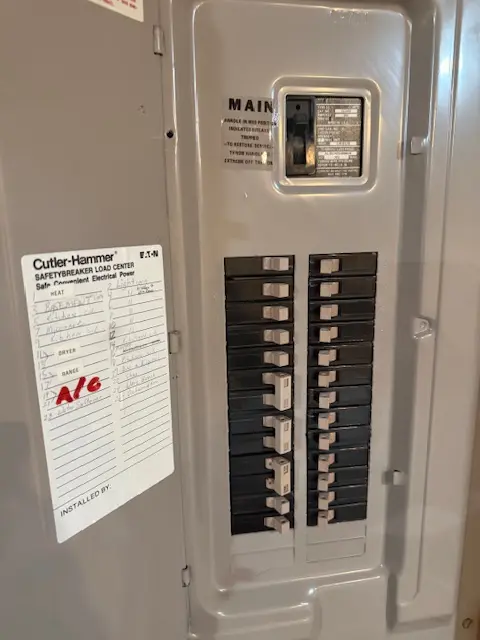
If a Portfolio transformer is dead, buzzing, resetting, or only powering lights part of the time, the breaker panel should be part of the troubleshooting path. A tripped breaker, overloaded circuit, weak receptacle, GFCI issue, or shared load can all make a good transformer look bad.
My preferred order is simple: confirm the breaker is on, test the receptacle or hardwired feed, check the transformer input, then measure transformer output under load. Only after that should you move downstream to cable runs, connectors, fixtures, and LED modules.
If a transformer is overheating, tripping a GFCI, sitting too low, or getting wet near the terminals, the mounting location may be part of the problem. Review the outdoor lighting transformer mounting code requirements before replacing the unit.
Transformer problems are not always inside the transformer itself. The low-voltage plug and limited-energy connector guide explains how loose terminals, over-torqued lugs, connector corrosion, and poor cable contact points can create heat, buzzing, flicker, and unstable output.
Why Portfolio Lighting Transformers Cause So Many Problems
The transformer is the power source for most low voltage Portfolio landscape lighting systems. It takes household electricity and converts it into the lower voltage needed for path lights, spotlights, deck lights, and other outdoor fixtures. When something goes wrong at the transformer, every light connected to that run can be affected.
In many cases, the transformer has not completely failed. The problem is often something smaller, such as a tripped GFCI outlet, a timer that lost its settings, a photocell that is not reading light correctly, or loose low voltage wire connections.
When a transformer allows lights to turn on but then shuts them off shortly after, the issue is usually related to overload, overheating, or internal protection features. This delayed shutdown behavior is a key diagnostic clue. To break down exactly what causes this and how to test it properly, see why landscape lights turn on then off for a full symptom-based troubleshooting guide.
Transformer troubleshooting teaches the same kind of process isolation used in engineering and software debugging. The technical troubleshooting skills guide explains how electrical diagnostics build logic, sequencing, and analytical thinking.
A transformer that repeatedly shuts down and restarts may indicate overload, voltage instability, or downstream wiring problems. The landscape transformer intermittent troubleshooting guide explains why outdoor lighting systems can work inconsistently even when the transformer appears functional.
If the transformer label reads GLA-200-12WF-1, the next diagnostic step should be model-specific rather than generic. A blank display may begin at the GFCI outlet, lights that stay on during the day usually point toward the photocell, and loud humming can result from overload, mounting resonance, or loose output connections. The Portfolio GLA-200-12WF-1 transformer manual and troubleshooting guide walks through those exact symptoms and shows when the transformer itself is actually the failed component.
Common Portfolio Transformer Problems
| Problem | Likely Cause | What to Check First |
|---|---|---|
| Lights will not turn on at all | No outlet power, tripped GFCI, timer issue, failed transformer | Outlet, breaker, GFCI, timer mode |
| Lights click on and off | Overloaded transformer or unstable connection | Total wattage and wire terminals |
| Only some lights work | Loose cable splice, damaged wire, failed fixture | Wire run and first fixture that stopped working |
| Lights stay on during the day | Photocell blocked, dirty, shaded, or failing | Photocell location and sensor surface |
| Transformer hums or feels hot | Overload, age, or internal wear | Load rating and transformer condition |
If your transformer is showing an error code instead of simply failing, it may be trying to tell you exactly what is wrong. See the Hampton Bay transformer error code guide for a breakdown of E1, E2, and E3 and how to fix each one quickly.
If you are still relying on a timer-based transformer, it may be worth looking at how modern systems improve control and reduce wasted runtime. The AI outdoor lighting systems guide explains how smart controllers and automation can upgrade an existing setup, while the AI automated landscape lighting page shows how these systems work in real-world use.
If the transformer is not the problem and the real issue is weak or failing fixtures, the best VOLT landscape lighting fixtures guide can help you compare stronger replacement options built for better durability and more consistent light output.
If your system technically works but is creating glare, spillover, or late-night lighting problems, the issue may be compliance rather than transformer failure. Use the Outdoor Lighting Ordinance Guide to review shielding, brightness, and control requirements before replacing more parts.
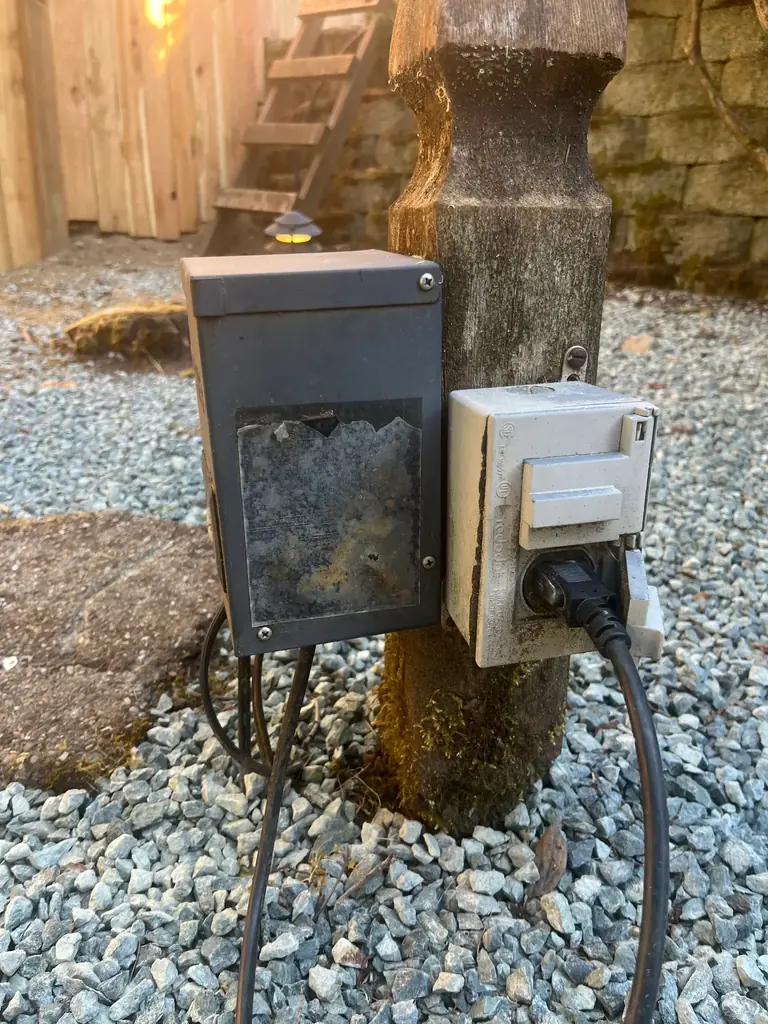
Before replacing an unidentified transformer, record the enclosure dimensions, digital display style, number of programming buttons, output-terminal arrangement, power-cord type, and the total wattage of the connected fixtures. Those clues can distinguish several Portfolio transformer generations that used similar exterior housings but different timers, photocells, output capacities, and control boards.
Portfolio Lighting Transformer Troubleshooting Steps
1. Confirm the outlet is supplying power
Start with the simplest check. Make sure the transformer is plugged into a working outlet. Many outdoor outlets are protected by a GFCI, and those can trip after rain, moisture exposure, or a temporary power interruption. Press the reset button and test the outlet with another device if needed.
It is also worth checking whether the outlet is tied to a wall switch or whether a breaker has tripped at the electrical panel.
2. Check the timer or control setting
Many Portfolio transformers have a timer, manual override, photocell mode, or a combination of settings. After a power outage or seasonal adjustment, the unit may still have power but be set to the wrong operating mode.
Switch the transformer to manual on if that option is available. If the lights come on in manual mode, the main issue is usually in the timer, photocell, or control settings rather than the transformer itself.
3. Inspect the low voltage wire terminals
Unplug the transformer before inspecting the wire connections. Look at the low voltage wires where they attach to the terminal screws. Loose wires, corrosion, partially stripped insulation, or a poor connection can interrupt power to the lighting system.
Tight, clean terminal connections are important for steady performance, especially on longer landscape lighting runs.
4. Check whether the transformer is overloaded
Every transformer has a maximum wattage rating. If the total load of all connected lights exceeds that limit, the transformer can trip internally, shut down, click on and off, or run hotter than normal.
Add up the wattage of every fixture on the system, including any replacement bulbs or later additions. If the total is too high, reduce the load or split the system across more than one transformer.
5. Look for damaged cable or failed fixture connections
If only part of the yard is dark, the transformer may not be the problem. A damaged wire, loose connector, corroded splice, or failed fixture can interrupt power farther down the run. This often affects the lights after the damaged point while the earlier fixtures still work.
Start with the first light that stopped working and inspect the cable and connection there.
6. Evaluate the photocell
A dirty or poorly placed photocell can cause strange on-off behavior. If the sensor is blocked, facing another light source, or no longer reading daylight correctly, it may keep the transformer off or leave lights on at the wrong time.
Clean the photocell and make sure it has a clear view of normal outdoor light conditions.
7. Test for voltage output if needed
If you have already checked the outlet, controls, wires, and load, use a multimeter or voltage tester to check the transformer output. Most low voltage landscape lighting systems run in the 12 to 15 volt range.
If the transformer is receiving power but not delivering output, internal failure becomes much more likely.
How to Reset a Portfolio Lighting Transformer
Resetting the transformer can clear a temporary problem caused by overload, a brief power interruption, or a control glitch. It is quick to try and sometimes restores operation right away.
- Unplug the transformer from the outlet
- Wait 30 to 60 seconds
- Plug it back in securely
- Set it to manual on or the correct operating mode
- Check whether the lights come back on
If the transformer shuts off again immediately, that usually points to an overload, short, bad connection, or internal transformer problem.
For a dedicated reset walkthrough, see How to Reset a Portfolio Lighting Transformer.
Some transformer problems can be repaired, but others are a sign that the unit is simply worn out and should be replaced. If your transformer keeps overheating, will not send power to the lights, or fails even after basic troubleshooting, moving to a full replacement kit is often the most practical solution. Our Portfolio landscape lighting transformer replacement kits guide walks you through complete replacement options, including modern low voltage kits with updated controls, sizing help, and compatibility advice for existing Portfolio landscape lighting systems.
If the transformer resets but the GFCI trips again when the lights turn on, the failure is often in the cable run, connector, or fixture body rather than the timer. The landscape transformer GFCI fault guide explains the step-by-step diagnosis.
When It Is Time to Replace the Transformer
Some transformer problems can be fixed quickly, but not every unit is worth chasing for hours. If the transformer is overheating, producing a burning smell, tripping repeatedly with a normal load, or showing no output after basic checks, replacement is often the better option.
Age also matters. Outdoor electrical equipment wears down over time, especially after years of rain, heat, cold, and power surges. A properly sized replacement transformer can improve reliability and protect the rest of the lighting system.
For archived transformer model numbers, fuse references, and related manual notes, use the Portfolio technical archive.
Transformer Not Working
Use this page if the system still shows no output after the basic checks above.
Read the guideTransformer Buzzing
Helpful if the unit hums, runs hot, or seems unstable under load.
Read the guideTimer Not Working
Use this guide if the transformer works in manual mode but not on its normal schedule.
Read the guide- No voltage output even though the outlet has power
- Visible rust, damage, or melted areas
- Persistent humming, excessive heat, or repeated trips
- Frequent shutdowns after reset and wiring checks
Spring foliage can accidentally shade a photocell and cause transformers to activate hours too early in the afternoon. The Portfolio Easter & Spring Lighting Maintenance Guide explains the “12-inch shrub rule” and other seasonal timer problems that appear after winter.
Portfolio transformer problems become harder to solve when the label shows a partial model number, Lowe's item number, or internal manufacturing code instead of the number used in the manual. Before replacing a transformer that may only need a terminal repair, fuse check, load test, or timer reset, compare the number in the Portfolio Lighting Lost Models Archive to see whether it belongs to a known transformer family.
Final Thoughts on Portfolio Transformer Problems
A Portfolio lighting transformer problem does not always mean the entire system has failed. In many cases, the actual issue is tied to outlet power, timer settings, wire terminals, photocell behavior, or system overload. Working through the checks in order helps narrow things down without replacing parts unnecessarily.
Taking a step-by-step approach saves time, reduces guesswork, and makes it easier to decide whether the fix is simple or whether it is finally time for a new transformer.
Some transformer issues can be repaired, but others are a sign that the unit has reached the end of its service life. If your transformer keeps failing, will not power the lights consistently, or is no longer practical to repair, it may be time to compare replacement options from other brands. Our Portfolio lighting transformer alternatives guide walks through compatible replacement choices, explains what makes a transformer work with an older Portfolio system, and helps you choose a modern option that fits your lighting load and wiring layout.
If your system is working but still creating harsh or inconsistent lighting, the issue may be control, not hardware. The AI security and ambient lighting guide shows how to improve behavior without replacing the entire system.
If the transformer shows signs of heat damage, loose wires, or melted connection points, use our terminal block and transformer lug repair guide to diagnose and fix the output connection before replacing the entire unit.
If your transformer is failing repeatedly, compare symptoms against other retail low-voltage systems before buying a replacement. The Paradise Lighting transformer troubleshooting resource covers overheating, timer problems, photocell failures, and output issues that overlap with many Portfolio-style systems.
Lighting Inspiration and System Examples
These examples show the kinds of Portfolio lighting setups where transformer performance matters most, especially in outdoor systems with multiple fixtures and longer cable runs.
Path Lighting Systems
Path lights depend on steady transformer output for even brightness, safe walkways, and reliable nighttime lighting.
View path lightsDeck and Stair Lighting
Deck lights and stair lights often reveal power or wiring issues when the transformer load is not balanced well.
View outdoor lightingLandscape Spotlights
Accent lights and spotlights can show the first signs of overload or connection problems when part of a lighting run goes dark.
View landscape lightingMore Portfolio Lighting Topics
Explore more Portfolio lighting pages for installation help, placement ideas, replacement parts, and outdoor lighting guidance.
Portfolio Lighting Placement Guide
Learn where to place path lights, deck lights, landscape fixtures, and indoor lighting for better performance and appearance.
Read the guidePortfolio Lighting Installation Guide
Review installation basics, setup tips, and practical steps for getting Portfolio lighting systems running properly.
Read the guideLow Voltage Wire Connectors
Wire connectors are one of the most overlooked reasons path lights, spotlights, and accent fixtures stop working.
Read the guideFrequently Asked Questions
Why will my Portfolio transformer not turn on at all?
The most common first checks are outlet power, a tripped GFCI, timer mode, and whether the transformer is receiving input power before you assume the unit itself is bad.
Why do my Portfolio lights turn on and off by themselves?
This can happen when the transformer is overloaded, the photocell is reading light incorrectly, or a connection is unstable at the low voltage terminals or along the wire run.
Can a bad fixture make it seem like the transformer failed?
Yes. A damaged fixture, splice, or cable section can shut down part of the run and make it look like the transformer is the problem when the failure is actually farther down the line.
How do I know when it is time to replace the transformer?
If the outlet has power, the settings are correct, the wiring checks out, and the transformer still shows no output or repeatedly overheats and trips, replacement is usually the better move.
What other Portfolio pages should I check if the system is still not working?
Start with reset, not working, timer not working, and wiring diagram.
Portfolio Lighting Master Model & Replacement Handbook
Stop wasting time hunting for discontinued Portfolio parts. This premium PDF helps you identify legacy Portfolio Lighting models, understand common failures, and find compatible replacement options from brands like Malibu, VOLT, Hampton Bay, and Kichler.
Inside the PDF:
- 100+ model breakdown pages
- Transformer, path light, spotlight, and wall lantern specs
- Common failure patterns for discontinued models
- Compatible replacement brands and parts strategy
- What to check before buying the wrong part
If one wrong part costs you $20–$80, this $9.99 handbook can pay for itself before you make your first replacement purchase.