
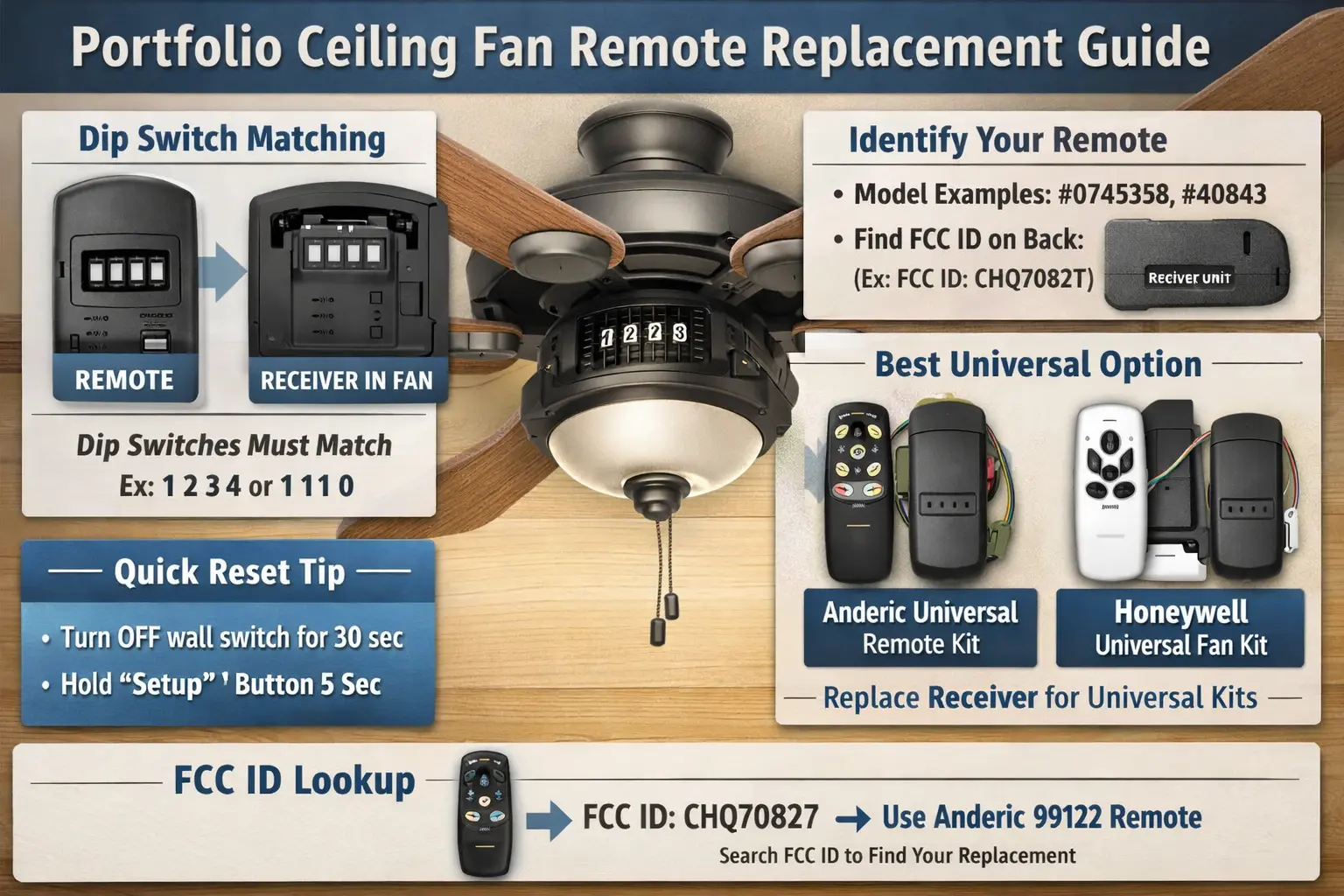
Quick Answer: My 7-Point Fan Remote Resync & Component Diagnostics Matrix
Fixing a dead Portfolio ceiling fan remote is all about getting the radio signal line open again, not rushing to buy new hardware. Because these systems rely on matching internal frequency blocks, a sudden loss of control usually means the hardware dropped its sync after a power surge, or the tiny manual frequency sliders shifted out of place inside the battery compartment.
Whenever I walk into a room where the wall controls or hand remotes won't trigger the fan blades or light kit, I trace down the communication breakdown using these seven practical steps:
- 1. Checking Under the Battery Cover: I pull the plastic slider off the back of the remote and look for a row of four tiny dip switches. If these tiny toggles don't perfectly line up with the matching switches on the receiver box up in the ceiling, the fan will completely ignore the remote.
- 2. The 30-Second Circuit Power Cut: When electronic controls freeze up, I flip the main room breaker switch off for a full half-minute to completely drain the residual power inside the fan canopy, clearing out hidden system hang-ups.
- 3. Nailing the 60-Second Sync Window: Right after I flip the power breaker back on, I grab the remote and immediately hold down the Fan Off or Light button for 5 to 10 seconds; this forces the transmitter to lock onto the canopy receiver before the security window closes.
- 4. Unmasking Wall Dimmer Interference: If your fan power runs through a standard wall dial or slide dimmer, it chokes the incoming voltage; I always wire fan circuits to clean, non-dimming switches so the electronic controls don't stutter or hum.
- 5. Freeing Stuck Mechanical Toggle Switches: Sometimes the wireless command goes through but nothing moves; I slide the physical summer/winter reverse toggle on the motor casing back and forth a few times to ensure it isn't stuck dead in the middle, which kills motor power.
- 6. Upgrading to a Universal Receiver Kit: If the original factory handheld remote is genuinely broken or lost, I don't waste time hunting down discontinued matching stock; I wire a universal remote and receiver kit straight into the upper canopy wiring space.
- 7. Identifying DC vs. AC Motor Matches: If you do buy a universal wireless kit, make sure it matches your motor style; trying to run a traditional AC kit on a modern DC motor will permanently fry the speed-control circuit boards.
⚠️ CRITICAL COMPONENT RISK: Forcing mismatched universal control signals onto a specialized motor circuit board can cause severe motor hums, blade stuttering, and eventual component failure. Mismanaging these wireless frequencies triggers three primary control failures that I analyze in my hardware component guides below.
Ceiling fan issues can easily mask themselves as basic lighting bugs at first, especially when you are looking at a broken light kit, a dead wall control switch, a jammed pull chain, or flickering bulbs overhead. However, motor units bring unique mechanical challenges into play like wobbling brackets, bad blade balance, humming stators, ceiling support limits, and airflow drop-offs. If the specific fixture giving you trouble is a Portfolio model, take a close look at my full Portfolio ceiling fans guide where I show you how to separate basic light kit fixes from motor troubleshooting, hardware mounting codes, and model replacement paths.
Don't start taking down heavy brackets or throwing away good handheld remotes blindly. Use my step-by-step pairing layout diagrams, dip switch orientation grids, and universal canopy splicing blueprints detailed further down this page to get your air moving again safely.
Older Ceiling Fan Light Kits Can Usually Be Modernized
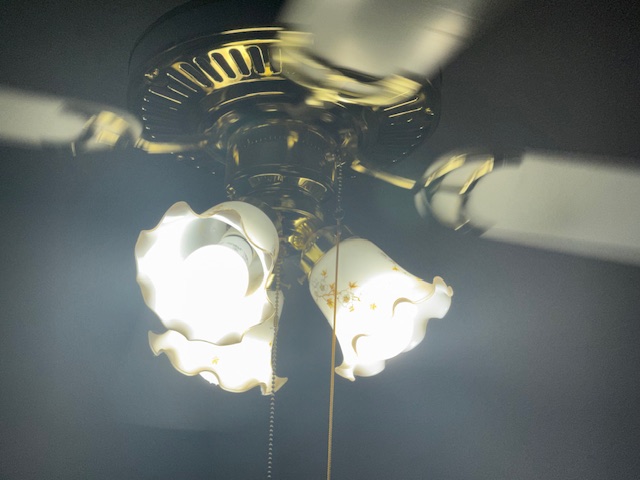
One of the biggest mistakes homeowners make is replacing an entire ceiling fan when looking to replace parts like a remote when the real issue is only the lighting performance . Older fan light kits often have solid metal housings, durable sockets, and attractive glass shades that can still work very well with modern LED upgrades.
In many cases, switching to matching high-quality LED bulbs dramatically improves brightness consistency, glare control, efficiency, and indoor comfort without changing the fixture itself.
Portfolio Ceiling Fan Remote Problems and the Most Likely Fix
Use this quick table to narrow down whether you need a reset, a new handheld remote, or a full remote-and-receiver kit.
| Problem | Most Likely Cause | Best Next Step | What Usually Works |
|---|---|---|---|
| Remote does nothing | Dead battery, bad pairing, failed receiver | Reset power and check dip switches | Re-pair first, then replace remote or receiver kit |
| Light works but fan will not spin | Reverse switch stuck in neutral, receiver issue, motor capacitor issue, wrong remote type, or wrong code | Check the physical reverse switch, confirm AC vs DC remote type, and test all speeds | Fully click the reverse switch into position, then recheck pairing and receiver compatibility |
| Fan works but light will not turn on | Wrong pairing, bulb issue, light kit issue | Test manual wall power and remote light button | Bulb check plus remote re-sync |
| Replacement remote will not pair | Dip switches do not match or receiver is incompatible | Open canopy and compare receiver switches | Use a universal kit with a new receiver |
| Remote only works at short distance | Weak battery or failing receiver antenna | Install fresh battery and inspect canopy receiver | Replace receiver if range stays poor |
| Buttons respond inconsistently | Worn remote contacts or partial receiver failure | Try reset and battery replacement | New handheld remote or full kit |
How to Pair Your New Portfolio Remote
Pairing a replacement remote is usually simple once you know where the receiver is and how the switch code system works. On many Portfolio ceiling fans, the handheld remote and the receiver communicate using a small bank of dip switches. These tiny sliders must match exactly.
Step 1: Cut Power
Turn off the breaker or wall switch to the fan before touching the canopy or receiver. This protects you while checking the wiring, receiver, and switch settings.
If you need more help opening the canopy, checking wiring, or working safely around the fan bracket and receiver, see the Portfolio lighting installation and instructions guide before continuing.
Step 2: Check the Remote Battery Compartment
Open the battery cover and look for the dip switches. Some remotes have four small sliders. Others may use a learn button instead of switches, but many older Portfolio units rely on the slider pattern.
Step 3: Open the Fan Canopy
Lower the canopy enough to see the small black receiver module. It is usually tucked above the mounting bracket. Look for the same row of dip switches on the side of the receiver.
- Dip switches on the remote may be hidden under the battery, inside the battery compartment, or behind a tiny plastic sliding door.
- The receiver is often a small black or white puck or rectangular module tucked inside the mounting bracket area at the ceiling.
- If you do not see the receiver right away, gently lower the canopy and look above the bracket where the house wires and fan wires connect.
Step 4: Match the Switch Pattern
Set both the handheld remote and the receiver to the same pattern. This is the step many people skip, and it is one of the most common reasons a replacement remote appears defective.
Step 5: Restore Power and Sync
Turn the wall switch or breaker back on. Within the first minute, hold the setup button, fan button, or the required speed sequence until the fan or light blinks, beeps, or responds.
If your Hampton Bay ceiling fan uses the UC7067RC remote and suddenly stopped responding, don't assume the remote has failed. Receiver pairing, DIP switch settings, frequency mismatches, and failed capacitors can all produce identical symptoms. Follow our complete UC7067RC troubleshooting guide before replacing expensive parts.
The Dip Switch Master Table
If your Portfolio ceiling fan remote uses four dip switches, these are the code patterns you should compare first. The correct code is not universal, but this table helps you understand what you are looking at when you open the remote and canopy.
| Example Code | What It Means | When to Use It | Important Note |
|---|---|---|---|
| 0000 | All switches in the same starting position | Seen on some original factory pairings | Do not assume this is correct unless both remote and receiver already match |
| 1111 | All switches in the opposite position | Sometimes used after replacement or service | Only valid if both components use the same setting |
| 1010 | Alternating pattern | Common example used for testing or manual setup | Useful when resetting both remote and receiver together |
| 0101 | Alternating reverse pattern | Another clean test code when both parts are accessible | Change both pieces together, never just one |
| Custom Pattern | The code already set in your fan | Best choice in most real-world repairs | Match the existing receiver first rather than guessing |
Portfolio-Specific Remote Identification
One of the hardest parts of replacing a Portfolio ceiling fan remote is that many original remotes do not prominently say Portfolio on the housing. That is because Portfolio has often been sold as a private-label brand, so the remote may show a generic model number, an item number, or only a regulatory label.
Look for the Model or Item Number First
Check the back of the remote, inside the battery compartment, or on the original paperwork. Numbers printed there are often more useful than the brand name when matching a replacement.
If the number on your remote or fan label is incomplete, worn off, or confusing, use the Portfolio lighting model number lookup guide to cross-check item numbers, labels, and identification clues before ordering a replacement remote.
Use the FCC ID Trick
If the remote does not show a helpful model number, look for the FCC ID. This is often the best clue on older remotes. When users search a random string of letters and numbers from the back of a remote, they are usually trying to confirm a replacement. That is why keeping a clear FCC ID reference section on this page is so useful.
- Item or model numbers printed inside the battery cover
- FCC ID label on the back shell
- Battery type and switch layout
- Button arrangement such as Hi / Med / Lo and Light
Compare Button Layout Before Buying
A replacement remote that looks similar is not always a true match. Compare the button layout, number of speed buttons, light control style, and whether the original remote had dip switches or a learn button.
Check Your Fan Speeds First: DC Motor vs AC Motor Remotes
Before buying a replacement remote, check how many fan speeds your original control had. This is one of the fastest ways to avoid ordering the wrong remote.
If you have already checked the battery, dip switches, receiver match, reverse switch, and pairing window, the Portfolio lighting customer service page may help you track down additional product support information or next-step guidance.
Portfolio ceiling fans have used both AC motor and DC motor control systems, and their remotes are not interchangeable. If you buy the wrong type, the replacement remote will never pair correctly, even if it looks similar.
- DC motor remotes usually have 6 speeds and often use a Learn button instead of dip switches.
- AC motor remotes usually have 3 speeds such as Hi / Med / Lo and commonly use a 4-dip-switch code system.
Why This Matters
If your Portfolio fan uses a DC motor remote and you buy a basic 3-speed universal dip-switch remote, it will not work. Likewise, many older AC fans will not respond to a learn-button remote designed for a different receiver system.
Best Buying Check Before Ordering
- Count the number of speed buttons on the old remote
- Look for dip switches under the battery cover or behind a sliding panel
- Check whether the receiver inside the canopy has matching dip switches
- If your fan has 6 speeds and no dip switches, look for a learn-button style replacement
Search by FCC ID or Label Clue
This section is designed to help when your remote only has a code on the back. Match the label clue to the remote style and then confirm the receiver type before ordering.
If your remote label gives you only a partial number or FCC ID, it can also help to check the Portfolio lighting manuals page for installation sheets, wiring references, and control details that may match your fan or receiver.
| Label Clue You Found | What to Compare Next | Best Replacement Direction | Why It Matters |
|---|---|---|---|
| FCC ID only | Button layout, dip-switch count, battery type | Find a remote with the same control layout or use a universal kit | Older Portfolio remotes are often easiest to identify by regulatory label |
| Item number on sticker | Search the item number plus fan control style | Exact-match remote if available | Item numbers can connect the remote to the original fan listing |
| Remote has 4 dip switches | Receiver must have the same switch bank | Matching remote or full remote-and-receiver kit | Switch systems depend on identical coding |
| Remote has no switches | Look for a learn or setup button sequence | Learn-button replacement or universal learn kit | These systems pair differently from older switch-coded remotes |
| No useful label remains | Compare canopy receiver, wire colors, and button layout | Universal kit with new receiver | This is often the fastest path when identification is unclear |
Troubleshooting: Why Your Portfolio Remote Stopped Working
Many homeowners assume the remote itself failed, but ceiling fan control problems often come from weak batteries, canopy receiver failure, bad switch matching, or an interrupted pairing sequence.
Weak Battery or Dirty Battery Contacts
Always start with a fresh battery. If the remote sat unused for a long time, inspect for corrosion or bent battery terminals. A weak battery can still light a small indicator but fail to send a strong signal.
Mismatched Dip Switches
If the remote was dropped, replaced, or opened, the switch pattern may have changed. The receiver above the canopy does not know that. It will only respond to the exact same pattern.
Receiver Failure Inside the Canopy
If you have good batteries and correct switch matching but the fan still does not respond, the receiver may have failed. This is especially likely if the light blinks, only one function works, or the remote works at random.
Power Reset Problems
Some remotes will not pair unless the power cycle is done in the correct order. Cut power fully, wait at least 30 seconds, restore power, and begin the pairing sequence immediately.
Check the Manual Reverse Switch
On many Portfolio ceiling fans, there is a small physical reverse switch on the side of the motor housing. If this switch gets bumped halfway and sits between forward and reverse, the remote may still turn the light on, but the fan blades will not spin at all.
- The physical reverse switch is fully clicked into one direction
- The remote matches the correct AC or DC motor type
- The dip switches match exactly between remote and receiver
- The receiver is getting full power from a standard wall switch
- The fan is not connected to an old dimmer or speed-control wall slider
Will a Universal Remote Work with Portfolio Fans?
Yes, a universal remote can often work with a Portfolio ceiling fan, but the most reliable fix is usually a universal kit that includes both a new handheld remote and a new canopy receiver.
This is the detail many shoppers miss. They buy only the handheld remote, then assume it is defective when the old receiver never recognizes it. In reality, the receiver and the remote are designed to work as a matched pair in many universal systems.
If you are not sure whether your replacement remote, receiver, or control style will work with your existing fan, review the Portfolio lighting compatibility guide before buying. It is especially helpful when comparing dip-switch remotes, learn-button remotes, and universal receiver kits.
When a Universal Kit Makes the Most Sense
- Your original remote is missing and you cannot identify it
- The receiver is old, unreliable, or unresponsive
- The original remote model is no longer sold
- You want a cleaner reset instead of guessing at switch codes
What to Check Before Buying
Compare the fan canopy space, wire connections, number of speeds, light kit support, and whether the fan uses a separate wall switch. If your fan has unusual wiring or a built-in proprietary control board, installation may be less straightforward.
The Silent Killer of Fan Receivers: Wall Dimmers
Are you using a sliding wall dimmer to turn your ceiling fan on and off? Stop. Remote-controlled Portfolio ceiling fans need a full 120V power supply to feed the canopy receiver correctly.
When a dimmer reduces voltage at the wall, it can starve the receiver inside the fan canopy. That often leads to humming at low speeds, flickering lights, unreliable pairing, or complete receiver failure over time.
Common Signs a Wall Dimmer Is Causing Problems
- Humming or buzzing after installing a universal remote kit
- Lights flicker when the fan changes speeds
- The remote works inconsistently or loses pairing
- The receiver fails shortly after installation
If your fan is wired through an old dimmer or variable speed wall control, replace it with a plain single-pole toggle switch before blaming the new remote or receiver.
The 30-Second Reset Before You Buy Anything
Try this quick reset before ordering a new remote. It only takes a minute and solves more problems than most people expect.
- Turn the wall switch off or cut power at the breaker.
- Wait 30 full seconds.
- Restore power.
- Within 60 seconds, hold the Setup, Fan, or speed button for 5 seconds.
- Test fan speeds and the light button again.
If the fan responds after the reset, the issue was likely a lost pairing state instead of a failed remote. If nothing changes, move on to switch matching and receiver inspection.
What If Your Original Portfolio Remote Is Completely Missing?
If the original remote is gone, focus on the receiver inside the canopy. That receiver tells you more than the fan housing usually will. Look for dip switches, wire labels, antenna style, and any printed codes on the receiver body. Those clues are often enough to decide whether you should keep searching for a match or move directly to a universal kit.
In many real-world cases, a missing remote means the quickest fix is a new remote-and-receiver set rather than spending hours trying to identify a discontinued handheld model.
If the original remote is gone and you are comparing replacement options, the main Portfolio lighting parts and accessories page is a good place to continue if you need broader help beyond the handheld remote alone.
If you are not sure whether the issue is the remote, receiver, or the fan itself, it may help to step back and review the full range of ceiling-mounted fixtures and controls in the Portfolio ceiling lighting category to better understand how these systems are designed and replaced.
Can I Use My Phone as a Portfolio Remote?
Most older Portfolio ceiling fans do not connect directly to a phone app on their own. However, some homeowners add smart control by using a compatible bridge or hub that works with remote-controlled devices. That can be helpful if your goal is to avoid carrying a handheld remote or to control the fan with routines and voice commands.
If you want to explore that route, the best starting point is a general compatibility overview such as the smart hub compatibility guide. If you simply need the fan working again today, a replacement remote or universal receiver kit is still the faster solution.
Before You Return the Replacement Remote
Many replacement remotes get returned even though the remote itself is fine. The real problem is usually one of four things: the wrong dip-switch pattern, an old receiver that cannot communicate with the new remote, weak batteries, or a missed pairing window after power is restored.
Portfolio Ceiling Fan Remote Replacement FAQ
Where is the reset button on a Portfolio ceiling fan?
Many Portfolio remotes do not have a dedicated reset button labeled on the outside. The reset function is often handled by restoring power and then holding the setup, fan, or speed button sequence immediately after power returns.
Can I use my phone as a Portfolio remote?
Not directly on most older Portfolio fans. You may be able to add smart control with a compatible bridge or hub, but the original fan usually still relies on a handheld remote and receiver.
Why does my fan light blink but the fan will not spin?
This often points to a receiver pairing problem, mismatched dip switches, or a motor-side problem such as a capacitor issue. If the light responds but the fan does not, do not assume the handheld remote is the only problem.
Do I need to replace the receiver when I buy a universal remote?
In many cases, yes. Universal remotes work best when installed as a matched remote-and-receiver set. Reusing the old receiver is possible sometimes, but it is one of the main reasons universal remote replacements fail.