Portfolio Lighting Troubleshooting
The main troubleshooting hub when your timer issue is only one part of a broader outdoor or low-voltage lighting problem.
Read the guide
Most Portfolio light timer problems are caused by power issues, incorrect settings, or a failing timer—and you can usually fix them in just a few minutes once you identify the symptom.
If your Portfolio light timer is not working, the key is to match the problem to the cause. Timers rarely fail randomly—there is usually a specific reason the lights are not turning on, not turning off, or behaving inconsistently.
Once you identify the symptom, the fix becomes simple. Most issues come down to power supply problems, incorrect timer settings, wiring faults, or a worn-out timer unit.
Start with the symptom—once you know what the timer is doing, you can usually fix the problem in a few simple steps.
If the timer problem appears to be part of a bigger system issue, the best next page is Portfolio lighting troubleshooting. If the timer is part of a low-voltage landscape system, you may also want landscape lighting timer not working and landscape lighting transformer guide.
See the Troubleshooting HubA Portfolio light timer usually stops working because of power issues, incorrect settings, wiring problems, transformer failure, or a bad timer unit. The fastest fix is to check power first, then settings, then wiring.
| What Happens | Most Likely Cause | What To Check First |
|---|---|---|
| Lights won’t turn on | No power or bad schedule | Outlet, breaker, timer settings |
| Lights won’t turn off | Override or timer failure | Manual mode, photocell, timer relay |
| Lights stay on all night | Photocell or override | Photocell behavior |
| Works sometimes | Loose wiring or failing timer | Connections and timer condition |
| Stopped after outage | Lost programming | Reset and reprogram timer |
Most timer problems can be identified in seconds by matching the symptom first.
Always solve the simplest cause before moving to deeper system checks.
A light timer is supposed to make outdoor lighting easier by turning lights on and off without constant manual control. When it fails, the lighting system may still have power, but it no longer follows the schedule the way it should. That is why timer problems often feel different from full lighting failures. The lights may still work in manual mode, work only sometimes, or work at the wrong time of day.
The fastest way to solve that kind of problem is to separate the timer itself from the rest of the system. First make sure the timer has power. Then confirm the settings are correct. After that, look at wiring, transformer behavior, and any photocell or control interference that may be changing how the timer behaves.
In most cases, a light timer stops working because of one of these issues:
That list covers the most common real-world timer failures and gives you a practical starting point before you dive deeper.
A light timer controls when a set of lights turns on and off. Some timers are simple mechanical units. Some are digital. Some are built directly into a transformer in a low-voltage system. Others work alongside photocells, which means the timer is only one part of the control process.
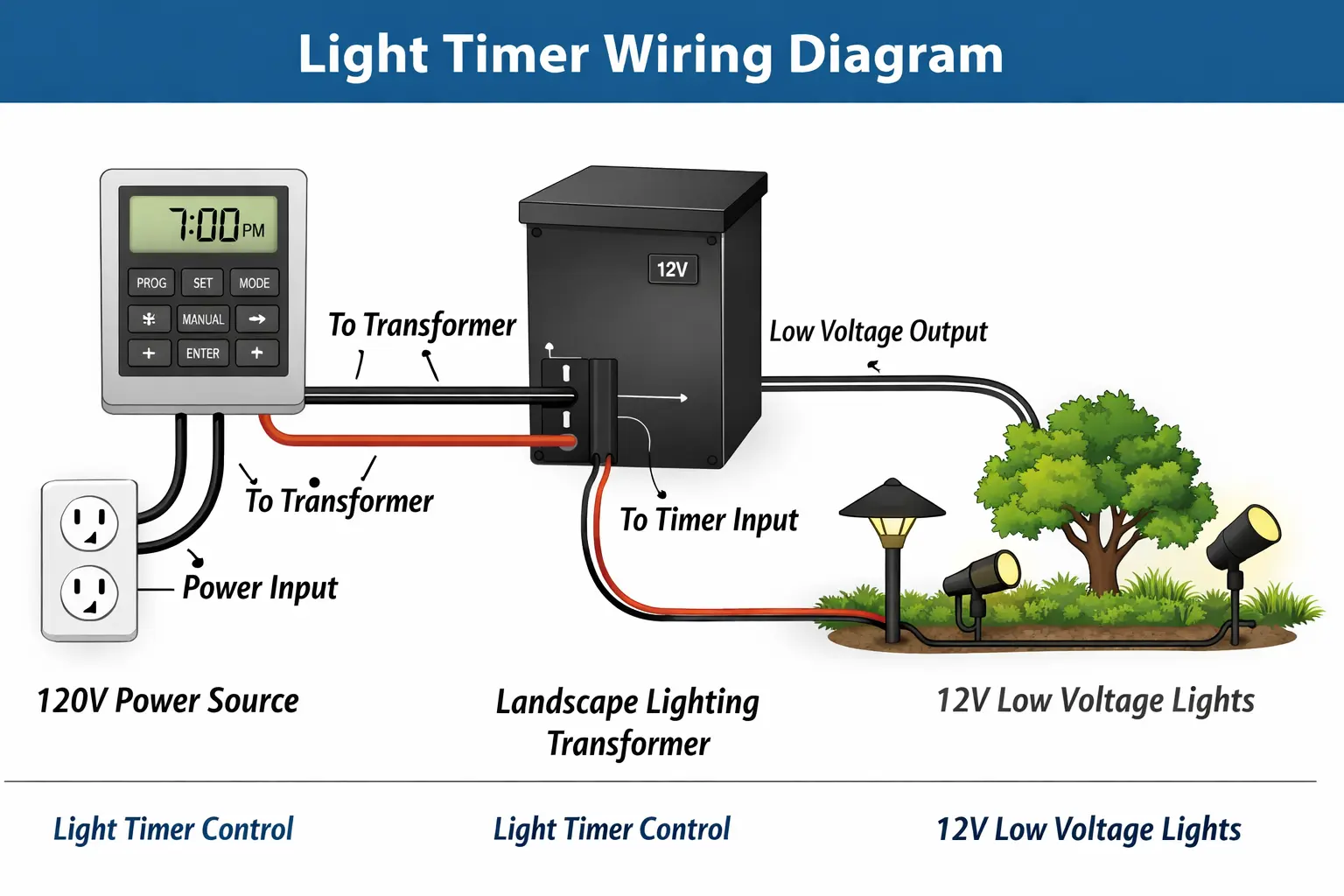
In a landscape lighting setup, the timer may control when the transformer sends power to the system. In a more basic outdoor setup, the timer may directly control the fixture circuit. Either way, the concept is the same: the timer is there to control schedule, not to create power. That means the timer can only work correctly if power, wiring, and any related control components are also working properly.
If you want the bigger system picture first, read how landscape lighting works.
Start with the simplest question: is the timer actually receiving power? If the timer has no usable power source, nothing else about the schedule matters yet.
If the timer is plugged into an outlet or built into a transformer powered by an outlet, confirm that outlet is working.
Tripped breakers and GFCI outlets are common causes of timer problems, especially outdoors where moisture exposure and power interruptions are more likely.
On digital timers, a blank display or no response to button input often points toward a power problem first.
Timer settings are one of the most common reasons a timer appears to be broken when it is actually still functional.
The programmed on and off times may simply be incorrect for what you expect.
This is especially common on digital timers. A schedule that looks correct at first glance may be set for the wrong half of the day.
Some timers get switched into manual mode or bypass mode, which makes them look inconsistent because they stop following the programmed schedule.
A reset is often worthwhile before going deeper into replacement decisions. Many timer issues come from lost settings, partial lockups, or internal confusion after a power interruption.
Disconnect power, wait briefly, and restore it. This can clear simpler electronic issues.
Some timers include a dedicated reset feature that returns the timer to a fresh programming state.
Once reset, enter the schedule again from the beginning and verify the time settings closely.
Wiring problems can make a timer behave unpredictably. The timer may appear dead, may work only sometimes, or may fail to control the lights consistently if its wiring is loose, corroded, or connected incorrectly.
A loose terminal or weak splice can interrupt timer control without causing a full system outage.
If the timer was recently installed or replaced, incorrect terminal placement may be the real reason it is not working.
Outdoor systems are especially vulnerable to moisture-related wiring problems over time.
For deeper wiring help, use how to wire landscape lighting.
In many landscape systems, the timer is built into the transformer or depends on the transformer to send power correctly. That means a timer problem is sometimes really a transformer problem in disguise.
If the timer is part of the transformer housing, the timer and transformer should be thought of as one control unit during troubleshooting.
If the transformer has power but does not deliver usable output, the timer may appear to be failing even when the deeper issue is power delivery.
For the transformer side of the diagnosis, use landscape transformer not working and landscape lighting transformer guide.
Some systems use both a timer and a photocell. When that happens, the photocell may override or interact with the timer in ways that make the timer seem unreliable.
If the lights behave strangely around dusk, stay on all day, or ignore part of the timer schedule, the photocell may need attention instead of the timer.
For that problem, review landscape lighting photocell not working.
When the timer does not turn the lights on, the most likely causes are no power, incorrect scheduling, transformer trouble, wiring faults, or a failed timer output.
This is one reason step-by-step order matters so much. If you start by replacing the timer before confirming power and settings, you may end up changing the wrong part.
If the lights come on but do not turn off correctly, look closely at the off schedule, manual override mode, relay failure, and any photocell behavior that may be holding the system on longer than expected.
A stuck timer can look like a schedule problem, but the deeper cause may be an internal control failure.
Lights that stay on all night often point to one of three issues: the timer is bypassed, the photocell is overriding the schedule, or the timer has an internal failure and is no longer switching the circuit off correctly.
This symptom is especially common in systems where more than one control method has been added over time.
Intermittent timer behavior usually points toward unstable power, loose wiring, inconsistent internal timer operation, or a timer that is beginning to fail rather than already fully dead.
This can be one of the hardest symptoms to diagnose because the timer may appear fine during testing and then fail later when left on schedule.
This is one of the most common timer problems. A power outage can reset or scramble digital timer settings, push the timer into the wrong mode, or erase stored scheduling if the unit depends on an internal battery or memory function.
If your timer stopped working after an outage, start with reset and reprogramming before assuming the hardware itself is bad.
Mechanical timers often fail because of worn gears, broken pins, worn switching parts, or physical wear over time.
Digital timers more often fail because of lost programming, internal electronic failure, display issues, or power-interruption effects.
Knowing which type you have helps you troubleshoot more realistically because the failure patterns are not always the same.
Landscape timer problems tend to be more complicated than indoor timer problems because the timer is often part of a broader low-voltage control system. Moisture, outdoor wiring, transformer integration, and photocell interaction all make the troubleshooting picture bigger.
For the outdoor-specific version of this topic, visit landscape lighting timer not working.
Some timer failures are really installation problems. Common examples include:
These issues can make the timer seem inconsistent or fully dead even when the timer unit itself is still functional.
Timer replacement is often the best choice when the timer no longer responds, behaves inconsistently even after reset and reprogramming, or clearly shows internal failure.
If the problem keeps returning after you confirm power, settings, and wiring, the timer itself becomes a stronger suspect than the surrounding system.
For replacement-related help, visit Portfolio lighting parts and accessories.
A few practical habits can prevent a lot of timer trouble:
Timer failures often seem sudden, but many develop slowly from small setup and maintenance issues that go unnoticed.
If your timer problem is causing lights to stay on too late and creating a compliance issue, see the Outdoor Lighting Ordinance Guide for help understanding curfew rules, smart control fixes, and late-night lighting requirements.
The main troubleshooting hub when your timer issue is only one part of a broader outdoor or low-voltage lighting problem.
Read the guideHelpful when you want to understand how timers fit into the larger transformer, wiring, and fixture system before troubleshooting.
Read the guideUse this page when the timer seems fine but the low-voltage system is still not receiving or sending power correctly.
Read the guideBest for understanding transformer sizing, timer integration, and how transformer issues can affect control behavior.
Read the guideThis is the outdoor-specific timer page when the problem clearly belongs to a landscape lighting system.
Read the guideHelpful when the timer seems to work partly but a photocell may be overriding or disrupting the schedule.
Read the guideImportant when timer failure may actually come from wiring problems, loose terminals, or poor outdoor connections.
Read the guideUse this page when troubleshooting shows that the timer or another related control component needs replacement.
Read the guideA light timer usually stops working because of lost power, incorrect settings, loose wiring, a bad timer unit, transformer problems in low-voltage systems, or photocell interference.
Most timers can be reset by cycling power, using the reset button if available, and then reprogramming the schedule correctly.
This is often caused by no power to the timer, incorrect schedule settings, manual override mode, transformer issues, or wiring faults.
Yes. In low-voltage systems, the timer may be built into the transformer or depend on the transformer to deliver power correctly.
Yes. Outdoor timers can fail over time because of moisture, wear, electrical stress, internal component failure, or damaged wiring connections.
Digital timers often lose settings after power outages, internal battery failure, or electrical interruption, and may need to be reset and reprogrammed.
This page is designed to be the main troubleshooting hub for Portfolio light timer problems, helping you move from simple setup checks into deeper timer, transformer, photocell, wiring, and replacement-part diagnosis as needed.