
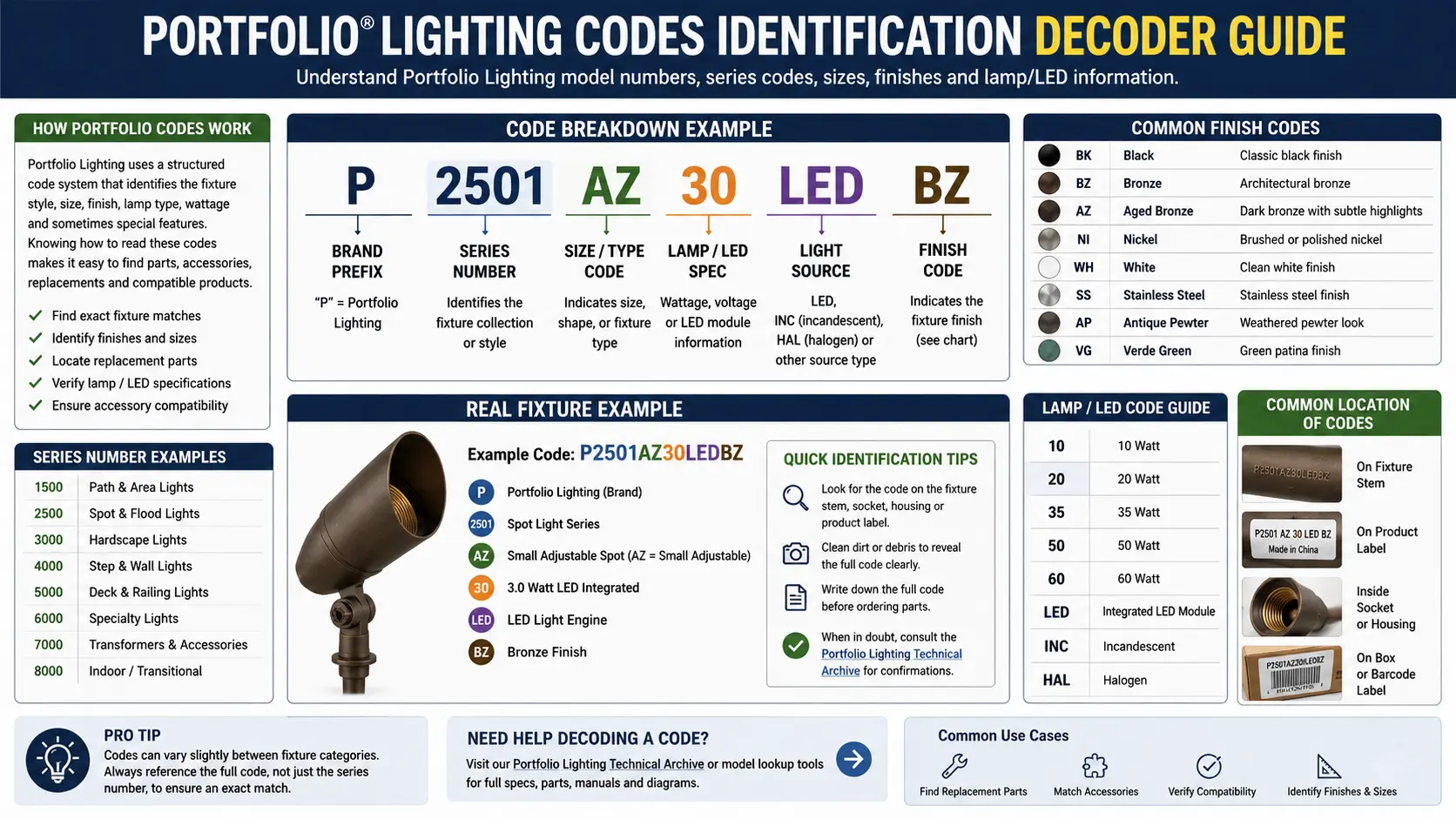
Master Code Table: Every Format You Will Find on a Portfolio Fixture
Before diving into the details, here is the complete reference table. Every number format you will encounter on a Portfolio lighting fixture, transformer, or packaging — what it actually is, where to find it, and what action it enables.
| Code Format | What It Actually Is | Example | Where to Find It | What to Do With It |
|---|---|---|---|---|
| 7 digits, no prefix | Lowe's Item Number (SKU) | 0482436 | Box, Lowe's receipt, Lowe's website URL | Use for returns, price lookup, purchase history. Does NOT directly identify the fixture model for parts. |
| E + 5–6 digits | UL File Number (certification — NOT model number) | E123456 | Silver sticker on wire, fixture base, or transformer housing | Search at iq.ul.com to identify the actual OEM manufacturer. Use to find alternative parts sources when Portfolio is discontinued. |
| 4 digits (no letters) | Date of Manufacture Code (WWYY or YYWW format) | 2214 = Week 22, 2014 | Stamped or printed on housing, transformer door interior, or base label | Decode to determine manufacture date. Compare to purchase date to check warranty eligibility. Do NOT discard without reading. |
| IP + 2 digits | Ingress Protection Rating (IEC 60529) | IP65, IP44, IP67 | Box, instruction sheet, or housing label | Determines safe installation orientations. IP44 cannot face upward in rain. IP65 handles water jets. IP67 required for in-ground or pooling water areas. |
| GL + 5 digits | Portfolio landscape transformer model number | GL22640, GL22655 | Inside transformer cabinet door, housing label | Look up in model number database for manuals and compatible replacement parts. See the model number lookup. |
| 12V / 13V / 14V / 15V | Transformer output tap voltage (voltage drop compensators) | 15V terminal | Terminal block inside transformer cabinet | Use the Multimeter Delta method: measure at fixture endpoint before selecting tap. Never use 15V to compensate for a bad splice — fix the splice first. |
| UL 1838 | Listing standard number for low-voltage landscape transformers | UL 1838 Listed | Transformer housing label | Confirms the transformer met the safety standard for low-voltage (12V AC) landscape lighting systems. Required for NEC-compliant installation. |
| ETL + code | Intertek (ETL) listing — equivalent to UL listing | ETL Listed | Housing label or sticker | Same safety significance as UL Listed. Search Intertek's directory at intertek.com/marks/etl. Both UL and ETL test to the same UL standards. |
| Laser-etched alphanumeric under lens | Hidden model number ("ghost code") | LV-0402 or similar | Metal rim under glass lens, base of stake, underside of housing cap | Use pencil rubbing technique to reveal. See Ghost Code section below. |
UL E-File Numbers vs Model Numbers: The #1 Identification Confusion
This is the single most common misidentification made by Portfolio lighting owners — and it derails every parts search that starts with it. Understanding what an E-number actually is, and how to use it productively, can unlock parts sources that most homeowners never find.
What the E-Number Actually Is
The silver sticker on your Portfolio fixture — the one on the wire near the plug, or on the underside of the transformer — contains a number that begins with the letter E followed by 5 or 6 digits: for example, E162934. This is a UL File Number. It is assigned by Underwriters Laboratories (now UL Solutions) to a specific manufacturer and product category when that manufacturer applies for safety certification. The number identifies the UL file — a dossier that covers the specific safety testing conducted and the conditions under which the product is certified to be safe.
The E-number does not identify your specific fixture model. It does not correspond to a product part number. Entering it in a search engine typically returns nothing actionable for homeowners. But it contains something genuinely valuable: it identifies who manufactured the product and what factory it came from. For Portfolio lighting — which was a Lowe's store brand assembled from products made by several manufacturers over the years — the E-number is the key to finding the original equipment manufacturer (OEM) behind the Portfolio-branded product.
Portfolio's Manufacturing History: Cooper Lighting and Beyond
The Portfolio brand was a Lowe's exclusive product line. The majority of Portfolio indoor lighting fixtures were manufactured by Cooper Lighting, headquartered in Peachtree City, Georgia — now operating as Cooper Lighting Solutions, a business unit of Signify (the parent company of Philips Lighting). Cooper Lighting's UL file numbers appear on many Portfolio indoor fixtures and some transformers.
Portfolio landscape lighting — path lights, spotlights, deck lights, and low-voltage kits — was sourced from multiple suppliers including factories in China that also supplied other landscape lighting brands. This is why two Portfolio fixtures with the same visual appearance might carry different E-numbers, and why a component for one "discontinued" Portfolio fixture might still be available from the original factory under a different brand label.
How to use an E-number to find OEM parts: Go to iq.ul.com (UL Solutions Product iQ database — free account required). Enter the E-number in the search field. The result will show the company name and address under whose UL listing the product was certified. This is the actual manufacturer. Search that manufacturer's name plus "landscape lighting" or the fixture type to find their direct product catalog. Parts that are "discontinued" under the Portfolio brand often remain available directly from the OEM or through electrical distributor channels at that manufacturer. This technique has saved owners of "discontinued" Portfolio landscape fixtures hundreds of dollars in full-system replacements.
Distinguishing an E-Number from Other Codes at a Glance
| Format | Example | Type | Searchable At |
|---|---|---|---|
| E + 5–6 digits | E162934 | UL File Number | iq.ul.com — reveals manufacturer/factory |
| 7 digits starting with 0 | 0482436 | Lowe's SKU | lowes.com search or URL — purchase/return history only |
| GL + 5 digits | GL22640 | Portfolio model number | portfoliolighting.net model lookup, ManualsLib, Google |
| 4 digits, often stamped | 2214 | Date of Manufacture code | Not searchable — decode manually (Week 22, Year 2014) |
| Intertek number | 3008294 | ETL Certification number | intertek.com/marks/etl — equivalent to UL |
Date Code Logic: How to Read It and Claim Your Free Warranty Replacement
Somewhere on nearly every Portfolio fixture and transformer is a 4-digit number that most owners interpret as part of the model number, ignore entirely, or misread. It is the date of manufacture — and for anyone within the warranty window, it is potentially worth the price of a new transformer, LED module, or fixture. Most people throw away this money because they cannot read the stamp.
The Format: WWYY (Week-Year)
The most common format for manufacturing date codes on Portfolio (and most consumer lighting brands) is WWYY — a two-digit week number (01 through 52) followed by a two-digit year. Some manufacturers reverse it to YYWW (year first, then week). If your stamp says 1422:
- WWYY interpretation: Week 14 of 2022 = approximately early April 2022
- YYWW interpretation: Year 2014, Week 22 = approximately late May 2014
To determine which interpretation is correct: if the first two digits are above 52 when read as a week (e.g., 7221 would give "week 72" which is impossible), they are the year digits. If both interpretations give valid weeks (like 1422 — week 14 and week 22 are both valid), check the year interpretation against your knowledge of when you purchased the system. A year of 22 = 2022 in YYWW is possible; a year of 14 = 2014 in WWYY is also possible.
| Stamp | WWYY Reading | YYWW Reading | How to Determine Which |
|---|---|---|---|
| 2214 | Week 22, 2014 = late May 2014 | Year 2022, Week 14 = early April 2022 | Check purchase date — if you bought in 2022, use YYWW. If you bought pre-2015, use WWYY. |
| 0318 | Week 03, 2018 = mid-January 2018 | Year 2003, Week 18 = late April 2003 | Year 2003 is unusual for LED products. Likely WWYY = January 2018. |
| 5221 | Week 52, 2021 = late December 2021 | Year 5221 = impossible | Obviously WWYY. Year 5221 does not exist. |
| 2109 | Week 21, 2009 = late May 2009 | Year 2021, Week 09 = early March 2021 | Use product type: halogen fixtures commonly pre-2015; LED fixtures likely post-2015. |
Using the Date Code for Warranty Claims
Portfolio LED landscape lighting products were sold at Lowe's with typical warranty terms of 5 years on LED components and 1 year on transformers (exact terms vary by product — check the original instruction sheet if available, or contact Lowe's customer service with the Lowe's item number). Cooper Lighting (the primary Portfolio manufacturer) offered limited warranties that were honored through the retail purchase channel.
If your date code puts the fixture within 5 years of your purchase date, do not buy a replacement before making a warranty inquiry. Lowe's customer service can look up purchase history using your Lowe's account, Lowe's credit card, or phone number associated with your account — no receipt required. When calling, have: the Lowe's item number (7-digit code from the box or original receipt), the date code from the fixture housing, and your purchase date (approximate is fine).
Transformer Tap Codes: The 12V–15V Terminals Decoded
On multi-tap Portfolio and other brand landscape transformers, the terminal block carries labels like 12V, 13V, 14V, and 15V. Most homeowners treat these as brightness settings. They are not. They are voltage drop compensators — and using them without measuring is an electrical mistake that can damage fixtures and, if used to mask a bad splice, create a fire hazard.
What Voltage Drop Is and Why the Taps Exist
Every low-voltage landscape lighting wire run experiences voltage drop — a reduction in delivered voltage due to the electrical resistance of the copper wire. The formula is Ohm's law: V_drop = I × R, where I is the current drawn by the fixtures in amperes and R is the resistance of the wire run in ohms. Longer runs and thinner wire both increase resistance. More fixtures add load current. The combination means that a 12V transformer delivering 12V at its terminals might only deliver 9V or 10V at a fixture 150 feet away on a 16 AWG cable with 8 fixtures in series.
LED fixtures rated for 12V will appear dim, flicker, or fail to start below approximately 10.5V. Halogen MR16 bulbs rated for 12V will be significantly dim below 11V. The multi-tap transformer addresses this by allowing the installer to pre-compensate: by starting at 15V at the transformer terminal, the wire run loses 3V over distance and delivers 12V at the fixtures — exactly where they need to be.
The Multimeter Delta Rule: The Only Safe Way to Select a Tap
The correct tap selection procedure uses a multimeter (set to AC volts, 20V range) at two measurement points:
This is the safety fact found nowhere else: if your landscape system has a corroded splice, damaged wire connection, or loose pierce-point connector, moving to a higher voltage tap does not fix the problem — it makes it worse. Here is the physics: a bad splice has high resistance. Resistance in a conductor under current flow generates heat proportional to I²R. By moving to a higher tap, you increase the current drawn by the fixtures downstream of the splice. More current through the bad splice = more heat. At some point, the insulation around the splice melts, the splice shorts to ground, and the internal breaker trips — if you're lucky. If you're not, you have a fire ignition point in a buried splice.
The diagnostic test: If your voltage delta (step 3 above) is larger than expected given your run length and wire gauge — for example, a 3.5V drop on a 60-foot 14 AWG run with only 4 fixtures — the excess voltage loss is from a bad connection, not normal wire resistance. Find and fix the connection before selecting any tap. Use the voltage drop guide to calculate expected drop for your wire gauge and run length: see the voltage drop guide and the voltage drop calculator.
IP Safety Codes: Which Portfolio Fixtures Can Uplight and Which Cannot
IP (Ingress Protection) ratings on Portfolio outdoor fixtures are one of the most consequential and most ignored codes on the product. Many homeowners who buy a Portfolio fixture marked "Outdoor" assume it can be installed in any outdoor orientation — including aimed upward at trees and architectural features (uplighting). The IP code determines whether that assumption is safe. Getting it wrong means a flooded lens, a shorted socket, and a tripped breaker after every rain.
Understanding the IP Code System
IP ratings are defined in the international standard IEC 60529. The rating consists of two digits: the first rates protection against solid particles (0–6 scale), the second rates protection against water (0–9 scale). For outdoor landscape lighting, the relevant combinations are:
Water: Splash from any direction
⚠ NOT safe facing up
Water: Low-pressure jets
✓ Safe for most outdoor use
Water: Submersible 1m/30min
✓ In-ground, pooling water
Water: Continuous submersion
✓ Pond, pool, fountain
The Critical Uplighting Rule for IP44 Fixtures
This is the safety rule that Portfolio's own marketing consistently obscures by labeling IP44 fixtures as "Outdoor." An IP44 fixture is protected against splashing water from any direction — meaning water hitting the lens from the side, above, or from rain. What IP44 is specifically not designed for is water accumulation inside the lens cup.
When an IP44 landscape spotlight is aimed upward — the classic uplighting position for illuminating a tree, a garden statue, or an architectural wall — the lens cup faces skyward. Rain fills the lens cup. The IP44 seal, designed to keep splash water out when the fixture is oriented normally (facing roughly horizontally or downward), is not designed to contain standing water that pools from above. Over time — or sometimes after a single heavy rain — water enters the socket area, bridges the electrical contacts, and creates a ground fault. The GFCI trips. The socket corrodes. If no GFCI is present, a fire risk develops.
| IP Rating | Safe for Downlighting (Path, Step) | Safe for Horizontal Aim (Wall Wash) | Safe for Uplighting (Aimed Up) | Safe for In-Ground Well Light |
|---|---|---|---|---|
| IP44 | Yes — water drains away | Yes — minimal pooling | No — lens cup collects rain and standing water | No — will flood |
| IP65 | Yes | Yes | Yes — fully sealed against low-pressure water jets from any direction | Caution — if water pools above ankle depth after rain, IP67 preferred |
| IP67 | Yes | Yes | Yes | Yes — designed for temporary submersion |
| Not rated / "Damp Location" | Covered areas only (eaves, soffits) | Not for open outdoor use | Never | Never |
Finding the IP Rating When the Box Is Gone
If you no longer have the original box or instruction sheet, the IP rating for many Portfolio fixtures can be found in the product listing at Lowes.com (search the 7-digit Lowe's item number or the fixture name). If the fixture is discontinued and the Lowe's page is removed, search the fixture's model number on ManualsLib.com — the specification sheet embedded in the manual typically includes the IP rating. As a last resort, search the UL E-number on the Product iQ database — the UL listing may specify the installation orientations for which the fixture was tested.
The Ghost Code: Revealing Hidden Model Numbers with a Pencil
Outdoor fixtures spend years exposed to UV, moisture, temperature cycling, and physical abrasion. Paper labels and vinyl stickers that come new and legible can be completely unreadable after 3–5 years of outdoor service. But in many cases the identification information is still there — you just cannot see it yet. The ghost code technique recovers laser-etched or die-stamped model codes that remain in the metal long after every label has weathered away.
The Technique: What It Is and Why It Works
Many Portfolio landscape spotlights, recessed ground lights, path light heads, and step lights have their part number or model identifier laser-etched or mechanically stamped directly into the metal housing — specifically in locations that are protected from visible weathering: the inner rim beneath the glass lens, the underside of the fixture cap, the interior base of the stake housing, or the interior face of the transformer cabinet.
Laser etching and die-stamping create recessed characters in the metal surface — characters that are functionally invisible until you apply a simple reveal technique borrowed from gravestone rubbing and coin imprinting. Place a piece of paper (thinner paper works better — standard printer paper is fine) over the suspected location. Rub a soft graphite pencil (the softest grade you have — 4B or 6B is ideal, but even a standard #2 pencil works) lightly and evenly across the paper surface, using long strokes rather than scrubbing. The raised or recessed characters will appear as lighter or darker areas respectively on the paper — exactly as tombstone rubbing reveals inscriptions on weathered stone.
Where to look first on Portfolio landscape fixtures:
Spotlights and bullet fixtures: Unscrew the lens ring and remove the glass lens. Look at the inside face of the metal housing rim — the flat circular surface that was behind the lens. Laser-etched codes are commonly here. Also check the underside of the adjusting yoke and the base of the stake where it meets the body. Path lights: Remove the cap or top shroud. Check the inside of the top rim and the underside of the cap. Deck and step lights: Check the interior flange around the bulb socket area, and the underside of the trim ring. Transformers: Open the cabinet door fully. Check the interior top edge of the cabinet housing and the interior door frame — stamped or etched model information often appears in these non-obvious locations.
What to Do Once You Have the Ghost Code
Once you have the revealed character string — even partial information like "LV-04" or "GL226" — take a clear photograph of the rubbing and use it in several searches:
- Search the full or partial code at portfoliolighting.net using the model number lookup tool
- Search on ManualsLib.com — enter the model code fragment in the search; ManualsLib contains instruction sheets for many Portfolio fixtures that identify the full model family
- Search Google with the code + "Portfolio lighting" or "landscape lighting" — even partial codes often surface product pages, forum discussions, or instruction PDFs that reveal the full model
- Search the UL Product iQ database using the E-number from the original wire sticker if you still have it — the listing may reference specific model numbers approved under that file
Even if you can only identify the fixture family (e.g., Portfolio low-voltage spotlight, early 2010s era, brass housing) rather than the exact model, that information is often enough to source compatible replacement parts — particularly bulbs, connectors, and stake hardware that are shared across a fixture family.
I have recovered usable model information from Portfolio fixtures that have been in service for 12–15 years — fixtures where every label had been replaced by a blank, sun-bleached plastic surface. The pencil technique works most reliably on aluminum and zinc-die-cast housings (the majority of Portfolio landscape fixtures) and least reliably on plastic housings where the etching was shallower. On plastic, try raking light from a flashlight held at a nearly parallel angle to the surface instead — the shadows cast by very shallow embossing can reveal characters that the pencil rubbing misses. Between the two techniques, I've been able to save clients from unnecessary full system replacements more times than I can count.
Where Every Code Lives: The Physical Location Guide
Even knowing what every code means is useless if you can't find it. Here is a systematic location guide for every type of Portfolio fixture and transformer.
Landscape Spotlights and Bullet Fixtures
- Model/Part Number: Bottom of stake (molded or stamped), underside of adjusting yoke, inner face of lens ring (ghost code location)
- UL E-Number: Wire sticker, approximately 12–18 inches from the fixture along the power lead
- Date Code: Housing base label near the wire exit point; also sometimes on the underside of the adjusting knuckle
- IP Rating: Original box only, or Lowe's product page; rarely on the fixture itself for consumer grade
Path Lights and Area Fixtures
- Model Number: Bottom of stake, underside of the cap/top assembly, inside the socket housing (requires removing the cap)
- UL E-Number: Wire sticker near the plug or connector; also sometimes on the interior base of the housing
- Date Code: Inside the housing near the socket, or stamped on the stake near the ground line
Deck and Step Lights
- Model Number: Rear face of the mounting flange (requires removal from deck surface), interior of the housing behind the lens
- UL E-Number: Label on the power lead near the connector
- Date Code: Interior face of the housing, often near the socket area
Landscape Transformers
- Model Number (GL-prefix): Interior of cabinet door (large label, usually readable), rear housing label
- UL Listing / E-Number: Front or rear housing label, also inside cabinet near the terminal block
- Date Code: Interior door label alongside the model number; sometimes on the rear housing
- Tap Voltage Labels (12V–15V): Terminal block inside the cabinet — these are stamped metal labels adjacent to each screw terminal
- Wattage Rating: Always on the exterior housing label — this is the transformer's maximum load capacity
How to Use a UL Code to Find the OEM Manufacturer — Step-by-Step
The UL Product iQ database lookup is the key that unlocks alternative parts sources for discontinued Portfolio products. Here is the complete procedure.
Portfolio Lighting Codes FAQ
I found a 6-digit number starting with E on my Portfolio fixture sticker. Is this the part number I need to order replacement parts?
No — the E-number is a UL File Number, not a model or part number. It identifies the safety certification file for the product at Underwriters Laboratories and tells you who manufactured the fixture, but it is not the part number you need to order replacement components. For replacement parts, you need either the model number (for Portfolio transformers, this is typically a GL-prefix code found inside the cabinet door) or the Lowe's item number (7-digit number from the original box or receipt) to search for the original product. If you have the E-number and want to use it productively, search it at iq.ul.com to identify the OEM manufacturer, who may supply compatible replacement parts under their own brand.
My Portfolio transformer says "15V" but my lights are still dim. Should I move to an even higher voltage?
No — 15V is typically the highest tap on consumer landscape transformers, and exceeding fixture-rated voltage shortens LED driver life. If your lights are dim on 15V, the issue is not the tap voltage selection but the system design: either the wire runs are too long for the wire gauge in use, the fixture count per run exceeds what the wire can support without major voltage drop, there is a damaged splice or corroded connection adding resistance, or all of the above. The correct diagnostic is to measure voltage at the first and last fixture on the problem run. If you're measuring below 10.5V at the last fixture even on 15V tap, you need heavier gauge wire, shorter runs, a hub wiring layout, or a second transformer — not a higher voltage. Using the 15V tap to compensate for a bad splice is specifically a fire safety hazard and is the most important warning on this page. See the voltage drop guide for run-length and wire-gauge tables.
The box for my Portfolio spotlight says "Outdoor Wet Location." Does that mean it's IP65 and safe for uplighting?
Not necessarily. "Wet Location" is a UL/NEC designation that means the fixture can withstand direct precipitation and occasional water contact — it does not correspond directly to a specific IP code. A "Wet Location" rating from UL testing may correspond to IP44 or IP55 by IEC 60529 methodology, not automatically IP65. IP44 is splash-proof from any direction but not designed for water accumulation in the lens cup when aimed upward. For safe uplighting, you need a fixture that is either explicitly rated IP65 or higher, or one whose installation instructions specifically state it is suitable for upward-facing installation. If neither the box nor the instruction sheet specifies IP65 or above, treat the fixture as IP44 and do not aim it straight up at areas where rain will pool in the lens.
I found a 4-digit number stamped on my Portfolio fixture housing that reads "1718." What does it mean and can I use it for warranty?
The code 1718 most likely means Week 17, Year 2018 (WWYY format) — approximately late April 2018. To verify: Week 17 is a valid week number (1–52), and 2018 is a plausible year for Portfolio landscape LED fixtures. This would put manufacture at approximately 6–7 years before mid-2025. If you purchased the fixture in 2018 or 2019, a 5-year LED warranty would have expired approximately 2023–2024. However, if you purchased it significantly after manufacture (e.g., as an overstock item in 2020 from a clearance sale), your purchase date might bring it within the window. Contact Lowe's customer service with both the date code and the purchase date (from your account history) and let them make the warranty determination. The date code is your documentation — do not throw the fixture away before making that inquiry.
I rubbed a pencil over the lens rim area and got some partial characters — "GL-226" — but can't read the rest. Is that enough to identify the fixture?
GL-226 is a very useful fragment. Portfolio transformer models in the GL22640–GL22655 range are among the most documented Portfolio landscape lighting components on this site and in the broader parts ecosystem. If your partial code is from a transformer rather than a fixture, the GL22640–GL22655 family is well-covered in the model number lookup. If it is from a fixture, "GL226" as a fixture code is less common — try searching "GL226" at ManualsLib.com and search "Portfolio GL226 landscape light" in Google to see if any instruction sheet PDFs surface. Also try photographing the rubbing area with a strong flashlight held at an extreme angle to the surface — raking light often reveals characters that the pencil rubbing faintly suggested but didn't fully capture.
Related Portfolio Lighting Guides
- Portfolio Model Number Lookup
- How to Identify Portfolio Lighting
- Portfolio Lighting Troubleshooting
- Replacement Parts Guide
- Bulb Replacement Guide
- MR16 LED Replacement Guide
- Transformer Sizing Guide
- How to Test a Transformer
- Hampton Bay Transformer Guide
- Transformer Replacement Guide
- Voltage Drop Guide
- Voltage Drop Calculator
- Connectors Guide
- How to Wire Landscape Lighting
- Wire Gauge Guide
- One Zone Not Working
- All Lights Out at Once
- Landscape Lighting Maintenance
- Brand Comparison Guide
- Portfolio Lighting Alternatives
- Outdoor Lighting & Health
- Color Temperature Guide
- Landscape Lighting Layout