
Quick Answer
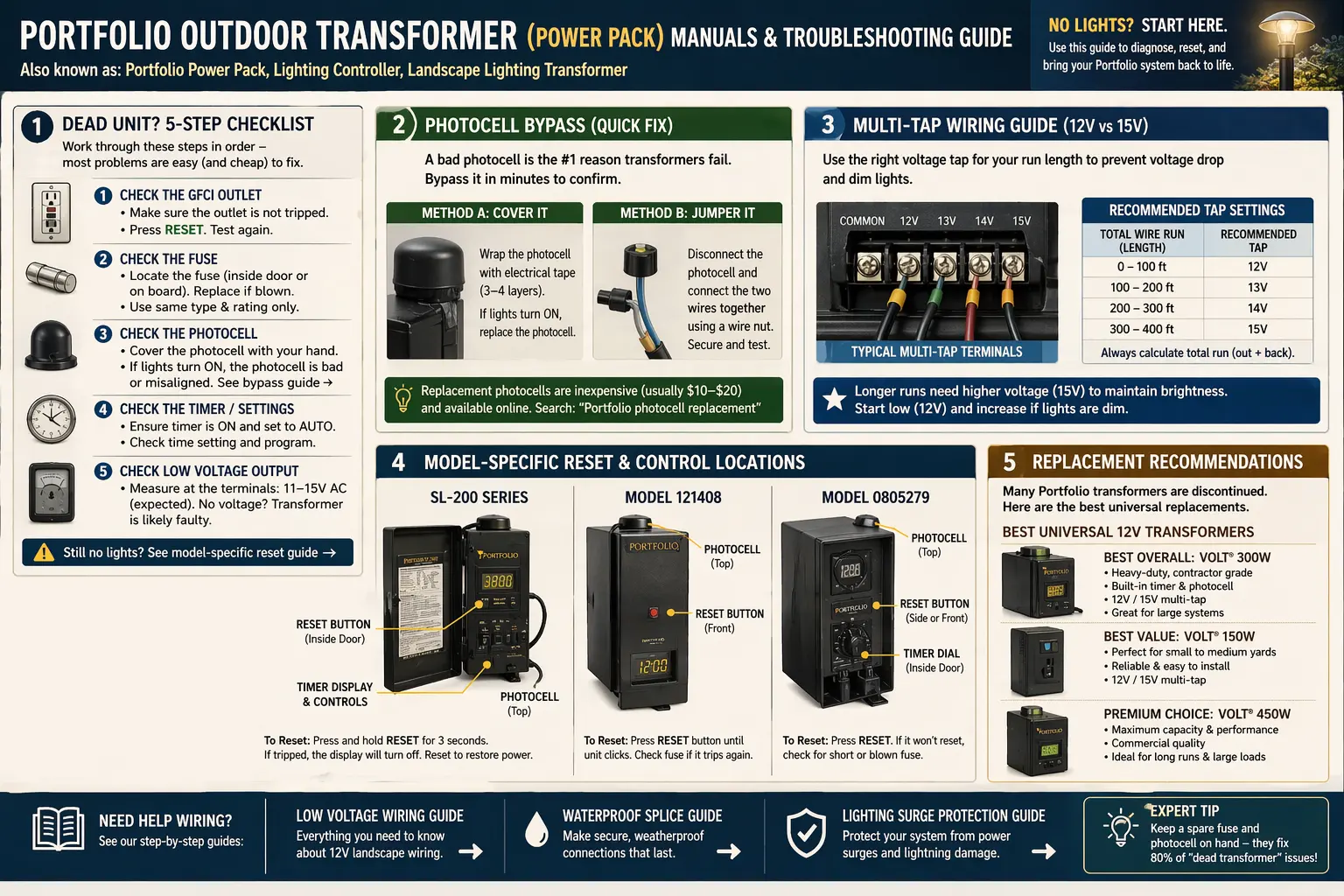
Most homeowners searching for a Portfolio transformer manual are really looking for help with a “Portfolio power pack” or “lighting controller.” That terminology gap matters because the whole yard usually goes dark when the transformer fails, and urgent searches like that need a simple, practical answer fast.
Older Portfolio transformers often remain installed for 5 to 15 years, which means many official support pages are gone, the original paperwork is missing, and the homeowner is stuck with a dead box on the wall and no idea whether the problem is the outlet, fuse, photocell, timer, or the transformer itself.
- Dead unit diagnostic steps
- Photocell bypass testing
- 12V vs 15V tap guidance
- Common reset locations and control layouts
- When to repair vs replace an older Portfolio power pack
Most people searching for a Portfolio transformer manual are really trying to find one of three things: reset instructions, wiring/tap guidance, or proof that the transformer is actually bad before replacing it.
Looking for a Physical PDF Manual?
Since many older Portfolio transformer manuals are discontinued, most homeowners no longer find a working official PDF. To make this easier, we have compiled the most useful wiring notes, reset steps, photocell checks, and tap guidance for common models below.
- SL-200: common reset / overload and control-panel checks (view manual & troubleshooting)
- 121408: timer mode, photocell, and fuse-first troubleshooting (open model 121408 manual)
- 0805279: front control layout, tap labeling, and output testing (view model reference & manual guide)
Do not replace your transformer until you confirm the exact model. Many Portfolio power packs look identical but use different wiring layouts and control systems. Use our Portfolio lighting model number lookup to identify your unit first and avoid costly replacement mistakes. I put a large list of available pdf's on that page.
If your outdoor transformer model is missing from the manual list, check the Portfolio technical archive for older power pack numbers, reset notes, and part cross-references.
Specific Portfolio Outdoor Transformer Model Guides
Outdoor Portfolio transformers often look similar, but the model number matters because wattage, timer controls, photocell behavior, and terminal layout can change by unit.
The Portfolio GLA-200-12WF-1 is a 200-watt low-voltage power pack commonly identified by its photocell-controlled timer, digital menu, and separate low-voltage terminal area. Its full nameplate capacity should not be treated as the preferred continuous load, because heat and voltage drop become more difficult to control near 200 watts. The Portfolio GLA-200-12WF-1 transformer manual explains the 160-watt practical load ceiling, dusk-to-dawn programming, timed-hour settings, terminal wiring, photocell diagnosis, humming, flickering, and replacement decisions.
Use the Portfolio EE4859BK outdoor transformer manual if your label shows EE4859BK or the housing and wiring layout match that style.
The Portfolio 999928302 outdoor transformer guide gives a separate reference point for identifying setup and replacement details.
For compact systems, the Portfolio SL-100-12 low-voltage transformer manual helps verify load limits and wiring basics.
If you are diagnosing a larger transformer, the Portfolio LTF300WH 300-watt troubleshooting guide explains what to check before replacement.
The Portfolio 0066580 model manual and parts guide supports older model identification and parts matching.
The Dead Unit Checklist: Start Here First
If the whole system is out, do not start by digging in the yard. Start at the power pack. This 5-step checklist catches the most common failures before you assume the transformer is finished.
If the transformer still appears completely dead after these checks, continue with Portfolio lighting transformer not working for a more focused dead-unit diagnosis path.
- Check the GFCI outlet. Press reset on the outdoor GFCI or the upstream garage / patio GFCI that may control the transformer outlet.
- Check the transformer fuse or breaker. Some Portfolio power packs have a replaceable fuse, while others rely on an internal reset or overload condition.
- Check the timer and mode setting. Make sure the transformer is not simply in the wrong timer position, daylight override, or photocell mode.
- Check the photocell. A failed photocell can make a healthy transformer look dead because it never tells the system to turn on.
- Check output voltage. Test the 12V or 15V taps to confirm whether the transformer is sending usable power to the yard.
What the Symptoms Usually Mean
Use this table to narrow down whether you are dealing with an input-power problem, a control issue, or a true transformer failure.
| Symptom | Most Likely Cause | Best First Check | What Usually Fixes It |
|---|---|---|---|
| Whole yard dark | GFCI trip, bad outlet power, blown fuse, failed photocell, dead transformer | Check outlet and transformer input power | Reset GFCI, replace fuse, bypass bad photocell, or replace transformer |
| Unit has power but lights never come on | Timer mode issue or bad photocell | Switch to manual-on test mode | Correct timer setting or replace photocell |
| Lights come on only sometimes | Failing photocell, unstable timer, overload, loose output connection | Test photocell and output taps | Photocell replacement, connection tightening, or load reduction |
| Near lights bright, far lights dim | Voltage drop | Check 12V vs 15V tap use | Use correct tap, shorten run, or improve wiring layout |
| Transformer buzzes loudly | Overload, failing internal component, age-related wear | Disconnect yard load and retest | Load correction or transformer replacement |
Photocell Bypass Instructions: The Test That Saves a Lot of “Dead” Transformers
A surprising number of older Portfolio power packs are not really dead at all. The photocell has simply failed, which keeps the transformer from switching on at dusk. That is why photocell bypass testing is one of the most useful diagnostic steps on an older unit.
What a Bad Photocell Looks Like
- The outlet has power and the transformer appears intact
- The timer settings look correct
- The system never turns on automatically at night
- Manual override or alternate mode behaves differently than photocell mode
Safe Diagnostic Bypass Method
Disconnect power first. Open the control compartment, identify the photocell leads or connection point, and temporarily bypass the photocell according to the unit’s wiring layout so the transformer can be tested in a constant-on state. Use insulation and only test long enough to confirm whether the rest of the transformer is still functioning.
If bypassing the photocell brings the yard back to life, the transformer itself may still be usable. That is a high-authority fix because it turns an apparent full-unit failure into a smaller and cheaper repair.
Multi-Tap Wiring Guide: 12V vs 15V
One of the most useful professional-level features on older Portfolio transformers is the multi-tap output. Many DIYers ignore it, but it is one of the best tools for dealing with long wire runs and dim far-end fixtures.
Before following any outdoor transformer wiring or mounting instructions, check low voltage lighting permit requirements to confirm whether your project needs a permit or inspection.
What the 12V Tap Does
The 12V tap is the standard output for many shorter runs and modest fixture loads. If the cable run is short and the total load is reasonable, this is the normal starting point.
What the 15V Tap Does
The 15V tap helps offset voltage drop on longer runs. By starting the run slightly higher, the fixtures farther away can still receive usable voltage after the normal losses that happen through long cable and multiple connections.
This is also why the approved voltage drop guide and transformer guide are essential supporting pages for this topic.
12V vs 15V Tap Quick Comparison
| Tap | Best Use | What You May Notice | When to Use It |
|---|---|---|---|
| 12V | Short to moderate runs | Normal output for many standard systems | Use first on shorter runs or evenly lit systems |
| 15V | Longer runs with visible drop | Can brighten distant fixtures that look weak on 12V | Use when distance and cable loss are the real problem |
Model-Specific Reset and Control Notes
Older Portfolio power packs do not all use the same control layout, but some homeowners search by specific model number rather than by “transformer.” These notes help bridge that gap for common legacy units.
For deeper technical references including connectors, switches, and mounting hardware, see Portfolio lighting technical manuals and wiring diagrams.
For detailed information on TC001 transformer models, use the model-specific manual and parts guide.
SL-200
On many SL-200 style units, homeowners should look near the timer/control face and overload protection area first. If the unit has a manual reset or overload device, it is often located near the low-voltage output section or behind the front access panel.
121408
For 121408 searches, focus on the timer mode, photocell status, and fuse check before assuming the transformer core is bad. Many “dead” units in this class are really control-side failures rather than a full transformer burnout.
0805279
The 0805279 model family is one of the most searched legacy Portfolio transformer lines. Check the front control area, fuse location, and multi-tap output labeling first. These are the spots most homeowners need when the original manual is gone.
Common Portfolio Transformer Models at a Glance
| Model | What Users Usually Need | Best First Check |
|---|---|---|
| SL-200 | Reset location, overload check, output test | Check control face and overload/reset area first |
| 121408 | Timer mode, photocell, fuse, dead unit help | Confirm timer mode and photocell before assuming full failure |
| 0805279 | Tap labeling, fuse, front control layout | Check output tap labels and front control section first |
How to Tell If the Transformer Is Actually Bad
Older transformers get blamed for many problems they did not cause. Before replacing the unit, confirm that the issue is really inside the transformer and not at the outlet, control side, or yard wiring.
If the housing feels unusually hot or the transformer hums harder than normal, review Portfolio transformer getting hot to compare normal warmth with overload or internal failure signs.
Signs the Transformer Itself Is Likely Failing
- No usable output after input power and control settings are confirmed
- Unit hums loudly even with the yard load disconnected
- Internal fuse repeatedly opens after replacement
- Visible overheating, scorch marks, or melted wiring insulation
- Output taps test weak or unstable under known-good conditions
For a more direct voltage-testing process, use the approved How to Test a Landscape Lighting Transformer page alongside this manual guide.
If the transformer repeatedly trips power instead of simply going dark, use Portfolio transformer breaker tripping to separate overload and short-circuit problems from true transformer failure.
If your outdoor transformer manual does not show enough detail, compare it against the Portfolio lighting model specs guide.
When Replacement Makes More Sense Than Repair
Because many older Portfolio outdoor transformers are discontinued, there is a point where replacement makes more sense than chasing another legacy part. That is especially true when the unit has multiple failures: bad timer, bad photocell, weak output, and visible age-related wear all at the same time.
Good Reasons to Replace
- The core transformer no longer provides stable output
- The housing or wiring is degraded from years outdoors
- The control side has multiple failures
- You need more reliable modern performance than the old unit can provide
When that happens, the clean next step is the approved Portfolio Lighting Transformer Alternatives page, along with the broader Landscape Lighting Transformer Guide.
Portfolio Outdoor Transformer Manuals FAQ
What is a Portfolio power pack?
A Portfolio power pack is the low-voltage transformer and control unit that powers the landscape lighting system. It may include a timer, photocell, multi-tap output, or overload protection.
Why did my whole yard go dark?
If the entire yard is dark, start with the transformer or power pack. Common causes include a tripped GFCI, blown fuse, bad photocell, timer setting error, overload, or a failed transformer.
Can I bypass a bad photocell on a Portfolio transformer?
For diagnostic purposes, you can temporarily bypass a failed photocell circuit to confirm the transformer still powers the lights, but the test should be done carefully and only with power disconnected first.
What is the difference between the 12V and 15V taps?
The 12V tap is the normal output for many shorter runs. The 15V tap is often used to offset voltage drop on longer cable runs so the far fixtures still receive usable voltage.