
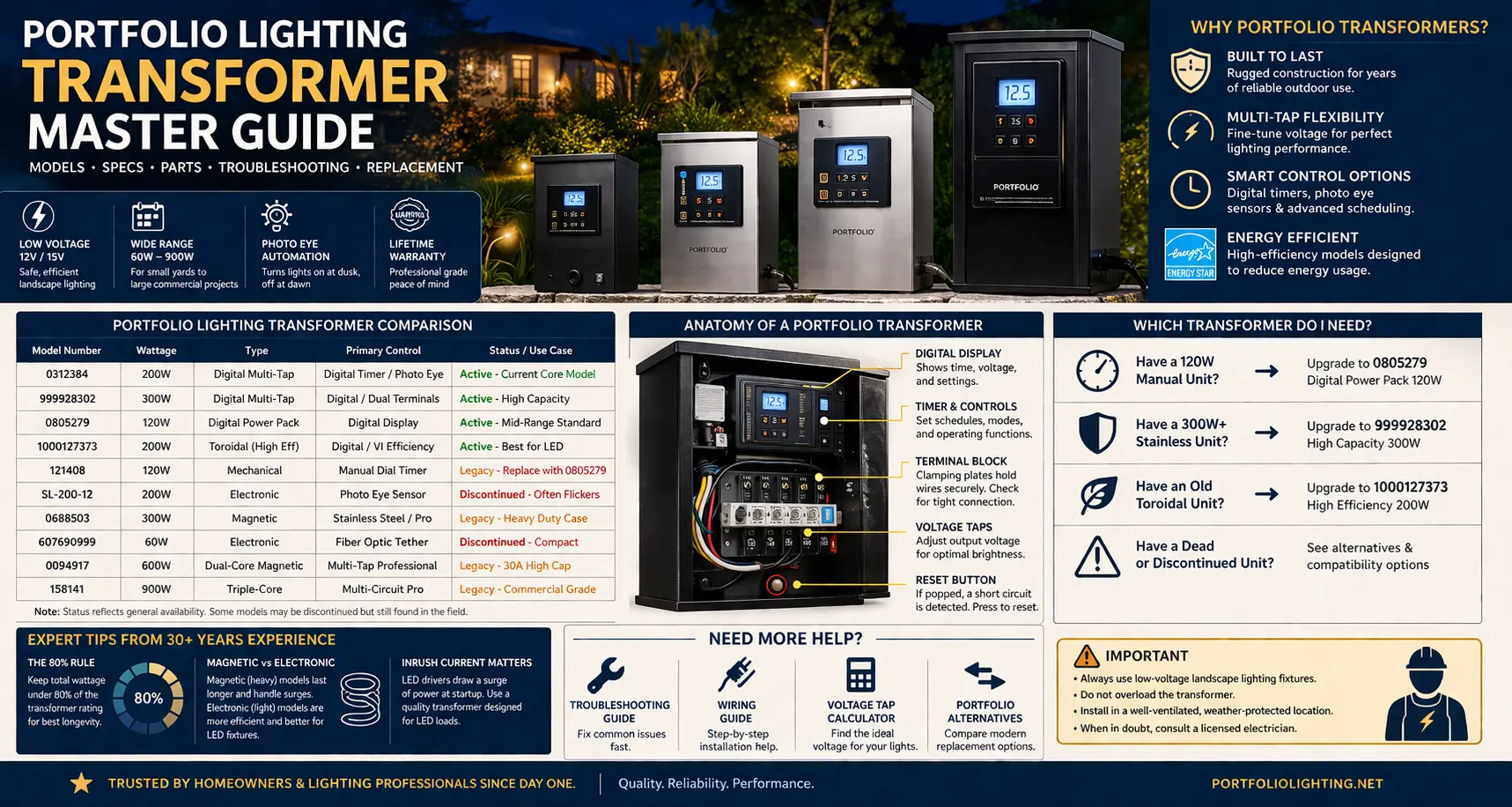
Quick Answer: My Step-by-Step Fix for Portfolio Transformers
When a customer calls me out because their landscape lights went completely dark, I follow a strict diagnostic rule: always isolate the line-side power input before you condemn the transformer core or start ripping out your buried lines.
Over the years, I have watched the same handful of electrical failure patterns repeat across nearly every yard. If you jump straight to ordering a new unit without running a few basic multi-meter checks first, you will likely hook up the new power pack only to watch it trip, click, or fail exactly like the old one.
To get your system back online safely, match your current system setup against my active field notes:
- The Blank Display Screen: If your digital screen is dead, do not panic. Go check your outdoor breaker and the reset button on your exterior GFCI outlet first. If the outlet has local power but the screen stays blank, read my focused walkthrough on fixing a dead Portfolio transformer input line before doing anything else.
- The Daylight Timing Bug: If your lights stay stuck on all afternoon, your internal electronic timer loop is either corrupted or a nearby shade tree is blocking the light sensor. Wipe down the clear photo eye lens, or jump over to my Portfolio technical archive for model manuals and reset patterns to override the automation.
- The Rapid Clicking or Dim Bulbs: A distinct humming, chattering, or visible voltage drop down the line means you have overloaded the magnetic core. Calculate your total fixture wattage—if you are exceeding 80% of your unit's maximum load rating, your terminal lines are bound to overheat.
- Planning a Full Core Upgrade: If your casing is physically rusted through, hot to the touch, or clicking with zero output, the unit has reached the end of its working life. To match your current wattage and wire runs to a modern, heavy-duty layout, read my real-world field review on Portfolio lighting transformer replacement paths.
Keep in mind that when a modern low-voltage system starts rapidly cycling on and off or throws a visual warning light, it is actively trying to protect itself from a line short. Because these digital display behaviors vary wildly across different production years, I spent a weekend compiling a complete landscape lighting transformer error code guide for all major brands to help you decipher specific overload faults, thermal limits, and smart-controller diagnostic signals on the spot.
What Should You Do Next?
- If your transformer is not turning on → check reset or power
- If lights are behaving incorrectly → check timer or photo eye
- If the unit is old or unreliable → upgrade to a digital model
- If you are unsure → use the model table below to match your unit
Quick Logic Summary
- If your reset button is popped, the problem is usually overload or a short, not a dead transformer.
- If your lights stay on all day, check the photo eye tether before replacing the whole unit.
- If you are replacing a legacy manual unit, move to a digital transformer in the same load class or slightly above it.
- If you are running LEDs, keep the load under about 80 percent of rated wattage for longer transformer life.
If you’re replacing or upgrading a transformer, compatibility matters more than brand. I walk through that in the universal lighting compatibility source.
Transformer lifespan is only part of the equation. The Residential LED Fixture Repairability Database compares how easily different fixtures can be serviced when drivers, gaskets, or mounting hardware eventually fail.
Start at the Power Source Before Blaming the Transformer
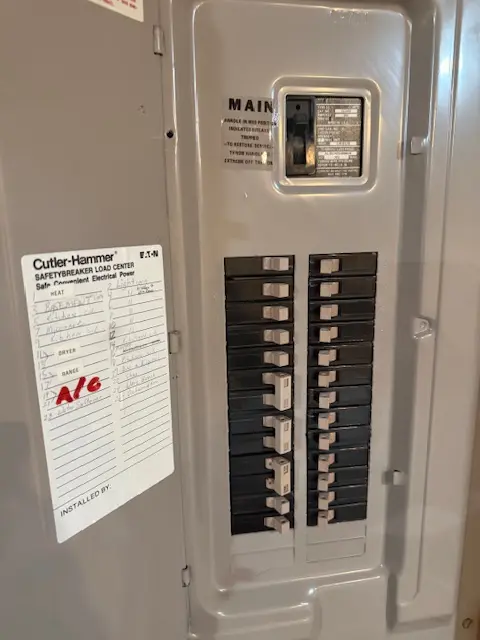
Before replacing a Portfolio transformer, I always want to know what is feeding it. A transformer connected to a heavily shared circuit may show symptoms that look like a bad transformer: dim lights, flicker, nuisance resets, timer issues, or inconsistent output under load.
The breaker panel is the starting point of the lighting system. From there, power moves to the outdoor receptacle or hardwired connection, then to the transformer, then through the low-voltage cable, and finally to each fixture. If the source circuit is weak, overloaded, or unstable, the entire lighting system can become unstable downstream.
Transformer failure is only one part of a complete landscape lighting system. The Portfolio Lighting Failure Database compares transformer failures alongside wiring problems, connector corrosion, voltage-drop issues, photocell failures, damaged fixtures, and aging components to help identify the true root cause before replacing expensive equipment.
Portfolio Transformer Model Pages Worth Checking
Before replacing a transformer, match the exact model number when possible. Two Portfolio transformers can share the same basic 12V function but differ in wattage, timer type, photocell behavior, terminal layout, and replacement path.
The EE4859BK transformer model page helps identify that specific Portfolio power-pack family.
The 999928302 transformer model guide is useful for comparing label data, setup behavior, and replacement options.
The SL-100-12 transformer manual focuses on the smaller 100-watt Portfolio transformer class.
The LTF300WH transformer troubleshooting page is the better first stop when a 300-watt unit is failing, overheating, or cycling off.
The 0066580 manual and parts lookup helps connect transformer diagnosis with model-specific replacement parts.
Model Number Finder
Start typing any model number to highlight matching rows in the master transformer table below.
Portfolio Transformer Master Specification Table
If your transformer matches model 121408, go straight to the Portfolio lighting model 121408 transformer manual for model-specific instructions, control details, and replacement guidance.
To match your transformer model and diagnose issues faster, see the Portfolio Lighting transformer and model library index .
For deeper comparisons of transformer heat, voltage stability, acoustic hum, standby drain, and smart-load behavior, visit the lighting transformer reliability and heat benchmark archive.
| Model Number | Wattage | Type | Primary Control | Status / Use Case |
|---|---|---|---|---|
| 0312384 | 200W | Digital Multi-Tap | Digital Timer / Photo Eye | Active - Current Core Model |
| 999928302 | 300W | Digital Multi-Tap | Digital / Dual Terminals | Active - High Capacity |
| 0805279 | 120W | Digital Power Pack | Digital Display | Active - Mid-Range Standard |
| 1000127373 | 200W | Toroidal (High Eff) | Digital / VI Efficiency | Active - Best for LED |
| 121408 | 120W | Mechanical | Manual Dial Timer | Legacy - Replace with 0805279 |
| SL-200-12 | 200W | Electronic | Photo Eye Sensor | Discontinued - Often Flickers |
| 0688503 | 300W | Magnetic | Stainless Steel / Pro | Legacy - Heavy Duty Case |
| 607690999 | 60W | Electronic | Fiber Optic Tether | Discontinued - Compact |
| 0094917 | 600W | Dual-Core Magnetic | Multi-Tap Professional | Legacy - 30A High Cap |
| 158141 | 900W | Triple-Core | Multi-Circuit Pro | Legacy - Commercial Grade |
If your unit is the older SL-200-12 style transformer, use Portfolio lighting model SL-200-12 troubleshooting for the specific flicker, sensor, and replacement issues that commonly affect that model family.
Common Portfolio Transformer Problems
- Transformer not turning on
- Lights stay on all day or night
- Lights flicker or dim
- Reset button keeps tripping
- Timer not working correctly
If you’re not sure which transformer component is failing, I’ve mapped common issues by model in the Portfolio lighting model parts directory. It’s the fastest way to pinpoint the problem before replacing anything.
Transformer load and fixture driver heat are closely connected in low-voltage systems. The landscape lighting heat failure guide explains how overloaded runs and sealed LED housings shorten fixture life.
A transformer can be correctly sized and still be part of an unreliable lighting system if the downstream wiring is buried too shallow, the connectors are corroded, the fixtures are not wet-location suitable, or voltage drop has not been tested under load. After verifying transformer wattage, output, mounting, ventilation, and primary protection, use the low-voltage lighting inspection checklist for transformer-fed systems to review the complete installation from power source to farthest fixture.
Diagnosing Problems Before Replacing a Transformer
Replacing a transformer should be one of the final steps in a troubleshooting process, not the first. Buzzing sounds, overheating, intermittent shutdowns, dim fixtures and random flickering can originate from overloaded circuits, failing LED drivers, damaged cable runs, corroded connectors or moisture intrusion rather than the transformer itself. Compare your symptoms against these documented bad transformer warning signs, perform targeted integrated LED bypass testing procedures to determine whether the fixture electronics are failing, and if the diagnosis remains unclear, use Portfolio Lighting AI assistance to evaluate voltage, load calculations, fixture compatibility and likely failure points before purchasing replacement equipment.
Transformer Records Matter for Permits, Inspections, and Failures
A transformer should be documented as part of the full lighting system, not treated as a separate box on the wall. The as-built lighting diagram requirements for permits explain how to show transformer location, cable routes, load zones, fixture schedules, and control equipment. Before final approval, use the landscape lighting common code violations guide and the inspection failure database to catch transformer mounting, overload, GFCI, and documentation problems. The landscape lighting permit requirements by state adds local review context, while the solar lighting UL 8750 guide is useful when transformer-fed zones are combined with standalone solar fixtures.
The Anatomy of a Portfolio Transformer
The reset button
I’ve explained this to a lot of homeowners, and I’ve found the simplest way to think about it is this: the transformer is the bridge between your house power and your lighting system. It takes high voltage and safely converts it down for outdoor use.
When I tested output at the terminals, I could clearly see the drop from 120V input to low-voltage output. That’s what allows landscape lighting systems to run safely without the risks of full line voltage.
It’s the heart of the system.
If the reset button is popped or tripped, that usually points to a short circuit, overload, or wiring fault. It does not automatically mean the transformer itself is dead.
If the reset button has tripped and you want the exact recovery steps before assuming the unit is bad, follow the Portfolio lighting transformer reset guide to check overload, short-circuit, and restart issues in the right order.
The terminal block
Many Portfolio units use clamping plates instead of traditional terminal screws. Over time, that connection can loosen or lose contact, especially on older systems that have been opened and closed repeatedly.
The photo eye tether
This is one of the most distinctive Portfolio transformer details. When the photo eye is unplugged, dirty, blocked, or left in the wrong location, the lights may stay on, stay off, or behave like the timer is broken even when the transformer is otherwise fine.
If the lights are turning on at the wrong time, ignoring settings, or acting like the sensor is faulty, continue with Portfolio lighting transformer timer not working for more specific timer and control troubleshooting.
If you are trying to understand where wires, terminals, and common connections should actually go, compare your unit with the Portfolio lighting transformer wiring diagram before tightening terminals or replacing the transformer unnecessarily.
For transformer model references and specification comparisons, see the Portfolio lighting model specs guide.
When to Repair vs Replace
- Repair: Reset issues, loose wiring, sensor problems
- Replace: Burnt smell, dead unit, repeated failures
- Upgrade: Old manual units with outdated controls
When repeated transformer problems point to a bigger system issue, use the commercial-grade landscape lighting upgrade guide to decide whether upgrading is smarter than another repair.
Choosing the right transformer is only half the equation. The Best LED Landscape Lighting Fixtures Guide compares which fixtures actually run cooler, last longer, and work best with existing Portfolio low-voltage transformers.
Many discontinued transformers still operate correctly even when the original fixtures are gone. The legacy transformer compatibility guide explains how older magnetic transformers interact with newer LED fixtures, MR16 retrofits, and replacement connectors.
A 200-watt transformer is large enough for a substantial residential system, but the full 200-watt label should not become the design target. The GLA-200-12WF-1 is a useful example because its long-term reliability depends on operating below maximum load, splitting long runs intelligently, and keeping the photocell and control board away from unnecessary heat. The GLA-200-12WF-1 programming and troubleshooting guide provides a model-specific load blueprint, wire-gauge comparison, timer sequence, and field diagnostic table.
Do Not Blame the Transformer Until the Downstream System Is Checked
Many transformer complaints are actually downstream failures caused by corroded connectors, overloaded runs, damaged fixture leads, or voltage drop. When the symptoms are confusing, the Portfolio Lighting AI diagnostic tool can help sort transformer behavior from fixture and wiring problems. If green powder appears inside a connector, the green dust connector corrosion guide explains why a dirty-looking splice can create enough resistance to imitate transformer weakness. If transformer replacement or voltage correction makes fixtures brighter, the property-line light trespass foot-candle guide is useful for checking whether the improved output now needs better aiming, shielding, or lower lumen output.
Magnetic vs. Electronic vs. Toroidal
Older magnetic Portfolio transformers are usually heavier and often more durable, but they run less efficiently and take up more space. Electronic units are lighter and easier to package, but they can be more sensitive to unstable loads and power issues. Toroidal designs are often the better choice for modern LED systems because they are more efficient and better suited for cleaner power delivery.
If you are working with a larger multi-tap transformer and need help choosing taps, wiring terminals, or balancing voltage across longer runs, continue with the Portfolio 200W multi-tap transformer wiring and manual guide.
I’ve worked on transformers that seemed to randomly turn on and off, and in many cases, the issue wasn’t electrical—it was the timer or photocell.
What Should You Buy Now?
Before choosing a replacement, confirm the correct load class with the Portfolio lighting transformer wattage guide so you do not undersize the next unit or overload it from day one.
Also, before choosing a replacement, it helps to see how different systems and components fit together. Browse the Portfolio lighting catalog to compare transformers, fixtures, and compatible upgrades.
If your transformer replacement involves hardwiring, trenching, or a new exterior outlet, review low voltage lighting permit requirements before starting the work.
If you have a 120W manual unit
A digital 120W-class replacement like the Portfolio 0805279 is often the cleanest next step.
If you have a 300W+ stainless or pro-style unit
Move toward a modern higher-capacity digital multi-tap setup such as the class represented by 999928302 if you want more flexibility, cleaner controls, and better support for newer LED layouts.
If your unit is dead and you are ready to move on
Go straight to Portfolio Lighting Alternatives if you want replacement options outside the legacy Portfolio ecosystem.
If you are upgrading instead of replacing like-for-like, use the Portfolio lighting transformer sizing guide to choose a safer wattage range with enough headroom for future fixtures and better long-term reliability.
For TC001 transformer-specific wiring, fuse checks, and timer issues, see the TC001 model manual and parts guide.
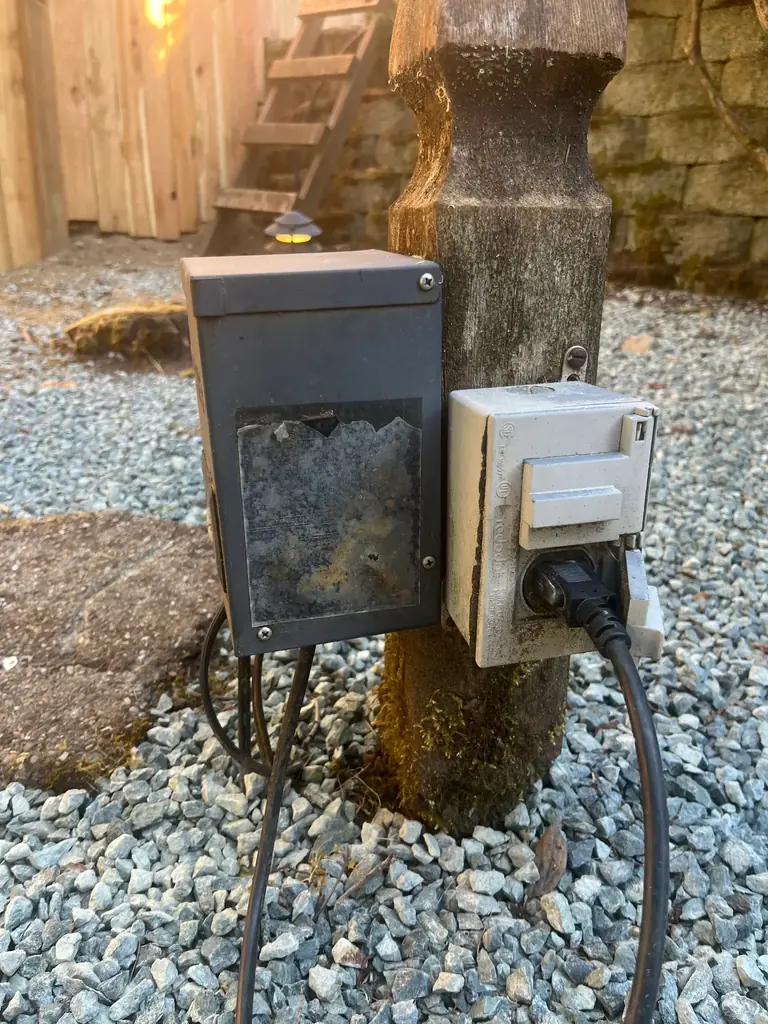
This type of weathering is also a warning to inspect the surrounding installation. Check the outdoor receptacle cover, plug connection, mounting surface, transformer ventilation, cable entries, terminal corrosion, and nearby vegetation. An unreadable label does not prove the transformer is unsafe, but it does make load verification and replacement planning more important.
Quick Replacement Guide
| Old Transformer | Replace With | Why |
|---|---|---|
| 60W–120W manual | Digital 120W | Better control and reliability |
| 200W magnetic | 200W digital multi-tap | Handles longer runs better |
| 300W+ legacy | Modern high-capacity transformer | Improved efficiency and support |
Transformer problems are often misdiagnosed as fixture failure. Before replacing every light, compare the cost of a transformer, timer, photocell, terminal repair, or full power-pack replacement. The Portfolio Lighting repair cost guide explains when a transformer repair is the cheaper move and when full replacement makes more sense.
If you’re considering replacing an older Portfolio transformer with a newer unit, I recommend checking the Portfolio to Origin21 compatibility guide first to understand what actually carries over.
Transformer Problems Can Overlap With Code, Control, and Moisture Issues
A transformer is only one part of an outdoor lighting system; the connected controls, fixture seals, and original installation conditions all affect whether the system remains safe and reliable. If the transformer is being paired with smart controls, sensors, automation modules, or low-voltage control wiring, the smart lighting control and NEC Article 725 guide explains how Class 2-style control circuits should be evaluated separately from transformer load wiring. If the transformer belongs to an older system, the outdoor lighting grandfathering guide explains when old work may remain and when repairs or modifications can trigger updates. If the symptom is cloudy fixture lenses or trapped moisture after the transformer is working correctly, the Portfolio foggy lens condensation repair guide helps identify sealing and drainage failures at the fixture level.
Use the Right Follow-Up Guide
Once you identify the transformer model, the next step is usually one of three things: troubleshooting it, wiring a replacement, or sizing the next unit correctly.
If the transformer appears to turn on but the fixtures still do not light, review why a Portfolio transformer is not powering lights before replacing the unit, since the problem may be output wiring, load balance, or fixture-side voltage loss.
If you need original setup instructions or wiring details for your exact model, browse the Portfolio lighting manuals to compare factory specifications with your current setup.
Looking for specific Portfolio transformer models like 00742, 0805279, HOSL04B, or GL-series power packs? The Portfolio Lighting Master Model Technical Database includes technical profiles, common failure points, and compatibility notes for legacy transformer systems.
Transformer tap selection directly affects how fixtures behave at the end of a long lighting run. The fixture voltage-drop impact guide explains how driver instability, dim-end flicker, and uneven brightness develop in low-voltage systems.
- Portfolio Transformer Troubleshooting Guide
- Landscape Lighting Wiring Guide
- Transformer Wattage Guide
- Transformer Sizing Guide
- Transformer Replacement Guide
- How to Test a Landscape Lighting Transformer
Looking at the different transformer models by Portfolio, I’ve seen wiring issues cause transformer symptoms more times than I can count. In my experience, loose terminals and poor connections are one of the biggest hidden problems.
When I tightened terminal screws and re-tested voltage output, I’ve seen systems go from unstable to completely solid. I’ve also noticed heat buildup around loose connections, which is a warning sign I never ignore.
Connections matter more than people think. So make sure you follow up and check your connections before looking to replace the whole trransformer. These other guides will definitely help you make that final decision before you replace the whole unit.
Transformer sizing and wire sizing must work together to prevent dim lights and unstable voltage. The landscape lighting ampacity and wire sizing database explains how cable gauge affects long-run transformer performance.
Larger transformers make it easy to overload a property with unnecessary brightness if fixture lumen output is not carefully planned. The lumen pollution versus traditional light pollution article explains why total brightness matters as much as fixture direction in modern outdoor lighting design.
Transformer overloads and unstable low-voltage systems are sometimes connected to hidden field problems such as damaged fixtures, exposed wire splices and leaning lights caused by failed ground stakes. This Portfolio landscape lighting stake repair guide explains how to repair or reinforce unstable outdoor fixtures before wiring damage develops, while the transformer error code and warning guide helps decode shutdown conditions, blinking indicators and overload protection behavior across multiple transformer brands.
A landscape lighting transformer is one of the most important components in a low-voltage lighting system. Understanding expected transformer service life can help determine whether a repair, replacement, or system upgrade makes the most sense. See our outdoor lighting component life expectancy guide for lifespan information covering transformers and other outdoor lighting hardware.
Protect the Transformer and the Fixtures Together
A transformer may look like the main failure point, but the real problem can start downstream at the fixture or upstream at the power source. Before replacing a transformer, inspect older sockets for oxidation using this Portfolio corroded socket repair guide, then review this surge protector guide for Portfolio transformers to reduce damage from spikes, storms and utility events. For outdoor upgrades, this dark-sky compliance versus IDA certification guide helps make sure the new lighting is not just working, but aimed, shielded and selected responsibly.
Transformer wattage is only one part of overall system performance. Two transformers with identical wattage ratings can produce noticeably different operating temperatures, standby losses, and efficiency under partial load. For measured operating characteristics across multiple transformer sizes, see our Landscape Transformer Efficiency & Load Loss Benchmarks database, which compares no-load consumption, operating efficiency, and expected annual energy losses using standardized benchmark testing.
When only one light fails, the transformer is often not the cause. Local fixture problems—including damaged sockets, failed LED drivers, broken stakes, loose connectors, cracked lenses, or internal corrosion—are much more common. The Portfolio Lighting Fixtures guide explains how individual fixture construction affects troubleshooting so transformer problems can be separated from fixture failures more quickly.
Transformer sizing cannot be based on steady operating watts alone. At startup, the transformer core, LED-driver capacitors, and cold halogen filaments can create short current surges that place far more stress on breakers, timers, photocells, and relay contacts than the normal running load suggests. Use the landscape lighting inrush current and peak-load database to compare startup behavior across LED, halogen, magnetic-transformer, and electronic-transformer systems.
What Most People Get Wrong
- Replacing the transformer when the problem is wiring
- Ignoring the reset button and overload protection
- Using too much load on a small unit
- Blaming the timer when the photo eye is the issue
If you are comparing transformer-based systems with solar alternatives, review the solar vs low voltage energy efficiency guide to understand how transformer efficiency compares to solar battery and panel performance.
Transformer installation is affected by newer NEC rules. See NEC 2026 landscape lighting code updates for GFCI, wiring, and outdoor equipment requirements.
In my career, I’ve learned that testing tells you everything if you do it in the right order. I’ve worked on systems where guessing led nowhere, but measuring voltage and load gave clear answers.
When I check input voltage, output voltage, and then test under load, I can pinpoint the problem quickly. That’s when troubleshooting stops being frustrating and starts making sense.
Numbers don’t lie.
How Model-Specific Fixture Problems Affect Transformers
Many homeowners replace a transformer too early because older Portfolio fixtures can create overload, short-circuit and voltage-instability conditions that appear to be transformer failures even when the transformer itself is still functional.
The 016107 WHCM432R8 parts guide explains how water intrusion through failed lenses can eventually affect low-voltage performance, while the 0311569 kit troubleshooting guide demonstrates how mixed fixture loads inside older lighting kits can create unstable transformer behavior.
Mechanical fixture problems can also contribute to electrical faults. The 17945-000 shade repair guide explains how loose housings and missing weather protection affect connector integrity, while the 230132-145P replacement guide focuses heavily on intermittent splices and overloaded cable runs.
Additional transformer-related diagnostics appear throughout the FY09-003 0048184 manual guide, 18907-000 model guide, 25966-3 repair guide and 2851294 troubleshooting guide, where voltage drop, connector corrosion and low-voltage load balancing are analyzed in real-world repair situations.
Portfolio Transformer FAQ
How do I find my Portfolio transformer model number?
The model number is usually printed on the front label, the side label, or the bottom of the transformer housing. Many units also show wattage and control type near the timer or terminal area.
What usually fails first on a Portfolio transformer?
The most common issues are tripped reset protection, timer or photocell problems, loose terminal contact, and overload caused by too much load or a wiring fault in the system.
What should I replace a discontinued unit with?
Match the wattage class first, then choose the replacement based on whether you want manual control, digital scheduling, or a multi-tap transformer for longer runs.
How much load should I put on a 200W transformer?
For better longevity, most 200W systems should stay under about 160W total connected load.
Final Thoughts
Portfolio made a wide range of transformer designs over the years, and that is exactly why this page exists. The fastest way to solve a replacement or troubleshooting problem is to stop guessing and match the model first.
Once you know the transformer class, the next move becomes much clearer: repair it, rewire it, size a replacement, or move to a better modern unit.
Audible buzzing is one of the most common complaints in low-voltage lighting systems. The LED landscape lighting acoustic hum guide explains how transformers, dimmers, and LED drivers create noise under different load conditions.
Transformer sizing is only part of smart lighting performance. The landscape lighting transformer dimming compatibility guide explains how inrush current, low-end dimming floors, acoustic hum, and smart latency affect real-world transformer behavior.
Expert-Verified Troubleshooting
Every technical guide on PortfolioLighting.net is bench-tested in our Specialist Workshop. Our troubleshooting procedures are based on 25+ years of field experience and are maintained by Philip Meyer to ensure accuracy and electrical safety compliance.