Portfolio Lighting Troubleshooting
The main troubleshooting hub when your transformer issue overlaps with timers, photocells, fixtures, or full system failure.
Read the guide
If your Portfolio transformer is not working, the fastest way to fix it is to identify whether the problem is power, the transformer itself, or the wiring system. This guide walks you through that process step by step so you do not waste time replacing the wrong part.
Most transformer issues come down to a few common causes like power loss, overload, bad settings, or wiring problems. Once you check these in the right order, the issue usually becomes clear very quickly.
This page is built to help you troubleshoot that problem step by step. You will start at the power source, then work through transformer settings, output checks, wiring, overload conditions, timers, photocells, and the common warning signs that tell you when replacement makes more sense than another repair attempt.
If the transformer issue turns out to be only one part of a larger system failure, the best next page is Portfolio lighting troubleshooting. If you end up needing replacement parts, use Portfolio lighting parts and accessories.
Many people replace the transformer first, but in many cases the problem is actually wiring, connections, or settings. Testing in the right order helps you avoid unnecessary replacements.
See the Troubleshooting HubMost transformer problems come down to one of these:
Start by checking power and output first. That quickly tells you if the transformer is actually the problem.
The key is knowing whether the transformer is actually the cause before replacing it.
| What You See | Most Likely Problem |
|---|---|
| No lights at all | No power, breaker, or GFCI issue |
| Transformer has power but no output | Transformer failure |
| Only some lights working | Wiring or connector issue |
| Transformer shuts off | Overload or overheating |
| Works intermittently | Timer, photocell, or loose wiring |
A transformer problem can look like a fixture problem, a timer problem, a wiring problem, or a full system failure depending on how the issue shows up. That is one reason people sometimes replace bulbs or inspect fixtures first and end up missing the real cause. In low-voltage systems, the transformer deserves early attention because it controls the power feeding everything else.
The most practical way to troubleshoot is to work from the source outward. First confirm the transformer is receiving power. Then confirm it is set correctly. After that, verify that power is actually leaving the transformer and reaching the wiring system. Once you move through the problem in that order, the cause usually becomes much easier to isolate.
I found it very important to use the steps below before you start looking at a transformer replacement. Hopefully after completion, you wioll find the cause and move on to your next course of action.
In most systems, a transformer stops working because of one of these issues:
That checklist covers most real-world transformer problems and gives you a clear place to begin before jumping to replacement.
If your transformer stopped working after a storm, surge damage may be the cause. Use the landscape lighting surge protection guide to prevent future failures.
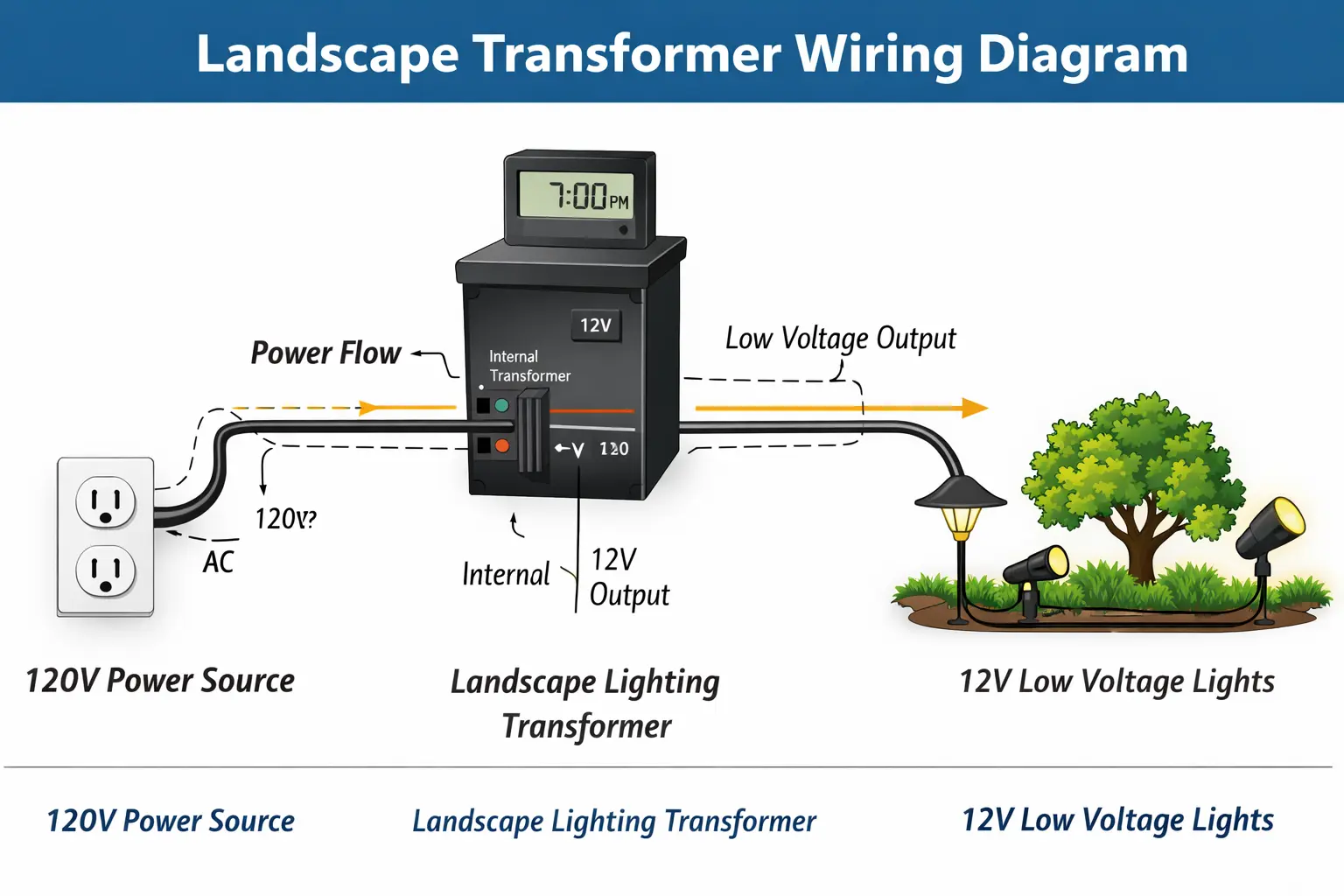
A landscape lighting transformer converts normal 120-volt household power into the 12-volt power most low-voltage outdoor fixtures use. That lower voltage then travels through the lighting wire to the rest of the system.
In practical terms, the transformer is both a power converter and a system control point. Many units also include timer functions, photocell interaction, and multiple output options. That is why transformer problems can look larger than one failed part. When the transformer is not behaving correctly, the whole lighting system can suffer.
For the broader system explanation, read how landscape lighting works.
Start with the basics. A transformer cannot work if it is not receiving power. This is one of the simplest checks, and it solves more problems than many homeowners expect.
Confirm the outlet feeding the transformer is live. If the outlet is dead, the transformer will look bad even though it is not the true cause.
Go to the electrical panel and check for a tripped breaker serving the outdoor outlet or landscape lighting circuit.
Outdoor systems frequently depend on GFCI-protected outlets. If the GFCI has tripped, resetting it may restore the transformer immediately.
Transformer settings can make a working transformer appear dead or unreliable. Some units are in manual mode when you think they are in auto mode. Others have timer settings that no longer match the expected schedule.
Incorrect timer programming is a common cause of “dead” systems that are actually waiting for a schedule you did not intend.
A transformer left in the wrong mode may ignore the program or act inconsistently.
Some transformers include multiple output taps or settings. Confirm the output arrangement still matches the system design.
Once you know the transformer has input power and the settings are reasonable, the next question is whether power is actually leaving the transformer and reaching the system.
If the transformer has no usable output, the lights will not work no matter how healthy the rest of the system is.
This is an important distinction. If the transformer is sending good power out, the problem is more likely in the wiring or fixtures. If the transformer is not sending power out, the issue stays closer to the transformer itself.
Wiring problems can make a transformer seem faulty when the real issue is power failing to leave the unit cleanly or reach the fixtures reliably.
Loose terminal connections can interrupt power flow or create unstable output behavior.
Nicks, cuts, crush points, or buried cable damage can make it look like the transformer has stopped working even though the failure is really in the line.
Outdoor wiring connections face moisture, dirt, and age. Corrosion weakens contact quality and can shut down part or all of the system.
For the deeper wiring page, use how to wire landscape lighting.
Overload is one of the most important transformer-specific problems. When too many lights are connected or the total system wattage exceeds capacity, the transformer may trip protection features, shut down, click, buzz, or run extremely hot.
This problem often shows up after homeowners expand the system over time without reevaluating transformer size. A transformer that once worked perfectly can begin failing only after the total load grows beyond what it was built to handle.
In many systems, the transformer is part of a control chain that includes a timer, a photocell, or both. That means the transformer may be fine physically while the controls connected to it are stopping the system from running correctly.
Timer settings, lost programming, manual override mode, or timer failure can all make the transformer appear inactive.
A photocell that misreads natural light or overrides the transformer controls can create confusing behavior around dusk and daytime operation.
Use landscape lighting timer not working and landscape lighting photocell not working for those issues.
If the transformer seems to have power but the lights stay off, the likely causes narrow down to output failure, wiring problems, loose connectors, or a serious control issue. This is where confirming output becomes especially important.
If the transformer has good output but the fixtures still do not light, the transformer may not be the actual cause after all.
This situation usually points downstream. The transformer may be working, but the wiring, connectors, voltage delivery, or fixture path may be failing after the power leaves the unit.
For those cases, use landscape lighting voltage drop and landscape lights not working.
A transformer that repeatedly trips or shuts off is often responding to overload, short circuits, moisture intrusion, or internal stress. That behavior is usually a protection response, not random failure.
For this specific issue, go to portfolio transformer tripping breaker.
Heat is one of the most important warning signs in transformer troubleshooting. Some warmth is normal under load, but excessive heat points toward overload, poor ventilation, internal wear, or failing components.
For the dedicated overheating page, use portfolio transformer getting hot.
Intermittent transformer behavior usually points toward loose connections, timer problems, overload stress, moisture-related instability, or a unit beginning to fail internally. This can be harder to diagnose because the transformer may seem fine during one check and fail later under real operating conditions.
Rain can expose weak points quickly. Moisture intrusion, corroded connections, damaged cable, wet terminals, and shorting conditions can all make a transformer shut down or behave unpredictably after storms.
If the system worked before rain and failed after it, moisture-related failure deserves early attention. For the broader rain-related guide, visit landscape lights not working after rain.
Transformers are often blamed for problems that begin in the wiring. Common examples include:
These issues matter because they change how the transformer sees the load and how the system receives the output.
A practical transformer test usually follows this order:
The goal is to separate transformer failure from wiring failure. Once you know whether the transformer is receiving power and sending power correctly, the rest of the diagnosis becomes much more focused.
Replacement is often the right move when the transformer shows no output, inconsistent power, repeated overheating, repeated shutdown, or visible signs of internal damage or age-related failure.
If you have already confirmed the outlet, breaker, GFCI, settings, and wiring are not the cause, and the transformer still behaves unpredictably, replacement may be more practical than continued troubleshooting.
For parts and replacement guidance, use Portfolio lighting parts and accessories.
Some smaller models fail more easily under load. If you have a 60W unit, see this Portfolio 0805279 troubleshooting guide for reset steps, clicking fixes, and timer issues specific to that model.
A replacement transformer should match the needs of the system, not just the old label. Think about total wattage, number of fixtures, wire run length, and whether you expect to expand the lighting later.
Choosing a transformer with too little capacity may recreate the same overload problem later. Choosing a properly sized unit gives the system more room to run reliably.
A few simple habits can prevent a lot of future transformer trouble:
Many transformer failures are not truly sudden. They are usually the final stage of a problem the system has been signaling for a while.
If your transformer issue is part of a larger lighting problem, visit our Portfolio lighting troubleshooting guide to work through wiring, timers, photocells, and fixture issues step by step.
The main troubleshooting hub when your transformer issue overlaps with timers, photocells, fixtures, or full system failure.
Read the guideHelpful when you want the full system picture before continuing deeper into transformer, wiring, and output diagnosis.
Read the guideUse this page when the transformer may be only one part of a bigger landscape lighting problem across the entire yard.
Read the guideImportant when the transformer seems fine physically but the control schedule is keeping the system from operating correctly.
Read the guideBest for systems where the transformer behavior may actually be affected by photocell control problems.
Read the guideUse this page when damaged cable, poor connectors, or loose transformer terminals are more likely than a bad transformer core.
Read the guideHelpful when the transformer has power but the far fixtures are weak, dim, or acting like power is not reaching them properly.
Read the guideGo here when the transformer repeatedly trips, shuts off, or triggers breaker-related symptoms under load.
Read the guideUse this page when overheating is the main warning sign and you need to separate normal warmth from overload or internal failure.
Read the guideUse this page when troubleshooting shows that the transformer or related system components need replacement parts.
Read the guideA landscape lighting transformer usually stops working because of lost power at the outlet, a tripped breaker or GFCI, timer or photocell issues, overloaded capacity, loose wiring, moisture damage, or internal transformer failure.
Start by checking the outlet, breaker, and GFCI. Then correct any overload or timer issues, power cycle the transformer, and use the reset feature if the model includes one.
If the transformer is not powering lights, the cause may be no power at the source, bad timer settings, output failure, damaged wiring, loose connectors, or overload conditions.
Yes. Landscape lighting transformers can fail over time because of heat, overload, age, moisture damage, internal electrical failure, or repeated stress on the unit.
You can test a transformer by confirming input power first, then checking output voltage, reviewing timer and control settings, and isolating wiring or fixture problems downstream.
Transformers often shut off because of overload, short circuits, moisture intrusion, overheating, or internal protection features responding to unsafe conditions.
This page is designed to be the core troubleshooting hub for Portfolio transformer problems, helping you move from simple power checks into deeper output, wiring, overload, timer, photocell, overheating, and replacement-part diagnosis as needed.