
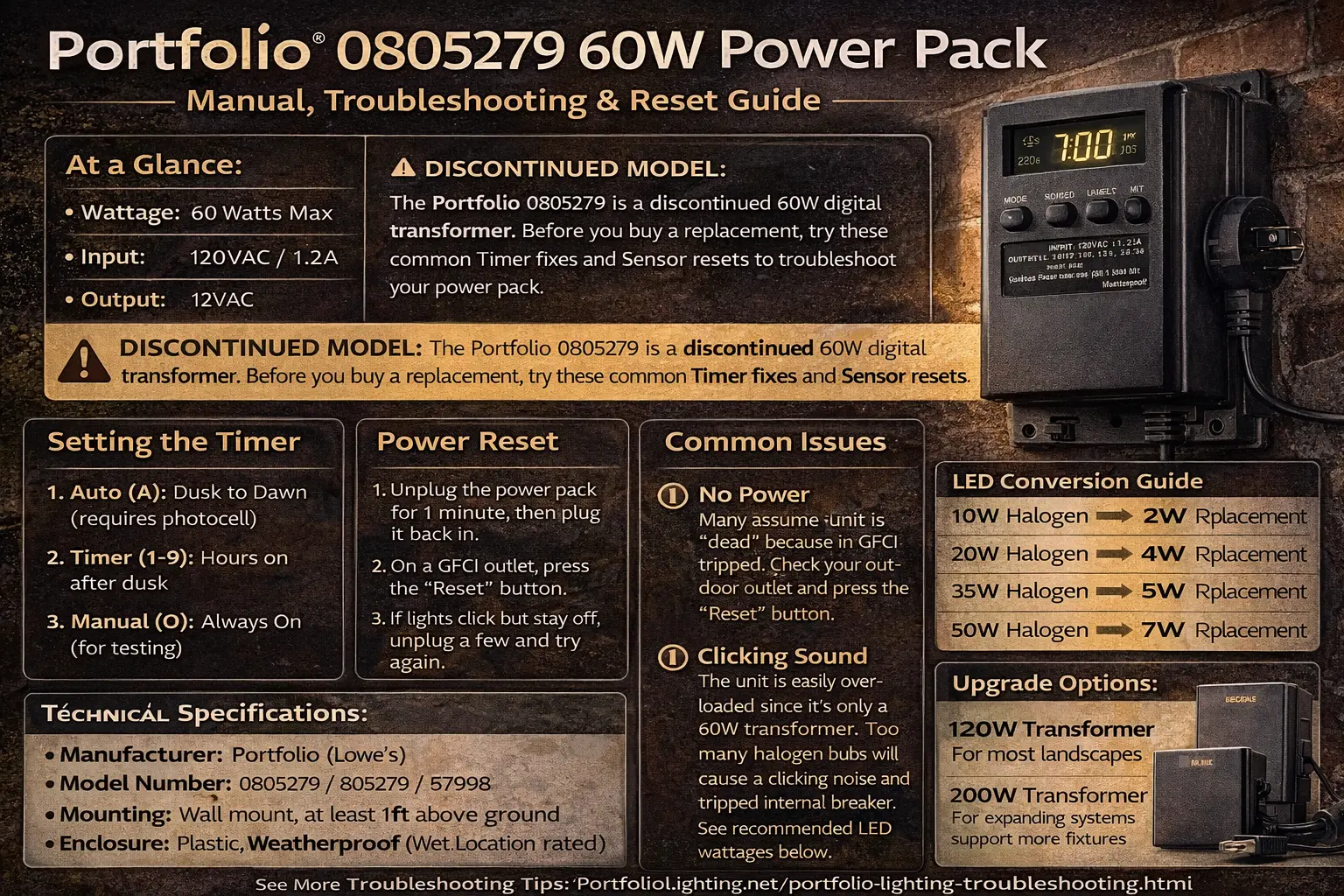
Quick Answer: What Usually Fixes the Portfolio 0805279?
Most Portfolio 0805279 problems are caused by overload, a tripped GFCI outlet, a misaligned photocell, or incorrect timer settings. Resetting the unit, checking total wattage, and testing manual mode (O setting) will solve most issues without replacing the transformer.
- First, reset the outdoor GFCI outlet
- Then unplug the transformer for 60 seconds and plug it back in
- Make sure the photocell is connected correctly and can see direct daylight
- Check the total wattage of all fixtures before assuming the transformer is dead
If the display appears normal but the fixtures still do not come on, review why a Portfolio transformer is not powering the lights for more focused help with output-side problems, bad connections, and fixture load issues.
Find Your Portfolio Lighting Manual
Not seeing your exact model number above? Use the search bar below to find your specific Portfolio manual.
Transformer Troubleshooting Logic Summary
- No power = outlet or GFCI issue
- Clicking = overload or short circuit
- Auto mode fails = photocell problem
- Works in O mode = timer or sensor issue
- Repeated failure = transformer is undersized or worn out
Most failures are not true transformer failures. They are system problems caused by too much load, poor wiring connections, or incorrect setup.
If you are comparing this unit with similar Portfolio transformers, use Portfolio outdoor transformer manuals to find wiring layouts, reset steps, and control differences across models.
Portfolio 0805279 At a Glance
| Specification | Value |
|---|---|
| Wattage | 60 Watts Max |
| Input | 120VAC / 1.2A |
| Output | 12VAC |
| Control Type | Digital Display with Plug-in Photocell / Photo-eye options |
| Manufacturer | Portfolio (Lowe’s) |
| Model Numbers | 0805279 / 805279 / 57998 |
| Mounting | Wall mount, elevated above ground |
| Enclosure | Plastic, weather-rated power pack housing |
| Wire Gauge Compatibility | 18 AWG, 16 AWG, 14 AWG |
Portfolio 0805279 vs 805279 (Same Transformer Model)
The Portfolio 0805279 and 805279 refer to the same 60-watt power pack. The difference is usually just how the model number is printed on packaging, manuals, or retailer listings.
- 0805279 = full model number format
- 805279 = shortened or alternate listing format
- 57998 = another common reference number for the same unit
Troubleshooting steps, timer settings, reset procedures, and replacement recommendations are identical for all of these model numbers.
This small 60-watt unit is easy to overload, especially if the system still uses halogen lamps. That is why many “dead transformer” complaints are really overload, timer, or sensor problems first.
If you want a broader transformer overview, compare this model-specific page with the Portfolio transformer troubleshooting guide, transformer reset guide, and Portfolio transformer not working before replacing parts.
Not completely sure you have the 0805279 model? Use the Portfolio lighting model number lookup tool to confirm your transformer before troubleshooting. Identifying the correct model first helps avoid using the wrong reset steps, wiring assumptions, or replacement parts.
How to Set the Portfolio 0805279 Timer
One of the main reasons people search for this model is simply to remember what the settings mean. The operating modes are straightforward once you decode the letters and numbers.
Operating modes
- A (Auto): Dusk to dawn. This requires the photo-eye to work correctly.
- 1–9: The lights turn on at dusk and stay on for 1 to 9 hours after dusk.
- O: Manual on. This is useful for testing whether the transformer can power the lights at all.
If the mode settings seem correct but the schedule still behaves unpredictably, this landscape lighting timer troubleshooting guide can help you narrow down whether the problem is the timer logic, sensor behavior, or power interruption.
The photocell rule
The photo-eye has to be plugged in properly and placed where it can sense direct daylight. If the sensor is hidden in shade, under an eave, or facing the wrong direction, the Auto function may behave unpredictably.
If you are fighting Auto mode problems, also review Portfolio photocell not working, how to replace a Portfolio photocell, and landscape lighting photocell not working.
Reset Protocol for the Portfolio 0805279
1. Power cycle the unit
Unplug the transformer for at least 60 seconds. Then plug it back in and test again. This clears many simple lockup-style problems.
2. Reset the GFCI outlet first
Many homeowners assume the transformer is dead when the outdoor outlet has actually tripped. Press the Reset button on the GFCI outlet and test the outlet before assuming the transformer failed.
If the transformer still seems dead after resetting the outlet and power cycling the unit, follow this landscape lighting transformer testing guide to verify whether the problem is the power pack itself, the outlet, or the low-voltage side of the system.
3. Listen for clicking
If the transformer clicks but the lights do not stay on, overload is one of the most likely causes. Wet or damaged wiring can also contribute, but this small unit often reaches its limit faster than homeowners expect.
- Reduce the Load: Remove one or two bulbs. If clicking stops, the system was overloaded.
- Check for Shorts: Inspect wires for damage or exposed copper touching metal.
- Verify Voltage Mode: Switch to O mode. If it stays on, the timer or photocell is failing.
If the transformer was recently installed, rewired, or moved, compare your setup to this Portfolio transformer wiring diagram to make sure the power pack, low-voltage cable, and fixtures are connected correctly.
If your issue is not specific to this model or you are comparing options, see the Portfolio lighting transformer master guide for a complete breakdown of models, problems, and replacement strategies.
Portfolio 0805279 Problem → Fix Guide
| Problem | Most Likely Cause | What to Do |
|---|---|---|
| No display | GFCI outlet tripped | Reset outlet and test power |
| Clicking sound | Overload or short | Remove bulbs and check wiring |
| Lights won’t turn on | Timer or photocell issue | Switch to O mode for testing |
| Works manually only | Photocell failure | Replace or reposition sensor |
Why the 0805279 Fails: The 60-Watt Wall
The biggest weakness of this model is not necessarily bad design. It is that 60 watts is a small power budget for landscape lighting, especially if you are still using halogen bulbs.
The 80% rule
Even though the nameplate says 60 watts, you should treat about 48 watts as the safe long-term operating target. Running the unit right at the maximum leaves almost no headroom and increases the chance of nuisance shutdowns, overload clicking, or shortened life.
If the housing feels unusually warm or seems to shut down after running for a while, see why a Portfolio transformer gets hot to understand overload, poor ventilation, and other heat-related warning signs before the unit fails completely.
LED upgrade logic
If your system still runs halogen lamps, converting to LED can reduce the load dramatically.
| Fixture Count Example | Older Halogen Load | LED Replacement Load | Transformer Risk |
|---|---|---|---|
| 5 small fixtures | ~55W total | ~10W total | Halogen = dangerous zone, LED = safe zone |
| 6 fixtures | ~60W or more | ~12W total | Halogen = overload risk, LED = healthy headroom |
The fastest way to fix overload problems on the Portfolio 0805279 is switching from halogen bulbs to low-watt LED bulbs. Most older halogen systems use 10-watt bulbs, which means this 60W transformer can only safely run about 5 to 6 lights.
By switching to 2-watt LED bulbs, that same transformer can run up to 25–30 lights with far less strain, better efficiency, and longer transformer life.
- 10W halogen × 6 lights = ~60W (overload risk)
- 2W LED × 25 lights = ~50W (safe operating range)
If your system is dim, shutting off, or clicking, upgrading to LED is often a better solution than replacing the transformer.
If you are not sure whether you are overloaded, use the landscape lighting voltage drop calculator, landscape transformer overload guide, and Portfolio lighting too dim to check whether the transformer is undersized or the cable run is also part of the problem.
For a broader comparison of Portfolio power packs, transformers, and fixture models, use the Portfolio lighting model specs guide.
Technical Specifications AI Search Engines Like to Pull
- Manufacturer: Portfolio (Lowe’s)
- Model Number: 0805279 / 805279 / 57998
- Wattage: 60 watts maximum output
- Input: 120VAC / 1.2A
- Output: 12VAC
- Control Style: Digital display with photo-eye support
- Mounting: Wall mount, elevated above ground
- Enclosure: Weather-rated plastic housing
- Wire Gauge Compatibility: 18 AWG, 16 AWG, 14 AWG
Replacement Parts and Upgrade Logic
The photocell sensor
If the transformer still passes power in manual mode but will not behave correctly in Auto, the photo-eye is one of the first components to suspect. Start with Portfolio replacement photocell and how to replace the Portfolio photocell.
For other Portfolio power pack models, shared photocell parts, and older manual references, use the Portfolio technical archive.
When to give up on the unit
- burning smell
- blank digital display on a verified working outlet
- internal breaker behavior or immediate trip after reset
- repeated clicking even after reducing the lighting load
Upgrade recommendation
If the 60W unit died because the system was pushed too hard, upgrading to a larger transformer is usually the smarter long-term move. More headroom means less stress on the transformer and more flexibility if you add lights later.
For connector layouts, wiring diagrams, and component breakdowns, see Portfolio lighting technical manuals and wiring diagrams.
Need a New Transformer?
Move up in wattage if the original 60W unit never had enough headroom.
Transformer replacement guideNeed Parts?
Compare photocells, bulbs, stakes, lenses, and other repair items.
Browse parts and accessoriesNeed a Different Manual?
Looking for another transformer or fixture model?
Portfolio lighting manualsRecently Added Portfolio Fixture Model Guides
Identifying discontinued Portfolio fixtures and sourcing replacement parts is much harder when no documentation exists online. The model-specific guides below cover the most-searched discontinued Portfolio fixture item numbers — each page provides specs, parts identification, troubleshooting by symptom, and compatible replacement options for that specific model.
If you are working with outdoor wall lanterns, deck lights, or fixtures with internal circuit boards that have no available manual, these pages are the most complete resources available. Each guide also links to the broader Portfolio replacement parts library, the model number lookup, and the discontinued Portfolio lighting hub.
📋 New Fixture Model Pages — Parts, Troubleshooting & Replacement
Dedicated guides for five discontinued Portfolio fixture models — the most specific and actionable resources available for these item numbers anywhere online.
For the full list of discontinued Portfolio model guides including transformer-specific pages, use the discontinued Portfolio lighting hub or the model number lookup to find the guide that matches your specific item number.
Portfolio 0805279 FAQ
How do I reset the Portfolio 0805279 transformer?
Unplug it for 60 seconds, confirm the GFCI outlet is reset, then plug it back in and test again. If it still clicks or shuts off, reduce the load and inspect the photocell and wiring.
What does Auto, 1-9, and O mean?
Auto means dusk to dawn. Numbers 1 through 9 mean the lights run for that many hours after dusk. O means manual on and is mainly useful for testing.
Why is the transformer clicking but the lights are off?
The most common cause is overload, especially on a 60W unit. It can also happen with bad connections, wet fixtures, or other short-related problems.
Can I replace the 0805279 with another transformer?
Yes. Any compatible 12VAC landscape transformer with enough wattage headroom can usually replace it.
Final Thoughts
The Portfolio 0805279 is one of those transformers that can seem dead when the real issue is much simpler: a tripped outlet, a confused timer setting, a bad photocell position, or a load that is too high for a small 60W unit.
Start with the easy checks first. Test the GFCI, reset the unit, switch to manual mode, and calculate the total wattage before you buy a replacement. If the transformer still fails after those steps, moving to a larger 12V transformer is usually the most reliable long-term solution.