
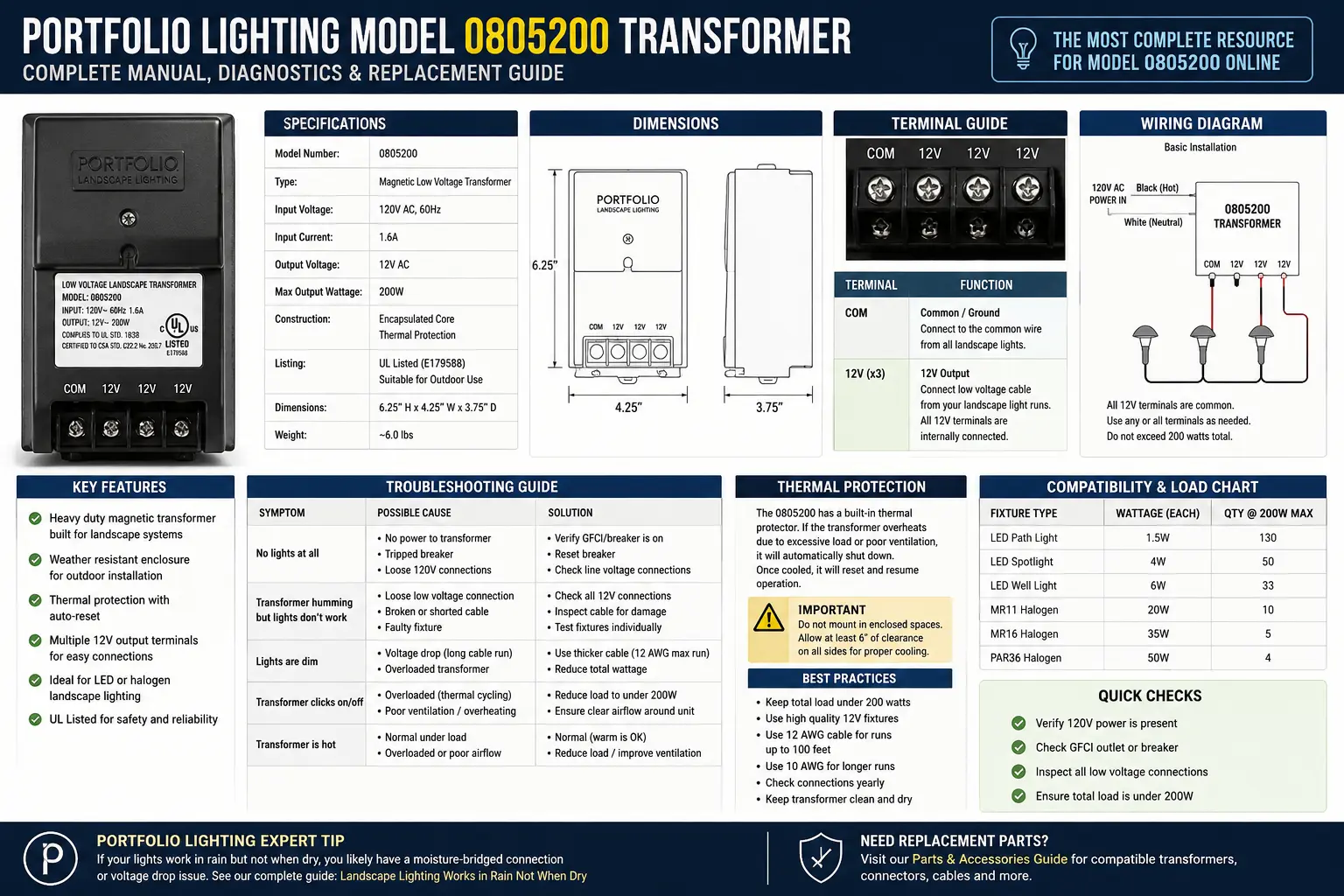
Quick Answer: What Portfolio Model 0805200 Usually Is
Portfolio model 0805200 belongs in the transformer and low-voltage control family, not the decorative fixture family. Treat it as a power-pack model first: identify the transformer rating, timer method, photocell behavior, terminal block condition and cable load before you buy parts.
The biggest mistake with this model is replacing the whole transformer before testing the low-voltage side. A transformer can look dead when the actual failure is a stuck timer, bad photocell, corroded terminal screw, overloaded cable run, shorted fixture, or a landscape wire connection that collapses only when the lights try to draw current.
What You Will Learn
Model 0805200 Identification: Confirm the Transformer Before You Diagnose
Before treating 0805200 as a failed transformer, confirm that the model label is actually on the power pack and not on a fixture, box, kit carton or instruction sheet. Portfolio outdoor lighting kits often mixed fixture model numbers, transformer model numbers and kit item numbers in the same paperwork.
On the transformer itself, look for the label near the rear housing, bottom edge, door interior, cord side or terminal compartment. The most useful information is not just the model number. You want the wattage rating, input voltage, output voltage, timer type, photocell reference and any warning labels about indoor/outdoor mounting.
| Label Clue | What It Tells You | Why It Matters | What to Record |
|---|---|---|---|
| Model 0805200 | Likely transformer or power-pack family | Determines troubleshooting path | Photograph the label before removal |
| Watt rating | Maximum connected load | Overloading causes cycling or shutdown | Total watts of all lamps on the run |
| 12V AC output | Low-voltage landscape lighting output | Affects LED retrofit compatibility | Confirm AC, not DC, before LED replacement |
| Timer / photocell markings | Control method | Bad controls mimic transformer failure | Manual, auto, dusk-to-dawn and timer settings |
On mobile, swipe the table horizontally to see every diagnostic column.
The 0805200 Failure Map: What Usually Fails First
Low-voltage transformers rarely fail in only one way. The symptom pattern tells you which part of the system deserves attention. A completely silent unit is different from a buzzing unit, a clicking unit, a unit that turns on then shuts off, or a transformer that works after rain but not during dry weather.
| Symptom | Most Likely Cause | Hidden Technical Reason | Best Next Test |
|---|---|---|---|
| No lights, no hum, no timer display | No input power, bad outlet, tripped GFCI or internal open circuit | The low-voltage side never energizes | Test the outlet and GFCI first |
| Transformer hums but no lights | Bad terminal connection, cable break or field short | Core is energized but load path is broken | Test voltage at output lugs with cable disconnected |
| Turns on then shuts off | Overload, shorted fixture or thermal protection | Transformer heats or trips under actual load | Reconnect one cable run at a time |
| Works manually but not automatically | Timer, photocell or mode-setting issue | The transformer output is good but control logic is not switching | Bypass or reset the control mode |
| Voltage reads normal but lights stay off | High-resistance connection downstream | Meter sees voltage but connection cannot carry lamp current | Test under load at first fixture |
This table is intentionally wide for diagnosis; mobile users can swipe to view all columns.
The Hidden 0805200 Transformer Behaviors Most Manuals Never Explain
The Portfolio 0805200 is a 200-watt low-voltage landscape lighting power center, and one of the biggest mistakes homeowners make is assuming every hum, reset trip, or flicker means the transformer itself has failed.
In reality, many 0805200 issues are caused by load behavior, voltage drop, partial shorts, oxidized terminal lugs, or thermal protection cycling rather than catastrophic transformer failure.
The “Core Saturation” Sound Test
One of the best real-world diagnostic tools for the 0805200 is simply listening carefully to the transformer while the lighting system is operating under load.
This is important because a loud hum does not automatically mean the transformer is defective. In many cases, it means the transformer is operating near 95%+ of its practical load capacity.
| Transformer Sound | What It Usually Means | Most Common Cause | Best Next Step |
|---|---|---|---|
| Soft steady hum | Normal magnetic vibration | Standard transformer operation | No repair needed |
| Loud constant hum | High electrical load | System approaching wattage capacity | Reduce fixture load and test again |
| Hum changes pitch when one fixture activates | Localized partial short | Damaged wire or failing fixture | Disconnect fixtures one at a time |
| Buzzing with flickering lights | Voltage instability | Loose lugs or oxidized terminals | Inspect terminal connections |
One hidden clue many installers miss is that a partial short often causes a changing hum rather than a dead short shutdown. The transformer is still operating, but magnetic stress inside the core changes as the load fluctuates.
The “Reset Loop” Thermal Cool-Down Diagnostic
Most manuals simply tell owners to “Press Reset.” That advice leaves out one critical detail: the internal thermal breaker inside the 0805200 physically needs time to cool before it can fully latch again.
This explains why some owners think the reset button is “broken.” In reality, the breaker may still be thermally expanded internally and unable to re-engage.
| Reset Behavior | What Is Happening Internally | Most Likely Cause | Correct Action |
|---|---|---|---|
| Reset button immediately pops back out | Breaker still hot internally | Thermal overload condition | Wait 30 seconds before retrying |
| Transformer resets then trips again | Persistent overload or short | Excess fixture wattage or damaged cable | Disconnect fixtures and isolate load |
| Button feels loose or weak | Mechanical reset fatigue | Repeated forced resets | Inspect breaker mechanism |
| Transformer works after cooling completely | Thermal protection functioning correctly | Operating near load limit | Reduce connected wattage |
The Creeping Terminal Lug Corrosion Problem
One of the most common long-term failures on the Portfolio 0805200 is not the internal transformer coil or timer board — it is oxidation slowly developing at the bottom screw terminals.
Because outdoor low-voltage systems experience moisture, temperature swings, and vibration, microscopic oxidation can begin forming where the copper wire contacts the terminal lug.
Retail replacement guides almost never mention this because the terminals may still “look fine” from the outside while resistance is already increasing internally.
| Terminal Condition | What It Means | Electrical Effect | Best Repair |
|---|---|---|---|
| Bright copper | Healthy connection | Low resistance | Reconnect normally |
| Dull copper | Early oxidation beginning | Resistance slowly increasing | Clean and retighten |
| Green corrosion | Moisture intrusion present | Voltage instability and heat | Cut back wire and rebuild connection |
| Blackened lug | Heat damage from resistance | Intermittent power delivery | Replace terminal hardware |
The hidden reality with older low-voltage transformers is that many “dead transformer” diagnoses are actually creeping resistance problems developing at the output lugs long before the internal transformer coil fails.
The 0805200 Transformer Test Sequence I Would Use Before Buying Parts
This sequence separates transformer failure from field wiring failure. Do not start by cutting splices or buying a new power pack. Start where the power enters the system and move outward.
- Test the outlet. Plug in a known working lamp or outlet tester. Reset the GFCI if the outlet is dead.
- Set the transformer to manual ON. This removes timer scheduling from the first test.
- Disconnect the landscape cable from the transformer lugs. This isolates the transformer from buried cable and fixtures.
- Measure output voltage at the lugs. A healthy 12V transformer commonly reads above 12V with no load.
- Reconnect one run at a time. If one branch causes shutdown, that branch has the fault.
- Test at the first fixture under load. Voltage with no light usually means a high-resistance connection.
Parts and Repair Paths for Portfolio 0805200
The right part depends on what failed. A bad timer does not require new path lights. A corroded terminal screw does not require replacing every fixture. A shorted cable branch does not mean the transformer is defective.
| Part or Area | When to Suspect It | Repair Logic | Related Existing Guide |
|---|---|---|---|
| Terminal block or output lugs | Lights flicker when wires move | Clean, tighten or replace damaged terminal hardware | terminal blocks and transformer lugs |
| Photocell | Works manually but not at dusk | Test photocell behavior before replacing transformer | replacement photocell guide |
| Timer | Wrong schedule, no automatic switching | Reset or replace control method | low-voltage timer guide |
| Transformer body | No output with cable removed and outlet verified | Replace with correct wattage and outdoor rating | transformer replacement guide |
| Wire connectors | Voltage disappears at fixtures | Replace old pierce connectors with sealed connectors | low-voltage wire connector guide |
Replacement Compatibility: Do Not Replace 0805200 by Shape Alone
The replacement transformer must match the system load, voltage type, outdoor rating and control needs. A physically similar black power pack may not be correct if the wattage rating is too low, the timer behavior differs, or the old system still uses halogen lamps that draw more power than modern LED fixtures.
If you are converting older Portfolio lights to LED, calculate the new load and check whether the transformer behaves correctly with a smaller LED load. Some older magnetic transformers are happiest under heavier halogen load; some electronic units may behave unpredictably when the LED load is extremely low.
FAQ: Portfolio Lighting Model 0805200
Is Portfolio 0805200 a fixture or a transformer?
Treat 0805200 as a transformer or power-pack model unless your label proves otherwise. The testing path should begin at outlet power, control mode, output voltage and connected landscape load.
Why does my 0805200 transformer hum but not power the lights?
A hum means the transformer core may be energized, but the low-voltage circuit may be open, overloaded or corroded. Disconnect the field cable and test output voltage directly at the transformer lugs.
Can I replace model 0805200 with any 12V transformer?
No. Match outdoor rating, wattage capacity, voltage type, timer or photocell needs, terminal capacity and LED/halogen load behavior before replacing it.
What should I check before buying a replacement?
Check the outlet, GFCI, manual mode, output voltage with the cable removed, terminal lugs, photocell behavior and each cable branch. Many apparent transformer failures are actually field wiring problems.
Use and Safety Note
This page is an independent model-specific guide for Portfolio lighting owners. Always verify the label on your own transformer and consult a qualified electrician for damaged wiring, water intrusion, hardwired power or line-voltage repairs.