
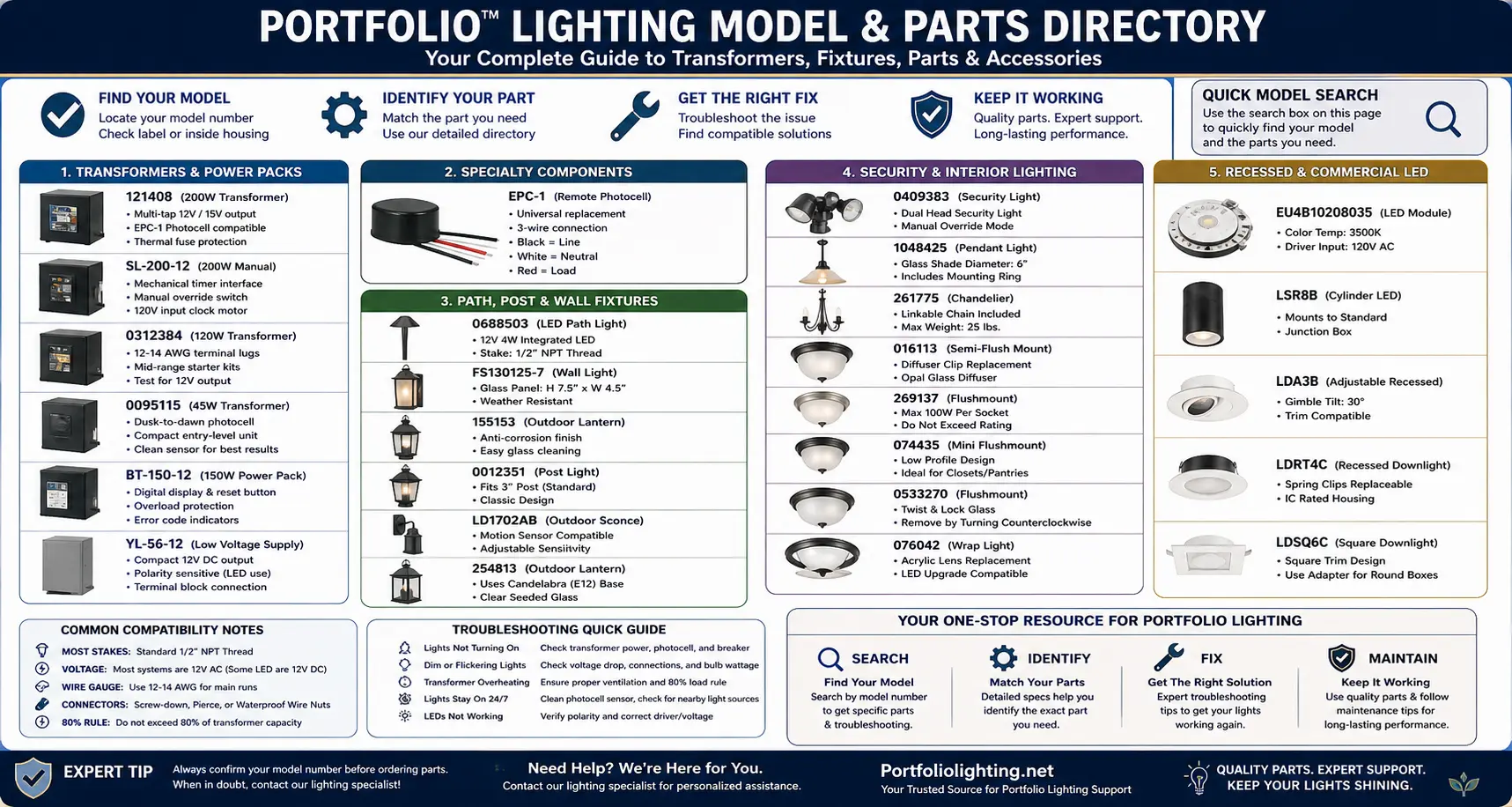
How This Parts Directory Works
If your system isn’t working at all or you’re not sure where the failure is, start with the Portfolio lighting troubleshooting guide. It walks through the exact steps I use to isolate issues quickly.
Identifying specific internal components for older fixtures can be a challenge, especially for discontinued units. For a comprehensive breakdown of technical specifications and wiring layouts, you can refer to our Portfolio Lighting Master Model & Replacement Handbook, which catalogs over 100 specialized models in one digital guide.
| What You See | What It Usually Means | What To Do First |
|---|---|---|
| Lights won’t turn on | Transformer, GFCI, or photocell issue | Check power source, then test output voltage |
| Lights stay on all day | Photocell failure or sensor blockage | Clean or replace photocell |
| Flickering lights | Voltage drop, bad connector, or failing LED driver | Test voltage at fixture and inspect connections |
| One fixture not working | Bad socket, stake, or connector | Test voltage at that fixture only |
| System worked before but now failing | Loose connection, corrosion, or overload | Check terminal lugs and wiring layout |
I built this as a practical repair directory because homeowners usually do not search a model number for trivia. They search it because something broke.
The best repair path starts by naming the part correctly. A transformer problem is not fixed with a new path light. A bad photocell is not fixed by replacing the whole yard. A broken stake does not require throwing away a working fixture head. That is the purpose of this page.
You can also browse common replacements in the Portfolio lighting parts and accessories guide.
If you want a deeper breakdown of older models and hard-to-find components, I recommend browsing the Portfolio technical archive. This is where I document discontinued models, rare parts, and real-world repair patterns I’ve seen over time.
Finding Parts Is Only Half the Repair Process
A replacement part is only useful when the failed component has been correctly identified. Many Portfolio Lighting repairs stall because homeowners replace bulbs when the transformer is failing, replace transformers when a connector is shorted, or replace entire fixtures when only an LED driver has failed. Before ordering components from this directory, review documented transformer failure patterns, perform LED bypass testing for integrated fixtures, and use Portfolio Lighting AI assistance to compare symptoms, evaluate compatibility and identify the most likely repair path for your specific model.
Where to Find Your Model Number
In my experience, most labels are faded or missing. Before guessing, check these locations:
- Inside transformer door
- Back of fixture housing
- Neck of path light (silver sticker)
- Mounting plate or base
Most Common Portfolio Failure Points
| Component | Failure Type | Fix |
|---|---|---|
| Photocell | Lights stay on or off | Replace sensor |
| Terminal lugs | Loose or corroded connections | Clean or replace lugs |
| Connector clips | No “bite” into wire | Use waterproof wire nuts |
| LED driver | Flickering or dim output | Replace driver or fixture |
| Transformer | No output or overload | Test input/output voltage |
Quick Search: Full Model Number Index
If you need full specifications for your exact unit, including voltage, wattage, and compatibility details, use the Portfolio lighting model specs directory to match your model before ordering parts.
If you want a deeper breakdown of how each model actually performs and fails in real-world use, see the Portfolio lighting model library, specifications, and repair index. I use that page to map specs, failure patterns, and repair paths across multiple models.
Before ordering replacement parts, use the Portfolio Lighting Master Model Technical Database to confirm the exact model family, electrical profile, and compatible part direction.
Tap a model number to jump straight to the repair card. If your exact number is not listed, use the closest category first, then use the contact link at the bottom of any card to send the issue.
If you're trying to locate documentation for your fixture, the Portfolio lighting manuals page is a good place to start for installation guides and product documentation.
If you're trying to visually match your fixture or browse older product lines, the Portfolio lighting catalog can help you identify styles and find compatible replacements.
Identifying specific internal components for older fixtures can be a challenge, especially for discontinued units. For a comprehensive breakdown of technical specifications and wiring layouts, you can refer to our Portfolio Lighting Master Model & Replacement Handbook, which catalogs over 100 specialized models in one digital guide.
Some Portfolio model searches lead to outdoor transformers and path lights, but long codes with LD, LDRT, ERM, D010TE, DE010, or trim finish segments usually belong to architectural recessed LED products. Those should be matched through the Portfolio architectural LED catalog guide before choosing a parts path.
Featured Portfolio Model Repair Pages
Some Portfolio model numbers need more than a basic lookup because the real repair depends on the fixture style, connector type, transformer behavior, socket condition, lens seal, and discontinued part compatibility.
Start with the SS9C-P5-BKT-CPK1 model guide for bundled fixture identification, the 0378225 cable connector repair page for splice and oxidation failures, the 0157561 flood light parts guide for flood fixture repair, the 0062582 path light manual page for socket and stake diagnostics, the 0805200 transformer manual for power-center testing, and the 7404280540 replacement parts guide for fixture-level compatibility.
These pages are designed to help owners diagnose the actual failed component instead of replacing the entire system unnecessarily.
Many vintage Portfolio fixtures use replacement parts that are no longer identified by modern product listings alone. Cross-referencing model numbers with original construction details often provides a more accurate way to locate compatible hardware. The Portfolio Vintage Lighting guide explains how restoration projects combine model research with physical fixture identification to locate usable replacement parts.
Search by Symptom (Start Here if Something Broke)
- Humming or buzzing? → Check transformer coil or overload
- Lights won’t turn off? → Photocell or timer conflict
- Flickering lights? → Voltage drop or connector failure
- Only one light out? → Fixture-level issue (socket, stake, or connection)
- System dead? → GFCI, breaker, or transformer input failure
For specific transformer manuals and wiring setups, check the Portfolio outdoor transformer manuals. This is where I break down model-specific controls, timers, and troubleshooting steps.
If you're seeing loose wires, overheating, or intermittent power, I’ve broken down exactly what fails and how to fix it in this guide on Portfolio lighting replacement terminal blocks and transformer lugs. In my experience, this is one of the most common failure points in older systems.
Before replacing a failed part, compare how newer drivers, transformers, smart controls, and LED systems behave in the lighting hardware compatibility and performance comparison archive.
Transformer & Power Pack
This group is organized as an action-and-repair directory. Use the model card to identify the likely replacement part, common failure point, and next troubleshooting move.
For deeper transformer diagnostics, see the Portfolio lighting transformer master guide.
For wiring diagrams and step-by-step installation details, see the Portfolio lighting technical manuals and wiring diagrams. This is especially helpful if you're troubleshooting transformers, photocells, or connection layouts.
If you’re working with models like 284369, TC001, or 284357, I’ve put together a focused breakdown with manuals and parts in this guide: Portfolio lighting models 284369, TC001, and 284357 manuals and parts.
Model 121408: 200W Transformer
If you're working with the 121408 transformer specifically, I’ve put together a full breakdown with wiring, controls, and common failure points in this Portfolio lighting model 121408 transformer manual. This is the exact process I use to diagnose and fix these units.
Input: 120V AC • Output: 12V AC (multi-tap)
Capacity: 200W • Outdoor rated metal housing
Control: Photocell compatible (EPC-1)
Common Failure Point: Terminal lugs + photocell sensor
| Directory Field | Action and Repair Detail |
|---|---|
| Core Info | A heavy-duty multi-tap outdoor transformer. |
| The Stone to Turn Over | EPC-1 photocell compatibility. |
| Troubleshooting Target | System not turning on: check GFCI, timer mode, photocell, output terminals, and internal thermal fuse behavior. |
| Replacement Part Direction | Photocell, terminal lugs, timer parts, transformer output screws, outdoor-rated connectors |
Before ordering: Match the model number, voltage, mounting method, finish, dimensions, and connector style. If your label is faded, use the Portfolio lighting model number lookup.
Model SL-200-12: 200W Manual Transformer
If you're using the SL-200-12 transformer and the timer isn’t working correctly or the lights won’t follow the schedule, I’ve put together a full breakdown in this Portfolio SL-200-12 troubleshooting guide. It walks through the exact timer and power checks I use to fix these units.
Input: 120V AC • Output: 12V AC
Capacity: 200W • Manual dial timer
Control: Mechanical timer pins
Common Failure Point: Timer motor + worn pins
| Directory Field | Action and Repair Detail |
|---|---|
| Core Info | Known for its mechanical timer interface. |
| The Stone to Turn Over | Timer replacement pins and manual override toggle switches. |
| Troubleshooting Target | Timer not spinning: confirm 120V input and clock motor operation before replacing the whole transformer. |
| Replacement Part Direction | Timer pins, manual override switch, terminal screws, output lugs |
Before ordering: Match the model number, voltage, mounting method, finish, dimensions, and connector style. If your label is faded, use the Portfolio lighting model number lookup.
Model 0312384: 120W Transformer
If you're working with the 0312384 transformer or system and need to replace a failed component, I’ve broken down the exact parts that typically fail in this Portfolio lighting model 0312384 replacement parts guide. This is where I map what usually goes bad and what actually fixes it.
Input: 120V AC • Output: 12V AC
Capacity: 120W • Entry-level transformer
Wire Support: 12–14 AWG terminals
Common Failure Point: Voltage drop under load
| Directory Field | Action and Repair Detail |
|---|---|
| Core Info | A mid-range unit often found in starter landscape kits. |
| The Stone to Turn Over | Low-voltage terminal lug sizes, typically 12-14 AWG. |
| Troubleshooting Target | Low output: test the secondary coil for 12V vs. 11V drops under load. |
| Replacement Part Direction | Terminal lugs, output screws, photocell or timer parts, waterproof connectors |
Before ordering: Match the model number, voltage, mounting method, finish, dimensions, and connector style. If your label is faded, use the Portfolio lighting model number lookup.
Model 0095115: 45W Transformer
Input: 120V AC • Output: 12V AC
Capacity: 45W • Dusk-to-dawn photocell unit
Control: Integrated sensor
Common Failure Point: Dirty or blocked photocell
| Directory Field | Action and Repair Detail |
|---|---|
| Core Info | Entry-level dusk-to-dawn unit. |
| The Stone to Turn Over | Integrated photocell specs and sensor-eye placement. |
| Troubleshooting Target | Lights stay on 24/7: clean the sensor eye or check for shadows. |
| Replacement Part Direction | Photocell assembly if serviceable, terminal screws, small-run connectors |
Before ordering: Match the model number, voltage, mounting method, finish, dimensions, and connector style. If your label is faded, use the Portfolio lighting model number lookup.
Model BT-150-12: 150W Power Pack
Input: 120V AC • Output: 12V AC
Capacity: 150W • Digital display transformer
Control: Resettable overload system
Common Failure Point: Overload trips + reset switch wear
| Directory Field | Action and Repair Detail |
|---|---|
| Core Info | Reliable 150W unit with a digital display. |
| The Stone to Turn Over | Reset button location and overload error-code meanings. |
| Troubleshooting Target | Overload: calculate total wattage on the 12V line. |
| Replacement Part Direction | Reset button, digital timer module, terminal lugs, photocell parts |
Before ordering: Match the model number, voltage, mounting method, finish, dimensions, and connector style. If your label is faded, use the Portfolio lighting model number lookup.
Model YL-56-12: Low Voltage Power Supply
Input: 120V AC • Output: 12V (LED driver style)
Capacity: ~56W • Compact power supply
Wiring: Polarity-sensitive output
Common Failure Point: Terminal block + polarity errors
| Directory Field | Action and Repair Detail |
|---|---|
| Core Info | Compact power supply often used for smaller LED runs. |
| The Stone to Turn Over | Input/output wiring diagram logic; polarity matters for LED. |
| Troubleshooting Target | Power loss at the terminal block: inspect loose screws, corrosion, polarity, and output voltage. |
| Replacement Part Direction | Terminal block, low-voltage leads, LED driver-compatible connectors |
Before ordering: Match the model number, voltage, mounting method, finish, dimensions, and connector style. If your label is faded, use the Portfolio lighting model number lookup.
Specialty Components
This group is organized as an action-and-repair directory. Use the model card to identify the likely replacement part, common failure point, and next troubleshooting move.
If you're dealing with flickering or LED issues, review the Portfolio LED lighting guide for driver and voltage troubleshooting.
Model EPC-1: Remote Photocell
Voltage: 120V line voltage control
Wiring: 3-wire (Line / Neutral / Load)
Use Case: Universal transformer sensor replacement
Common Failure Point: Sensor degradation + wiring mix-up
| Directory Field | Action and Repair Detail |
|---|---|
| Core Info | Universal replacement sensor for most Portfolio transformers. |
| The Stone to Turn Over | 3-wire color coding: Black = Line, White = Neutral, Red = Load. |
| Troubleshooting Target | Lights will not turn on at dusk: clean sensor, check line/load wiring, and block sensor to test. |
| Replacement Part Direction | Photocell sensor, wire connectors, weatherproof mounting hardware |
Before ordering: Match the model number, voltage, mounting method, finish, dimensions, and connector style. If your label is faded, use the Portfolio lighting model number lookup.
Path, Post & Wall Fixtures
This group is organized as an action-and-repair directory. Use the model card to identify the likely replacement part, common failure point, and next troubleshooting move.
Model 0688503: LED Landscape Path Light
Voltage: 12V low voltage
Power: ~4W integrated LED
Mounting: 1/2" NPT stake thread
Common Failure Point: Connector + stake breakage
| Directory Field | Action and Repair Detail |
|---|---|
| Core Info | 12-volt, 4-watt integrated LED path light. |
| The Stone to Turn Over | Replacement stake thread size, usually 1/2-inch NPT-style. |
| Troubleshooting Target | Path light out: test voltage at fixture before replacing integrated LED head. |
| Replacement Part Direction | Stake, connector, fixture head, low-voltage splice |
Before ordering: Match the model number, voltage, mounting method, finish, dimensions, and connector style. If your label is faded, use the Portfolio lighting model number lookup.
Model FS130125-7: Outdoor Wall Light
Voltage: 120V line voltage
Material: Metal housing + glass panels
Mounting: Wall junction box
Common Failure Point: Water intrusion + gasket failure
| Directory Field | Action and Repair Detail |
|---|---|
| Core Info | Outdoor wall light with replaceable glass panels. |
| The Stone to Turn Over | Glass panel dimensions for weather damage replacement. |
| Troubleshooting Target | Water entry: inspect wall box seal, gasket, glass clips, and mounting plate. |
| Replacement Part Direction | Glass panel, gasket, mounting screws, outdoor wire connectors |
Before ordering: Match the model number, voltage, mounting method, finish, dimensions, and connector style. If your label is faded, use the Portfolio lighting model number lookup.
Model 155153: Outdoor Lantern
Voltage: 120V
Fixture Type: Outdoor lantern
Bulb Base: Typically E26 medium base
Common Failure Point: Corrosion + socket wear
| Directory Field | Action and Repair Detail |
|---|---|
| Core Info | Outdoor lantern fixture used for entry and exterior wall lighting. |
| The Stone to Turn Over | Anti-corrosion tips for the finish and glass cleaning. |
| Troubleshooting Target | Finish corrosion: clean gently, inspect seal, and avoid harsh abrasives. |
| Replacement Part Direction | Glass, mounting screws, gasket, lamp socket parts |
Before ordering: Match the model number, voltage, mounting method, finish, dimensions, and connector style. If your label is faded, use the Portfolio lighting model number lookup.
Model 0012351: Post Light
Voltage: 120V
Mounting: Standard 3" post fit
Fixture Type: Outdoor post light
Common Failure Point: Loose mount + base corrosion
| Directory Field | Action and Repair Detail |
|---|---|
| Core Info | Outdoor post light designed around standard post mounting. |
| The Stone to Turn Over | Mounting diameter: standard 3-inch post fitment. |
| Troubleshooting Target | Loose post fit: confirm post diameter, set screws, and base corrosion. |
| Replacement Part Direction | Post fitter screws, glass, socket, gasket |
Before ordering: Match the model number, voltage, mounting method, finish, dimensions, and connector style. If your label is faded, use the Portfolio lighting model number lookup.
Model LD1702AB: Outdoor Sconce
Voltage: 120V
Sensor: PIR motion detection
Control: Adjustable sensitivity
Common Failure Point: Dirty lens + sensor misfire
| Directory Field | Action and Repair Detail |
|---|---|
| Core Info | Outdoor sconce with motion/PIR sensing features. |
| The Stone to Turn Over | Motion sensor sensitivity settings and PIR lens replacement. |
| Troubleshooting Target | Motion problems: clean PIR lens, adjust sensitivity, check warm-up mode, and test manual override. |
| Replacement Part Direction | PIR lens, sensor module if serviceable, mounting hardware, glass |
Before ordering: Match the model number, voltage, mounting method, finish, dimensions, and connector style. If your label is faded, use the Portfolio lighting model number lookup.
Model 254813: Outdoor Lantern
Voltage: 120V
Feature: Motion + manual override
Mounting: Wall box
Common Failure Point: Override mode lock + sensor failure
| Directory Field | Action and Repair Detail |
|---|---|
| Core Info | Outdoor lantern that may use candelabra or medium base depending on version. |
| The Stone to Turn Over | Identify Candelabra E12 vs. Medium E26 base requirements. |
| Troubleshooting Target | Wrong bulb fit: check socket base and maximum wattage before installing bulbs. |
| Replacement Part Direction | E12/E26 bulb, glass, gasket, mounting bracket |
Before ordering: Match the model number, voltage, mounting method, finish, dimensions, and connector style. If your label is faded, use the Portfolio lighting model number lookup.
Security & Interior Lighting
This group is organized as an action-and-repair directory. Use the model card to identify the likely replacement part, common failure point, and next troubleshooting move.
Model 0409383: Security Light
Voltage: 120V
Feature: Motion + manual override
Mounting: Wall box
Common Failure Point: Override mode lock + sensor failure
| Directory Field | Action and Repair Detail |
|---|---|
| Core Info | Exterior security light with manual override behavior. |
| The Stone to Turn Over | Manual override mode controlled by wall switch sequence. |
| Troubleshooting Target | Lights stuck on: reset wall switch sequence, check sensor, and verify photocell/daylight behavior. |
| Replacement Part Direction | PIR sensor, lamp heads, wall gasket, mounting screws |
Before ordering: Match the model number, voltage, mounting method, finish, dimensions, and connector style. If your label is faded, use the Portfolio lighting model number lookup.
Model 1048425: Pendant Light
Voltage: 120V line voltage
Fixture Type: Hanging pendant light (ceiling canopy mount)
Mounting: Standard junction box with canopy + threaded rod or chain
Bulb Base: Typically E26 medium base (verify before ordering)
Glass Fit: Match fitter diameter (common sizes: 2.25" or 3.25")
Hidden Search Variations: Portfolio 1048425 pendant, Item #1048425, Portfolio pendant glass shade replacement, Portfolio hanging light canopy parts
Common Failure Point: Loose shade ring, cracked glass, missing canopy hardware, incorrect fitter size
| Directory Field | Action and Repair Detail |
|---|---|
| Core Info | Pendant fixture with glass shade and mounting ring. |
| The Stone to Turn Over | Glass shade diameter and mounting ring size. |
| Troubleshooting Target | Loose shade: confirm retaining ring, shade diameter, and socket collar fit. |
| Replacement Part Direction | Glass shade, retaining ring, canopy hardware |
Before ordering: Match the model number, voltage, mounting method, finish, dimensions, and connector style. If your label is faded, use the Portfolio lighting model number lookup.
Model 261775: Chandelier
Voltage: 120V line voltage
Fixture Type: Chain-hung chandelier
Mounting: Ceiling junction box with canopy and chain support
Hidden Search Variations: Portfolio 261775 chandelier, Item #261775, Portfolio chandelier chain parts
Common Failure Point: Chain support, canopy hardware, socket wear
| Directory Field | Action and Repair Detail |
|---|---|
| Core Info | Chandelier fixture with chain-supported hanging assembly. |
| The Stone to Turn Over | Linkable chain specs and hanging weight. |
| Troubleshooting Target | Hanging issue: check chain rating, canopy support, junction box rating, and fixture weight. |
| Replacement Part Direction | Chain links, canopy, mounting strap, socket parts |
Before ordering: Match the model number, voltage, mounting method, finish, dimensions, and connector style. If your label is faded, use the Portfolio lighting model number lookup.
Model 016113: Semi-Flush Mount
Voltage: 120V line voltage
Fixture Type: Semi-flush ceiling light
Shade System: Diffuser or glass held by clips / retaining hardware
Hidden Search Variations: Portfolio 016113 semi flush, Item #016113, Portfolio ceiling light clips
Common Failure Point: Loose diffuser clips, heat-stressed shade hardware
| Directory Field | Action and Repair Detail |
|---|---|
| Core Info | Semi-flush mount ceiling fixture with diffuser clips. |
| The Stone to Turn Over | Diffuser clip replacement part numbers. |
| Troubleshooting Target | Loose diffuser: inspect clip tension, heat damage, and glass lip. |
| Replacement Part Direction | Diffuser clips, glass shade, mounting screws |
Before ordering: Match the model number, voltage, mounting method, finish, dimensions, and connector style. If your label is faded, use the Portfolio lighting model number lookup.
Model 269137: Flushmount
Voltage: 120V line voltage
Fixture Type: Flushmount ceiling light (low-profile mount)
Mounting: Direct to junction box with center mounting plate
Bulb Base: Typically E26 medium base (enclosed fixture rated)
Glass Style: Twist-lock or finial-mounted diffuser (varies by revision)
Hidden Search Variations: Portfolio 269137 flushmount, Item #269137, Portfolio ceiling light glass replacement, Portfolio flush mount diffuser stuck
Common Failure Point: Stuck glass dome, over-tightened finial, heat expansion locking diffuser, socket wear from high wattage bulbs
| Directory Field | Action and Repair Detail |
|---|---|
| Core Info | Flushmount ceiling fixture with socket wattage limits. |
| The Stone to Turn Over | Maximum wattage per socket to avoid melted insulation. |
| Troubleshooting Target | Heat damage: check bulb wattage, socket condition, and insulation discoloration. |
| Replacement Part Direction | Socket, glass, mounting screws, approved bulb |
Before ordering: Match the model number, voltage, mounting method, finish, dimensions, and connector style. If your label is faded, use the Portfolio lighting model number lookup.
Model 074435: Mini Flushmount
Voltage: 120V line voltage
Fixture Type: Mini flushmount ceiling light
Best Use: Small rooms, closet-style spaces, pantry-style areas
Hidden Search Variations: Portfolio 074435 mini flushmount, Item #074435, small Portfolio ceiling light
Common Failure Point: Heat buildup, tight clearance, wrong bulb wattage
| Directory Field | Action and Repair Detail |
|---|---|
| Core Info | Compact flushmount useful for closet or pantry spaces. |
| The Stone to Turn Over | Closet/pantry clearance code concerns. |
| Troubleshooting Target | Overheating: use correct bulb wattage and observe fixture clearance requirements. |
| Replacement Part Direction | Glass, socket, mounting screws |
Before ordering: Match the model number, voltage, mounting method, finish, dimensions, and connector style. If your label is faded, use the Portfolio lighting model number lookup.
Model 0533270: Flushmount
Voltage: 120V line voltage
Fixture Type: Flushmount ceiling light
Glass Style: Twist-lock or clip-retained shade depending on version
Hidden Search Variations: Portfolio 0533270 flushmount, Item #0533270, stuck Portfolio glass shade
Common Failure Point: Stuck glass, heat expansion, clip tension loss
| Directory Field | Action and Repair Detail |
|---|---|
| Core Info | Flushmount fixture with twist-and-lock glass. |
| The Stone to Turn Over | Twist-and-lock glass removal instructions, often stuck by heat. |
| Troubleshooting Target | Stuck glass: let cool completely, support glass, and rotate carefully without forcing clips. |
| Replacement Part Direction | Glass shade, clips, socket parts |
Before ordering: Match the model number, voltage, mounting method, finish, dimensions, and connector style. If your label is faded, use the Portfolio lighting model number lookup.
Model 076042: Wrap Light
Voltage: 120V line voltage
Fixture Type: Utility wrap light / garage light
Lens Type: Long acrylic diffuser
Hidden Search Variations: Portfolio 076042 wrap light, Item #076042, Portfolio wrap light lens replacement
Common Failure Point: Yellowed diffuser, cracked lens, ballast or driver failure
| Directory Field | Action and Repair Detail |
|---|---|
| Core Info | Wrap light fixture with acrylic lens. |
| The Stone to Turn Over | Acrylic lens replacement and ballast bypass instructions for LED. |
| Troubleshooting Target | Flicker or no start: check ballast, tombstones, and LED tube compatibility. |
| Replacement Part Direction | Acrylic lens, ballast, LED tubes, tombstones |
Before ordering: Match the model number, voltage, mounting method, finish, dimensions, and connector style. If your label is faded, use the Portfolio lighting model number lookup.
Recessed & Commercial LED
This group is organized as an action-and-repair directory. Use the model card to identify the likely replacement part, common failure point, and next troubleshooting move.
Model EU4B10208035: LED Module
Type: LED replacement module / integrated LED component
Power Type: Driver-controlled LED output
Match By: Output voltage, current, connector, module size, and mounting holes
Hidden Search Variations: Portfolio EU4B10208035 LED module, LED driver board, Portfolio LED replacement module
Common Failure Point: Driver mismatch, dim output, flicker, failed LED board
| Directory Field | Action and Repair Detail |
|---|---|
| Core Info | LED module with 3500K color temperature and driver input requirements. |
| The Stone to Turn Over | Color temperature 3500K and driver input voltage. |
| Troubleshooting Target | Module dead: test driver input/output before replacing LED module. |
| Replacement Part Direction | LED module, driver, spring clips, connector |
Before ordering: Match the model number, voltage, mounting method, finish, dimensions, and connector style. If your label is faded, use the Portfolio lighting model number lookup.
Model LSR8B: Cylinder LED
Voltage: 120V line voltage or driver-fed LED depending on fixture version
Fixture Type: Cylinder LED downlight / surface-style fixture
Match By: Trim size, driver rating, color temperature, and mounting method
Hidden Search Variations: Portfolio LSR8B cylinder LED, LSR8B light, Portfolio cylinder downlight
Common Failure Point: Driver failure, color shift, trim mismatch
| Directory Field | Action and Repair Detail |
|---|---|
| Core Info | Cylinder LED fixture for commercial or architectural applications. |
| The Stone to Turn Over | Mounting bracket for commercial junction boxes. |
| Troubleshooting Target | Mounting problem: confirm box type, bracket hole pattern, and fixture weight. |
| Replacement Part Direction | Mounting bracket, driver, trim, junction box hardware |
Before ordering: Match the model number, voltage, mounting method, finish, dimensions, and connector style. If your label is faded, use the Portfolio lighting model number lookup.
Model LDA3B: Adjustable Recessed
Fixture Type: Adjustable recessed LED / directional downlight
Match By: Aperture size, trim style, driver output, and swivel range
Hidden Search Variations: Portfolio LDA3B recessed light, LDA3B adjustable downlight, Portfolio directional recessed LED
Common Failure Point: Driver flicker, loose trim springs, aiming mechanism wear
| Directory Field | Action and Repair Detail |
|---|---|
| Core Info | Adjustable recessed fixture with gimbal aiming. |
| The Stone to Turn Over | Gimbal tilt angle, commonly a 30-degree range, and trim compatibility. |
| Troubleshooting Target | Aiming issue: verify trim clearance and gimbal movement before forcing adjustment. |
| Replacement Part Direction | Trim, spring clips, driver, LED module |
Before ordering: Match the model number, voltage, mounting method, finish, dimensions, and connector style. If your label is faded, use the Portfolio lighting model number lookup.
Model LDRT4C: Recessed Downlight
Fixture Type: 4-inch recessed LED downlight / retrofit-style trim
Match By: Can size, trim diameter, connector type, and color temperature
Hidden Search Variations: Portfolio LDRT4C recessed light, LDRT4C downlight, Portfolio 4 inch LED trim
Common Failure Point: Weak spring clips, driver flicker, wrong can fit
| Directory Field | Action and Repair Detail |
|---|---|
| Core Info | 4-inch recessed downlight style fixture. |
| The Stone to Turn Over | Spring clip replacement for loose housings. |
| Troubleshooting Target | Fixture sagging: inspect clip tension, ceiling thickness, and housing fit. |
| Replacement Part Direction | Spring clips, trim, driver, connector |
Before ordering: Match the model number, voltage, mounting method, finish, dimensions, and connector style. If your label is faded, use the Portfolio lighting model number lookup.
Model LDSQ6C: Square Downlight
Fixture Type: 6-inch square recessed LED downlight
Match By: Square trim size, can compatibility, driver output, and Kelvin rating
Hidden Search Variations: Portfolio LDSQ6C square downlight, LDSQ6C LED trim, Portfolio square recessed light
Common Failure Point: Trim fit, driver failure, color mismatch
| Directory Field | Action and Repair Detail |
|---|---|
| Core Info | Square recessed downlight style fixture. |
| The Stone to Turn Over | Square-to-round junction box adapter requirements. |
| Troubleshooting Target | Poor fit: confirm adapter ring, box shape, trim size, and spring clip alignment. |
| Replacement Part Direction | Adapter, trim, spring clips, driver |
Before ordering: Match the model number, voltage, mounting method, finish, dimensions, and connector style. If your label is faded, use the Portfolio lighting model number lookup.
If you're seeing newer replacements or different branding, review the Portfolio to Origin21 rebrand guide to understand compatibility and what parts will still work with your system.
When exact replacement parts cannot be found, cross-compatibility becomes more important than model matching. The legacy landscape lighting parts compatibility guide explains which older components commonly interchange across discontinued systems.
Recently Added Portfolio Fixture Model Guides
Identifying discontinued Portfolio fixtures and sourcing replacement parts is much harder when no documentation exists online. The model-specific guides below cover the most-searched discontinued Portfolio fixture item numbers — each page provides specs, parts identification, troubleshooting by symptom, and compatible replacement options for that specific model.
If you are working with outdoor wall lanterns, deck lights, or fixtures with internal circuit boards that have no available manual, these pages are the most complete resources available. Each guide also links to the broader Portfolio replacement parts library, the model number lookup, and the discontinued Portfolio lighting hub.
If a Portfolio model does not appear in a normal parts directory, it may still be identifiable by its number pattern, finish code, voltage, fixture shape, or failure behavior. The Portfolio Lighting Lost Models Archive is designed for these uncertain cases, especially models where the correct part depends on comparing the label, bulb access, lens style, stake thread, socket type, or transformer connection method.
📋 New Fixture Model Pages — Parts, Troubleshooting & Replacement
Dedicated guides for five discontinued Portfolio fixture models — the most specific and actionable resources available for these item numbers anywhere online.
For the full list of discontinued Portfolio model guides including transformer-specific pages, use the discontinued Portfolio lighting hub or the model number lookup to find the guide that matches your specific item number.
Why Portfolio Model Directories Matter for Real Repairs
A true Portfolio Lighting parts directory should do more than list model numbers. The real challenge with older Portfolio fixtures is identifying whether the failed component is actually the lens, shade, connector, transformer, stake, LED module or mounting hardware. Many discontinued Portfolio fixtures share similar housings while using completely different internal parts and electrical layouts.
The 016107 WHCM432R8 lens and parts guide explains how gasket compression, retainer depth and lens geometry affect replacement compatibility, while the 0311569 kit replacement guide demonstrates why older Portfolio fixture kits can create confusion when homeowners search for one failed component instead of the complete assembly.
Hardware compatibility also becomes increasingly important as Portfolio fixtures age. The 17945-000 shade replacement guide focuses heavily on fitter sizing, diffuser stability and shade-retention issues, while the 230132-145P replacement guide explains how intermittent low-voltage connector failures are often mistaken for total fixture failure.
Many discontinued models also require rebuilding missing manual information from field evidence. The FY09-003 0048184 manual guide, 18907-000 repair guide, 25966-3 troubleshooting guide and 2851294 replacement guide all show how transformer labels, bulb markings, connector styles and fixture geometry can reconstruct missing installation and compatibility data that no longer exists online.
Portfolio Lighting Model Parts Directory FAQ
What is the Portfolio Lighting Model Parts Directory?
It is an action-and-repair hub that connects Portfolio model numbers to common failure points, likely replacement parts, and next troubleshooting steps.
How do I find the right replacement part for a Portfolio model?
Start by matching the model number, product category, voltage, fixture dimensions, connector style, and known failure point. Then use the model card to identify likely replacement parts such as photocells, terminal lugs, stakes, glass, drivers, or mounting hardware.
Should I replace the whole Portfolio fixture or only the part?
If the transformer, connector, stake, glass, socket, driver, or sensor is the only failed item, a part replacement may be enough. If an integrated LED fixture is sealed, water-damaged, or non-serviceable, full fixture replacement may be the better repair path.
What if my model number is not listed?
Use the closest product category and compare voltage, dimensions, connector style, finish, and failure symptoms. You can also use the contact page to send the model and issue so the directory can be improved over time.
If you can’t find your exact part, don’t guess—use this Portfolio lighting alternatives guide to find compatible replacements that actually work with your system.