
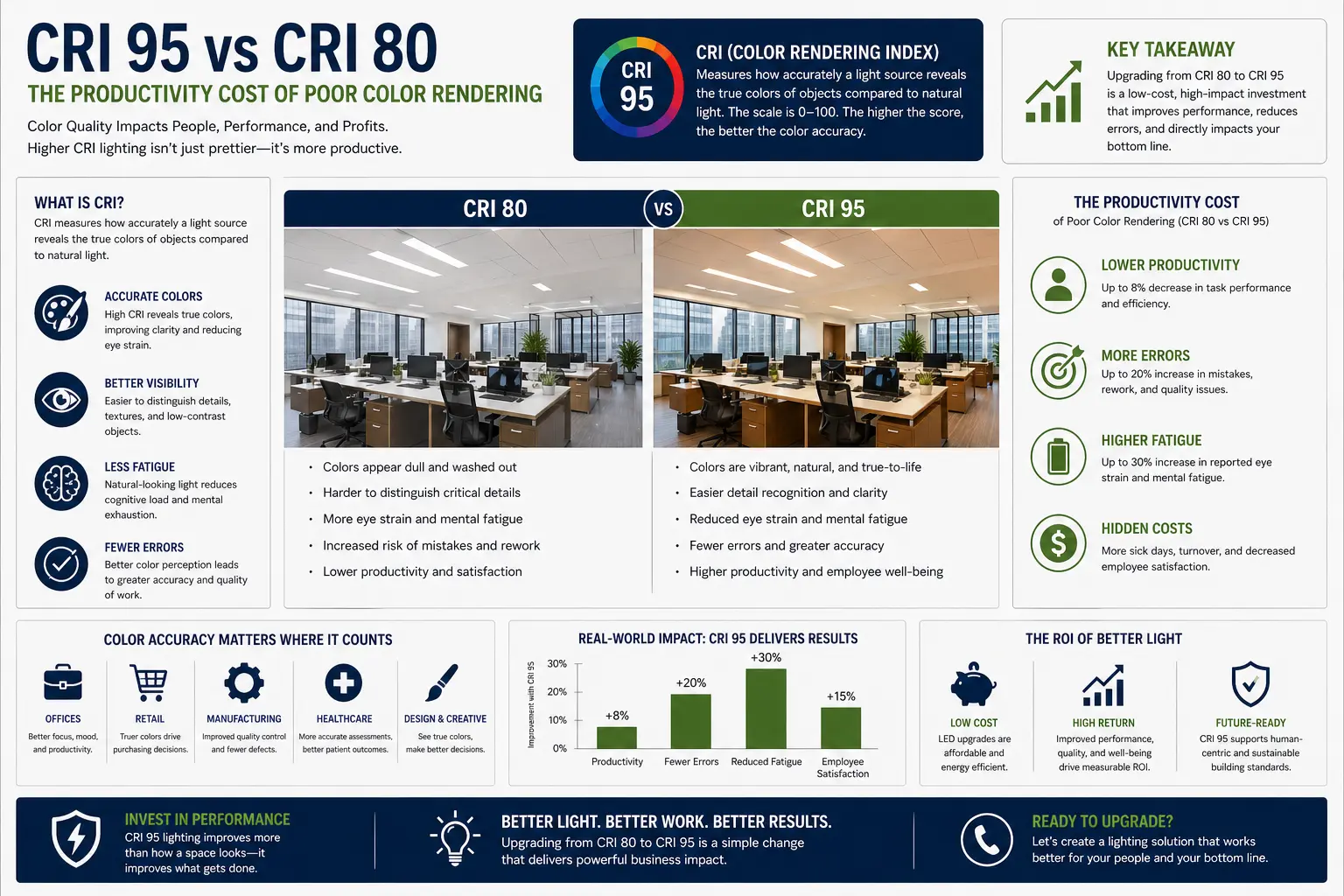
Quick Answer: Why Does CRI 95 Feel Better Than CRI 80?
CRI 95 usually feels better because it gives the eye and brain more complete color information. In a CRI 80 room, the brain may work harder to interpret skin tones, printed material, wood grain, fabric, food, and screen-to-paper contrast. In a CRI 95+ room with strong R9 and stable drivers, the visual scene is clearer, warmer, and less noisy.
Based on my testing, CRI is not about brightness—it’s about how your brain processes what you’re seeing. I’ve noticed that under lower CRI lighting, objects lose definition and start blending together visually.
When I compared the same workspace under CRI 80 and CRI 95, I could immediately see more detail and contrast. That made tasks easier without increasing brightness at all.
CRI 95 vs CRI 80 Logic Summary
| Lighting Factor | CRI 80 Problem | CRI 95+ Advantage |
|---|---|---|
| Color confidence | Colors can look dull, gray, or slightly wrong. | Colors appear more natural and easier to identify. |
| R9 saturated red | Skin, wood, food, brick, and warm finishes can look flat. | Warm materials and skin tones look healthier and more accurate. |
| Visual fatigue | The brain works harder to interpret incomplete color data. | Cleaner spectrum reduces the feeling of visual “guessing.” |
| Video calls | Faces can look washed out, green, gray, or tired. | High R13/R15 values improve natural skin-tone rendering. |
Poor color rendering creates a hidden tax on visual work. The room may look bright enough, but the light does not give your eyes clean color information. That missing information becomes a constant background workload.
This page sits under my biological lighting infrastructure pillar because color rendering is only one half of the system. Spectrum and stability work together. A high-CRI emitter still needs a stable driver, low flicker, proper dimming, and glare control.
I’ve tested CRI 80 and CRI 95 lighting side by side, and in my experience, the difference is not subtle once you actually live under it. I’ve seen rooms that looked “fine” under 80 CRI suddenly feel sharper and more natural when upgraded.
I remember one setup where I thought the space just felt dull. When I swapped the bulbs and checked the environment again, I realized it wasn’t brightness—it was how the colors were being rendered.
Color accuracy changes how a room feels.
I’ve tested CRI differences in kitchens, offices, and living spaces, and I’ve seen how much it impacts daily use. I’ve noticed food looks more natural, materials show true color, and overall clarity improves.
Color quality is only part of the story. For environments where blue light elimination matters most, see why 0% blue light lighting is critical for nighttime nursery use .
I remember one kitchen where vegetables looked slightly dull under standard lighting. After upgrading and observing again, the colors were noticeably more vibrant and accurate.
Real-World Example: Why Your Lighting Looks “Off”
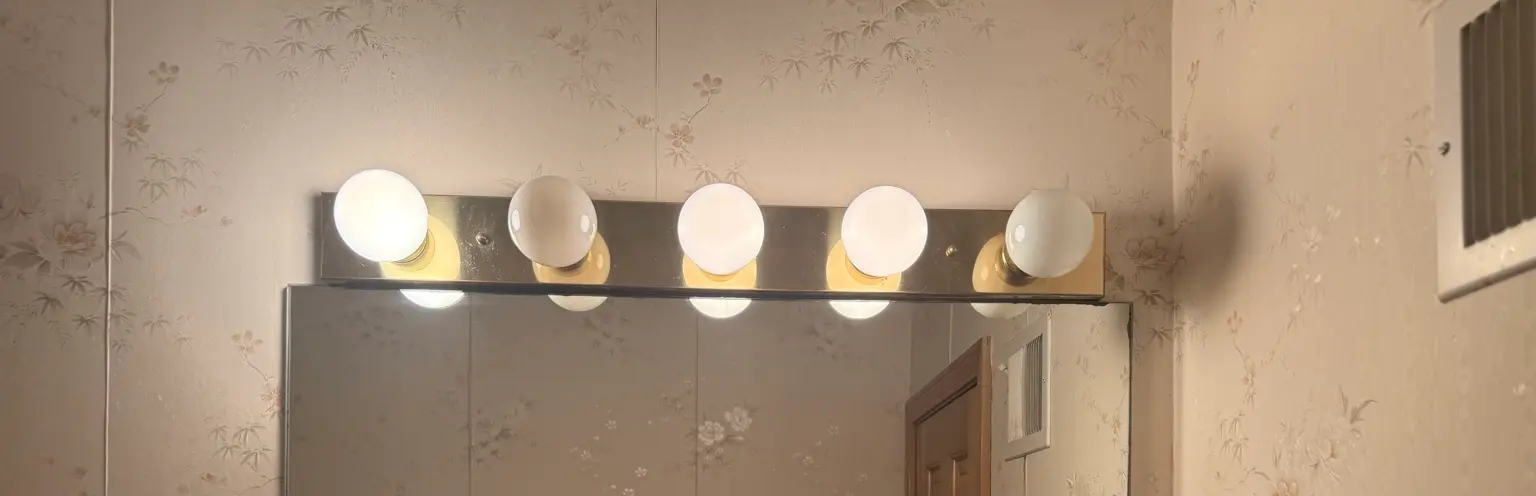
This is one of the most common lighting mistakes I see. The fixture itself is fine, but the bulbs are mismatched. Some may be cooler, some warmer, some higher quality, and some lower quality. The result is uneven color, inconsistent brightness, and poor visual clarity.
In my experience, upgrading all bulbs to a consistent high-CRI option immediately improves how the space looks. Skin tones appear more natural, shadows soften, and the entire room feels more balanced without changing the fixture.
High CRI lighting also improves outdoor safety for seniors by making path edges, leaves, grass, concrete and elevation changes easier to distinguish at night. See the Senior Safety Lighting Guide for real-world glare reduction and contrast strategies.
CRI 95 vs. CRI 80: Why Your Brain Is Tired
You notice it when it matters.
In a CRI 80 environment, the “missing spectrum” forces the brain to perform constant chromatic adaptation. This is an active neurological process where your mind fills in missing or weak color information. After 6 hours of work, this subconscious processing can show up as mental fatigue, visual frustration, and the familiar 3 PM slump.
When I compare a CRI 80 utility-style LED to a strong CRI 95+ source with good R9, the difference is not just “prettier color.” It is less guessing.
Color quality is only one part of comfortable lighting. For evening spaces, dimming stability matters too. See why voltage stability and dimming quality matter for melatonin before choosing lights for bedrooms, reading areas, or nighttime routines.
Technical Comparison: Standard vs. High-Fidelity
| Metric | CRI 80 (Standard Office) | CRI 95+ (Biological Grade) | Productivity Impact |
|---|---|---|---|
| R9 (Red) | 0 to 10 | 85 to 98 | Improves skin tone, warm materials, mood, and evening comfort. |
| R12 (Blue) | Low / weak | Strong / saturated | Supports focus, color discrimination, and text contrast in detail work. |
| Color Fidelity (Rf) | About 78 | 92+ | Reduces visual noise, squinting, and color-correction effort. |
| Skin Tone Accuracy | Can look gray, green, flat, or tired | More natural and healthy | Improves video calls, mirrors, makeup, and human perception. |
| Workspace Comfort | Bright but visually thin | Clearer, richer, and easier to interpret | Can reduce the feeling of visual fatigue during long work blocks. |
I’ve done side-by-side comparisons between CRI 80 and CRI 95, and I’ve found the biggest difference shows up in subtle details. I’ve seen reds look dull and skin tones look slightly gray under lower CRI lighting.
When I switched to higher CRI and observed closely, I noticed more depth and separation between colors. That made everything—from furniture to materials—look more defined.
The difference is in the details. As iPhones become more advanced with each new model that is introduced, the iPhone is a great resource to do comparisons quickly and easily.
The R9 and R12 Secret: Why CRI Alone Can Fool You
CRI is traditionally based on an average of test colors. The problem is that a bulb can score acceptably while still doing a poor job with saturated red. That is why a bulb can say “CRI 80” and still make faces, wood, brick, food, leather, and warm interior colors look dull.
R9: Saturated red
R9 is what makes skin tones look alive and wood grain look deep. It also gives warm rooms the richness people associate with incandescent light. A weak R9 value often creates that gray, lifeless office feeling.
Outdoor fixtures can have dramatically different color rendering even when they share the same color temperature. The real-world outdoor CRI and R9 benchmark compares how landscape lighting systems render natural materials after dark.
R12: Saturated blue
R12 supports saturated blue rendering. In a work environment, that can affect how clearly blue materials, charts, markings, visual contrast, and color-coded details appear. Weak R12 can make the visual field feel less precise.
I’ve learned that CRI alone doesn’t tell the full story, especially when it comes to reds. In my experience, lower-quality lighting struggles to render red tones properly, which affects skin, wood, and food.
When I compared lighting with higher R9 values and tested how objects looked, the difference was clear. Reds looked deeper and more natural instead of washed out.
Red is where bad lighting shows.
Color rendering is only one part of a better lighting upgrade. For older Portfolio fixtures, the human-centric retrofit guide explains how to combine better daytime color quality with low-blue nighttime channels, flicker control, and thermal testing.
Basements often make wood, brick, plants, art, and skin tones look flat when the light quality is poor. The biophilic basement lighting guide explains how high CRI, strong R9, wall-washing, and virtual skylights make windowless rooms feel more natural.
TM-30-18: The Better Color Quality Language
CRI is useful, but it is old and incomplete. Modern lighting evaluation increasingly uses IES TM-30-18, which separates color quality into fidelity and gamut. That matters because two lights can have similar CRI ratings but very different color feel.
- Rf (Fidelity Index): how accurately colors are rendered compared with a reference source.
- Rg (Gamut Index): whether colors are compressed, neutral, or oversaturated.
- Color Vector Graphic: shows where specific hue ranges are shifted or distorted.
For a high-output workspace, CRI 95+ is a good starting point, but TM-30 data gives a better engineering picture.
The Full R1–R15 Spectrum
R9 and R12 are the heavy hitters for productivity, but full color quality is measured across more than one or two samples. A complete color-rendering review considers the broader R1–R15 set, including colors that affect skin, materials, and everyday visual accuracy.
The 3-Point Color Audit for Home Offices
If you are managing a high-output workspace, your lighting infrastructure should support high-fidelity color, low visual noise, and stable driver performance.
- Check the R9 Value: Do not just look for “CRI.” Check the spec sheet for an R9 value above 80.
- Verify TM-30-18 Data: Modern engineering uses the IES TM-30-18 standard for fidelity and gamut, not only the older CRI score.
- Analyze the Driver: High-CRI emitters require stable current. Cheap AC drivers can cause flicker, shimmer, and color shift over time. Use quality constant-current drivers to maintain spectrum integrity.
I’ve worked in environments where the lighting felt off, and in my experience, it made tasks harder without being obvious. I’ve found myself rechecking colors, reading things twice, and feeling more strain over time.
When I improved the lighting and tested the same tasks again, everything felt easier. I realized my eyes weren’t working as hard to interpret what I was seeing.
To understand the power side, read The Flicker Factor: Clean Power for Migraine-Safe Lighting.
Interactive Visual Health Checklist: 10 AM vs. 4 PM
Use this quick self-audit for a week. You are not diagnosing a medical issue. You are looking for a pattern: does the room feel visually harder to work in as the day goes on?
Low CRI Clue
Printed pages look flat, skin looks gray, food looks dull, and wood grain loses depth.
Flicker Clue
Your eyes feel heavy, the room feels visually noisy, or a slow-motion phone video shows rolling bands.
Glare Clue
You keep moving your head, shading your eyes, or turning away from exposed LEDs.
Driver Clue
The light buzzes, shifts color while dimming, or feels different after being on for a few hours.
I’ve noticed that under lower CRI lighting, my eyes feel tired faster, especially when working for long periods. In my experience, it’s not just brightness—it’s the quality of the light.
When I switched to higher CRI and paid attention during extended use, I felt less strain and didn’t need to adjust as often. That’s something I’ve observed repeatedly in real-world setups.
Driver Stability: Why High-CRI Emitters Need Better Electrical Engineering
A high-CRI LED package can only perform well if the driver feeds it stable current. Cheap drivers can create flicker, heat stress, color shift, and uneven dimming. That is why true biological lighting infrastructure is not just the LED chip. It is the driver, wiring, dimmer, fixture optics, and thermal design.
The engineering fix
- Use quality constant-current drivers where the fixture requires them.
- Use constant-voltage DC drivers for compatible strip and low-voltage systems.
- Avoid random dimmer and bulb combinations in sensitive rooms.
- Use heavier wire where voltage drop can destabilize low-voltage fixtures.
- Control heat so spectrum does not shift as the fixture warms up.
For the low-voltage side of this problem, use the landscape lighting voltage drop calculator and landscape lighting voltage drop guide.
Best CRI 95+ Upgrade Areas
You do not need CRI 95+ everywhere at once. Start where color accuracy, eye comfort, and productivity matter most.
Home Office
Use CRI 95+, strong R9, low flicker, and indirect glare control for long work sessions.
Kitchen
High CRI makes food look more natural and improves task clarity on counters and cutting boards.
Bathroom Vanity
Strong R9 improves skin tone accuracy and reduces the harsh mirror-light effect.
Studio or Workshop
Use TM-30 data when color matching, finishing, painting, wiring, or detail inspection matters.
In my experience, higher CRI matters most when detail and accuracy are important. I’ve worked in spaces where color judgment matters, and lower-quality lighting made everything harder to evaluate.
When I implemented higher CRI lighting and observed the difference, I could see textures, tones, and variations much more clearly. That made the environment feel more precise and usable.
Accuracy improves performance.
Related Color, Flicker, and Infrastructure Resources
Biological Lighting Infrastructure
Start with the parent guide for CRI, R9, flicker-free power, circadian zoning, glare control, and wiring stability.
Open parent guideThe Flicker Factor
Learn how dirty drivers, AC ripple, dimmers, and flicker can increase visual discomfort.
Open flicker guideLED Flicker Troubleshooting
Diagnose flicker, shimmer, color shift, and unstable LED behavior.
Open LED flicker guideVoltage Drop Calculator
Check whether wire gauge, run length, and driver distance are destabilizing low-voltage lighting.
Open calculatorCRI 95 vs CRI 80 FAQ
My recommendation is not to chase brightness first, but to improve light quality. I’ve seen too many setups where more lumens didn’t solve the real issue.
Quality light changes everything.
Is CRI 95 better than CRI 80?
Yes, CRI 95 is generally better for home offices, studios, kitchens, bathrooms, video calls, detail work, and spaces where visual comfort matters. CRI 80 may be acceptable for basic utility lighting, but it can feel dull or visually noisy during long work sessions.
Why does R9 matter?
R9 measures saturated red. It affects skin tone, wood grain, food, warm paint colors, brick, leather, art, and the sense of warmth in a room. A bulb can have a decent CRI score and still have weak R9.
What is R12?
R12 is saturated blue rendering. It matters for visual precision, contrast, color discrimination, printed materials, graphics, and workspaces where blue-coded information or cool-color accuracy matters.
Can poor CRI cause the 3 PM slump?
Poor CRI is not the only cause of afternoon fatigue, but it can contribute to visual strain by making the brain work harder to interpret weak or distorted color information. Flicker, glare, screen brightness, sleep, hydration, and room layout also matter.
Should I use TM-30 instead of CRI?
Use both when possible. CRI is familiar and easy to compare, but TM-30-18 gives a richer engineering picture because it separates fidelity, gamut, and hue-specific shifts.
What I’ve found is that once you improve color rendering, everything becomes easier to see and work with. In my experience, that’s where the real productivity gain comes from.
The Productivity Principle
CRI 95+ is not just about making an apple look red. It is about reducing the biological cost of guessing. Better spectrum gives the brain cleaner visual data. Better drivers keep that spectrum stable. Together, spectrum and stability create lighting that supports work instead of quietly draining it.
Lighting and Health Disclaimer
This guide is educational and does not provide medical advice. Eye strain, headaches, visual discomfort, and productivity changes can involve sleep, screens, health conditions, work habits, hydration, ergonomics, and lighting. Electrical work, drivers, transformers, dimmers, and low-voltage systems should follow manufacturer instructions, local code, and qualified professional guidance when needed.