
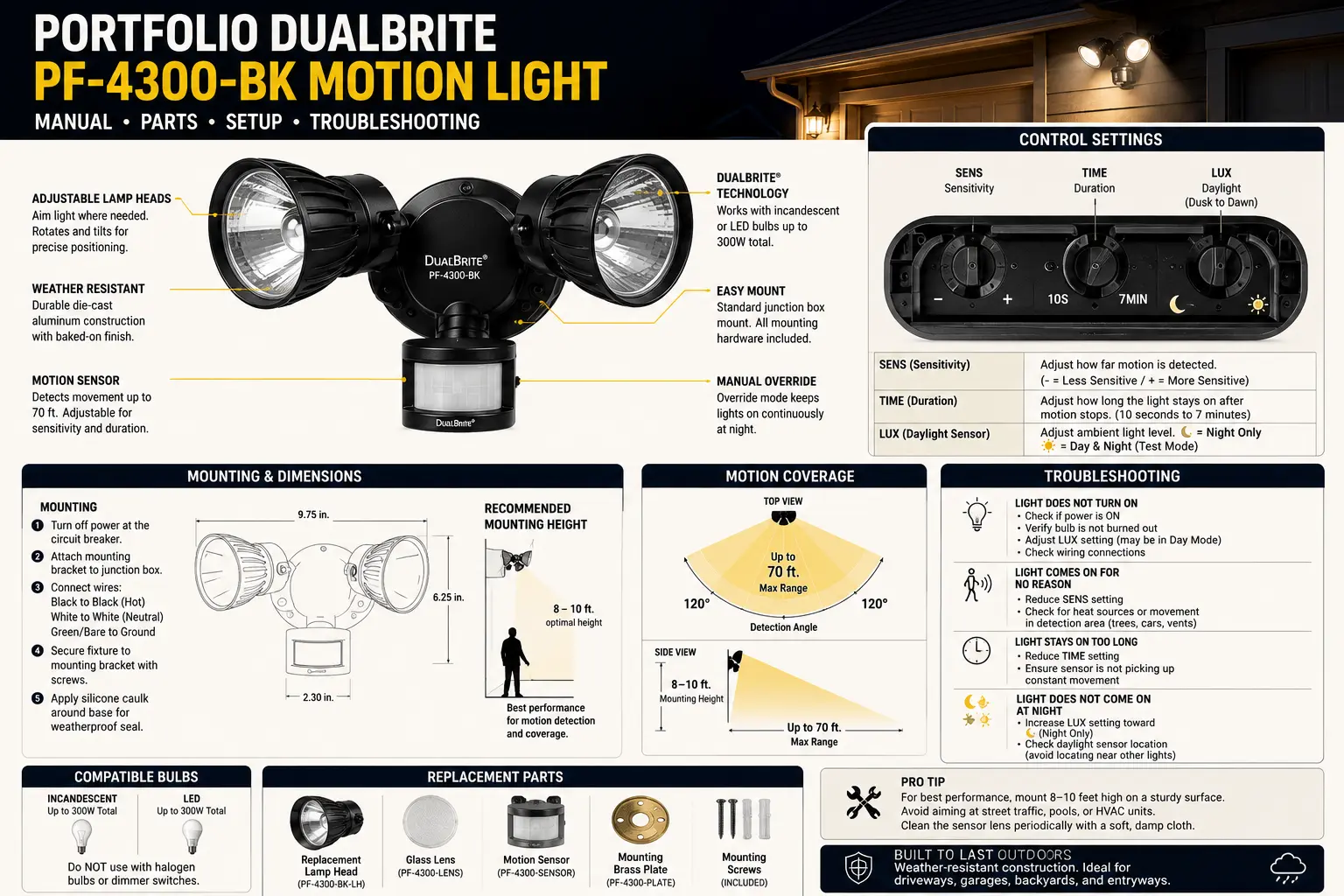
TL;DR: PF-4300-BK Problems at a Glance
| Symptom | Most Likely Cause | Fast Test | Best Fix |
|---|---|---|---|
| Light stays on all night | DualBrite mode, manual override, or sensor seeing constant heat | Turn wall switch off for 60 seconds, then test after dark | Reset override, reduce time setting, re-aim sensor |
| Only works in test mode | Dusk sensor blocked, too much nearby light, or wrong mode expectation | Cover sensor at night and switch from TEST to AUTO | Move aim, reduce light feedback, clean lens |
| Turns on and off repeatedly | Heat reflection, lamp head feedback, loose neutral, or LED incompatibility | Aim lamp heads away from sensor and watch cycle | Separate sensor view from lamp output |
| No light at all | No line power, failed switch, bad connection, failed control board | Check breaker, switch, GFCI, and voltage at box | Repair supply wiring or replace fixture |
| One head works, one does not | Burned lamp/LED module, loose internal lead, corroded socket | Swap bulbs if socketed; inspect head wiring | Replace bulb/head or fixture assembly |
The Portfolio DualBrite PF-4300-BK is frustrating because a working fixture can look broken when one setting is wrong. Unlike a simple porch light, a DualBrite motion light has three overlapping systems: a normal 120-volt supply, a photocell or dusk detector, and a motion control circuit. If any one of those systems is misread, the fixture may stay on, refuse to come on, or behave differently in test mode than it does at night.
The important field rule is this: do not troubleshoot the PF-4300-BK as a bulb first. Troubleshoot it as a control sequence. The lamp heads are the visible output, but the wall switch, dusk sensor, motion lens, mode switch, time dial, sensitivity dial, and nearby reflected light all decide what the fixture does.
Editorial Review and Compatibility Notes
Technical review by: Philip Meyer, Lighting Specialist
Last verified: July 6, 2026
This guide is written as a manual-style repair reference for an older Portfolio motion light family. Because discontinued Portfolio fixtures may have small production differences, always compare your actual label, switch markings, lamp type, gasket shape, and wiring before ordering parts.
For a broader model lookup path, use the Portfolio Lighting model number lookup and the Portfolio model library index.
PF-4300-BK DualBrite Settings Decoder
The most valuable part of the missing manual is usually the settings logic. The labels may vary slightly, but the control idea is consistent: one setting controls how long the bright motion mode stays on, one setting controls how sensitive the sensor is, and DualBrite controls whether the light runs at a lower level before motion is detected.
| Control | What It Really Does | Field Mistake | Best Starting Point |
|---|---|---|---|
| TEST | Lets you aim the sensor in daylight or short-cycle mode | Leaving the light in TEST and assuming it is in night operation | Use only for aiming, then switch to AUTO/normal |
| TIME | Controls how long bright light stays on after motion | Setting too long and thinking the light is stuck | 1 or 5 minutes for testing |
| SENS/RANGE | Controls how far and how easily motion triggers | Maxing sensitivity near roads, trees, vents, or reflective walls | Middle setting first |
| DualBrite | Runs low-level accent/security light before motion | Thinking low-level night light means the sensor is stuck on | OFF during troubleshooting |
| Dusk-to-dawn/Auto | Allows night-only operation | Nearby light source prevents the photocell from seeing darkness | Test after full dark with nearby lights off |
The Manual Override Trap: Why the Light Seems Stuck On
Many homeowners accidentally put the PF-4300-BK into manual override with a wall switch sequence. A quick off/on action can tell the fixture to stay on instead of waiting for motion. This is why the light may work normally for months, then suddenly act like the motion sensor failed after someone flips the switch quickly.
The reset is not just “turn it off and on.” Give the control board time to discharge its state. Turn the wall switch off for at least 60 seconds. Turn it back on and avoid rapid toggling. Then test after dark. If the light returns to motion mode, the fixture was not broken; it was latched in override.
If your light is part of a broader outdoor fixture problem, compare symptoms with the Portfolio PF-4300-BK motion sensing porch light guide and the Portfolio motion sensor lighting guide.
Why It Works in TEST Mode but Not at Night
TEST mode is not proof the fixture is fully healthy. TEST mode proves the lamp output and motion circuit can respond under simplified conditions. Normal night operation adds the dusk detector, time delay, DualBrite state, and environmental light feedback.
The “Porch Light Blinding” Failure
If another fixture shines into the PF-4300-BK sensor lens, the light may believe it is still daytime. This can happen with a porch lantern, soffit light, nearby wall light, reflected light from white siding, or even the fixture’s own lamp heads if they are aimed back toward the sensor.
The “Self-Feedback” Failure
When the lamp heads are aimed too close to the sensor, the sensor area warms and brightens after activation. The control sees a changed environment and can retrigger or delay shutoff. This is common when the sensor is under an eave and the heads are angled sharply downward.
The “Edge of Darkness” Failure
At dusk, the photocell may hover near its threshold. The light can behave inconsistently for 20 to 40 minutes around sunset. Do not judge final operation during that transition window. Test after full dark or before dawn.
Symptom-by-Symptom Troubleshooting
Light stays on constantly
First, turn DualBrite OFF and reset manual override. If the light still stays on, lower the time setting and sensitivity. Watch the sensor area for moving heat sources: dryer vents, HVAC discharge, waving shrubs, flags, street traffic, pets, or tree shadows crossing warm pavement.
Light does not turn on with motion
Confirm power at the switch and breaker, then use TEST mode. If TEST works, the issue is likely dusk detection, mode setting, sensor aim, or sensitivity. If TEST does not work, move to wiring and output checks.
Light flickers or chatters
Flicker is often blamed on the bulb, but outdoor motion fixtures add more failure points. A loose neutral, water inside the backplate, corroded wirenut, failing photocell, or incompatible LED replacement can create flicker. If flicker changes when the wind moves the fixture, suspect wiring or socket contact.
Light turns on every few minutes with no person present
This is usually not a ghost trigger. Motion sensors detect moving heat contrast. A car engine, warm animal, air vent, sun-warmed shrub, or moving branch can be enough. Reduce sensitivity and aim the sensor lower across the target path instead of outward toward the street.
Light stopped working after rain
Rain points to the gasket, backplate, wire entry, lens seal, or wall box. Use the rain-focused checklist in Portfolio lights not working after rain and compare with outdoor lighting wet-location listing requirements.
Wiring and Safety Checks for the PF-4300-BK
The PF-4300-BK is a line-voltage outdoor fixture. That makes it different from low-voltage landscape lights. You are not testing 12V output from a transformer. You are dealing with household power at the wall box.
| Wire / Component | What to Check | Why It Matters |
|---|---|---|
| Line/hot feed | Power reaches the fixture when switch is on | No line power means the sensor cannot operate |
| Neutral | Neutral is secure and not shared incorrectly | Loose neutral can cause flicker, ghost behavior, or no operation |
| Ground | Ground connected to fixture and metal box if present | Outdoor metal fixtures need proper grounding |
| Wire connectors | No green corrosion, loose copper, water staining, or cracked wirenuts | Corroded splices create intermittent operation |
| Wall box | Weather-rated box, gasketed cover, no water pooling | Water behind the fixture can destroy controls |
For wall box requirements, use outdoor lighting junction box requirements. For grounding concerns, see Portfolio light fixture not grounded.
Five Field Tests That Beat Guessing
Cover the dusk sensor after sunset and walk across the detection zone, not straight toward the fixture.
Aim lamp heads away from the sensor and watch whether cycling stops.
Power off for 60 seconds, restore power once, and avoid rapid toggling.
Run at low-to-mid sensitivity for one night to isolate false triggers.
If failures appear after storms, inspect backplate staining and sensor lens moisture.
Temporarily turn off nearby exterior lights to see whether the photocell begins working.
Portfolio DualBrite PF-4300-BK Replacement Parts
| Part | Failure Sign | Replace Separately? | What to Match |
|---|---|---|---|
| Motion sensor head | No motion response, erratic triggers, cracked lens | Sometimes, if compatible | Voltage, wiring, gasket, mounting thread, housing fit |
| Photocell/dusk detector | Works in TEST but not AUTO, wrong day/night behavior | Usually not easily separate | Control board compatibility and weather seal |
| Lamp heads | One head dead, socket corrosion, cracked housing | Sometimes | Thread size, finish, wire routing, gasket |
| Bulbs / LED lamps | Dim output, flicker, one side out | Yes if socketed | Base, wattage, outdoor/enclosed rating |
| Mounting strap | Fixture loose or crooked | Usually universal | Box screw spacing and backplate coverage |
| Backplate gasket | Water inside fixture or wall box | Often improvised/replaced | Shape, thickness, compression, outdoor material |
Repair-or-Replace Logic for This Discontinued Fixture
Do not replace the PF-4300-BK just because the settings are confusing. But do not over-repair a fixture with a compromised control board or water-damaged housing either. The dividing line is whether the failure is external, adjustable, or internal.
- Repair makes sense when the issue is switch override, sensitivity, aim, bulb replacement, loose mounting, a bad gasket, or minor corrosion.
- Replacement makes sense when the sensor lens is cracked, the control board is water-damaged, the fixture cycles with no environmental cause, or the housing no longer seals.
- Electrician help makes sense when you find damaged line-voltage wiring, no ground, a wet wall box, repeated breaker trips, or unknown conductors.
For compatible replacement direction, compare Portfolio lighting alternatives, Portfolio lighting compatibility guide, and replacement for Portfolio landscape lighting where applicable.
What Most Manuals Do Not Explain About DualBrite
The hidden frustration with DualBrite is that low-level light and motion light are two different behaviors sharing the same fixture. Low-level light can be intentional. Bright light can be triggered. Manual override can bypass both expectations. The homeowner sees only “the light is on” or “the light is off,” but the fixture may be in one of several states.
That is why the best diagnostic method is to temporarily simplify the fixture: DualBrite OFF, short time setting, moderate sensitivity, full dark, no nearby competing light, and lamp heads aimed away from the sensor. Once it behaves correctly in simple mode, add features back one at a time. This single sequence solves more PF-4300-BK confusion than replacing parts blindly.
Portfolio DualBrite PF-4300-BK FAQ
Why does my PF-4300-BK stay on all night?
It may be in DualBrite mode, manual override, or a long time setting. Turn DualBrite off for testing, reset the wall switch by leaving power off for at least 60 seconds, then test after full dark.
Why does it only work in TEST mode?
TEST mode bypasses normal night-only logic. If TEST works but AUTO does not, check the dusk sensor, nearby light sources, mode setting, and sensor aim.
Can I replace just the motion sensor?
Sometimes, but only if the replacement sensor matches the voltage, wiring, gasket, housing, and mounting style. On many discontinued fixtures, full replacement is more reliable than adapting a mismatched sensor.
Why does wind trigger the light?
The sensor is usually detecting moving heat contrast, not wind itself. Moving branches, warm walls, vents, or shrubs can create enough changing infrared pattern to trigger the sensor.
Is the PF-4300-BK low voltage?
No. Treat it as a 120-volt outdoor wall or security light unless your fixture label proves otherwise. Do not troubleshoot it like a 12-volt landscape light.
Safety and Compatibility Disclaimer
This page is an independent technical guide for Portfolio Lighting owners. Portfolio model names and numbers are used for identification. Always turn off power before inspecting a line-voltage fixture. If wiring is damaged, wet, ungrounded, or unclear, use a qualified electrician.