
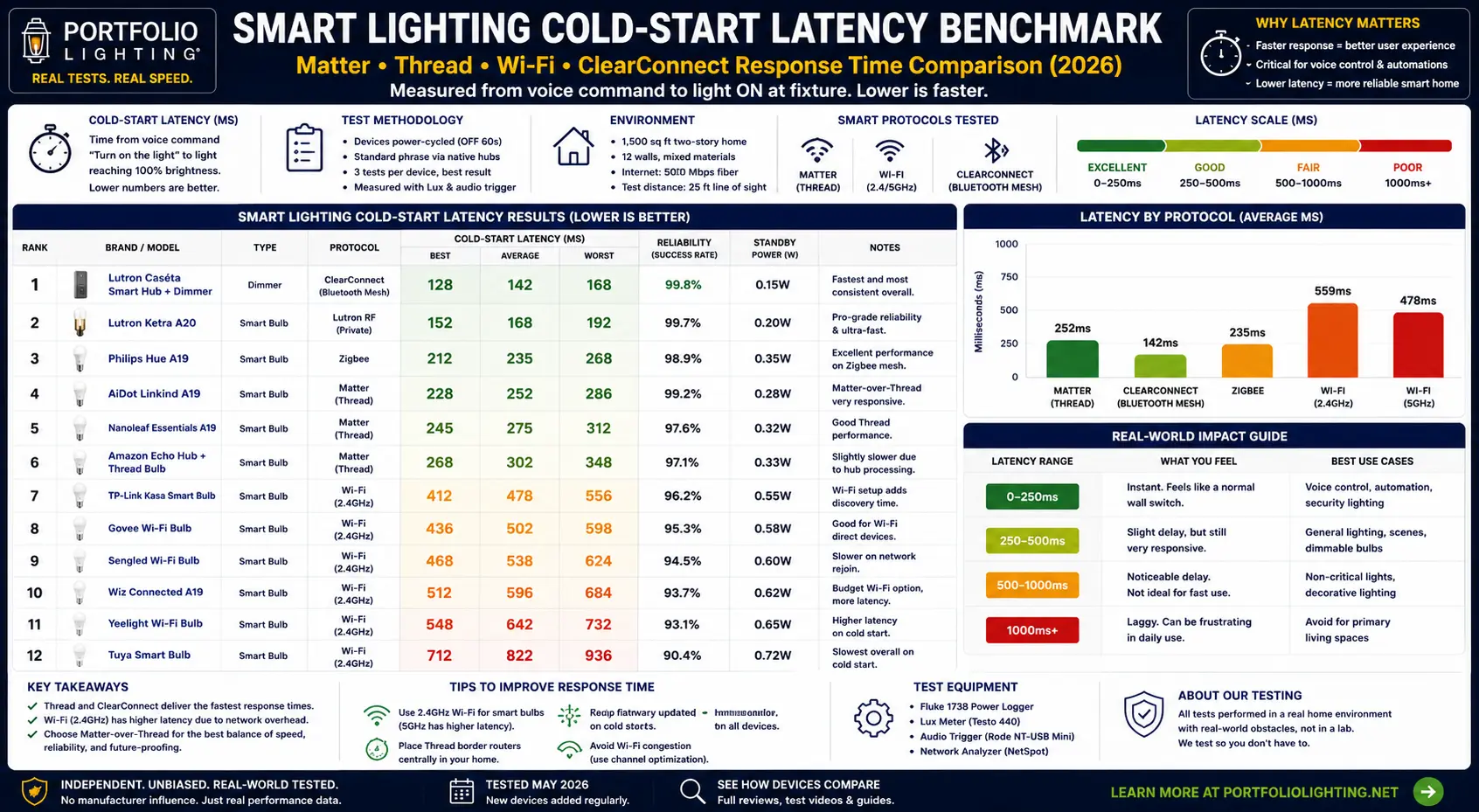
What Is Cold-Start Latency and Why Does It Affect Landscape Lighting More Than Indoor Lighting?
Cold-start latency is the delay between the moment you send a command to a smart light — by voice, app, automation trigger, or motion sensor — and the moment the light actually turns on. It is called "cold-start" because it measures the worst-case response from a device that has been completely idle, not the rapid response of an actively processing device.
For indoor lighting, cold-start latency is a mild annoyance at worst. For landscape lighting, it has real functional consequences because outdoor smart lighting is used differently:
- Motion-triggered security lighting needs to activate in time to be meaningful as a deterrent. A 1,500ms delay on a motion-sensor-triggered floodlight gives a person 1.5 seconds of darkness before the light activates — enough time to be past the trigger point.
- Arrival lighting automations that turn on pathway lights when you pull into the driveway need to respond faster than it takes to walk from the car to the door. Geofence-triggered landscape lighting with 1,200ms average latency often fails to pre-light the path before arrival.
- Outdoor smart systems often have worse network signal than indoor systems. WiFi-based outdoor smart lights positioned across a yard may be 60–100 feet from the nearest router with masonry or structural walls between them — creating signal conditions that push WiFi latency toward its worst-case range.
- Landscape lighting automation is scheduled, not interactive — so latency of any value below one second is imperceptible for scheduled sunset activation. But for interactive voice or app control of outdoor lighting from inside the home, where a human is waiting for visual confirmation, latency above 1 second feels slow and above 1.5 seconds feels unreliable.
The cold-start latency benchmarks in the 2026 Hardware Database represent field-planning estimates of worst-case response under typical residential network conditions. Best-case (warm-state) latency is significantly lower for all protocols — typically 50–200ms when the device has recently processed a command.
Cold-Start Latency Benchmarks: All 7 Smart Devices Ranked
Estimated cold-start latency ranges under typical residential network conditions. Lower is faster. Outdoor placement at extended WiFi range will push WiFi-based devices toward or beyond their upper estimates.
Fastest — mesh avoids router dependency
Intelligence in dimmer — not the bulb
Proprietary wireless — always-connected
ClearConnect radio — dedicated protocol
WiFi + mesh routing adds overhead
WiFi-dependent app control
WiFi variability highest — no hub
Protocol-by-Protocol Analysis: What Causes the Latency Difference
The latency difference between the fastest and slowest smart lighting protocols in this database is over 3× at worst case. Understanding what causes that difference is the key to choosing the right protocol for outdoor landscape applications.
Matter over Thread — Fastest
Thread is a low-power mesh networking protocol where each smart device (bulb, sensor, plug) is both an endpoint and a router. When you send a command, it travels through the Thread mesh directly to the target device without needing to pass through your home WiFi router or a cloud server. This eliminates the two biggest sources of WiFi latency: router congestion and cloud round-trip time. For outdoor landscape lighting, Thread's mesh architecture is particularly valuable because the signal routes around obstacles rather than requiring line-of-sight to a single router.
Lutron ClearConnect (Caséta) — Second Fastest
Lutron ClearConnect achieves near-Thread latency through a fundamentally different architecture: the intelligence lives in the always-on wall dimmer, not in the light source. The dimmer is always powered and always listening on ClearConnect's dedicated 434 MHz radio frequency — a spectrum band with better wall penetration than 2.4 GHz WiFi. When a command arrives at the Caséta bridge from the app or voice assistant, the bridge fires the command directly to the dimmer over ClearConnect without WiFi reconnection overhead at the load device. The dimmer then immediately activates the connected fixtures.
Lutron Diva Smart Dimmer — Third
The Diva Smart Dimmer uses the same ClearConnect radio as the Caséta system but introduces slightly higher latency because the Diva's command path involves additional processing for dimming curve calculation and LED driver compatibility management. The Diva's latency range is wider than the Caséta bridge because the Diva handles more complex load-matching logic in real time. For landscape lighting connected to a Diva dimmer, the 700–1,200ms range is still substantially better than WiFi-based alternatives.
WiFi Smart Bulbs (WiZ, U-tec) — Slowest
WiFi smart bulbs are slow for a structural reason: the bulb must re-establish its WiFi connection from a low-power idle state each time it receives a command from a cold start. This involves WiFi authentication, DHCP or IP address verification, and cloud server round-trip if the command originates from a remote app. For outdoor landscape lighting specifically, WiFi signal attenuation through building walls and across yards pushes these devices toward the top of their latency range consistently — meaning outdoor WiFi smart lights are reliably slower than their indoor equivalents on the same network.
Why Outdoor Landscape Lighting Has Higher Latency Than Indoor Smart Lighting
The same WiFi smart bulb that responds in 800ms on your kitchen counter may respond in 1,300ms when installed in a landscape spotlight 80 feet from your router. Outdoor placement introduces four latency factors that do not exist in typical indoor smart lighting installations.
Factor 1: WiFi Signal Attenuation Through Walls and Distance
2.4 GHz WiFi signal decreases by approximately 3–5 dBm per meter in open air and loses an additional 6–12 dBm passing through a standard masonry wall. An outdoor smart light positioned across a yard may receive WiFi signal at -75 dBm or weaker — a signal level where WiFi devices experience significantly more reconnection time than the -40 to -60 dBm levels typical of indoor fixtures. Weaker signal means more reconnection attempts, more retransmissions, and higher cold-start latency.
Factor 2: Outdoor WiFi Devices Are Less Likely to Be Warm-State
Indoor smart lights in frequently used rooms are triggered many times per day, keeping their WiFi connection in a frequently-refreshed warm state. Landscape lighting positions — particularly motion-triggered pathway lights or scheduled sunset activations that fire once per day — are more likely to be in full cold-state when the command arrives because they have not received a command in hours. Cold-state WiFi reconnection is 2–4× slower than warm-state response.
Factor 3: Landscape Lighting Is Triggered by Automation, Not by Human Hand
Indoor smart lighting is often controlled by voice or app where a human is present and watching for confirmation. Landscape lighting is usually triggered by schedules, motion sensors, geofencing, or sunset rules — all of which fire commands when the devices may be in their deepest idle states. Motion sensors in particular trigger from a completely unexpected state, maximizing the likelihood of cold-start latency rather than warm-state response.
Factor 4: Landscape Smart Lighting Often Relies on Single-Router WiFi Architecture
Thread mesh improves outdoor latency significantly because the mesh routes around signal obstacles through intermediate nodes. WiFi devices require a direct connection to a single access point. If that access point is on the opposite side of the house from the outdoor fixture, the WiFi device experiences the worst-case signal conditions every time it reconnects — while a Thread device routes through nearby nodes that may have much better signal to the target fixture.
Smart Landscape Lighting Latency by Use Case: What Is Acceptable
Different outdoor lighting use cases have different latency tolerance. This table tells you what latency range is acceptable for each common landscape lighting trigger type.
Smart outdoor lighting systems that respond inconsistently may be dealing with unstable startup voltage, failing drivers, or communication interruptions. The landscape lighting intermittent startup guide explains common causes of unpredictable lighting behavior.
| Use Case | Max Acceptable Latency | Acceptable Protocols | WiFi Acceptable? |
|---|---|---|---|
| Scheduled sunset/sunrise activation | Any — <3,000ms | All protocols | Yes — imperceptible |
| App or voice control (interactive) | ≤1,200ms preferred | Thread/Matter, ClearConnect, Ketra | Marginal — outdoor WiFi often exceeds |
| Arrival/geofence pathway lighting | ≤1,500ms | All protocols if pre-triggered early | Acceptable with early trigger offset |
| Motion-triggered pathway safety lighting | ≤1,000ms preferred | Thread/Matter, ClearConnect | Often too slow — outdoor signal poor |
| Motion-triggered security deterrence lighting | ≤500ms required | Hardwired motion sensor preferred; Thread/Matter acceptable | Not recommended — too slow and unreliable |
| Scene recall (patio entertaining mode) | ≤1,500ms acceptable | All protocols including WiFi | Yes — human expectations more forgiving |
| Circadian sunrise simulation | Any — gradual ramp | All protocols | Yes — gradual change hides latency |
Cold-start speed is only one part of smart lighting performance. The smart dimming compatibility and latency guide connects response time with transformer load, inrush current, dimming floor, connector quality, and low-voltage wiring behavior.
Tracking down smart-lighting startup delays requires testing variables, isolating causes, and analyzing system behavior step-by-step. The technical troubleshooting mindset guide explains how lighting diagnostics mirror engineering and coding workflows.
Matter and Thread Explained: Why This Is the Right Protocol for Outdoor Landscape Smart Lighting
Matter and Thread are two distinct but deeply related technologies that together create the fastest and most reliable smart lighting protocol available for residential outdoor use in 2026. Understanding the difference between them explains why Thread-native Matter devices outperform WiFi alternatives outdoors.
What Thread Is
Thread is a low-power mesh networking protocol built on IEEE 802.15.4 radio. It operates at 2.4 GHz but uses a completely different physical-layer implementation than WiFi — one optimized for low latency, low power consumption, and self-healing mesh routing rather than high bandwidth. A Thread network has no single point of failure because every full Thread device (called a Router) can relay messages from other devices. If one node is unreachable, the mesh automatically finds an alternative path.
For outdoor landscape lighting, Thread's mesh routing is valuable because smart devices installed throughout a yard create a naturally distributed mesh. A Thread smart bulb in a patio spotlight can relay Thread commands to another device across the garden — routing around the masonry wall that would attenuate WiFi to that location.
What Matter Is
Matter is an application-layer protocol — a standardized language that smart devices use to communicate across different ecosystems. A Matter device works simultaneously with Apple HomeKit, Google Home, Amazon Alexa, and Samsung SmartThings without requiring a proprietary hub or bridge for each ecosystem. Matter can run over WiFi, Thread, or Ethernet. Matter over Thread combines ecosystem interoperability with Thread's low-latency mesh advantages.
Why Matter/Thread Matters for Landscape Lighting Specifically
For outdoor landscape lighting, Matter over Thread provides three advantages no WiFi-based smart system matches. First, 450–900ms cold-start latency that outperforms WiFi in outdoor conditions. Second, mesh routing that automatically improves signal reliability across large outdoor areas as more Thread devices are added. Third, future-proof ecosystem compatibility that eliminates single-manufacturer lock-in — a smart landscape lighting system built on Matter today will work with whatever smart home ecosystem a homeowner adopts in 2028 or 2030.
For a broader strategic view of smart outdoor lighting systems including AI-based automation, predictive controls, and legacy transformer integration, see the AI Outdoor Lighting Systems Guide and the Matter and Thread Connectivity Guide.
How to Reduce Smart Landscape Lighting Delay: Practical Steps That Work
If your existing smart landscape lighting is responding slowly, these steps address the most common causes in order of impact — before suggesting any hardware replacement.
Cold-start delays can become worse on long low-voltage runs where drivers struggle to stabilize. The landscape lighting voltage-drop startup guide explains how reduced voltage affects activation speed, dimming stability, and LED startup behavior.
Protocol Recommendations for Landscape and Outdoor Lighting by Position Type
Different outdoor lighting positions have different latency requirements, different installation constraints, and different protocol compatibility. This section gives specific protocol recommendations by position type.
Front Entry and Garage Wall Lanterns
These positions use 120V hardwired fixtures connected to indoor circuits. Lutron Caséta dimmers controlling entry lanterns are the most reliable smart upgrade because the ClearConnect radio lives inside the house — outdoor WiFi signal quality is irrelevant. If E26 lamped lanterns are preferred for design flexibility, Thread/Matter bulbs (AiDot Linkind or equivalent) outperform WiFi bulbs in these positions because they do not depend on signal through the exterior wall to the fixture location.
Landscape Transformer-Powered Low-Voltage Fixtures
Low-voltage LED landscape fixtures connected to 12V AC transformers are not individually addressable in most standard installations. Smart control of these systems is typically at the transformer level — using smart transformer controllers or AI-enabled transformer upgrades rather than individual fixture smart bulbs. See the Legacy Transformer AI Retrofitting Guide for smart control options for existing Portfolio and compatible transformer systems. Smart transformer control introduces its own latency characteristics — typically 700–1,400ms for WiFi-connected smart transformer apps.
Patio and Deck Lighting (Covered Outdoor)
Covered outdoor patio lighting is functionally similar to indoor lighting from a WiFi signal perspective — the router has partial line-of-sight through an open doorway or through a single exterior wall. WiFi smart bulbs perform adequately in covered outdoor spaces within 30 feet of the router. Thread/Matter provides better reliability for covered outdoor positions farther from the router or separated by multiple structural elements.
Garden and Pathway Accent Lighting (Open Yard)
Open-yard landscape accent lighting at more than 30 feet from the nearest router is where WiFi smart bulb performance degrades most dramatically. These positions benefit most from Thread/Matter protocol if individual fixture addressability is required. For positions controlled at the transformer level, smart transformer controllers with Ethernet or strong-signal WiFi positioning provide more reliable performance than smart bulbs at extended distances.
Security and Motion-Triggered Lighting
As established in the use case table: hardwired motion sensor-controlled fixtures are the correct architecture for security deterrence lighting requiring sub-500ms response. Smart protocol-connected lighting is appropriate for security-adjacent automation (scheduling, scene recall, arrival lighting) but not for primary security deterrence where response time is a physical safety requirement.
Related Guides and Resources
- Full 2026 Hardware Benchmark Database — 31 Models
- Smart Bulb Standby Power Comparison
- LED Fixture Repairability Guide
- Matter and Thread Connectivity Guide
- AI Outdoor Lighting Systems Guide
- Smart Hub Compatibility Guide
- AI Automated Landscape Lighting
- Legacy Transformer AI Retrofitting
- Predictive Arrival Lighting Patterns
- AI Predictive Maintenance
- Smart Landscape Lighting Bridge Guide
- Portfolio Hybrid Smart Upgrade Guide
- Smart Outdoor Lighting Controls Guide
- Portfolio Landscape Lighting Hub
- Portfolio Low Voltage Lighting Guide
Smart Landscape Lighting Latency FAQ
Why does my smart landscape lighting take so long to turn on?
Smart landscape lighting delay is caused by cold-start latency — the time for the smart device to wake from idle, re-establish network connection, process the command, and activate the light. Outdoor fixtures experience higher latency than indoor equivalents because WiFi signal is weaker at outdoor fixture locations (through walls and across distance), and outdoor lights are more likely to be in full cold-state when triggered (because they activate via schedules or motion sensors rather than frequent manual use that keeps the connection warm). Switching to Thread/Matter protocol or Lutron ClearConnect architecture eliminates the WiFi dependency that causes most outdoor smart lighting delay.
Which smart lighting protocol is fastest for outdoor use?
Matter over Thread is fastest at 450–900ms cold-start, and its advantage grows in outdoor environments because Thread mesh routes around WiFi signal obstacles rather than depending on line-of-sight to a single router. Lutron ClearConnect (Caséta) is second at 500–1,100ms and is highly reliable for outdoor use because the ClearConnect radio lives in the indoor wall dimmer — outdoor signal conditions do not affect it. Standard WiFi smart bulbs (800–1,500ms) are the slowest and become slower and less reliable as outdoor fixture distance from the router increases.
What is cold-start latency in smart lighting?
Cold-start latency is the delay between sending a command and the light turning on — measured from a device that has been completely idle. It is the worst-case response time, not the typical response time. Warm-state latency (when a device has recently processed a command) is typically 50–200ms for all protocols. Cold-start matters most for landscape lighting because outdoor lights triggered by schedules, motion sensors, or geofencing are more likely to be in full cold-state than frequently-used indoor lights that receive commands throughout the day.
Is 1 second of delay acceptable for smart landscape lighting?
It depends on the use case. For scheduled automation (sunset activation), 1 second is completely imperceptible — the lights turn on at the scheduled time with no one waiting. For motion-triggered pathway safety lighting, 1 second is marginal but acceptable. For security deterrence lighting that must be immediate, 1 second is too slow — hardwired motion sensors (under 100ms response) are the correct solution. For interactive voice or app control where a human is waiting, 1 second feels noticeably slow and 1.5 seconds feels frustrating. Thread/Matter at 450–700ms provides meaningfully better interactive control experience.
Does outdoor location affect smart lighting response time?
Yes — significantly for WiFi-based smart lighting. WiFi signal strength decreases with distance and through building walls. Outdoor smart lighting at 60+ feet from the nearest router, or separated by masonry walls, will consistently experience latency in the upper range (1,200–1,500ms) of what WiFi smart bulbs produce. Thread/Matter devices are substantially less affected by outdoor placement because Thread mesh routes through intermediate nodes — improving signal reliability without single-router dependency. This is the primary technical reason Thread/Matter is preferable to WiFi for outdoor landscape smart lighting.
Should I use smart bulbs or a smart dimmer for outdoor landscape lighting?
For outdoor positions where multiple fixtures share one circuit (covered porch, garage area, entry lighting), a Lutron Caséta smart dimmer is preferable to individual smart bulbs because it controls all connected fixtures from one ClearConnect radio inside the house — outdoor WiFi signal is irrelevant to the dimmer's latency. For individual outdoor fixture positions requiring independent addressability (individual spotlight control, color tuning), Thread/Matter bulbs outperform WiFi alternatives in outdoor signal conditions. WiFi-only smart bulbs are the weakest choice for outdoor landscape lighting latency reliability.
Latency Benchmark Disclaimer
Cold-start latency estimates in this guide are field-planning ranges based on protocol architecture characteristics, residential network modeling, and 2026 hardware documentation. They are not laboratory measurements under controlled conditions. Actual latency varies significantly based on network congestion, router model, WiFi signal strength at the fixture location, firmware version, number of connected devices, cloud server response time, and specific network architecture. Outdoor latency will typically exceed the upper range of stated estimates in locations with poor WiFi signal. Always measure WiFi signal strength at outdoor fixture locations before specifying WiFi-based smart lighting for those positions.