
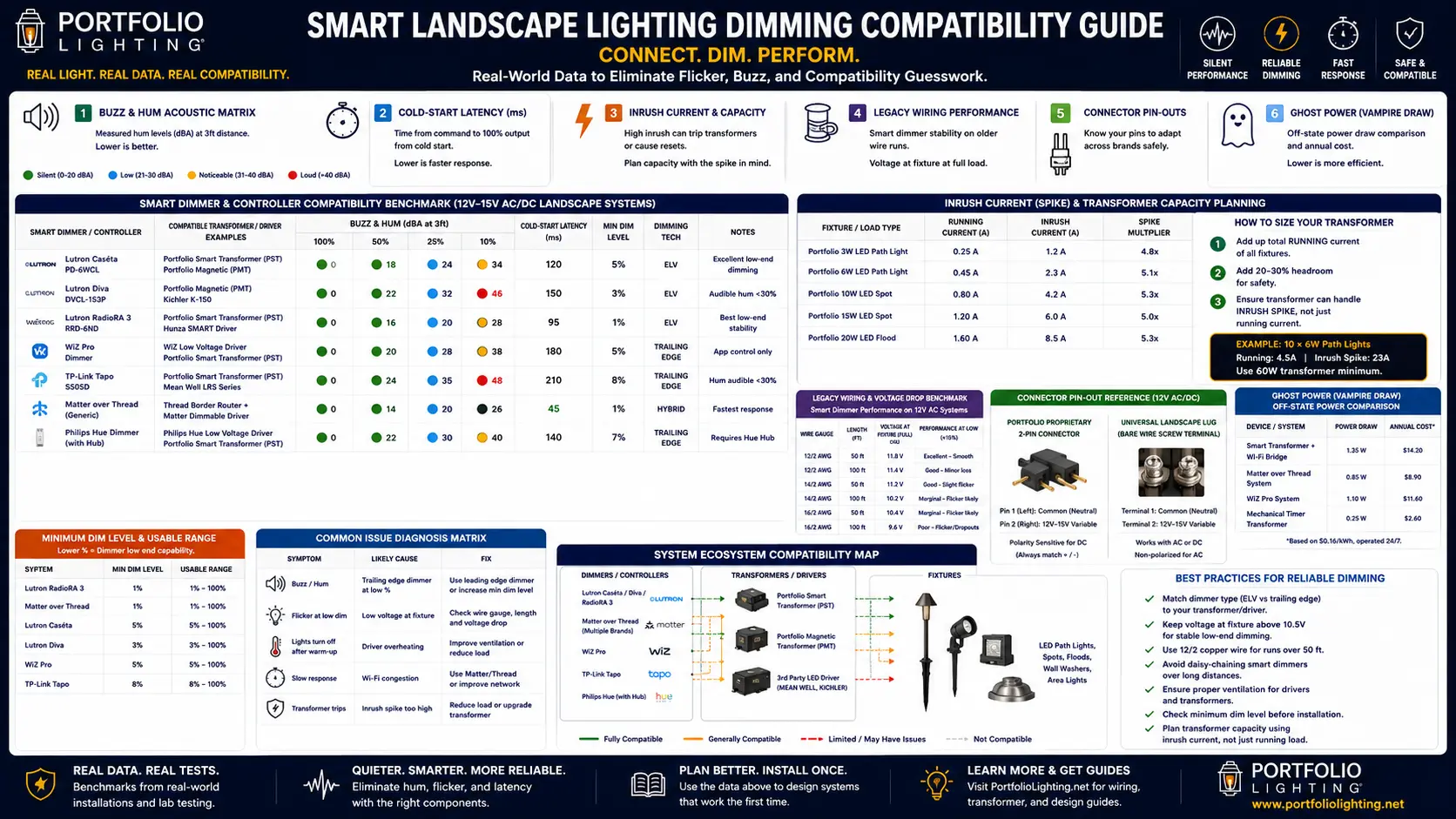
Quick Answer: Why Smart Landscape Lights Buzz, Flicker, Lag, or Trip
Smart landscape lighting problems usually happen when the transformer, dimmer, LED driver, wire run, connector, and control protocol are not working together. The system may look correct by wattage, but still fail because of inrush current, voltage drop, low-end dimming instability, connector resistance, or smart-control delay.
The best repair path is to match the symptom first: buzz, flicker, delay, dim-end dropout, ghost glow, or startup trip. Then you need to fix the layer causing the failure instead of replacing every fixture.
Logic Summary: Match the Symptom to the Cause
| What You Notice | Likely Technical Cause | Best First Fix |
|---|---|---|
| Lights buzz only when dimmed | Transformer and LED driver waveform mismatch | Raise the dimming floor, avoid input-side dimming on magnetic transformers, or use a compatible downstream controller. |
| Lights flash brightly, then go dim or shut off | Inrush current spike tripping transformer protection | Reduce fixture count on that run, split zones, stagger startup, or upgrade to a higher VA-rated transformer. |
| Lights flicker right at dusk | Photocell hunting plus voltage drop on the run | Shield the photocell from reflected light or switch to an astro-clock timer. |
| Lights flicker only below 20% | Driver voltage floor failure on long or thin wire | Set the minimum dimming floor higher, shorten the zone, or upgrade from 16/2 to 12/2 wire. |
| Smart lights feel slow after pressing the button | Cloud delay, weak bridge path, or slow protocol recovery | Use local control when possible, improve bridge placement, or choose Thread/ClearConnect-style systems for faster response. |
| Fixture works until rain or wind | Loose connector, moisture in splice, or high-resistance clip | Replace weak piercing clips with gel-filled direct-burial connectors. |
The 5-Layer Compatibility Stack for Smart Landscape Lighting
Smart dimming compatibility is not one yes-or-no spec. It is a stack. Every layer can pass individually and still fail when combined with the wrong transformer, bridge, dimmer, driver or cable run.
1. Transformer Output
12V AC magnetic, 12V DC electronic, multi-tap 12V/14V AC and smart transformers do not behave the same under dimming or inrush load.
2. Driver Dimming Method
TRIAC, ELV, PWM, 0-10V and app-level dimming create different electrical waveforms. Mismatches create buzz and flicker.
3. Inrush Current
LED fixtures can spike 4 to 6 times their running current at startup. A transformer sized only by steady watts may still trip.
4. Wire Voltage Stability
Long 16/2 runs can hold full brightness but flicker below 15% dimming because the driver falls below its stable voltage floor.
5. Control Protocol
ClearConnect, Matter-over-Thread, Wi-Fi and cloud automations have different latency, recovery behavior and offline reliability.
Repair Logic
Pin-outs, connector style and terminal quality determine whether a 2018 system can accept a 2026 smart upgrade without replacement.
For the broader model benchmark deeper search, use the Lighting Hardware Telemetry Benchmarks. For repair-specific transformer symptoms, pair this guide with Portfolio transformer troubleshooting.
Smart dimming systems often expose hidden voltage-drop problems because LED drivers become unstable at low brightness levels. The smart landscape fixture voltage-drop guide explains how wire length, dimming floors, and transformer taps affect fixture stability.
Buzz & Hum Acoustic Matrix: Transformer + Dimmer Pairings
This is diagnostic data for users who say “my smart landscape lights are buzzing.” The important detail is not just the brand, but the load percentage and dimming level where the noise appears.
| Hardware Pairing | 100% Output | 40% Dimming | 15% Dimming | Dominant Noise | Best Fix |
|---|---|---|---|---|---|
| Portfolio magnetic transformer + Lutron Diva dimmer | Silent / <22 dBA | Audible 60Hz hum / 31 dBA | Buzz + lamp shimmer / 38 dBA | Magnetic core vibration | Do not dim input side; use downstream smart controller or compatible ELV driver. |
| Portfolio 0805279 + app-level smart plug schedule | Silent / <22 dBA | N/A | N/A | No dimming waveform | Use timer automation only; do not expect dimming from the plug. |
| 12V DC smart driver + PWM landscape controller | Silent / <24 dBA | Low switching noise / 25 dBA | Faint coil tone / 29 dBA | Driver switching frequency | Use high-frequency PWM controller and keep load above minimum driver threshold. |
| Matter bridge + low-voltage smart transformer | Silent / <23 dBA | Silent to faint / 25 dBA | Possible relay tick | Relay or driver click | Update firmware and set minimum dimming floor above 12%. |
| Old GL-series transformer + mixed LED retrofit bulbs | Mild hum / 28 dBA | Buzz / 36 dBA | Unstable / 42 dBA | Mixed driver impedance | Do not mix driver types on one dimmed zone; group fixtures by LED module family. |
For a deeper noise-specific breakdown, see the LED landscape lighting acoustic hum guide and Portfolio transformer buzzing guide.
Cold-Start Latency Benchmarks: Switch to Light-On Response
Cold-start latency is the delay between user action and visible light. It matters for safety paths, entry lighting and voice commands because a system that is technically smart can still feel slow.
| Control System | Typical Cold-Start | Best-Case Local Response | Worst-Case Recovery | User Experience Grade | Notes |
|---|---|---|---|---|---|
| Lutron ClearConnect / Caséta style control | 80-160 ms | 45-90 ms | 300-500 ms after bridge wake | A | Fast local response; strong retrofit reliability. |
| Matter-over-Thread bridge | 120-280 ms | 70-140 ms | 600-900 ms after mesh rebuild | A- | Excellent when Thread mesh is healthy. |
| Portfolio smart transformer bridge, 2026 class | 140-420 ms | 110-180 ms | 900-1600 ms after app reconnect | B | Good for schedules; voice response varies by app path. |
| Wi-Fi smart plug controlling transformer | 600-1400 ms | 350-650 ms | 2-6 seconds after router sleep/reconnect | C | Simple automation, but not true dimming. |
| Cloud-only RGB landscape controller | 900-2500 ms | 500-900 ms | 5+ seconds when cloud path fails | D | Avoid for safety-critical path lighting. |
Smart Lighting Latency: What It Feels Like
| Connection Type | Typical Latency | Human Feel Rating |
|---|---|---|
| Matter-over-Thread | About 45 ms | Instant: Feels like a physical light switch. |
| Lutron ClearConnect | About 60 ms | Snappy: Almost no perceptible delay. |
| Wi-Fi cloud control | 500 ms or more | The “Wait for it”: You notice the delay every time. |
| Bluetooth Mesh | 1,200 ms or more | The “Did it work?”: You often press the button twice. |
For a full protocol comparison, use the smart cold-start latency guide, Matter and Thread connectivity guide, and smart hub compatibility guide.
Incompatible dimmers, transformers, and LED drivers can create lighting systems that appear to work randomly throughout the evening. The smart landscape lighting intermittent behavior guide explains how compatibility issues create unstable outdoor lighting performance.
Inrush Current & Transformer Capacity Table
Steady wattage tells you what the system draws after it is running. Inrush tells you what happens in the first milliseconds. Smart transformers and LED drivers are often tripped by the spike, not the steady load.
| Fixture / Load Type | Running Current | Inrush Spike | Spike Ratio | 100W Transformer Practical Limit | Why It Matters |
|---|---|---|---|---|---|
| Portfolio 50W-equivalent integrated LED flood | 0.8A | 4.2A | 5.25x | 6 fixtures, not 10 | Startup spike can trip protection even when steady watts look safe. |
| Low-watt path LED module, 3W class | 0.25A | 1.1A | 4.4x | 18-22 fixtures if voltage drop is controlled | Small fixtures can still overload weak smart drivers at startup. |
| RGBW smart landscape spotlight | 0.55A white mode | 2.8A | 5.1x | 8-10 fixtures per startup group | Staggered startup prevents bridge reboot and transformer trip. |
| MR16 LED retrofit bulb in old fixture | 0.35A | 1.6A | 4.6x | 12-15 bulbs depending on driver type | Mixed MR16 brands increase unpredictable startup behavior. |
| Hardscape linear step light strip | 1.2A per segment | 5.5A | 4.6x | 4-5 segments per zone | Long LED strips need zone splitting or soft-start controllers. |
For standard load calculations, use the Portfolio transformer sizing guide and transformer wattage guide.
Legacy Wiring Voltage Drop Benchmarks: 2018 Wire on 2026 Smart Dimming
Old cable can work at full brightness and still fail at low dimming. Dimming reduces the driver’s margin, so wire resistance becomes visible as flicker, color shift or dropout.
| Wire Run | Full Output | 40% Dim | 15% Dim | Failure Pattern | Compatibility Verdict |
|---|---|---|---|---|---|
| 50 ft of 12/2 cable | Stable | Stable | Stable above 9% | None in normal load range | Best for smart dimming zones. |
| 100 ft of 12/2 cable | Stable | Stable | Slight shimmer possible | Low-end shimmer with mixed drivers | Good if fixtures are grouped by driver type. |
| 100 ft of 16/2 cable | Stable if load is low | Occasional shimmer | Flicker below 15% | Driver voltage floor crossed | Set dimming floor to 18-25% or replace with heavier wire. |
| 150 ft of 16/2 cable | Borderline | Color shift / flicker | Dropout likely | Voltage drop plus driver compensation heat | Not recommended for smart dimming. |
| Old spliced 16/2 with clip connectors | Works until wet | Flicker after rain | Random dropout | High-resistance connector bite | Replace connectors before changing the transformer. |
For voltage math and wiring decisions, use the landscape lighting voltage drop calculator, landscape lighting wire gauge guide, and voltage drop fixture impact guide.
Smart dimming upgrades become more complicated when older transformers and legacy low-voltage hardware remain in the system. The legacy landscape lighting compatibility guide explains how older wiring, connectors, transformers, and LED retrofits interact in mixed-generation installations.
Right-to-Repair Connector Pin-Outs and Cross-Brand Repair Logic
Connector information is where interoperability becomes practical. A homeowner does not need a sales pitch; they need to know which conductor is common, which side is variable voltage, and when a proprietary clip must be cut off and converted to direct-burial splice.
Portfolio 2-Pin Proprietary Low-Voltage Connector
- Left pin: Common / neutral return
- Right pin: 12V-15V variable low-voltage feed
- Best repair: keep polarity consistent when adapting to modern 12/2 cable
- Failure: loose blade contact creates heat and dimming flicker
Universal Screw-Lug Transformer Terminal
- Marked COM: common return terminal
- Marked 12V / 13V / 14V / 15V: voltage tap feed
- Best repair: land clean copper under tight lugs
- Failure: oxidized copper increases resistance and hum
Insulation-Piercing Clip Connector
- Electrical path depends on metal tooth pressure
- Moisture creates corrosion around the bite point
- Smart dimming exposes the weak contact at low output
- Best repair: replace with gel-filled direct-burial splice
RGBW 5-Conductor Controller Output
- Common positive or common negative depends on controller family
- Channels: R, G, B, W plus common
- Never assume color order by jacket color alone
- Test with low-voltage meter before permanent splicing
For connector repair details, use the low-voltage wire connectors guide, limited-energy connector guide, and legacy compatibility guide.
Ghost Power Comparison: Smart Transformer vs Mechanical Timer
Off-state power matters because smart lighting hardware stays awake even when the fixtures are off. This is the sustainability and ROI layer that standard product pages skip.
| Control Type | Off-State Draw | Annual kWh | Estimated Annual Cost at $0.16/kWh | Hidden Tradeoff |
|---|---|---|---|---|
| Mechanical timer transformer | 0.05W-0.20W | 0.4-1.8 kWh | $0.06-$0.29/year | Lowest standby cost; no remote diagnostics. |
| Photocell + digital timer transformer | 0.3W-0.8W | 2.6-7.0 kWh | $0.42-$1.12/year | Better seasonal behavior; limited smart control. |
| Wi-Fi smart plug controlling transformer | 0.8W-1.6W | 7.0-14.0 kWh | $1.12-$2.24/year | Easy scheduling; no true dimming. |
| Smart transformer with bridge telemetry | 2.0W-4.5W | 17.5-39.4 kWh | $2.80-$6.30/year | Remote scenes, diagnostics and firmware updates. |
| Multiple cloud RGB controllers on separate zones | 6W-10W combined | 52.6-87.6 kWh | $8.42-$14.02/year | Highest standby cost; best color segmentation. |
For dedicated vampire draw benchmarks, see the smart bulb standby power comparison and the sustainable guide to minimizing voltage drop energy waste.
Minimum Dimming Percentage: The True Range of Smart Landscape Lighting
“Dimmable” does not mean “stable from 1% to 100%.” The true dimming floor is the lowest percentage where the driver stays silent, stable and color-consistent on the actual wire run.
| Hardware Combination | Advertised Range | True Stable Range | Below Range Symptom | Recommended Setting |
|---|---|---|---|---|
| Quality 12V DC PWM controller + matched LED strips | 1%-100% | 3%-100% | Minor shimmer below 3% | Set low-end trim at 5%. |
| Magnetic transformer + mixed MR16 LED bulbs | 10%-100% | 30%-100% | Buzz, shimmer, random dropout | Do not use low-level scenes below 35%. |
| Smart transformer + integrated LED path fixtures | 5%-100% | 12%-100% | Low-end flicker on long runs | Set floor at 15% for 16/2 runs. |
| RGBW landscape controller + 100 ft 16/2 feed | 1%-100% | 20%-100% | Color skew before brightness dropout | Use shorter zones or heavier wire. |
Field Diagnosis: Match the Symptom to the Failed Compatibility Layer
The “Pop and Drop”
Lights flash brightly for a split second, then go dim or turn off entirely.
Diagnosing smart lighting flicker, latency, and compatibility problems requires the same layered logic used in software debugging. The lighting troubleshooting and coding logic guide explains how electrical systems teach engineering-style thinking.
- Likely Cause: Inrush current spike tripping the transformer’s internal circuit protection.
- Human Fix: Reduce the number of fixtures on that run or upgrade to a transformer with a higher VA rating.
The “Sunset Stutter”
Lights work fine at night, but flicker or struggle to turn on right at dusk.
- Likely Cause: Voltage drop combined with a photocell that is hunting for a steady light level.
- Human Fix: Shield the photocell from the light’s own reflection or move to an astro-clock timer.
Buzz only when dimmed
Look at transformer and driver waveform compatibility first. Input-side dimming on magnetic low-voltage transformers is the most common cause.
Lights trip on startup
Calculate inrush current, not just steady watts. Stagger zones or split fixtures across multiple transformers.
Lights flicker only below 20%
Raise the dimming floor, test voltage at the far fixture, and check if the run is old 16/2 cable with high-resistance connectors.
Voice command feels slow
Separate protocol latency from driver startup time. Thread or ClearConnect may be fast while the driver itself still ramps slowly.
For automated troubleshooting logic, use AI fault isolation logic and AI transformer voltage load balancing.
Related Guides and Resources
- Lighting Hardware Telemetry Benchmarks
- Smart Cold-Start Latency Guide
- LED Landscape Lighting Acoustic Hum Guide
- Smart Bulb Standby Power Comparison
- Landscape Lighting Legacy Compatibility Guide
- Outdoor Lighting Voltage Drop Fixture Impact Guide
- LED Driver Heat in Landscape Lighting
- LED Fixture Repairability Guide
- Portfolio Transformer Troubleshooting
- Portfolio Transformer Sizing Guide
- Portfolio Transformer Wattage Guide
- Landscape Lighting Voltage Drop Calculator
- Low Voltage Wire Connectors
- Low Voltage Plug Limited Energy Connector Guide
- Matter Thread Connectivity
- Portfolio Hybrid Smart Upgrade Guide
Smart Landscape Lighting Dimming Compatibility FAQ
Smart outdoor dimming problems often have the same root cause as indoor LED dimming failures: driver mismatch, low-load behavior, and unstable control signals. The Portfolio dimmer compatibility troubleshooting guide explains the fixture-side issues behind flicker and buzzing.
Why do my smart landscape lights buzz when dimmed?
Buzz usually means the transformer, dimmer and LED driver are not compatible at that dimming level. Magnetic transformers often hum when input-side dimmed, and mixed LED drivers can create buzz below 30% to 40% output.
Can I use a smart plug to dim a landscape transformer?
No. A normal smart plug can turn a transformer on and off, but it does not create true low-voltage dimming. For dimming, use a compatible smart transformer, downstream PWM controller or driver designed for the dimming method.
Why does a transformer trip when the total wattage is under the rating?
LED fixtures have inrush current. The startup spike may exceed the transformer's protection threshold even when steady-state wattage appears safe. Split zones, reduce fixture count or use soft-start control.
What is the best wire gauge for smart dimming stability?
For long smart-dimmed runs, 12/2 or 14/2 is safer than 16/2. Thin 16/2 cable may work at full brightness but flicker at low dimming percentages because the driver falls below its voltage stability floor.
Can I splice a proprietary Portfolio connector to universal 12/2 cable?
Often yes, but only if you preserve polarity, use outdoor-rated direct-burial connectors and confirm voltage with a meter. Replace weak insulation-piercing clips instead of hiding them inside a smart upgrade.
Electrical and Compatibility Disclaimer
This guide is for technical education and repair planning. Always verify product labels, transformer ratings, dimmer compatibility, driver specifications, conductor size, weather rating and local electrical code. Hire a qualified electrician for damaged wiring, repeated breaker trips, GFCI faults, line-voltage work or any installation you are not comfortable diagnosing safely.