
Quick Answer: How Do You Wire the Portfolio HOSL04B 200W Multi-Tap Transformer?
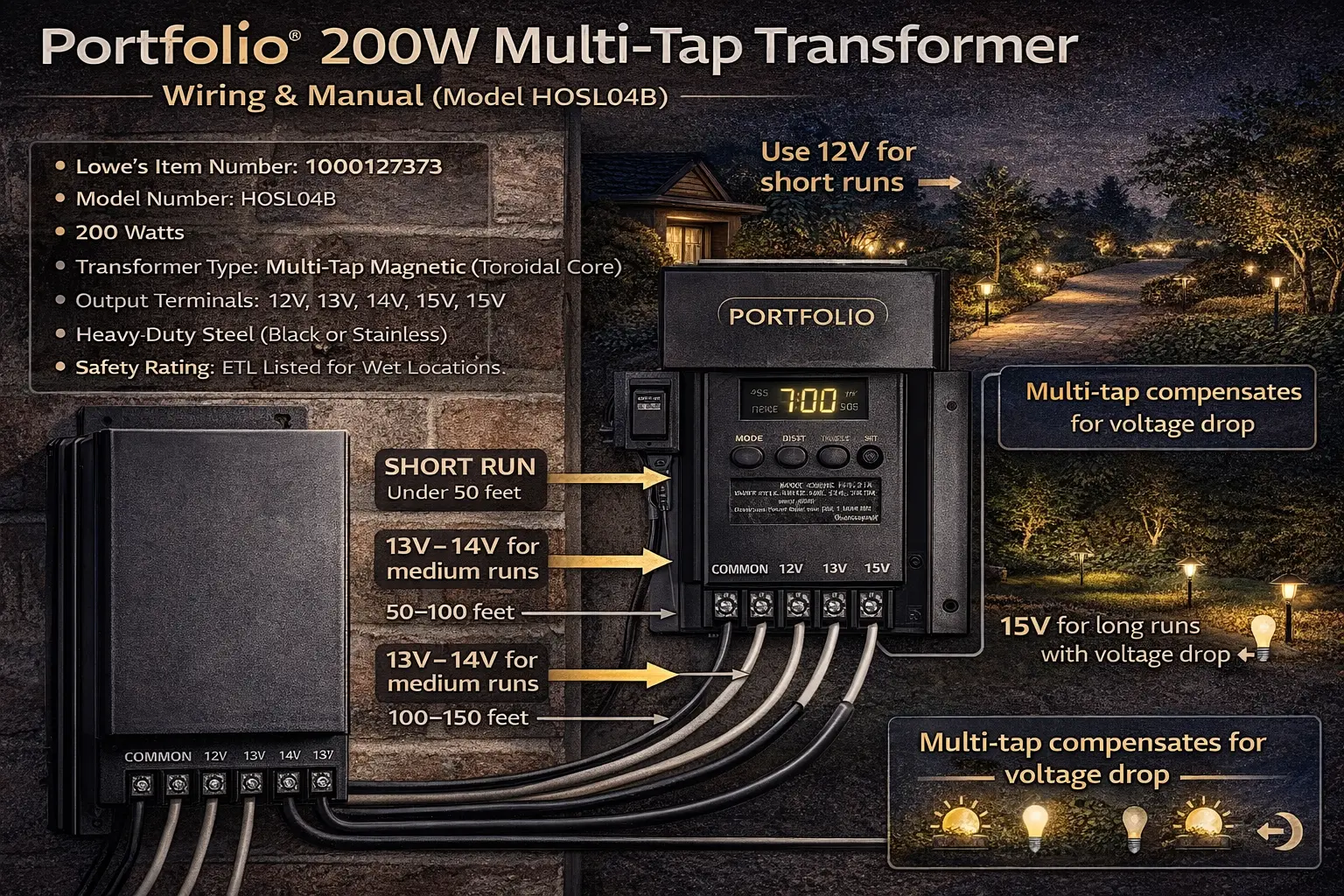
One wire from each run goes to common, and the other wire goes to the voltage tap you choose: 12V, 13V, 14V, or 15V. Use the lowest tap that still gives the farthest fixtures enough voltage. The longer the run and the heavier the load, the more likely you are to need a higher tap.
- Short run = usually 12V
- Longer run with dim far-end fixtures = 13V or 14V
- Very long or heavily loaded run = sometimes 15V
- Do not guess if you can calculate the drop first
If you want a broader overview of transformer types, capacity, and outdoor setup options, see Portfolio outdoor transformer lighting for more general help beyond this specific 200W multi-tap model.
Portfolio 200W Multi-Tap Identification Table
| Identifier | Specification |
|---|---|
| Primary Model Number | HOSL04B |
| Lowe’s Item Number | 1000127373 |
| UPC / GTIN | 0851776003739 |
| Wattage Capacity | 200 Watts Max |
| Transformer Type | Magnetic with High-Efficiency Toroidal Core |
| Voltage Output Taps | 12V, 13V, 14V, 15V AC |
| Terminal Style | Heavy-Duty Mechanical Lug (Screw-down) |
| Housing | Black Powder-Coated Heavy-Duty Steel |
| Efficiency Rating | DOE Level VI Compliant |
This transformer is designed for landscape lighting layouts that need more control than a basic 12V power pack provides. The entire reason the multi-tap system exists is to help you fight voltage drop on longer runs.
Lowes describes this Portfolio 200-watt unit as a low-voltage landscape transformer with a digital display, dusk-to-dawn sensor, two terminal connections, 12- or 14-gauge cable compatibility, a multi-tap design, and a toroidal core that improves performance and efficiency.
To calculate voltage loss across your system, use this voltage drop calculator to determine the correct wire size and tap setting.
To compare this 200W multi-tap transformer with other Portfolio models, use the Portfolio lighting model specs guide.
How to Use Multi-Tap Terminals for Long Wire Runs
The Portfolio 200W is not a standard single-output transformer. It gives you multiple voltage choices because long runs lose voltage as electricity travels down the cable. That is why lights at the far end of a run can look dimmer than lights closer to the transformer.
The solution is often not a bigger transformer. It is choosing the correct tap for the run.
If you are not sure which tap to use on a multi-tap transformer, use the voltage tap calculator to match your distance, wire gauge, and load to the correct output voltage.
What the taps really do
- 12V: normal output for short runs or light loads
- 13V: mild boost for moderate distance or moderate load
- 14V: stronger compensation for longer runs
- 15V: highest boost, usually reserved for severe voltage-drop conditions
The manual-family material for this multi-tap design shows 12V, 13V, 14V, and 15V outputs with a shared common, and notes that different terminals can be used as long as the total load on common stays within the transformer’s capacity.
If you need a broader step-by-step overview before wiring this transformer, this landscape lighting wiring guide covers the basic installation process, cable routing, and common connection mistakes.
Quick Reference Wiring Chart
| Tap | Typical Use | General Rule of Thumb |
|---|---|---|
| 12V Tap | Short runs and lighter loads | Use for runs under about 50 feet when voltage drop is minimal |
| 13V Tap | Moderate runs | Often useful around 50–100 feet depending on cable size and load |
| 14V Tap | Longer runs | Common choice when runs are long enough for noticeable dimming |
| 15V Tap | Severe drop or very long runs | Use carefully and mainly when calculations or measurements show it is needed |
These are rules of thumb, not universal guarantees. Wire gauge, total wattage, number of fixtures, and fixture type all change the right answer. That is why the voltage drop calculator belongs in your workflow every time.
If your lights look dim or uneven at the far end of the run, this landscape lighting voltage drop guide explains why it happens and how to choose a better tap setting or wiring plan.
For additional wiring diagrams and component-level specifications, refer to Portfolio lighting technical manuals and wiring diagrams.
Which Voltage Tap Should You Use?
- 12V Tap: Lights under 50ft + load under 80W
- 13V Tap: 50–100ft runs OR lights look slightly yellow
- 14V Tap: 100–150ft runs OR using 14-gauge wire with heavier load
- 15V Tap: Over 150ft OR measured voltage below 10.5V at fixture
- Manufacturer Model: HOSL04B
- Core Type: Toroidal (quieter and more efficient than standard transformers)
Using the correct tap prevents voltage drop, dim lighting, and uneven brightness across your system.
If you are not sure whether your cable size is part of the problem, review this landscape lighting wire gauge guide to see how wire thickness affects voltage drop, brightness, and overall transformer performance on longer runs.
The Clicks and Blinks Troubleshooting Section
1. Follow the 80% rule
Even though the nameplate says 200 watts, it is smart to keep the normal operating load under about 160 watts for cleaner headroom. That reduces stress and leaves room for startup behavior, uneven zone loading, and future additions.
2. Clicking often means overload or short circuit protection
The Lowes manual for the 200-watt Portfolio power pack says to check for overload, short circuits, poor terminal insertion, and bad fixture connections before pressing the reset button again. That fits the common real-world pattern: pinched cable, wet connector, exposed conductor, or too many watts on one transformer.
3. Check the sensor and timer logic too
The Portfolio 200-watt family uses a digital timer and dusk-to-dawn behavior, so if the system seems inconsistent, do not assume the transformer core itself is bad first. Verify the timer mode, photo-eye behavior, and outlet condition before digging up wiring.
How to Reset the Transformer Safely
- Turn the unit off and unplug it from the covered GFCI outlet
- Inspect all low-voltage wire connections and fixture connectors
- Look for underwater connectors, damaged cable, or pinched insulation
- Reduce the connected load if you suspect overload
- Press the reset button or restore power only after the fault is corrected
If you are not sure whether the problem is the transformer, the cable, or the fixtures, compare: transformer troubleshooting, how to test a landscape lighting transformer, and landscape lights not working.
Technical Specs Search Engines Like to Pull
- Built-in digital timer: manual on, dusk-to-dawn, or timed duration selections depending on family model behavior
- Toroidal core efficiency: newer Portfolio 200-watt listing notes improved performance and DOE Level VI efficiency
- Dual terminal connections: supports flexible wiring/home-run layouts
- Compatibility: 12-volt landscape lighting systems using common low-voltage cable sizes
- Cable compatibility: 12- or 14-gauge low-voltage cable on the newer listing, with older Portfolio manual-family guidance also covering low-voltage landscape cable installation
- Outdoor use: intended for outdoor low-voltage landscape lighting systems with a covered 120V Class A GFCI outlet
Wiring Rules That Matter More Than Most People Realize
For additional transformer manuals and model-specific wiring diagrams, refer to Portfolio outdoor transformer manuals to confirm correct tap usage and system setup.
- Keep the first fixture at least 10 feet from the transformer
- Do not bury low-voltage cable deeper than the manual allows
- Make sure no insulation is trapped under the terminal clamping plate
- Use the right cable gauge for the run length and load
- Distribute fixtures as evenly as possible across the run
If your system has a larger number of fixtures, switching to 12/2 professional-grade landscape wire improves voltage delivery and reduces dimming issues over long runs.
If you are planning a new run or replacing damaged wire, this landscape lighting cable guide explains what to use, how to route it, and how cable choice affects performance on a multi-tap transformer.
If you need more wiring depth, use the Portfolio transformer wiring diagram, how to wire landscape lighting, and landscape lighting wiring guide.
If you want to see how the transformer, cable, and fixtures connect as a complete system, use this low-voltage landscape lighting system diagram to compare your wiring layout with a standard setup.
Voltage Tap vs Distance and Load
| Tap | Distance | Best Use |
|---|---|---|
| 12V | Under 50 ft | Short runs, light load |
| 13V | 50–100 ft | Moderate runs |
| 14V | 100–150 ft | Longer runs or heavier load |
| 15V | 150+ ft | Very long runs or voltage loss issues |
Measuring voltage at the fixture with a basic multimeter is the most reliable way to confirm proper tap selection and identify voltage drop issues.
If your transformer has different tap labels or a similar discontinued model number, compare it with the Portfolio technical archive.
Upgrade and Performance Options
If you are using a 200-watt transformer, your system likely covers a larger area or includes multiple lighting zones. This is a good opportunity to improve brightness, consistency, and long-term reliability instead of just fixing one issue.
If you are deciding whether this transformer is the right size for your system, this landscape lighting transformer guide explains capacity, common sizing mistakes, and when it makes sense to move up to a larger unit.
- If lights at the far end of the run look dim or uneven, upgrading to higher-quality fixtures can make a noticeable difference. Start with Portfolio landscape spotlights and Portfolio LED landscape lighting for better output and efficiency.
- If your current transformer is struggling or nearing its limit, it may be time to upgrade instead of pushing it further. Review transformer replacement options and alternative transformer choices to find a better long-term solution.
- If you want more control over your system, timers and smart controls can be added even if the transformer itself is not Wi-Fi enabled. See smart hub compatibility and hybrid smart upgrade ideas for simple ways to expand your setup.
Portfolio 200W Multi-Tap Transformer FAQ
How do I choose between the 12V, 13V, 14V, and 15V taps?
Use the lowest tap that still delivers enough voltage to the farthest fixtures. Short runs usually stay near 12V. Longer runs often need a higher tap to compensate for voltage drop.
Why is my Portfolio 200W transformer clicking or blinking?
The most common causes are overload, a short circuit, loose cable terminations, or wet or damaged connectors. Start there before assuming the transformer core is bad.
Can this transformer run LED fixtures?
Yes. It is designed for 12-volt landscape lighting systems and can support modern LED fixtures as well as older halogen setups, as long as the load stays within capacity.
Do I need a new transformer if the farthest lights are dim?
Not always. On a multi-tap transformer, dim far-end lights often mean you need better tap selection, better wire sizing, or a better run layout before you need a replacement transformer.
Final Thoughts
The Portfolio 200W multi-tap transformer is built for more serious landscape lighting layouts, which means the most important skill is not just installing it. It is understanding how to use the taps correctly.
If your far-end fixtures are dim, the answer may be as simple as moving the run to a higher tap. If the transformer clicks or blinks, start with overload and short-circuit checks before you replace anything. And if you want to do it right the first time, use the voltage drop calculator instead of guessing.