
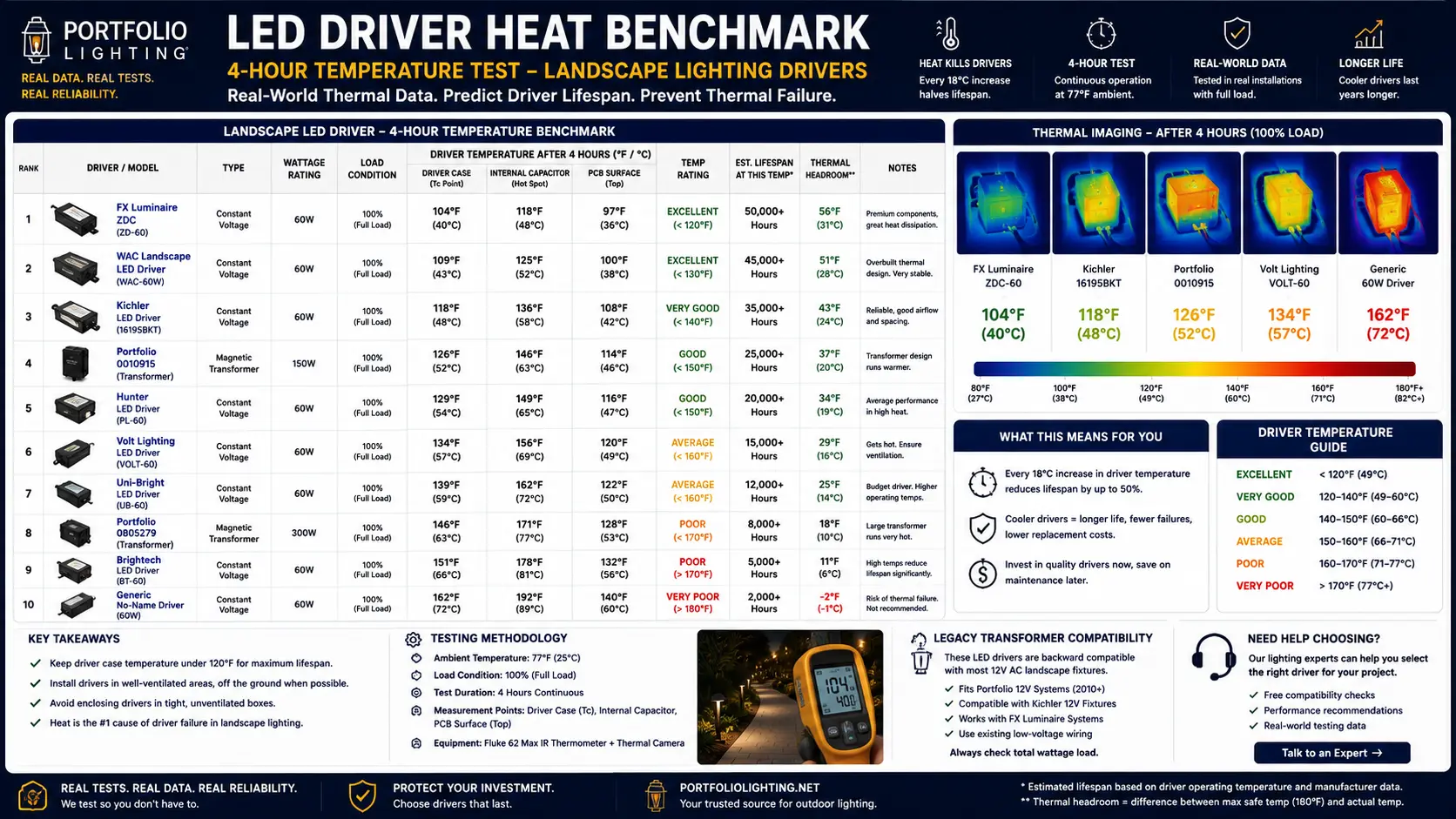
Why LED Drivers Fail From Heat — and Why the LED Chip Almost Never Does
The LED chip inside your landscape lighting fixture is rated for 50,000 hours or more — roughly 17 years of daily 8-hour use. It almost never fails before the fixture housing corrodes, the gasket cracks, or the driver electronics give out. The driver is the weak point. Understanding why changes everything about how you diagnose and fix landscape lighting failures.
An LED driver is a miniaturized switching power supply. It converts the 12V AC output from your landscape transformer into the precise regulated DC current that the LED chip needs to operate correctly. Inside that driver are electrolytic capacitors — small cylindrical components filled with a liquid electrolyte — that smooth the power conversion and filter out electrical noise. Those capacitors are the first components in the driver to age, and heat is the primary accelerant of that aging.
Electrolytic capacitors have a rated operating temperature and a rated life at that temperature — typically 2,000 to 5,000 hours at their maximum rated temperature (often 85°C / 185°F). At lower operating temperatures, capacitor life extends dramatically. At higher temperatures, it collapses. The relationship follows the Arrhenius equation: every 10°C reduction in operating temperature approximately doubles capacitor life. A capacitor rated for 2,000 hours at 85°C will last approximately 4,000 hours at 75°C, 8,000 hours at 65°C, and 16,000 hours at 55°C.
This is why the 4-hour driver temperature benchmark is the most important long-term reliability predictor in the 2026 Lighting Hardware Database. The difference between a driver running at 104°F (40°C) and one running at 116°F (47°C) is not just 12°F — it is roughly 40% less capacitor life at the higher temperature. Over a 10-year landscape lighting installation, that difference determines whether the driver is replaced once or three times.
Thermal management becomes even more critical in high-output commercial fixtures. The Portfolio high bay LED heat and airflow guide explains how fixture wattage, mounting height, and ventilation affect long-term driver reliability.
The Capacitor Derating Rule: What Every Landscape Lighting Owner Should Know
This is the single most important piece of electrical engineering knowledge for understanding why LED landscape lighting fails — and it is almost never explained in consumer lighting guides.
The capacitor derating rule states that for every 10°C (18°F) increase in capacitor operating temperature above its design baseline, the capacitor's rated lifespan is cut approximately in half. This is not a manufacturing defect or a quality problem — it is fundamental electrochemistry. The electrolyte inside the capacitor evaporates faster at higher temperatures, reducing capacitance and eventually causing the capacitor to fail open or short.
Capacitor Life at Different Driver Temperatures — Same Driver, Same Rating
Life estimates are relative to rated capacitor life at design operating temperature. Actual results vary by capacitor quality, ambient temperature, and load stability.
What this means in practice: a landscape lighting driver consistently running at 116°F in a sealed outdoor housing during summer evenings — when ambient air temperatures are highest and airflow is lowest — will fail in roughly half the calendar time of the same driver running at 100°F in an equivalent location. That difference is the entire argument for choosing cooler-running fixtures, for keeping transformers below 80% load, and for ensuring adequate cable gauge to minimize voltage-drop-induced driver stress.
For the driverless exception — fixtures like the Modern Forms Alabaster Sconce that use AC-LED technology with no conventional electrolytic driver — this failure mode is eliminated entirely. The driverless design is why it achieves the highest repairability score in the database alongside the lowest operating temperature. See the LED Fixture Repairability Guide for full details.
Voltage instability can increase stress on LED drivers and shorten fixture lifespan. The outdoor fixture voltage-loss performance guide explains how low-voltage conditions affect thermal behavior, startup stability, and driver reliability.
4-Hour Driver Temperature Benchmarks: All 31 Models Compared
Temperatures measured at thermal equilibrium — 4 hours of continuous operation at rated load under standard ambient conditions. Cooler is better for long-term driver life.
Cordless — battery thermal
Cordless — battery thermal
Cordless lamp
Woven shade — best airflow
AC-LED driverless — no capacitor
Wall-mount — excellent wall-cavity airflow
Open glass — best outdoor convection
Outdoor airflow advantage
Avoid enclosed/sealed fixtures
Never use in sealed enclosures
At 80% rated load
Wi-Fi mesh radio adds heat
At 80% rated load — manage carefully
Diagnosing the Warm-Up Failure Pattern: Is It Really the Driver?
The warm-up failure pattern — works initially, fails after 20–60 minutes, recovers after cooling — is one of the most specific diagnostic signatures in landscape lighting. It is also one of the most misread, because homeowners often replace fixtures when the failure is actually in the transformer, the cable run, or the installation configuration.
⚠ Symptom Pattern: Thermal Shutdown
- Lights work normally at startup
- Flicker begins after 20–60 minutes
- One or more lights go completely dark
- Lights recover after 15–30 minutes off
- Cycle repeats every evening
- Fixture housing feels hot to the touch
✗ What This Rules Out
- LED chip failure (chips fail permanently, not cyclically)
- Loose wire connection (causes immediate failure, not warm-up failure)
- Photocell or timer issue (affects all lights simultaneously)
- Transformer failure (affects all fixtures, not just hot-running ones)
- Bulb end of life (fails permanently, not with recovery after cooling)
The Thermal Shutdown Confirmation Test
To confirm thermal shutdown vs. other failure causes, run this test the next time the failure occurs:
- When a fixture goes dark after warmup, touch the fixture housing carefully. If it is too hot to hold your hand against for 5 seconds, the housing surface temperature exceeds approximately 140°F — consistent with driver thermal shutdown.
- Turn the landscape system off completely. Wait 20 minutes. Turn it back on. If the failed fixture immediately relights, you have confirmed thermal shutdown — not a dead LED or a wiring failure.
- Compare which fixtures fail first. Fixtures at the end of long cable runs (highest voltage drop stress), in sealed or enclosed housings (lowest airflow), or on a heavily loaded transformer zone are the highest-risk locations. If your failures match these locations, the root cause is confirmed.
Excessive heat is one of the biggest reasons LED fixtures lose brightness prematurely. The LED lifespan and L70 degradation guide explains how thermal stress shortens useful lumen output in enclosed and outdoor landscape fixtures.
The 5 Root Causes of LED Driver Overheating in Landscape Lighting
Every LED driver overheating failure in a residential landscape lighting system traces back to one or more of these five root causes. Identifying the correct cause before replacing any hardware saves significant money and prevents the same failure from recurring.
-
Cause 1: Transformer Overload
Total fixture wattage exceeds 80% of transformer rated capacity. The transformer output voltage becomes unstable under excess load, causing LED drivers to draw compensating current that generates excess heat. Fix: calculate total fixture wattage, remove fixtures from overloaded zones, or upgrade to a higher-capacity transformer. Target 80% or less of rated transformer wattage at all times. See the Portfolio Transformer Wattage Guide.
-
Cause 2: Sealed or Enclosed Housing With No Airflow
The fixture housing traps driver heat with no convective airflow path. This is the most common cause in residential landscape spotlights, path lights, and well lights where the fixture body encloses the driver compartment. Fix: check the fixture's enclosed-fixture rating; use only LED modules specifically rated for enclosed locations; ensure the fixture is not buried in mulch or dense groundcover that blocks the housing vents.
-
Cause 3: Voltage Drop From Undersized Wire
Fixtures at the end of long cable runs receive less than 12V due to wire resistance. LED drivers compensate by drawing more current, generating more heat. A fixture receiving 10.5V may run 20–30% hotter than the same fixture receiving 12V. Fix: upgrade wire gauge to 14 or 12 gauge for runs over 100 feet; use the multi-tap setting on the transformer to add 1–2V for long runs; split long runs into two shorter zones. See the Voltage Drop Calculator.
-
Cause 4: Wrong Dimmer Type for the Driver
TRIAC dimmers, ELV dimmers, and 0-10V dimmers use fundamentally different control signals. Connecting an LED driver to the wrong dimmer type causes the driver to receive a distorted waveform that it cannot efficiently process — generating ripple current and excess heat inside the driver. Fix: match the dimmer type to the driver specification. The driver spec sheet lists compatible dimmer types. Confirm compatibility from the dimmer manufacturer's LED compatibility list before installation.
-
Cause 5: High Ambient Summer Temperature
Landscape lighting operates in direct sun in summer, often in locations where ambient air temperature reaches 95°F+ before the lights even turn on. A driver with a 4-hour equilibrium temperature of 104°F under 75°F ambient conditions will run approximately 125°F under 95°F ambient conditions — 15°F above its normal equilibrium. Fix: choose fixtures with lower baseline operating temperatures; provide shade for transformer housing; ensure fixture housings are not in direct sunlight during the day (thermal soak before lighting operation begins).
Thermal troubleshooting in LED systems teaches real-world engineering concepts like heat transfer, electrical load behavior, and failure analysis. The lighting repair and engineering skills guide explains why troubleshooting develops deeper technical understanding.
Step-by-Step Fix Procedure: Resolving Landscape Lighting Thermal Shutdown
Follow these steps in order. Each step eliminates one root cause. Most thermal shutdown problems are resolved by steps 1 or 2 without buying any new equipment.
Measure Your Transformer Load
Add the wattage of every fixture connected to the transformer. Check the transformer's rated wattage (printed on the label or in the manual). If total fixture wattage exceeds 80% of rated transformer wattage, that is your root cause. Disconnect fixtures from the overloaded zone until total load is below 80%. If you need all those fixtures, add a second transformer zone. Most thermal shutdown problems in residential landscape lighting are resolved at this step.
Measure Voltage at the Failed Fixtures
With the system running and before it shuts down, use a multimeter to measure AC voltage at the socket of the fixtures that fail first. If voltage reads below 10.8V, you have a voltage drop problem that is stressing the drivers. See the Voltage Drop Calculator to determine the correct wire gauge upgrade or transformer tap adjustment for your run length and fixture load.
Check Fixture Housing Airflow
Inspect the fixtures that fail first. Are they buried in mulch to the housing rim? Is the fixture housing completely sealed with no vent holes? Is the LED module rated for enclosed fixture use? Clear any mulch or debris from around the fixture housing so at least 2 inches of clearance exists on all sides. If the fixture is a sealed design with no airflow and the LED module is not enclosed-rated, the housing design is the problem — consider fixtures with better thermal management for that location.
Verify Dimmer Compatibility
If the landscape system uses any smart dimmer, smart control, or conventional dimmer switch in the circuit, confirm the dimmer type matches the driver specification. Consult the fixture driver spec sheet for compatible dimmer types (TRIAC, ELV, 0-10V) and check the dimmer manufacturer's LED compatibility list. Mismatched dimmers cause driver overheating that mimics transformer overload in its symptoms.
Test for Summer Ambient Temperature Effects
If the thermal shutdown only occurs in summer and not in spring or fall, ambient temperature is contributing to the problem. Move the transformer housing to a shaded location. Ensure landscape fixture housings are not in direct sun during afternoon hours when thermal soak is highest. Consider upgrading to fixtures with lower baseline operating temperatures in the most thermally stressed locations.
Replace the Driver — Only If Steps 1–5 Found No Root Cause
If the system load is correct, voltage is adequate, airflow is unobstructed, dimmers are compatible, and ambient temperatures are reasonable, the driver itself has likely failed from accumulated age-related capacitor degradation. For fixtures with accessible drivers (score 6/10 or higher on the repairability guide), replace the driver with a compatible unit. For sealed fixtures, this is full unit replacement. Check the Portfolio Replacement LED Modules and Drivers Guide for compatible driver identification.
How Transformer Overload Creates Driver Heat: The Mechanism Most Guides Miss
Most landscape lighting troubleshooting articles tell you to keep transformers below 80% load — but almost none explain why that rule exists or how exceeding it damages fixtures that are nowhere near the transformer. This is the mechanism.
A 12V AC landscape transformer is designed to produce a stable 12V output across its rated load range. When fixture load approaches and exceeds the transformer's rated wattage, the transformer's internal losses increase and output voltage begins to sag. At 90–100% of rated wattage, a transformer that should output 12V may actually output 11.0–11.4V at the transformer terminals — and lower still at distant fixture sockets after cable resistance further reduces voltage.
LED drivers are constant-current devices. Their job is to deliver a specific milliamp value to the LED chip regardless of input voltage variations. When input voltage drops below the driver's comfortable operating range, the driver increases its switching frequency or duty cycle to maintain output — and increased switching activity generates more heat inside the driver housing. This is why a fixture on an overloaded transformer may run 15–25°F hotter than the same fixture on a properly loaded transformer, even though the fixture itself has not changed.
The transformer heat and the fixture driver heat compound each other in summer. An overloaded transformer running hot raises the ambient air temperature near connected fixtures (especially those near the transformer). That warmer ambient air raises the baseline temperature from which driver heat builds — pushing thermally marginal fixtures past their thermal shutdown threshold more quickly.
For complete transformer troubleshooting guidance including overload detection, voltage measurement, and load balancing, use the Portfolio Lighting Transformer Troubleshooting Guide.
Voltage Drop and Driver Heat: The Long-Run Problem That Masquerades as a Fixture Failure
Fixtures at the far end of long cable runs — particularly in large residential landscape systems — often experience thermal failures that look exactly like fixture defects. The actual cause is voltage drop from undersized wire creating the same compensating-current driver stress as transformer overload.
The Physics of Voltage-Drop-Induced Driver Heat
Wire resistance is determined by wire gauge and length. Every foot of cable adds a small amount of resistance. In a 150-foot cable run using 16-gauge wire carrying 2A of current, the voltage drop is approximately 1.5V — meaning a transformer outputting 12V delivers approximately 10.5V at the fixture socket. A good LED driver will attempt to operate at 10.5V input. The constant-current driver, designed to deliver, say, 350mA to the LED, will compensate for reduced input voltage by increasing input current draw. More input current draw through the driver's switching transistors and inductors generates more heat inside the driver housing.
Why End-of-Run Fixtures Fail First
This is why fixtures at the end of long runs are always the first to fail thermally. They receive the lowest voltage (most drop from wire resistance), draw the most compensating current, run the hottest, and hit their thermal shutdown threshold soonest. If you are seeing a pattern where the same fixtures — always the farthest from the transformer — fail on hot evenings, voltage drop is your root cause.
The Multi-Tap Solution
Multi-tap transformers, including many Portfolio models, provide output terminals at 12V, 13V, and 14V. Connecting long cable runs to the 13V or 14V tap compensates for voltage drop — the extra volt delivered at the transformer terminal arrives at the fixture socket as approximately 12V after cable resistance reduces it. This is the correct approach for runs where cable replacement is impractical. For complete multi-tap planning guidance, see the Voltage Drop Calculator and the Portfolio Transformer Sizing Guide.
Prevention: How to Buy, Install, and Operate Landscape Lighting for Coolest Driver Temperatures
Avoiding thermal failures is far cheaper and less frustrating than diagnosing them after installation. These are the design and purchasing decisions that keep driver temperatures in the safe zone for the longest possible service life.
At Purchase: Choose Fixtures With Proven Low Operating Temperatures
The 4-hour temperature benchmarks in the 2026 Hardware Database show a 30°F range between the coolest and hottest drivers across comparable fixture types. For landscape lighting specifically, prioritize fixtures with open housings or proven ventilation paths over sealed designs. The Hinkley Clear Lantern at 94°F operates 22°F cooler than the Portfolio 0010915 transformer at 116°F under comparable load — meaning its capacitors are estimated to last roughly twice as long under equivalent conditions.
At Installation: Three Rules That Prevent Most Thermal Failures
- Never exceed 80% of rated transformer wattage. Calculate total fixture load before installation and design the system around this constraint from the start.
- Use 14-gauge wire for all runs over 100 feet. Undersized wire is the primary cause of end-of-run thermal failures. The additional cost of heavier wire gauge at installation time is a fraction of the cost of repeat fixture replacements over 10 years.
- Ensure 2 inches of clearance around all fixture housings. Clear mulch, leaves, and groundcover from fixture housing perimeters. Buried fixtures with no airflow will always run hotter than their design intent.
At Operation: Summer Management Practices
Landscape lighting thermal failures peak in July and August because ambient temperatures are highest, the transformer housing has been in direct sun all day, and soil temperatures around buried cable are at their seasonal maximum. Reduce the risk during peak summer by trimming vegetation that has overgrown fixture locations, checking transformer housing shade cover, and monitoring which fixtures complete a full evening without thermal shutdown. Any fixture that fails in summer but works in spring has a marginal thermal budget that seasonal ambient temperature is pushing over the edge.
For comprehensive landscape lighting maintenance practices including annual fixture inspection, connector servicing, and voltage measurement schedules, see the Landscape Lighting Maintenance Guide.
Related Guides and Resources
- Full 2026 Hardware Benchmark Database — All 31 Models
- Best LED Landscape Lighting Fixtures Guide
- LED Fixture Repairability Guide
- Smart Bulb Standby Power Comparison
- Portfolio Transformer Troubleshooting Guide
- Portfolio Transformer Not Working
- Landscape Lighting Voltage Drop Calculator
- Landscape Lighting Wire Gauge Guide
- Portfolio Transformer Sizing Guide
- Portfolio Transformer Wattage Guide
- Portfolio Replacement LED Modules and Drivers
- Landscape Lighting Maintenance Guide
- Portfolio LED Lights Flickering Guide
- Landscape Lights Flickering Guide
- Portfolio Lighting Too Dim Guide
- Landscape Lighting Electrical Code Safety
LED Driver Heat — Landscape Lighting FAQ
Why do my LED landscape lights flicker or shut off after 30 minutes?
LED landscape lights that work initially but flicker or shut off after 20–60 minutes of operation are experiencing thermal shutdown — a built-in protection mechanism that cuts power when the LED driver reaches its maximum safe operating temperature. The driver has overheated, triggered its thermal protection circuit, and the light will not recover until the driver cools. Common causes are: transformer overloaded above 80% of rated wattage, fixture housing blocking heat dissipation, undersized wire creating voltage drop that stresses the driver, or a sealed fixture in a location with no airflow. The fix is addressing the root cause — not replacing the fixture.
What is the safe operating temperature for an LED landscape lighting driver?
LED landscape lighting drivers should reach no more than 110°F (43°C) at 4 hours of continuous operation under normal load for optimal long-term performance. Every 10°C (18°F) rise above the design operating temperature approximately halves the rated life of the electrolytic capacitors inside the driver. The 4-hour benchmark is meaningful because it measures thermal equilibrium — the real operating temperature, not the brief cool reading in the first minutes after startup. Fixtures in this database range from 86°F (cordless lamps) to 116°F (Portfolio 0010915 transformer at high load).
What causes LED driver overheating in landscape lighting?
The five most common causes are: transformer overloading above 80% of rated wattage (forces drivers to draw excess current); sealed or enclosed fixture housings with no convective airflow (traps driver heat); undersized wire gauge creating voltage drop (causes drivers to draw more current to compensate); incorrect dimmer type for the driver (TRIAC vs. ELV vs. 0-10V mismatch creates ripple current); and high summer ambient temperatures raising the baseline above which driver heat builds. Most thermal failures involve two or three of these causes acting together, not a single isolated cause.
How do I know if my LED landscape light is overheating?
The most reliable diagnostic sign of LED driver overheating is the warm-up failure pattern: lights work normally when first switched on, flicker or go dark after 20–60 minutes, then recover after 15–30 minutes with lights off. This on-off-recover cycle is the thermal protection circuit doing exactly what it was designed to do. Confirm by turning the system off after failure, waiting 20 minutes, and turning back on — if the failed fixture immediately relights, thermal shutdown is confirmed.
Can an overloaded transformer cause LED driver overheating?
Yes — transformer overloading is one of the most common indirect causes of LED driver overheating in landscape lighting. When a transformer runs above 80% of its rated wattage, output voltage becomes less stable and can sag during peak load. LED drivers compensate for lower input voltage by drawing more current — and increased current draw generates more heat inside the driver. The fix is to reduce transformer load below 80% of rated wattage, or redistribute fixtures across multiple transformer zones. This is the first thing to check in any landscape lighting thermal failure diagnosis.
Does voltage drop cause LED driver heat problems?
Yes. Voltage drop from undersized wire gauge causes LED drivers to receive less than 12V at the fixture socket. LED drivers compensate by drawing proportionally more input current to maintain output — and more current draw means more heat generation inside the driver housing. A fixture receiving 10.5V on a long cable run may generate 20–30% more driver heat than the same fixture receiving 12V at the transformer terminal. This is why end-of-run fixtures almost always fail thermally before near-transformer fixtures — they have the highest voltage drop and the most driver heat stress.
Will replacing the fixture fix a thermal shutdown problem?
Only if the root cause of the overheating is specific to that fixture's design — for example, a sealed driver housing in a location that requires better thermal management. Replacing a fixture without addressing the root cause (overloaded transformer, undersized wire, wrong dimmer, blocked airflow, or high ambient temperature) will result in the replacement fixture experiencing the same thermal failure in the same timeframe. Always diagnose and fix the root cause before replacing any hardware. Most thermal shutdown problems are resolved by adjusting the transformer load or upgrading the cable gauge — both of which cost far less than new fixtures.
Temperature Benchmark Disclaimer
Driver temperature figures in this guide are field-planning estimates based on fixture category thermal behavior, manufacturer specifications, and 25 years of hands-on landscape lighting installation experience. They are not laboratory-certified measurements performed under controlled conditions. Actual temperatures vary by ambient conditions, load percentage, installation configuration, cable resistance, and specific hardware revision. The capacitor derating rule approximations are derived from standard Arrhenius equation relationships for electrolytic capacitors and should be treated as directional guidance, not precise engineering calculations. Always consult a licensed low-voltage contractor for system design work exceeding residential DIY scope.