Portfolio Lighting Replacement Photocell
Use this page to identify the right replacement photocell and narrow down which sensor type best fits your fixture.
Read the guide
If your Portfolio dusk-to-dawn light is not working correctly, the problem is often the photocell sensor—not the whole fixture.
Most photocell issues show up as lights staying on all day, never turning on at night, or cycling on and off at the wrong time.
Use the quick guide below to confirm the problem and replace the photocell the right way.
If you need broader diagnostic help first, start with the Portfolio lighting troubleshooting hub. If you already know the sensor is bad and want help finding the correct part, see Portfolio lighting replacement photocell.
See Replacement Photocell HelpA Portfolio photocell is likely bad if your outdoor light stays on during the day, never turns on at night, or behaves inconsistently. Before replacing it, check the bulb, wiring, and power source to confirm the sensor is the actual problem.
If the issue looks bigger than one fixture or the sensor behavior is inconsistent across the system, review landscape lighting photocell not working for broader troubleshooting.
| What You See | Most Likely Cause | What To Do |
|---|---|---|
| Light stays on all day | Photocell stuck or blocked | Clean or replace sensor |
| Light never turns on | Bad sensor or bulb | Check bulb, then photocell |
| Light flickers at dusk | Weak or failing sensor | Replace photocell |
| Works only manually | Photocell failure | Replace sensor |
| Multiple lights affected | Transformer or wiring issue | Check system, not just sensor |
Most photocell problems can be identified in seconds by matching the symptom first.
Always confirm the problem before replacing parts.
Fast answer: If the light works manually but not automatically, the photocell is usually the problem. If multiple lights fail together, check the transformer, timer, or shared wiring first.
Photocells are one of the most overlooked parts in outdoor lighting systems, but they control one of the most important functions. They are what allow many porch lights, garage fixtures, security lights, and outdoor decorative fixtures to turn on automatically at dusk and switch off again at daylight without daily manual adjustment.
If your Portfolio exterior light is behaving strangely, this page should help you decide whether the photocell is actually the problem or whether the real issue is the bulb, the wiring, the timer, the transformer, or the fixture itself. It also connects naturally with Portfolio lighting troubleshooting, outdoor lighting, transformer troubleshooting, and landscape lights not working if the issue turns out to be larger than a single sensor.
A Portfolio photocell is a light-sensing component that automatically turns an outdoor fixture on at dusk and off at dawn. It reacts to ambient light levels instead of relying on a manual switch every evening. That makes it a common feature in exterior wall lights, flood lights, security fixtures, and certain outdoor system controls.
For you as the homeowner, the benefit is simple convenience. A properly working photocell keeps outdoor lighting consistent without needing daily adjustment. It helps with visibility near entries, garages, walkways, porches, patios, and yard features. In some installations, photocells also work alongside timers or transformers, especially in broader landscape lighting and low voltage lighting systems.
When the photocell fails, the fixture often becomes confusing rather than completely dead. The light may come on too early, not come on at all, flicker around dusk, or stay on during full daylight. Those symptoms make many homeowners think the bulb or fixture has failed, when the real issue is the sensor no longer reading natural light correctly.
One of the easiest ways to diagnose a photocell problem is by looking at the pattern of failure. Outdoor fixtures with bad bulbs and fixtures with bad photocells often behave differently.
These symptoms are especially common on exposed outdoor fixtures where the photocell sits in rain, sun, dirt, and changing temperatures. Over time, moisture, corrosion, and general wear can weaken the sensor or its wiring. This is why photocell replacement becomes a common repair topic on older Portfolio outdoor lighting, wall lantern, and flood lighting fixtures.
Before pulling the fixture apart, it helps to rule out the other common failure points. This saves time and prevents replacing the photocell when the real problem is somewhere else in the system.
If the problem started after storms or wet weather, see Portfolio lights not working after rain to rule out moisture-related wiring or fixture damage.
If the fixture schedule seems wrong but the sensor is not the cause, check Portfolio light timer not working before replacing the photocell.
If the bulb is burned out, the photocell may be working normally even though the light never comes on. This is especially important in fixtures using replaceable bulbs like MR16 LED replacement bulbs or other specialty replacements. A fresh bulb is often the fastest first test.
Dirt, spider webs, mulch splash, or even nearby decorative items can interfere with how the photocell reads light. If the sensor is blocked, the fixture may think it is darker than it really is.
Loose connections, damaged insulation, or moisture inside the fixture can mimic a sensor failure. Outdoor electrical problems often show up after rain, seasonal freeze-thaw cycles, or years of weather exposure. If the fixture is part of a larger low-voltage system, also review landscape lighting wiring and wire connector guidance.
In some setups, the issue may not be the photocell at all. If multiple outdoor lights fail together or the whole run behaves strangely, the real problem may be the transformer or timer. That is where transformer not working, transformer timer not working, and outdoor transformer lighting become more relevant than a single sensor replacement.
This table helps connect common symptoms with likely causes before you start replacing parts.
| Symptom | Likely Cause | Best Next Step |
|---|---|---|
| Light stays on during the day | Photocell stuck in dark mode or sensor blocked | Clean the sensor, test exposure, then replace the photocell if needed |
| Light never turns on at night | Bad bulb, failed photocell, or broken connection | Test the bulb first, then inspect photocell wiring and the fixture socket |
| Light flickers at dusk | Weak sensor, unstable wiring, or voltage issue | Inspect the photocell and wiring, then check transformer or power feed if needed |
| Fixture works only with manual override | Photocell likely failing | Replace the photocell or the sensor module |
| Multiple lights fail together | Timer, transformer, or shared power issue | Review transformer and system wiring before replacing individual photocells |
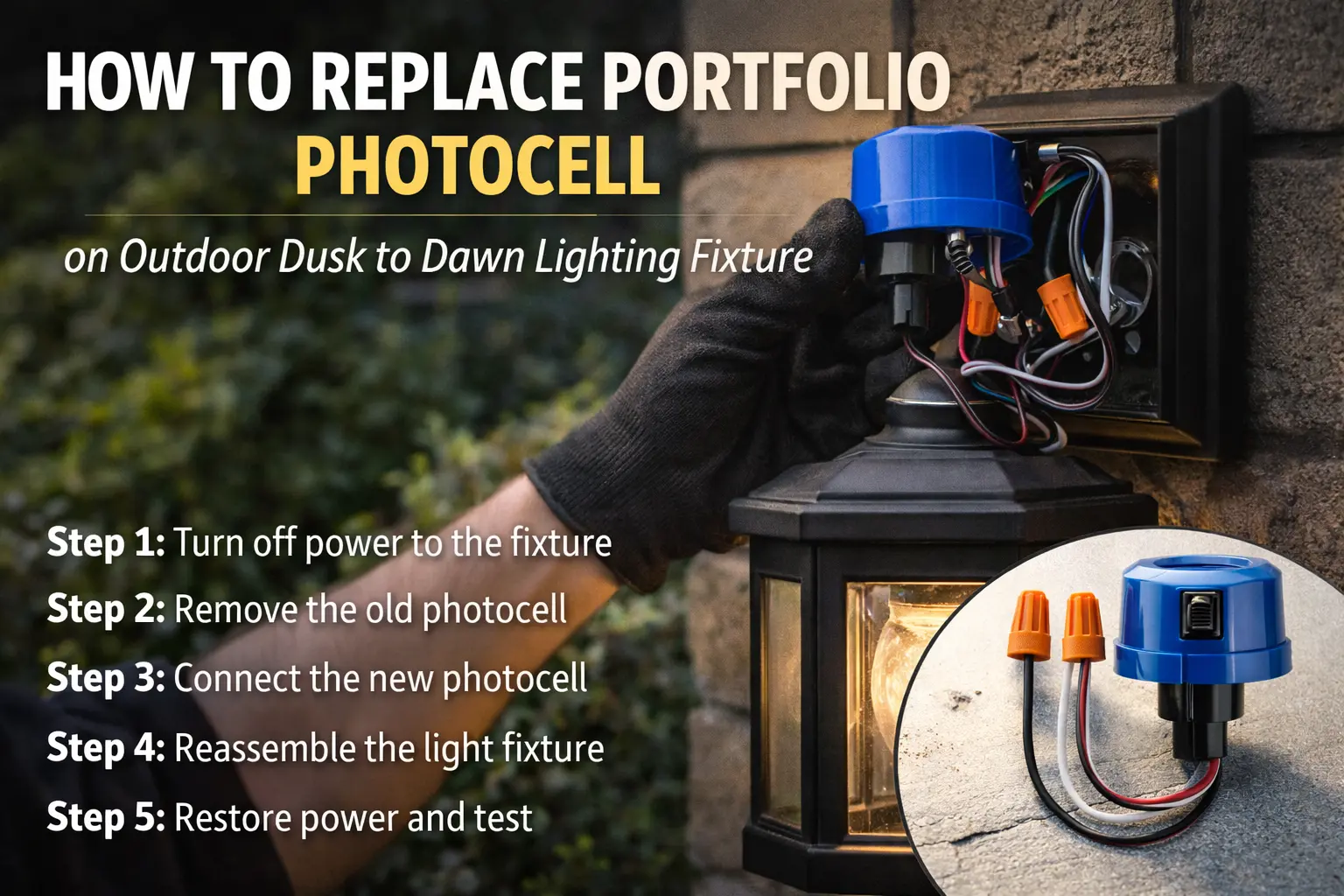
Once you are reasonably sure the sensor is the issue, replacing the photocell is usually a manageable repair. The exact layout will vary by fixture, but the basic process is often similar across dusk-to-dawn exterior lights.
If you are not sure which Portfolio fixture or sensor style you have, use the Portfolio lighting model number lookup before ordering parts.
If you are working with an older fixture and need wiring confirmation, check Portfolio lighting manuals before reconnecting the new photocell.
Shut off power at the breaker before opening the fixture or touching any wiring. This is the most important step. Outdoor lighting repair should always start with power disconnected.
Remove the housing cover, mounting plate, or access panel as needed. On some wall lights, the photocell sits near the top or side of the fixture body. On others, it may be integrated into a cap, cover, or small external sensor opening.
Trace the sensor wires carefully before disconnecting anything. If possible, take a photo first so the original wiring layout is easy to reference during reassembly.
Remove the sensor from its mount or opening and disconnect the wiring. Inspect nearby wires for corrosion, brittle insulation, or moisture damage. If the connection points look poor, this is also a good time to refresh worn connectors or related replacement hardware.
Connect the replacement photocell according to the fixture’s wiring arrangement. Keep the sensor positioned so it can read natural light accurately and is not blocked by trim, decorative covers, or nearby objects.
Put the fixture back together, restore power, and test operation. Some photocells may need realistic dark conditions to trigger properly, so testing at dusk or by temporarily shading the sensor can help confirm whether the replacement worked.
Replacing the photocell is often the best option when the fixture body still looks good, the housing is intact, and the overall installation still fits the space. This is common with attractive entry lights, garage fixtures, security lights, and exterior decorative lighting that still match the home well.
In those cases, replacing one small control part makes more sense than removing the entire light and starting over. It preserves the look of the home, costs less, and usually takes less time. This repair-first mindset fits well with pages like parts and accessories, where to buy replacement parts, and compatibility guidance.
Full fixture replacement becomes more reasonable when the housing is badly weathered, the socket is damaged, moisture keeps getting inside, or the photocell is only one of several failing components. In that situation, broader comparison pages like Portfolio lighting alternatives may help guide the next step.
If the sensor issue appeared after weather exposure in a yard lighting system, review Portfolio landscape lights not working after rain for moisture-related outdoor system failures.
Some visitors land on a photocell page because they are actually troubleshooting a larger outdoor system. If the sensor seems to be part of a transformer-based landscape setup, the photocell may interact with timers, low-voltage controls, or other switching components. That changes the repair path slightly because the sensor might not be mounted directly on a single decorative fixture.
For those cases, it helps to review Portfolio landscape lighting troubleshooting, low voltage lighting, timer setup, and transformer reset guidance. If one decorative wall light is misbehaving, the fixture photocell may be the answer. If the entire landscape run is out of sync, the system controls deserve more attention.
Photocell replacement often goes hand in hand with other small repairs. If you are already opening the fixture, it is worth checking whether any related part also needs attention.
Use this page to identify the right replacement photocell and narrow down which sensor type best fits your fixture.
Read the guideFind related parts such as hardware, sockets, lenses, covers, bulbs, and other repair components.
Read the guideHelpful when the lighting problem seems larger than one sensor and may involve controls or power delivery.
Read the guideThis is one reason photocell pages can be useful from both a visitor and search standpoint. The person searching for this repair usually needs more than one answer. You want to know what the photocell does, how to replace it, what other parts might be involved, and where to go next if the fixture still does not behave correctly.
It senses ambient light and automatically turns an outdoor fixture on at dusk and off at dawn.
Common signs include lights staying on during the day, never turning on at night, cycling on and off at the wrong time, or only working in manual override mode.
If the housing and socket are still in good condition, replacing the photocell is usually the more affordable and practical first step.
Yes. If several lights fail together or the system acts inconsistently, the real issue may be the transformer, timer, or shared wiring rather than a single sensor.
Yes. You can check the bulb first, inspect the sensor for blockage, review the wiring, and test the fixture at dusk or by shading the sensor before replacing the photocell.
This guide is built to help you decide whether a Portfolio photocell replacement is the right fix, how to install it safely, and how to move into deeper troubleshooting if the outdoor fixture still does not operate correctly afterward.