
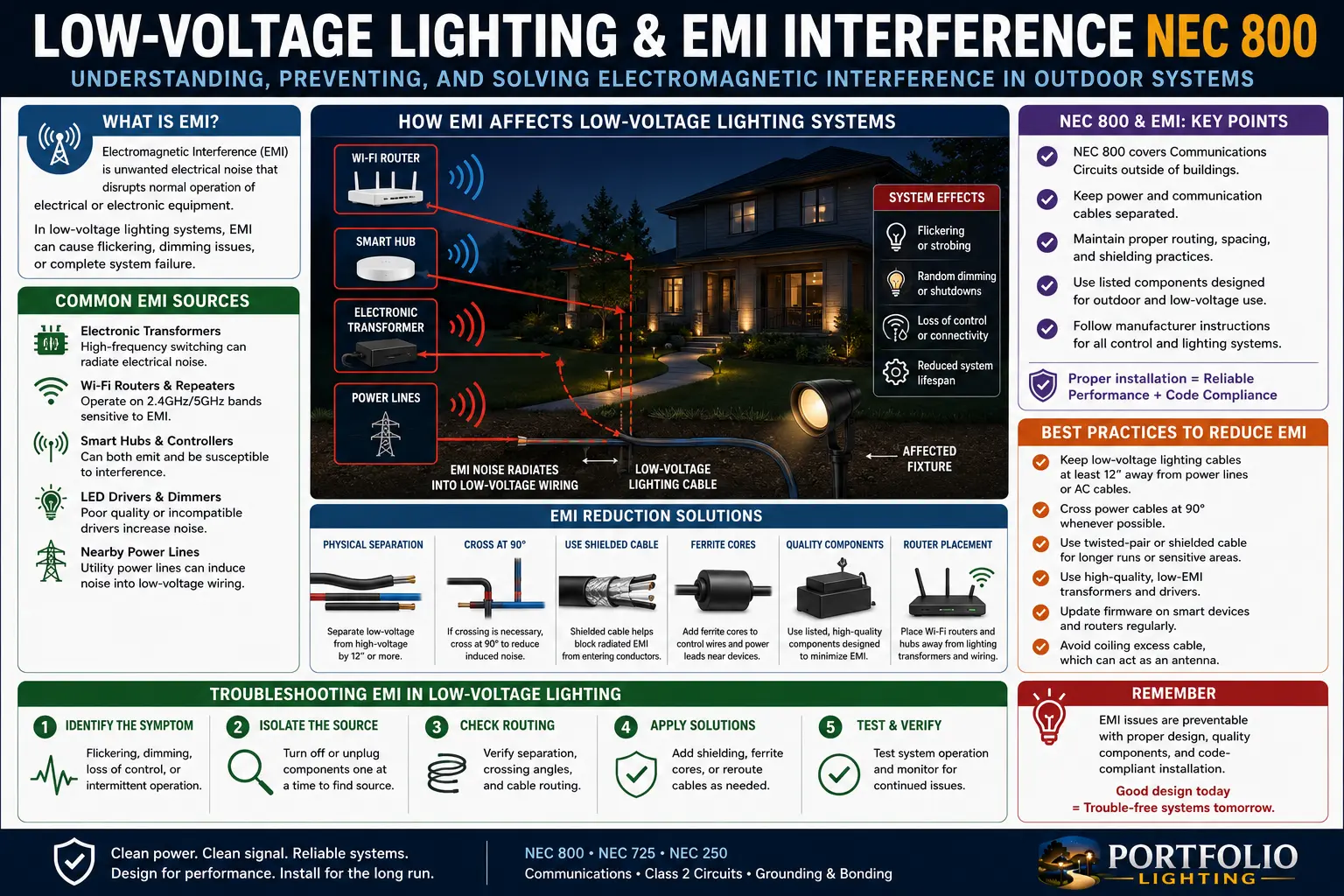
Quick Answer: Why Low-Voltage Lighting Creates EMI Problems
Low-voltage lighting can create electromagnetic interference when power, driver switching, dimming, long cable runs, weak connectors and communication wiring interact. The problem is not simply that the system is 12V or 24V. The problem is that modern LED lighting often uses electronic drivers and smart controllers that switch current rapidly. Those switching pulses can radiate through the air, travel along conductors, or couple into nearby data and communication cables.
NEC Article 800 is usually discussed around communications circuits, but the practical crossover for lighting is cable discipline: keep lighting power, smart control, sensor, data, camera, Ethernet, coax and communication-style wiring identified and separated correctly. Low-voltage does not mean noise-free, and “smart” does not mean code-free.
Logic Summary: EMI Is a System Shape Problem, Not Just a Bad Fixture
Most homeowners diagnose low-voltage lighting problems as either a bad bulb, bad transformer or voltage drop. EMI requires a different mental model. It asks how the system is shaped: where the power supply sits, how long the cable run is, whether cables are parallel to communication wiring, whether the driver switches cleanly, whether the dimmer chops the waveform, whether connectors are corroded, and whether the control wiring is bundled with lighting load conductors.
There are three EMI paths. Conducted noise travels along wires and power feeds. Radiated noise leaves the cable or driver like a tiny antenna. Coupled noise jumps from one nearby cable to another because the two routes run parallel for too long. The fix depends on the path. Ferrites may help conducted high-frequency noise, cable spacing may help coupled noise, and driver replacement may solve radiated noise from a poor power supply.
The strongest troubleshooting approach is source → path → victim. The source is the noisy device, usually a driver, dimmer, transformer, controller or damaged connection. The path is how the noise travels, such as shared power, parallel cable, wet connector or unshielded control wiring. The victim is the device affected: radio, camera, smart hub, Wi-Fi bridge, sensor, dimmer, gateway or LED strip controller.
Jump to Section
Where NEC Article 800 Enters the Low-Voltage Lighting Conversation
NEC Article 800 is associated with communications circuits. A basic landscape lighting circuit is not automatically an Article 800 installation just because the voltage is low. The connection appears when smart lighting projects start sharing physical space with communication wiring, camera cables, Ethernet-like runs, hub wiring, sensors, networked controllers and control conductors.
The practical homeowner takeaway is not to memorize article numbers. The takeaway is to avoid treating all small cables as interchangeable. A lighting cable carrying LED load current is not the same as a communication cable. A camera cable is not the same as a transformer secondary. A Class 2 control circuit is not the same as a line-voltage feed. When these systems meet, routing, separation, listing, cable type and enclosure design matter.
For the related control-circuit framework, use the smart lighting control NEC Article 725 Class 2 guide. For outdoor wiring safety, use the landscape lighting electrical code safety guide, landscape lighting splice connection code requirements and outdoor lighting junction box requirements.
EMI vs Voltage Drop: Two Problems That Often Look Similar
Voltage drop makes the far end of a low-voltage run dim, unstable or underpowered because voltage is lost along the wire under load. EMI causes noise, flicker, signal errors, radio interference, camera artifacts, smart hub dropouts or control glitches because unwanted electromagnetic energy is coupling into the system. They are different problems, but they often share the same root conditions: long cable runs, poor connections, overloaded drivers and messy wiring routes.
A fixture that dims at the end of a cable run may be voltage drop. A radio that buzzes only when the LED driver turns on may be EMI. A smart controller that loses connection when lights dim to 20% may be driver noise, control instability or both. That is why you should troubleshoot power quality and signal quality separately.
For voltage behavior, compare this guide with landscape lighting voltage drop, landscape lighting voltage drop calculator, AI transformer voltage load balancing and Portfolio LED lights flickering.
Low-Voltage Lighting EMI Symptom Map
| Symptom | Likely Noise Path | Most Likely Source | Best First Test |
|---|---|---|---|
| Radio buzz only when lights are on | Radiated or conducted noise | LED driver, dimmer, switching power supply | Run lights from a different known-good driver |
| Security camera lines or flicker at night | Conducted or coupled noise | Shared power, nearby lighting cable, noisy transformer | Temporarily separate camera cable from lighting cable |
| Smart hub drops when landscape lights dim | Conducted noise or shared circuit disturbance | Dimmer, controller, overloaded driver | Test at full output, then dimmed output |
| LED tape changes color randomly | Control/data corruption | Long unshielded control run or weak controller ground reference | Shorten control lead and test near controller |
| Path lights flicker near Wi-Fi bridge | Power instability or EMI coupling | Driver, transformer, connector corrosion | Inspect connectors and test voltage under load |
| Noise worsens after rain | Wet connector creating resistance/noise | Corroded splice, water inside fixture, compromised cable | Inspect wet locations and green dust connectors |
Common Lighting Noise Sources Homeowners Miss
Switching LED Drivers
Most modern LED systems do not simply pass smooth power to the light. They regulate current or voltage electronically. Cheap, overloaded or aging drivers can create high-frequency noise that travels into wiring and nearby devices.
Dimmers and PWM Controllers
Dimming often works by switching rapidly. That switching can create visible flicker, audible buzz or electromagnetic noise if the driver, controller and load are not compatible. For related flicker logic, see Portfolio LED lights flickering and Portfolio integrated LED bypass testing.
Transformer Hum and Magnetic Coupling
Older magnetic transformers can hum mechanically and electromagnetically. The hum may be harmless, overloaded or a symptom of failing insulation, loose laminations or poor load balance. Use bad landscape lighting transformer symptoms and Portfolio Lighting transformer master guide before replacing expensive equipment.
Corroded Connectors
A corroded low-voltage connector behaves like a nonlinear resistance point. It can create heat, voltage instability, intermittent flicker and noise-like symptoms that mimic driver failure. If green powder appears in connectors, use how to fix green dust in lighting connectors.
Cable Routing: The EMI Fix That Costs Almost Nothing
The easiest EMI fix is often physical separation. Lighting load cables should not run tightly bundled with communication, camera, sensor or network cables for long distances unless the wiring method and equipment are designed for it. Parallel runs create coupling. Crossings at roughly 90 degrees create less coupling. Distance is your friend.
Outdoor projects make routing worse because everything wants to follow the same wall, trench, soffit, fence or conduit path. That is convenient but not always quiet. If a landscape lighting cable shares a long parallel path with a camera cable or smart hub cable, the lighting cable can act like a noise injector. If a long RGB control lead shares a path with driver output conductors, color errors and flicker can appear only at certain scenes.
Smart Controls, Data Wiring and Article 725 Crossover
Smart lighting projects often involve both Article 800-style communications thinking and Article 725-style power-limited control thinking. A hub may communicate wirelessly but switch a load through a relay. A controller may receive data but output power to LED strips. A sensor may use small cable but still connect to a listed power-limited circuit. Treating these as one generic “low-voltage bundle” is where installations become messy.
The correct approach is to label each cable by function: power feed, transformer secondary, LED driver output, control lead, sensor input, data path, communication cable or network cable. Once you know the function, you can decide whether separation, shielding, ferrites, conduit, listed cable, direct-burial rating or professional installation is required.
For smart-system design, use smart hub compatibility guide, Matter and Thread connectivity, AI fault isolation logic and smart lighting control NEC Article 725 Class 2.
The EMI Diagnostic Tree: Source, Path, Victim
- Identify the victim: radio, camera, hub, sensor, LED zone, app controller or audio device.
- Record timing: only when lights are on, only when dimmed, only after rain, only with one scene or only when a transformer is loaded.
- Turn off lighting zones one at a time: find the zone that stops the interference.
- Move the victim temporarily: if noise changes with location, radiated or coupled EMI is likely.
- Change power source temporarily: if noise disappears with a known-good supply, driver or transformer noise is likely.
- Separate cable paths temporarily: lift or reroute cable away from communication wiring during testing.
- Inspect wet connectors: moisture can create intermittent resistance and noise-like failures.
- Document before replacing parts: EMI problems can return if the path, not the source, was the real issue.
EMI Fix Table for Low-Voltage Lighting
| Problem | Low-Cost Test | Real Fix | When It Fails |
|---|---|---|---|
| Radio buzz from LED driver | Move radio away and test with driver off | Replace noisy driver with better-filtered compatible driver | If noise is entering through shared power instead of radiating |
| Camera interference at night | Separate camera cable from lighting cable temporarily | Reroute cables, improve power supply and use proper cable separation | If camera power supply is the actual noise source |
| Smart controller resets | Remove lighting load and test controller alone | Split zones, reduce load or use dedicated supply | If weak Wi-Fi or hub placement is the real problem |
| RGB color errors | Shorten data/control run for bench test | Use correct controller distance, wiring and signal boosting strategy | If LED strip or pixels are damaged |
| Flicker after rain | Dry connectors and compare behavior | Replace wet/corroded connectors and improve sealing | If transformer or driver is already damaged |
| Noise on dimmed scene only | Test at 100%, 50% and 10% | Match dimmer/controller to driver and load | If LED product itself has poor internal electronics |
Portfolio Lighting Field Examples: EMI, Hum and Flicker Together
Older Portfolio landscape systems often mix magnetic transformers, long low-voltage cable runs, pierce connectors, LED retrofits and newer smart timers. That combination can create symptoms that look unrelated: a transformer hums, one run flickers, a camera shows lines, and a smart plug loses connection when the lights turn on. The common factor may be load shape and wiring layout, not four separate failures.
Start by separating power symptoms from signal symptoms. If lights are dim at distance, test voltage drop. If a controller resets, test load and power supply. If a camera glitches only when the lights are dimmed, test EMI. If failures appear after rain, inspect connectors and sockets. The Portfolio-specific repair path should include Portfolio Lighting troubleshooting, Portfolio transformer troubleshooting, Portfolio transformer surge protector installation, and Portfolio Lighting AI assistance.
Low Voltage Lighting EMI and NEC 800 FAQ
Can low-voltage landscape lighting cause EMI interference?
Yes. LED drivers, switching power supplies, dimmers, smart controllers, transformers, long cable runs and poor grounding can create or carry electromagnetic interference that affects radios, cameras, Wi-Fi devices, sensors and smart lighting controls.
What does NEC Article 800 have to do with low-voltage lighting?
NEC Article 800 is commonly associated with communications circuits. It becomes relevant conceptually when lighting control, smart hubs, data wiring, signal cables or communication-style wiring are routed near lighting power circuits.
Is EMI the same as voltage drop?
No. Voltage drop is a loss of voltage along a conductor under load. EMI is unwanted electromagnetic noise or signal coupling. They can appear together because long low-voltage runs, poor connections and overloaded drivers can create both dimming and noise symptoms.
Why do LED lights interfere with radios or cameras?
Many LEDs use electronic drivers or switching supplies. If the driver is noisy, poorly filtered, overloaded or installed near communication cables, it can radiate or conduct noise into nearby devices.
Do ferrite chokes fix LED lighting interference?
Ferrites can help with some high-frequency noise, but they are not a cure for overloaded drivers, bad wiring, improper separation, wet connectors, grounding problems or noncompliant installations.
When should I call an electrician or low-voltage specialist?
Call a professional when interference involves line-voltage wiring, communications service equipment, security cameras, data cabling, repeated breaker trips, damaged insulation, outdoor wet-location wiring or unclear mixed-voltage enclosures.
Expert-Verified Troubleshooting
This guide explains practical EMI troubleshooting and communication-wiring awareness for homeowners. It is not a substitute for the NEC, local amendments, equipment instructions or qualified low-voltage/electrical diagnosis.