
Quick Answer
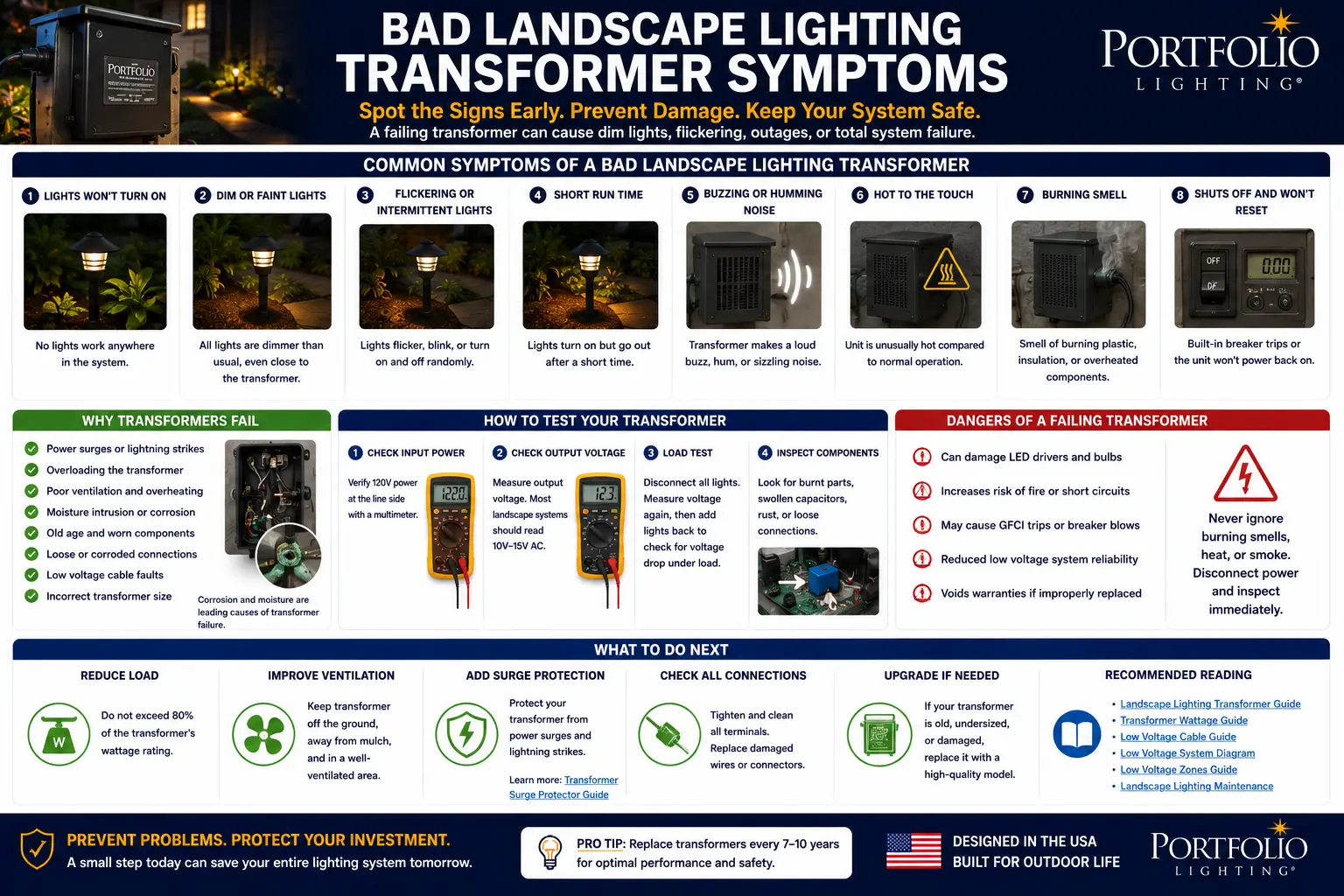
A bad landscape lighting transformer usually shows system-level symptoms, not just one bad fixture. Watch for no output at the transformer, lights turning on then shutting off, loud new buzzing, overheating, voltage collapse under load, repeated GFCI trips, failed timer or photocell controls, corrosion inside the enclosure and all-zone dimming that cannot be explained by wire length.
The most important diagnostic rule is this: do not replace the transformer until you separate transformer failure from cable, connector and fixture failure. A wet splice, overloaded run, corroded socket or damaged fixture can make a good transformer look bad.
This guide is designed to be the practical field reference for bad landscape lighting transformer symptoms. Instead of listing generic signs, it explains how each symptom behaves in the real world and how to decide whether the transformer, cable run, connector, fixture or control system is the true failure point.
That matters because transformer replacement is often the wrong first move. A transformer can show voltage with no load and still fail under load. A cable run can short only after rain. A corroded fixture socket can flicker badly enough to look like power-supply instability. This page helps you read those patterns before buying parts.
Logic Summary: Bad Transformer or Bad System?
- Transformer failures usually affect everything: All zones dead, no output, overheating, buzzing or repeated shutdowns point upstream.
- Wiring failures usually follow a run: One zone dead, rain-related failure or one section dimming points to cable, splices or fixtures.
- No-load voltage can mislead you: A transformer can show voltage on a meter and still collapse when real lights are connected.
- Heat is a warning: Warm is normal for many transformers; rapid heat, smell, melting or cycling is not.
- Controls can fake transformer failure: A bad timer or photocell can make the transformer look dead even when the power section still works.
- Surge history matters: Storm damage, outages and repeated transformer failure should trigger a surge-protection review.
What You Will Learn
- How to map symptoms to transformer, wiring or fixture causes
- Why voltage under load matters more than no-load voltage
- How to tell a bad transformer from a bad cable run
- How to read buzzing, heat and cycling behavior
- How rain and GFCI trips change the diagnosis
- When surge damage should be suspected
- When to replace the transformer
- Bad landscape lighting transformer FAQ
Bad Landscape Lighting Transformer Symptom Map
Transformer diagnosis starts by asking whether the symptom is system-wide or limited to one part of the installation. A transformer that has failed internally usually affects every connected run. A splice, cable or fixture failure usually follows the physical route of one cable run or one zone.
Use this page with the Portfolio Lighting transformer master guide, landscape lighting transformer guide, Portfolio transformer troubleshooting guide and landscape lighting transformer error code guide if your system has warning lights, smart diagnostics, tap labels or brand-specific protection behavior.
| Symptom | Transformer Is Likely Bad When | More Likely Wiring/Fixture Problem When | Field Clue |
|---|---|---|---|
| All lights are out | No output at transformer terminals with correct input power | Only one run or zone is dead | Test output with all low-voltage leads removed |
| Lights turn on then shut off | Transformer cycles with normal load removed or gets hot quickly | Shutdown stops when one cable run is disconnected | Disconnect zones one at a time |
| Lights are dim everywhere | Output voltage collapses under a known-good test load | Farthest fixtures are dim but first fixtures are normal | Compare voltage at transformer and farthest fixture |
| Loud buzzing | Buzzing is new, loud, hot or paired with flicker | Buzzing changes when loose mounting or overloaded run is corrected | Listen with loads removed |
| Timer or photocell fails | Manual override also fails or controls are burned/corroded | Lights work normally when photocell/timer is bypassed | Separate power section from control section |
| GFCI trips | Transformer trips GFCI with low-voltage leads removed | Trips only after a wet cable run is connected | Test transformer alone first |
| Heat or burning smell | Heat appears with no abnormal load or enclosure shows melting | Heat stops after overloaded run is removed | Do not continue operating |
| One zone is dead | Transformer tap for that zone has no output while others work | Cable run, splice or fixtures on that zone are damaged | Move zone lead to known-good tap only if safe |
The Test Most Homeowners Miss: Voltage Under Load
A digital meter can show voltage at the transformer even when the transformer cannot power real fixtures. This happens because open-circuit voltage does not prove the transformer can deliver usable current. The better test is output voltage while a known-good fixture or real system load is connected.
If the transformer reads normally with no load but the voltage collapses when lights are connected, the cause may be overload, a weak transformer, a shorted cable, a wet splice or a damaged fixture. Use the landscape lighting voltage drop guide, voltage drop calculator and transformer size calculator to compare the electrical behavior before replacing the unit.
| Test Step | What to Do | Good Transformer Behavior | Bad Transformer Warning |
|---|---|---|---|
| Input check | Confirm the outlet has power and the GFCI is not tripped | Transformer receives stable line power | No input power means outlet/GFCI issue, not transformer |
| No-load output | Remove low-voltage leads and test output terminals | Output is near expected tap rating | No output or unstable output points to transformer/control failure |
| Known-load test | Connect one known-good fixture or test load | Voltage remains usable and light stays steady | Voltage collapses or transformer shuts down |
| Zone isolation | Reconnect one cable run at a time | Only bad zone causes trouble | All zones fail the same way |
| Heat check | Run under normal load and monitor temperature | Warm is common; very hot is not | Rapid heat, smell or cycling means stop |
| Control bypass | Use manual mode or bypass failed control if design allows | Transformer powers lights in manual mode | Power section fails even when controls are bypassed |
When a Transformer Looks Bad But Is Not the Real Problem
A good transformer can shut itself down to protect the system. That protection behavior is often misread as transformer failure. If one run has a wet splice, shorted fixture, crushed cable or overloaded group of lights, the transformer may cycle, buzz, dim or trip even though the power supply is doing exactly what it should do.
Before replacing anything, check the low-voltage wire connector guide, landscape lighting connectors guide, landscape lighting cable guide, low-voltage failure points guide and Portfolio corroded socket cleaning and repair guide.
| Failure Source | How It Looks | Why It Gets Misdiagnosed | Better Diagnosis |
|---|---|---|---|
| Overload | Transformer hums, dims lights, cycles or shuts down | Looks like bad transformer | Add total watts and disconnect zones |
| Shorted cable or wet splice | Sudden shutdown, GFCI trip or one zone dead | Looks like transformer protection failure | Isolate cable runs and inspect splices |
| Voltage drop | Distant lights dim, first lights normal | Looks like weak transformer | Measure voltage at fixture under load |
| Failing photocell | Lights never turn on or stay on | Looks like dead transformer | Use manual mode or compare timer behavior |
| Internal transformer damage | No output, heat, buzzing, corrosion or burned smell | Can be blamed on fixtures | Test transformer with leads removed |
| Surge event | Transformer dead after storm/outage | Looks random | Inspect surge protection and downstream damage |
| Corroded socket | One fixture dim or flickers | Looks like transformer instability | Inspect fixture socket before replacing power supply |
Buzzing, Heat and Cycling: How to Read Transformer Behavior
A mild hum can be normal with some magnetic transformers, especially under load. A loud buzz, sudden new hum, vibration paired with flicker, rapid heating, burning smell or repeated shutoff is different. Those signs suggest overload, loose internal components, failing windings, shorted output, incompatible LED behavior or internal damage.
If buzzing is the main symptom, compare the Portfolio transformer buzzing guide, landscape transformer buzzing guide, Portfolio transformer getting hot guide, transformer not powering lights guide and transformer tripping breaker guide.
Rain, GFCI Trips and Wet-System Symptoms
If the transformer works when the system is dry but shuts down after rain, the transformer may not be the cause. Water in a splice, fixture, junction area, socket or cable wound can create intermittent current leakage or shorting. The key clue is whether the transformer behaves normally when the low-voltage runs are removed.
Use the landscape lighting keeps tripping GFCI guide, landscape lighting rain behavior guide, Portfolio lights not working after rain guide, outdoor lighting GFCI requirements guide and wet-location listing requirements guide.
Surge Damage: The Symptom Pattern After Storms and Outages
Surge damage often shows up as sudden transformer death after a storm, timer memory loss, erratic control behavior, burned smell, blown internal protection, or multiple fixtures failing at once. The transformer may look normal from the outside while the control board, timer, photocell or output section is damaged internally.
If your transformer failed after a storm or repeated outage, review the landscape lighting surge protection guide and the Portfolio transformer surge protector installation guide. If the system uses older Portfolio equipment, compare Portfolio transformer replacement, how to replace a landscape lighting transformer and Portfolio transformer alternatives.
When to Replace the Transformer
Replace the transformer when the evidence points to internal failure rather than an external cable or fixture fault. That usually means no output with confirmed input power, voltage collapse under a small known-good load, severe overheating, internal corrosion, water intrusion, burned parts, failed controls that cannot be bypassed, or repeated shutdown after every low-voltage run has been isolated.
If the system is Portfolio-specific, use the Portfolio lighting transformer replacement guide, Portfolio transformer sizing guide, Portfolio transformer wattage guide, Portfolio transformer replacement kits guide and replacement options for Portfolio landscape lighting.
| Finding | Repair/Reset First | Replace Transformer | Reason |
|---|---|---|---|
| GFCI tripped but transformer works after reset | Yes | No | Outlet protection event may have caused shutdown |
| Timer settings lost | Yes | No | Programming or power interruption may be the issue |
| No output with confirmed input and no load | No | Yes | Transformer power section or control board likely failed |
| Output collapses under small known-good load | No | Yes | Transformer cannot support real load |
| Only one cable run causes shutdown | Repair run first | Not yet | Cable, splice or fixture likely at fault |
| Transformer enclosure is burned, melted or water-filled | No | Yes | Safety and reliability are compromised |
| Transformer works but system is unprotected after surge history | Add protection | Maybe later | Surge protection may prevent repeat failure |
The 5-Minute Transformer Triage Sequence
This sequence catches the most common wrong diagnoses. First, confirm the outlet and GFCI have power. Second, place the transformer in manual mode if possible. Third, remove all low-voltage output leads and check whether the transformer still produces output. Fourth, reconnect one zone at a time. Fifth, test voltage under load with one known-good fixture.
If the transformer works with one known-good load but fails when a specific run is connected, the cable run is the suspect. If the transformer fails with every load or no load, the transformer becomes the suspect. This sequence is especially useful alongside how to test a landscape lighting transformer, Portfolio transformer reset and Portfolio transformer not working.
Bad Landscape Lighting Transformer Symptoms FAQ
What are the most common bad landscape lighting transformer symptoms?
Common symptoms include no output, lights dimming across multiple zones, buzzing, overheating, repeated shutdowns, timer or photocell failure, GFCI trips, flickering fixtures, low voltage under load and visible corrosion or burning inside the transformer.
How do I know if the transformer is bad or if the wiring is bad?
A bad transformer usually fails at the power source across all connected runs, while wiring faults often affect one zone, one cable run or one group of fixtures. Disconnecting zones one at a time and testing voltage under load can separate transformer failure from cable or fixture failure.
Can a transformer show voltage and still be bad?
Yes. A digital meter can show open-circuit voltage even when the transformer cannot support a real lighting load. The better test is voltage under load, temperature behavior, shutdown behavior and whether the output collapses when fixtures are connected.
Why does my landscape lighting transformer turn on and then off?
A transformer that turns on and then shuts off may be overloaded, overheating, detecting a short, affected by a wet splice, failing internally or operating with a bad photocell or timer. Disconnect zones one at a time before replacing the transformer.
Is transformer buzzing always bad?
A mild hum can be normal on some magnetic transformers, but loud buzzing, new buzzing, heat, flickering lights or a burning smell should be treated as a warning. Buzzing can come from overload, loose mounting, failing windings, LED retrofit behavior or internal stress.
When should I replace a landscape lighting transformer?
Replace the transformer when it has no reliable output, overheats under a normal load, trips protection repeatedly after the wiring is isolated, has burned or melted parts, water intrusion, severe corrosion, failing controls that cannot be bypassed or a damaged enclosure.
Bottom Line
A bad landscape lighting transformer should be diagnosed by behavior under real load, not by symptoms alone. No output with confirmed input, voltage collapse under a known-good load, severe heat, internal corrosion, burned parts and repeated shutdown after isolating all cable runs are strong replacement signs. But one bad zone, rain-related failure, dim far-end lights or flickering fixtures often point to wiring, connectors, voltage drop or sockets instead.