
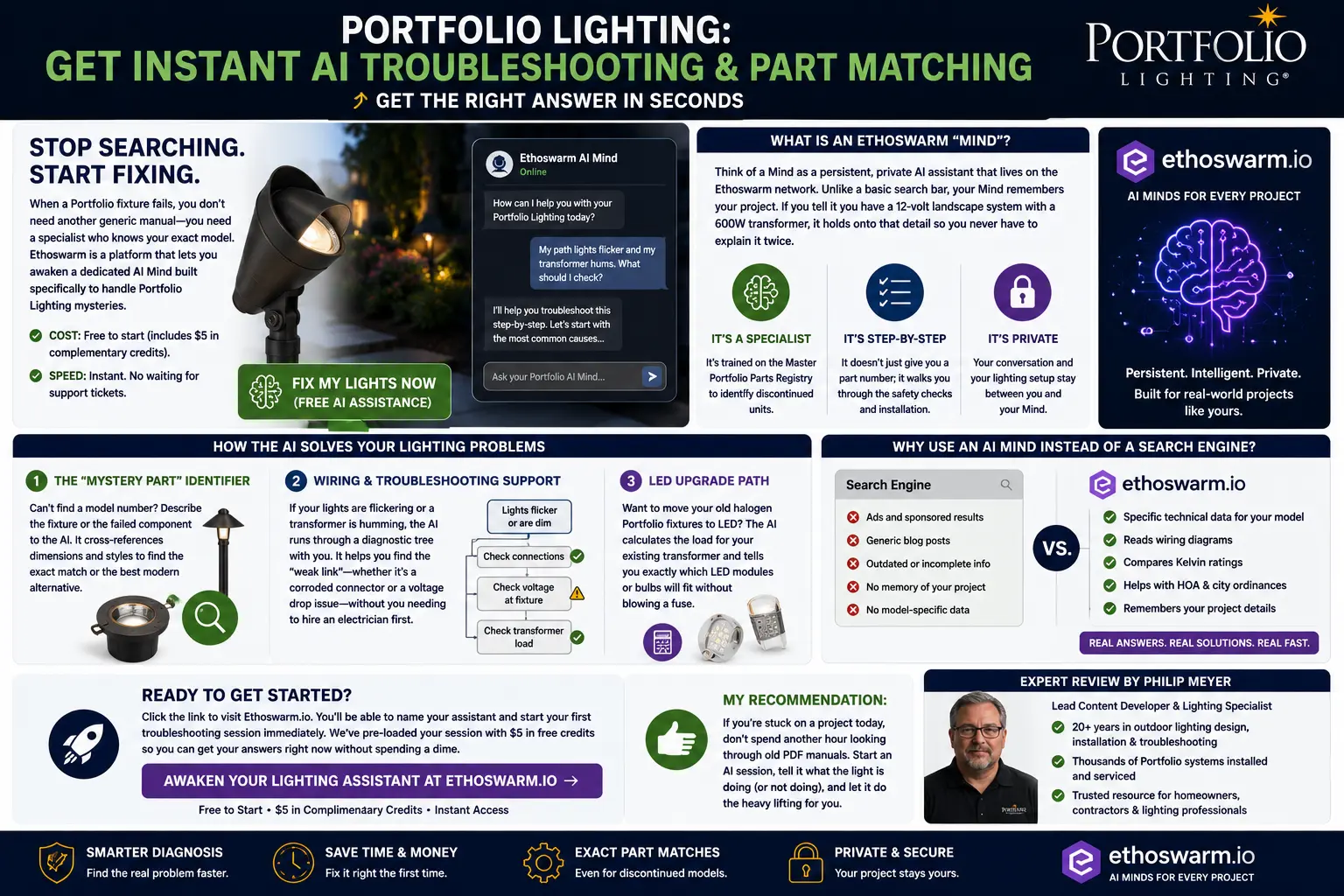
Stop Searching. Start Fixing.
Portfolio Lighting problems can be frustrating because many fixtures are discontinued, model numbers are hard to read, manuals disappear, and replacement parts often look similar online even when they do not fit. A search engine can give you a list of pages. A specialized AI troubleshooting session can help you work through the actual failure pattern.
Ethoswarm is a platform that lets you awaken a dedicated AI Mind for your project. Instead of starting over every time you ask a new question, the Mind can follow your situation: the fixture type, the transformer wattage, the symptoms, the cable run, the weather conditions, the part you already tried and the replacement decision you are trying to make.
For manual research and model lookup, use the Portfolio Lighting model number lookup, the Portfolio Lighting model parts directory and the Portfolio Lighting master model technical database. The AI assistance page is for the moment when you need those resources interpreted around your specific fixture, symptom or replacement problem.
What Is an Ethoswarm “Mind”?
A Mind is a persistent, private AI assistant that lives on the Ethoswarm network. For Portfolio Lighting, that means you can create an assistant focused on your lighting project instead of using a generic chat box that forgets your setup every time the conversation changes.
It Remembers the Project
If you tell it you have a 12-volt landscape system, a 600-watt transformer, eight path lights and two flood lights, it can keep that context during the troubleshooting session.
It Works Like a Specialist
It is designed to help with discontinued Portfolio parts, old model numbers, fixture symptoms, transformer behavior, voltage drop and compatibility questions.
It Walks You Step by Step
Instead of only naming a part, it can help you decide what to check first: socket corrosion, connector failure, transformer load, timer settings, fuse issues or fixture replacement.
What the Portfolio Lighting AI Mind Actually Does for You
The biggest advantage of a Portfolio Lighting AI Mind is that it turns a confusing repair problem into a guided diagnostic conversation. Instead of making you search through dozens of model pages, wiring diagrams, transformer guides and replacement-part listings separately, the AI helps organize the problem around your exact fixture, symptoms, transformer, wiring setup and repair goal.
1. It Starts With Your Exact Problem
You can describe the issue in plain language: “my path lights flicker after rain,” “my Portfolio transformer hums,” “half the run is dim,” or “I need a replacement lens but I cannot find the model number.” The AI then helps turn that description into a logical troubleshooting path instead of a random parts search.
2. It Remembers Your Setup
If you tell the AI you have a 12-volt system, a 300-watt or 600-watt transformer, MR16 bulbs, LED retrofits, a long cable run or multiple zones, it can keep that context during the session. That matters because transformer sizing, voltage drop, bulb replacement and connector diagnosis all depend on your actual system details.
3. It Helps Identify the Weak Link
Many lighting failures are not caused by the part homeowners first suspect. A dead fixture may actually be a corroded socket. A bad transformer symptom may be a shorted cable run. A dim zone may be voltage drop. The AI helps compare the symptom pattern against likely causes before you spend money.
How It Helps With Portfolio Model Numbers and Discontinued Parts
Portfolio Lighting model numbers are often confusing because older fixtures may be labeled by item number, kit number, finish code, component number or transformer model. The AI can help you organize clues from the fixture body, lens, shade, stake, connector, bulb, transformer label and old manual so you can narrow the part search more intelligently.
For example, if you only know the fixture is an older black Portfolio path light with a cracked clear lens, the AI can ask for the lens diameter, cap style, stem size, bulb type and connector style. That gives you a much better chance of matching the right replacement than searching “Portfolio replacement lens” and guessing from photos.
How It Helps With Transformer Problems
Transformer problems are one of the hardest areas for homeowners because several different failures look the same from the outside. A transformer that shuts off may be overloaded, overheated, shorted downstream, surge damaged or protecting itself from a wet splice. The AI can walk you through the difference between “bad transformer” symptoms and “bad wiring run” symptoms.
A strong AI troubleshooting session might ask whether all lights are out or only one zone, whether the problem appears after rain, whether the transformer hums, whether the breaker or GFCI trips, whether the timer works in manual mode and whether voltage is present under load. Those questions help separate transformer replacement from connector repair, cable repair or fixture diagnosis.
How It Helps With LED Upgrades
If you are replacing old halogen Portfolio bulbs with LED bulbs or integrated LED fixtures, the AI can help you think through transformer load, wattage reduction, minimum-load behavior, dimming compatibility, bulb base type, color temperature and whether the old transformer is still the right power source. This is especially helpful when a system works with halogen bulbs but flickers or behaves strangely after LED retrofits.
The AI can also help you avoid overbuying. In many older systems, switching to LED reduces total wattage so much that the original transformer may still be usable if the voltage, timer, photocell and wiring are healthy. In other cases, the transformer may be oversized, failing, buzzing or incompatible with the new LED load.
How It Helps With Safer Troubleshooting
A good troubleshooting process starts with safety boundaries. The AI can help you decide which checks are reasonable for a homeowner, such as documenting the model number, checking visible corrosion, confirming whether one zone or all zones are affected, photographing connectors and comparing transformer labels. It can also tell you when the problem should stop being a DIY diagnosis, especially with line voltage, water intrusion, burning smells, repeated breaker trips, pool wiring, dock wiring or damaged transformer enclosures.
Copy-and-Paste Prompts to Ask the Portfolio Lighting AI
The AI works best when you give it specific symptoms and context. Use these prompts to get a stronger answer faster.
For a Mystery Replacement Part
“I have an older Portfolio Lighting fixture with no readable model number. It is a [path light / flood light / deck light / wall light]. The broken part is the [lens / shade / stake / connector / bulb]. What measurements and photos do I need to identify the closest replacement?”
For a Transformer That Hums or Shuts Off
“My Portfolio landscape lighting transformer is [buzzing / getting hot / shutting off / not powering lights]. I have [number] lights connected and the transformer is rated [wattage]. What should I check first to tell whether the transformer is bad or a cable run is shorted?”
For Lights That Fail After Rain
“My Portfolio lights work when dry but fail after rain. The problem affects [one fixture / one zone / the whole system]. Help me diagnose whether this is a wet connector, corroded socket, GFCI issue, transformer problem or damaged cable.”
For LED Retrofit Planning
“I want to replace old halogen Portfolio landscape bulbs with LED bulbs. My transformer is [wattage] and I have [number] fixtures. Help me calculate the new load and identify compatibility issues before I buy bulbs.”
For Model Number Research
“The model number on my Portfolio fixture is [model number]. Help me determine whether this number refers to the fixture, kit, transformer, lens, shade or replacement part, and what related parts I should search for.”
How the AI Solves Portfolio Lighting Problems
The “Mystery Part” Identifier
If you cannot find a model number, describe the fixture, the broken lens, the missing shade, the stake thread, the bulb type or the failed component. The AI can help narrow the search toward the closest Portfolio part family or a modern replacement path. For deeper manual comparison, use the Portfolio technical manuals and wiring diagrams and Portfolio technical archive.
Wiring and Troubleshooting Support
If lights flicker, dim, blink, fail after rain or turn on and then shut off, the AI can walk through a diagnostic tree. It can help separate corroded connectors, voltage drop, transformer overload, bad sockets and timer problems before you buy the wrong replacement. Related resources include Portfolio Lighting troubleshooting, landscape lighting troubleshooting and low-voltage landscape lighting failure points.
LED Upgrade Path
If you want to move old halogen Portfolio fixtures to LED, the AI can help calculate load, compare bulb type, check transformer capacity and avoid incompatible retrofit choices. The best supporting pages are the Portfolio Lighting bulb replacement guide, Portfolio MR16 LED replacement bulb guide and Portfolio transformer wattage guide.
Best Problems to Ask the Portfolio AI Mind
The best AI questions are specific. Give the assistant the fixture type, model number if you have it, transformer size, symptoms, what changed recently and whether the problem happens after rain, after a timer cycle or only on one zone.
Part Matching
“I have a Portfolio path light with a cracked clear lens, no visible model number, 12V wiring and a black metal cap. What measurements should I take to match the lens?”
Transformer Symptoms
“My transformer hums and the lights turn off after 10 minutes. How do I tell if the transformer is bad or if one cable run is shorted?”
Rain Failures
“My Portfolio lights work when dry but trip after rain. Which connector, splice, fixture or GFCI checks should I do first?”
For those same topics, the AI can point you toward supporting research pages like bad landscape lighting transformer symptoms, landscape lighting transformer error codes, Portfolio corroded socket cleaning and repair and Portfolio transformer surge protector installation.
Why Use an AI Mind Instead of a Search Engine?
A search engine is excellent for finding pages. It is not always excellent at turning your exact symptoms into a repair plan. If your Portfolio light is flickering, the answer may be a weak socket, an overloaded transformer, a wet connector, voltage drop, a failing photocell or an incompatible LED retrofit. The AI can ask follow-up questions and reduce the guesswork.
Search also tends to mix ads, generic blog posts, unrelated product listings and partial manuals. A Portfolio-focused AI session can help interpret the technical details: model labels, wiring diagrams, Kelvin ratings, transformer load, MR16 bulb compatibility, connector type and even ordinance or glare concerns for larger outdoor projects.
If your project is moving beyond simple repair into layout or compliance, compare the outdoor lighting design plan guide, landscape lighting layout design guide, outdoor lighting GFCI requirements and dark-sky compliance versus IDA certification guide.
Important Safety Limits
AI assistance is for troubleshooting logic, research, part matching and planning. It is not a replacement for a qualified electrician. Stop and get professional help if you are dealing with line-voltage wiring, repeated breaker trips, burning smells, melted components, water inside a transformer, unknown conductors, pool-area wiring, dock wiring or any situation where you are not sure whether the system is safe.
Ready to Get Started?
Click below to visit Ethoswarm.ai. You can name your assistant and start your first Portfolio Lighting troubleshooting session immediately. Your session includes $5 in free credits so you can ask a real repair question now without spending anything upfront.
Awaken Your Lighting Assistant at Ethoswarm.ai →My recommendation: If you are stuck on a project today, do not spend another hour hunting through old PDF manuals. Start an AI session, describe what the light is doing or not doing, and let it help you narrow the cause before you buy parts.
Modern landscape lighting improvements with AI assistance often involve changing the lighting technique rather than simply upgrading fixture technology. Many homeowners transitioning away from older systems discover that strategically placed downlighting creates broader coverage and a more refined appearance than traditional ground-mounted fixtures. Our Portfolio downlighting guide explains where downlighting fits into a modern outdoor lighting plan and when it may outperform conventional fixture layouts.
Portfolio Lighting AI Assistance FAQ
What does Portfolio Lighting AI assistance help with?
It helps with troubleshooting, part matching, discontinued model research, transformer symptoms, LED upgrade decisions, voltage/load questions and step-by-step repair planning.
Does the AI replace Portfolio customer service?
No. It is a troubleshooting and research assistant. It is especially useful when older Portfolio manuals, model data or discontinued replacement parts are hard to find.
Can I use it if I do not know my model number?
Yes. Describe the fixture, shape, part, voltage, light source, connector and symptoms. A good AI session can help you decide what measurements or photos matter most.
Is it free?
Ethoswarm is free to start and includes $5 in complementary credits so you can begin a first troubleshooting session.