
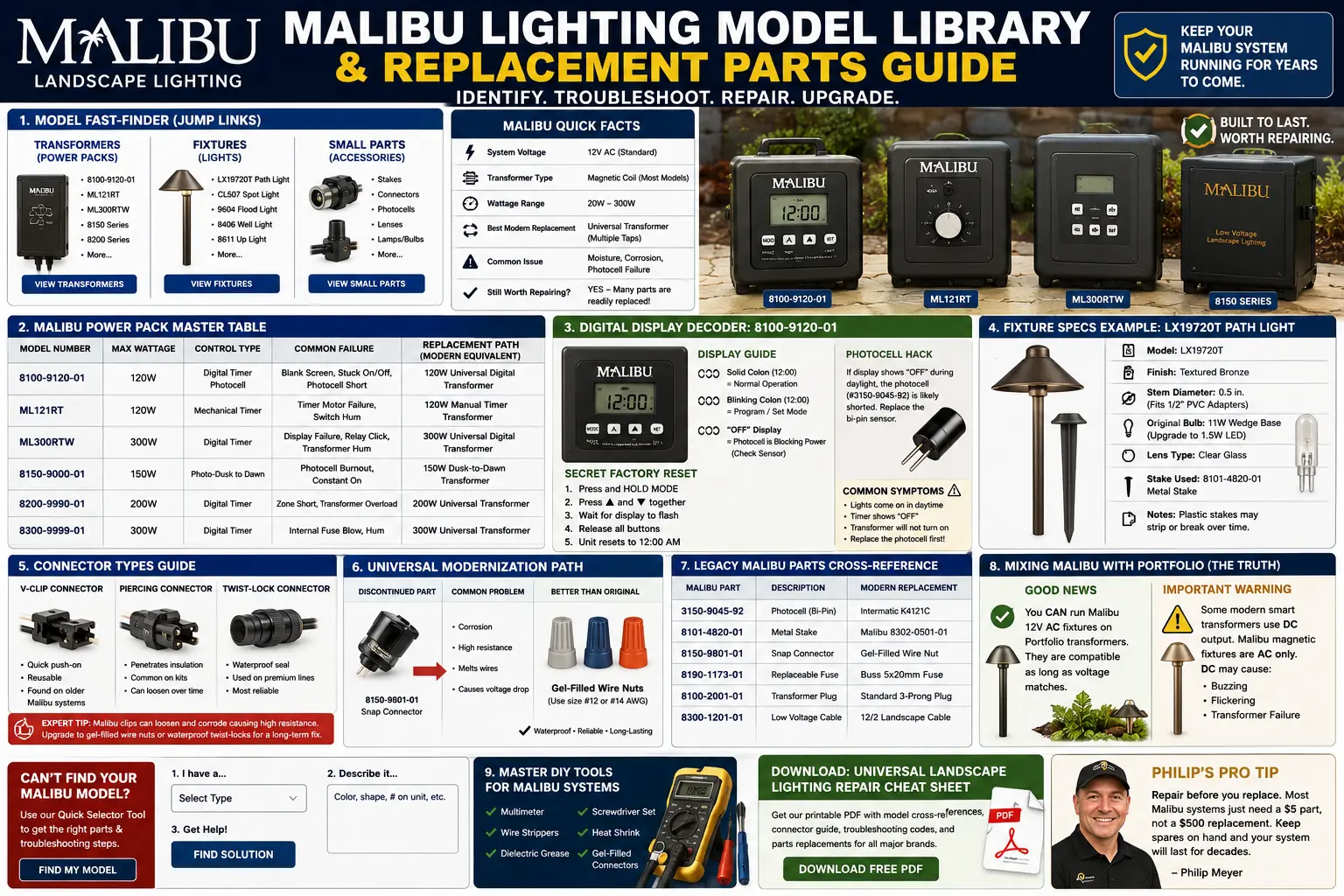
Quick Answer: How to Replace Malibu Lighting Parts Today
Start by identifying whether your Malibu problem is the transformer, connector, fixture body, stake, lamp, photocell, or cable. Then match the electrical and mechanical specs instead of chasing an exact discontinued part number.
For a wider repair path, compare this page with the discontinued landscape lighting parts guide and Portfolio lighting compatibility guide.
Malibu is one of several discontinued lighting systems that still share crossover parts, transformers, connectors, and low-voltage repair logic with newer systems. For broader replacement paths and compatible brands, see the Portfolio lighting alternatives guide.
If you already know the fixture family or failed part and only need replacement direction, use the Malibu lighting replacement parts guide for transformers, stakes, bulbs, connectors, photocells, and modern replacement paths.
Malibu Model Fast-Finder
Use this quick jump grid by the part you are holding in your hand. Malibu model labels are often faded, so grouping by object type is usually faster than searching the whole page.
Trying to identify an old Malibu transformer, fixture family, timer display code, or discontinued model number? Visit the Malibu Lighting Model Library and Replacement Parts Guide for digital display troubleshooting, power pack identification, fixture cross-reference help, connector upgrades, reset logic, and Portfolio-compatible replacement paths.
Transformers / Power Packs
Fixtures
Small Parts
Logic Summary: Malibu Replacement Parts Without Guessing
- Transformer first: Confirm 12V AC output before replacing fixtures.
- Connector second: Malibu snap connectors are a top failure point and should often be replaced with waterproof splices.
- Fixture third: Metal or socketed Malibu fixtures are usually worth saving; cracked plastic integrated fixtures are not.
- Bulb base matters: Match wedge, bi-pin, MR-style, voltage, wattage, and heat clearance.
- Portfolio compatibility: Many Malibu fixtures can run on a Portfolio 12V AC transformer if the load and connections are correct.
Anatomy of a Malibu Transformer: Identify It Without the Model Number
If the Malibu model label is faded or missing, the front controls usually tell you what kind of power pack you have. This matters because a digital transformer, dial timer, and dusk-to-dawn sensor unit fail in different ways.
Looking for exact Malibu ML, LX and 8100 model specifications? Visit the Malibu Lighting Model Library Top 40 Parts Lookup for transformer specs, connector failures, stake sizing, digital timer troubleshooting, replacement part numbers and detailed repair guidance for the most common Malibu lighting systems sold between 1990 and 2015.
| Transformer Style | What It Looks Like | Common Malibu Examples | Most Likely Failure | Best First Test |
|---|---|---|---|---|
| Digital Series | LCD screen with 3–4 soft buttons or small control buttons | 8100-series digital power packs | Blank screen, frozen display, OFF message, timer logic failure | Unplug, disconnect yard wires, reset display, then test output. |
| Analog Timer Series | Rotating dial with pins, tabs, or mechanical timer wheel | ML45T-style and older mechanical timer units | Stuck timer motor, worn pins, hum, bad dial schedule | Turn to manual ON and test transformer output. |
| Sensor Series | Few or no buttons, small photocell eye, dusk-to-dawn behavior | Dusk-to-dawn Malibu power packs | Photocell thinks it is daytime, lights stay off, lights stay on all day | Cover the sensor and test manual or forced-on mode if available. |
Malibu Power Pack Master Table
This is the high-intent troubleshooting table most Malibu owners need. If the lights are dead, flickering, or stuck in timer mode, identify the power pack behavior before replacing fixtures.
| Model Number | Max Wattage | Control Type | Common Failure | Replacement Path | Specialist Note |
|---|---|---|---|---|---|
| 8100-9120-01 | Often sold in 120W-class digital power pack families | Digital timer / photocell logic | Blank screen, frozen display, OFF message, photocell confusion | Modern 120W 12V AC outdoor transformer | Disconnect the lighting run before declaring the board dead. |
| ML121RT | 120W class | Timer / photocell depending on version | Timer drift, photocell failure, no output in auto mode | 120W universal low-voltage transformer | Usually replace the control method rather than chasing old boards. |
| ML300RTW | 300W class | Higher-capacity timer power pack | Mechanical hum, thermal stress, overloaded output | 300W multi-tap transformer or split-load transformer layout | Check connected wattage and long-run voltage drop before replacing. |
| Generic Malibu mechanical timer | 45W–200W families | Dial or pin timer | Timer motor failure, stuck tabs, hum | Modern outdoor transformer with digital timer | Old mechanical timers fail while the transformer output still works. |
| Malibu photocell power pack | Varies by model | Dusk-to-dawn / auto | Lights stay off, stay on, or cycle repeatedly | Transformer with replaceable photocell or timer-only mode | Photocell failure often mimics a dead transformer. |
Malibu Transformer Troubleshooting: Decoding the Power Pack
Malibu digital power packs fail in frustrating ways because the display, timer board, photocell input, and output protection can all create the same homeowner symptom: lights will not turn on.
If your Malibu digital transformer still shows a blank screen, OFF message, frozen buttons, or photocell confusion after reset attempts, continue with the dedicated Malibu 8100-9120-01 transformer manual and troubleshooting guide.
How to Fix a Blank Screen on Malibu 8100-9120-01
- Unplug the transformer from the GFCI receptacle.
- Disconnect the low-voltage output wires from the transformer terminals.
- Wait at least 60 seconds.
- Hold the manual/on button while plugging the unit back in.
- Release the button after the display wakes or resets.
- Set the clock and test manual output before reconnecting the yard cable.
Terminal Tap Test: Prove Whether the Transformer Is Actually Dead
If a Malibu transformer keeps turning off, clicks, resets, or goes blank after the yard wires are connected, do not assume the power pack is dead. A shorted cable, wet connector, or nicked wire in the yard can make a good transformer shut itself down.
- Unplug the Malibu transformer.
- Remove both low-voltage yard wires from the transformer terminals.
- Connect one known-good 12V landscape light directly to the transformer terminals.
- Plug the transformer back in and set it to manual ON.
- If the single test light stays on, the transformer is likely working and the problem is in the yard cable, connector, or fixture run.
Solid Colon vs Blinking Colon
A blinking colon usually means the clock or timer logic is active and counting. A solid colon with no switching response can indicate a frozen board, incomplete clock setup, or a display that appears awake while the relay is not engaging.
The Photocell Hack: OFF Message but Timer Looks Correct
If the display says OFF while the timer schedule appears correct, the photocell circuit may be telling the transformer it is daytime. On Malibu units that used a bi-pin photocell such as the #3150-9045-92 family, a shorted or moisture-damaged photocell can block normal output even when the schedule looks right.
Before replacing the transformer, cover the photocell, inspect the sensor wiring, check for moisture, and test manual mode. For broader transformer diagnosis, use Portfolio lighting transformer troubleshooting and transformer wiring diagrams.
Malibu Fixture Identification: Replacement Stakes, Bulbs and Lenses
Malibu fixture identification works best when you measure the physical part. The model label is often gone, but stem diameter, bulb base, lens diameter, finish, and stake thread usually reveal the replacement path.
LX19720T Path Light
Fixture type: low-voltage path light family.
Stem diameter: often close to 1/2-inch class tubing; verify before adapting to PVC or universal stakes.
Original bulb path: commonly replaced with lower-wattage LED where socket and voltage match.
Failure point: stripped plastic stake threads, corroded connector, cloudy lens.
CL507 Spot / Accent Fixture
Fixture type: directional accent or spot family.
Original lamp logic: halogen-style heat management matters when converting to LED.
Replacement path: match voltage, lamp base, beam angle, and housing clearance.
Failure point: gasket leaks and connector corrosion.
9604 Flood Light
Fixture type: low-voltage flood family.
Modernization: lower-wattage LED retrofit can reduce transformer load and heat.
Watch for: lens seal, socket corrosion, and water inside the flood housing.
Stakes and Mounting Parts
Common issue: plastic stake threads strip or snap during freeze-thaw movement.
Replacement path: match stem diameter and thread style, not just the Malibu brand name.
Pro note: the old 8101-4820-01 style metal stake concept is stronger than many modern plastic replacements.
Malibu Bulb and Fixture Cross-Reference Logic
| Fixture Family | Original Lamp Style | Modern LED Direction | Heat Warning | Best Diagnostic Test |
|---|---|---|---|---|
| Path lights | Wedge-base low-voltage lamps on many older models | Low-wattage 12V LED wedge replacement | A too-bright LED may glare under shallow caps | Swap known-good lamp before replacing fixture |
| Spot / accent lights | MR-style or bi-pin depending on housing | Match base, beam angle, voltage and clearance | Do not trap heat inside sealed housings | Check socket corrosion and voltage under load |
| Flood lights | Halogen or socketed low-voltage lamp | LED flood retrofit with similar beam spread | Water intrusion damages sockets faster than bulbs | Inspect lens gasket and cable entry |
LED Upgrade Warning: Old Malibu Transformers Can Output More Than 12 Volts
Many older Malibu halogen systems were designed around voltage drop. A transformer may output around 13V to 14V AC with little or no load so the farthest halogen lights still receive usable voltage at the end of a long wire run.
That can become a problem after an LED conversion. If you replace high-wattage halogen bulbs with low-wattage LEDs on a short cable run, cheap LED chips may see more voltage than they were designed to handle.
This also matters when mixing Malibu fixtures with Portfolio lighting transformers. A Portfolio transformer can run many Malibu 12V fixtures, but you still need to measure actual voltage at the fixture and confirm the LED lamp is rated for that output.
If the farthest Malibu fixtures are dim but the first fixtures are bright, review the landscape lighting voltage drop guide before replacing every fixture. The problem may be cable length, thin wire, or overloaded runs rather than bad Malibu parts.
Malibu systems with older thin cable should also be checked against the landscape lighting wire gauge guide, especially when converting halogen fixtures to LEDs or extending an existing run.
Universal Modernization Path: Better Than Original Malibu Connectors
The old Malibu 8150-9801-01 style black snap connector solved fast installation, not long-term service. As the plastic ages, the metal tooth loses contact pressure, corrosion forms around the bite point, and heat can build at the exact spot that should be carrying current cleanly.
This is the same logic used in the low-voltage wire connectors guide and limited-energy connector guide. The goal is not to preserve a weak original connector; it is to create a lower-resistance, weather-resistant connection that can survive soil moisture and freeze-thaw movement.
Can’t Find Your Malibu Model Number?
Use this quick selector logic to decide what to inspect first. This is a simple on-page helper, not a submitted form.
Mixing Malibu with Portfolio: Can Old Malibu Lights Run on a Portfolio Transformer?
Yes, many old Malibu 12V fixtures can run on a new Portfolio transformer when the transformer output is compatible, the total wattage is within capacity, and the connectors are repaired correctly. The transformer does not care about the brand label on the fixture; it cares about voltage, load, and wiring quality.
Before mixing systems, check the other brands with Portfolio connectors guide, universal lighting compatibility source, and transformer sizing guide.
Many homeowners discover their Malibu system can be repaired with upgraded universal connectors instead of brittle original clips. For crossover compatibility between Malibu, Portfolio, Hampton Bay, and other low-voltage systems, see will other lighting brands work with Portfolio connectors?
Before mixing Malibu fixtures with Portfolio transformers or universal low-voltage components, compare voltage type, connector style, wire gauge, lamp base, and transformer output using the universal lighting compatibility source.
Many older Malibu models share wiring logic and low-voltage hardware with other discontinued systems. The legacy landscape lighting interoperability guide explains which older transformers, lamps, connectors, and stakes can still be mixed successfully.
Malibu Lighting Model and Parts FAQ
Can Malibu lights run on a Portfolio transformer?
Yes, many Malibu 12V AC fixtures can run on a Portfolio transformer if the transformer output, total wattage, cable size, and connector method are compatible. Be careful with DC-only smart drivers because older Malibu fixtures were typically built around 12V AC landscape lighting.
What fails most often on Malibu power packs?
The most common failures are blank digital displays, failed timer boards, photocell confusion, mechanical hum, overheated terminals, and output protection triggered by wet connectors or shorted field wiring.
What should replace old Malibu snap connectors?
For permanent repairs, replace failed snap connectors with gel-filled, direct-burial rated waterproof splices sized for the cable. Old clips often create high-resistance heat and intermittent flicker.
Can Malibu halogen fixtures be converted to LED?
Yes, many socketed Malibu halogen fixtures can be converted to LED if the bulb base, voltage type, wattage, beam angle, and fixture heat clearance match. Always test voltage under load before blaming the lamp.
How do I identify a Malibu transformer if the model number is gone?
Start with the control style. A digital Malibu transformer usually has an LCD screen and several buttons, an analog version usually has a rotating dial or timer pins, and a sensor-style unit may only have a dusk-to-dawn photocell eye. After that, confirm wattage, terminal layout, and output voltage.
How do I test whether a Malibu transformer is dead or the yard wire is shorted?
Unplug the transformer, remove the yard wires, connect one known-good 12V light directly to the transformer terminals, and turn the unit on manually. If the test light stays on, the transformer is probably working and the problem is likely a nicked cable, wet connector, or shorted fixture run.
Can old Malibu transformers burn out new LED bulbs?
They can if the transformer output is high and the LED bulbs are cheap or poorly rated. Some older Malibu halogen transformers output more than 12 volts with light loads. After switching to LEDs, measure voltage at the fixture, especially on short wire runs.
Electrical Safety Disclaimer
This guide is for homeowner education and repair planning. Always follow product labels, local code, listing requirements, and safe work practices. Hire a licensed electrician for damaged line-voltage wiring, repeated GFCI trips, burned plugs, hardwired transformer replacement, pool or spa areas, or any installation you are not comfortable diagnosing safely.