
How Do You Fix Landscape Lighting Timer Problems? (Quick Answer)
Most landscape lighting timer problems are caused by incorrect settings, not electrical failures. Start by setting the correct time, switching to auto mode, checking the schedule, and confirming the photocell is not blocked.
- Wrong time: lights run at incorrect hours
- Manual mode: schedule is ignored
- Photocell issue: lights trigger at wrong time
Landscape Lighting Timer Problem Guide
| Problem | What It Means | Fix |
|---|---|---|
| Lights turn on during day | Wrong clock or photocell issue | Reset time or clean sensor |
| Lights not turning on | Auto mode off or schedule missing | Enable auto mode and set schedule |
| Lights stay on all night | Wrong off-time or override mode | Adjust off-time |
| Timer clicks but no lights | Transformer or wiring issue | Check system power |
| Settings keep resetting | Power loss or bad timer | Replace timer or battery |
Most timer issues come from setup or control problems—not failed lighting components.
Start Here: Fix Your Timer Fast
- Lights work in manual → fix timer settings
- Lights don’t work at all → check transformer
- Lights come on wrong time → fix clock or photocell
- Lights stay on too long → adjust off-time
Always test the system in manual mode first to isolate the problem.
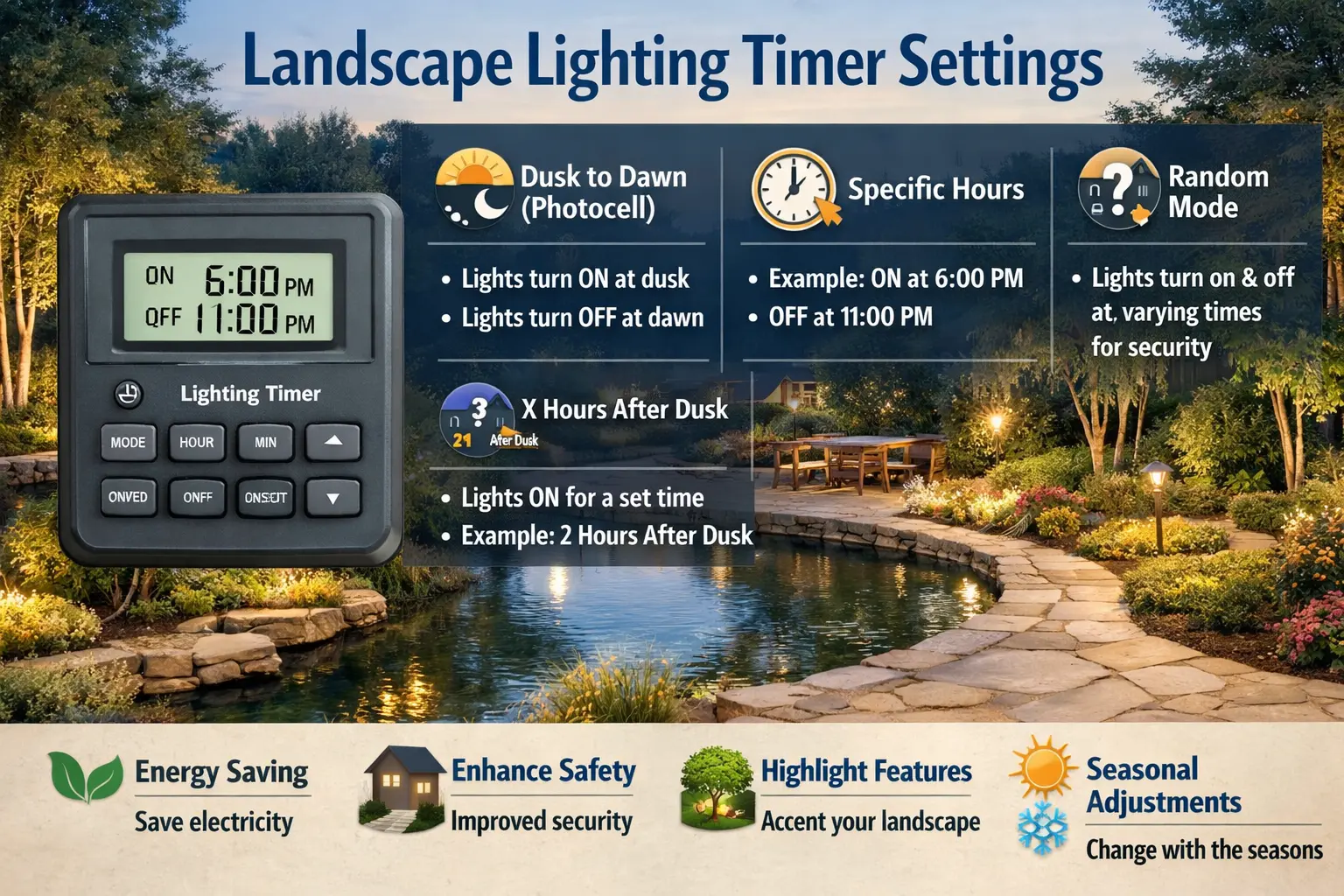
Landscape lighting timer settings determine when your outdoor lights turn on, turn off, and respond to changing daylight. When those settings are wrong, homeowners often assume they have a bad transformer, failed fixture, or damaged wire when the real issue is simply a control problem.
A properly set timer should make the system feel automatic. Your lights should come on when you expect them to, shut off when you want them to, and require very little attention in between. This page explains how timers fit into the overall low voltage system, how to set each common timer style, when to adjust the schedule during the year, and what to do when the timing still seems off.
If your timer settings look correct but the lights still do not respond properly, the issue may be electrical rather than programming-related. See our Landscape Lighting Timer Not Working guide for troubleshooting steps covering timer failure, wiring problems, transformer control issues, and power-related faults.
Common landscape lighting timer types
Not every landscape lighting timer works the same way. Knowing which control you have makes setup easier and keeps you from following the wrong instructions. Most homeowner systems fall into three categories: mechanical dial timers, digital programmable timers, and photocell-based controls. Some transformers combine more than one of these features, such as a timer plus a photocell, which gives you more than one way to automate the schedule.
Most low voltage systems use the timer as part of the transformer assembly rather than as a separate wall control. That means the timer is usually sitting next to the same components that power your yard lighting. If the system feels confusing, it helps to remember that the timer tells the system when to run, the transformer handles the power conversion, the cable carries that power to the fixtures, and the fixtures only perform as well as the controls behind them. This is why timer issues often overlap with pages like Portfolio outdoor transformer lighting, transformer wattage guide, and Portfolio lighting parts and accessories.
Mechanical timers
Mechanical timers usually use a rotating dial with tabs or pins around the edge. You set the current time by turning the dial to the right hour, then move the tabs or pins to mark when the lights should turn on and off. These are common on older systems because they are simple and easy to understand. The main downside is that they usually need seasonal adjustment because they do not automatically follow changing sunset times.
Digital timers
Digital timers let you program exact on and off events and often support more than one schedule. They are convenient when you want tighter control, but they also create more opportunities for settings mistakes. A missed save step, a reset after a storm, or a weak backup battery can wipe out the program and make the system seem inconsistent.
Photocell-based controls
A photocell senses ambient light and turns the system on at dusk. Some systems then use a timer to shut the lights off later at night. This is popular because it adapts naturally to changing sunset times, but it can also be confusing if the sensor is dirty, shaded, exposed to another light source, or mounted where it does not see daylight well.
Portfolio Low Voltage Lighting
See how timers, transformers, cable, and fixtures work together in a typical low voltage setup.
Read the guidePortfolio Low Voltage Lighting Timer Guide
Compare timer styles and control choices specific to Portfolio-style systems.
Read the guideLandscape Lighting Timer Setup
Use this page if you want a second step-by-step setup guide focused specifically on programming.
Read the guideLandscape Lighting Transformer Guide
Helpful when timer issues overlap with transformer sizing, layout, or outdoor power-pack questions.
Read the guideHow to set a landscape lighting timer step by step
The exact buttons and dial design vary, but the sequence below works well for most low voltage landscape lighting timers. The goal is not just to enter a schedule, but to make sure the timer and transformer are actually responding the way you expect before you walk away.
| Step | What to do | Why it matters |
|---|---|---|
| 1. Confirm power to the transformer | Make sure the outlet, GFCI, breaker, and transformer all have power before changing settings. | A dead outlet can look like a timer problem. |
| 2. Set the current time | Adjust the dial or digital clock to the correct present time. | Every other programmed event depends on the clock being right. |
| 3. Choose the correct control mode | Select auto mode, photocell mode, timer mode, or a combination mode depending on your system. | Manual mode overrides the schedule. |
| 4. Set the on-time | Program when the lights should start, or let the photocell handle dusk activation. | This controls evening startup. |
| 5. Set the off-time | Choose when the lights should turn off or how many hours after dusk they should run. | This prevents the system from staying on all night unless that is your goal. |
| 6. Test the schedule | Run the system in manual mode, then return it to auto mode and confirm it responds correctly. | Testing catches setup errors before the evening schedule matters. |
It helps to take setup one layer at a time. First, verify that the transformer itself is live. If the transformer has no incoming power, the timer cannot control anything. Next, make sure the current time is accurate. Even a perfect schedule will fail if the timer believes it is several hours earlier than it really is. On digital controls, double-check AM and PM. On mechanical timers, make sure the pointer lines up with the correct present time on the dial.
Once the clock is right, place the control in the proper operating mode. This is one of the most common causes of timer confusion. A lot of homeowners unknowingly leave the system in manual override, test mode, or a dusk-plus-hours mode they did not mean to use. The result is a timer that looks programmed but never actually follows the saved schedule.
When setting the on-time, think about how the system is used. Decorative accent lights may not need to run as long as safety lighting on a walkway or driveway. Many homeowners prefer dusk activation for convenience, while others choose a fixed schedule for tighter control. After the on-time is set, choose an off-time that makes sense for your household.
Finally, test everything before closing the transformer door. If the timer changes mode but the lights still do not respond, move into Portfolio lighting transformer troubleshooting, Portfolio lighting installation and instructions, and Portfolio lighting wiring diagram. For the bigger picture, review the full landscape lighting guide.
If you are still learning how the timer fits into the full low voltage system, it helps to review the landscape lighting timer setup guide. That page goes deeper into the actual programming process and works well as a companion resource for homeowners who want a clearer step-by-step walkthrough before adjusting their timer settings.
How the timer fits into the full landscape lighting system
A landscape lighting timer is only one piece of the system. It tells the transformer when to send power, but it does not fix voltage drop, overloaded runs, bad connectors, or a failing fixture. That is why timer issues can overlap with broader electrical and layout problems.
If your timer appears to be working but the lights still act oddly, the next places to check are wire size, connector quality, run length, and transformer load. Long cable runs can affect performance at the far end of the system. Loose or corroded connections can cause inconsistent output that looks like a timing problem. An overloaded transformer can shut down or behave unpredictably, which again makes the timer seem guilty when it is not.
Timer settings are useful, but they apply the same lighting pattern every night. Some systems go further by adjusting lighting throughout the evening based on how outdoor spaces are used. For that type of approach, see circadian outdoor lighting.
Landscape Lighting System Diagram
See how the timer, transformer, cable, and fixtures work together in a complete low voltage system.
View system diagramLandscape Lighting Voltage Drop
Helpful if lights get weaker farther down the run or timing problems seem tied to dim output.
View voltage drop guideLandscape Lighting Wire Gauge
Useful when cable size may be affecting long runs or larger lighting loads.
View wire gauge guideLandscape Lighting Connectors
Best for systems with intermittent lights, loose splices, or moisture-related connection problems.
View connector guideAdjusting timer settings for seasonal daylight changes
One reason homeowners get frustrated with landscape timers is that settings that looked perfect in summer do not always feel right in fall or winter. Sunset can move by hours across the year, and a fixed schedule does not automatically adapt unless a photocell is involved. That means a system that felt perfectly balanced in June can suddenly feel late, early, or wasteful by November.
If you use a mechanical or digital timer without a photocell, you will usually want to adjust the on-time a few times a year. A summer schedule might turn lights on later and run them for fewer hours. In winter, you may want them on earlier but still keep the same shutoff time for energy savings and bulb life.
Photocell-based controls are easier because dusk activation moves automatically with the season. Even then, homeowners often adjust the off-time so the system is not running longer than necessary during long winter nights.
Use a simple seasonal routine
At the start of spring, summer, fall, and winter, do a quick evening walk-by and check whether the lights are coming on when you actually want them. That simple habit catches more timer problems than most homeowners expect.
Watch for plant growth around the photocell
Shrubs, mulch splash, and even nearby lighting can interfere with a photocell. A timer that worked fine last year may start turning on late simply because the sensor is now shaded or getting hit with reflected light. That is one reason pages like landscape lighting layout design, landscape lighting layout, and landscape lighting spacing are useful companions.
Check the clock after storms and outages
Seasonal changes are not the only reason timers drift. Storms, unplugged transformers, tripped breakers, and weak backup batteries can all reset the clock. If the lights suddenly feel an hour off, check the clock setting first.
Common landscape lighting timer problems and fixes
Most timer problems come down to setup, mode selection, or a control component that is no longer responding consistently. The easiest way to narrow things down is to decide whether the timer is failing completely or whether it is just following the wrong program. If the lights will operate in manual mode but not in auto mode, the timer control is usually where the problem lives.
Lights turn on during the day
Check the clock setting, manual override status, and whether the photocell is dirty, shaded, or exposed to reflected light.
Lights never turn on automatically
Verify auto mode, saved program settings, incoming power, and transformer response in manual mode.
Lights stay on too long
Look for manual override, an incorrect off-time, or a dusk-plus-hours mode that is longer than you intended.
Timer clicks but lights do not respond
The control may be working while the transformer, cable, or fixture run has another issue farther downstream.
Timer loses settings repeatedly
When a digital timer repeatedly forgets its settings, look for power interruptions, a weak backup battery, or an aging control module. If the timer constantly resets, replacement may be more practical than reprogramming it again and again.
Photocell behaves unpredictably
If your timer depends on a photocell, inspect the sensor location. Photocells can be fooled by porch lights, uplights, reflected window light, or nearby ambient lighting. Sometimes the fix is not a new timer at all. Sometimes the sensor simply needs to be cleaned or repositioned.
If your timer settings appear correct but the lights still fail to come on at night, the issue may not be programming. Sometimes the timer is functioning normally but another part of the system prevents the lights from activating. Our Landscape Timer Not Turning Lights On guide explains how to troubleshoot situations where the timer schedule is set correctly but the landscape lighting system still does not respond.
Timer symptoms compared
| Symptom | Likely cause | Check first | Best supporting guide |
|---|---|---|---|
| Lights come on in daylight | Wrong clock, manual override, blocked photocell | Current time, mode, sensor location | Photocell not working |
| Lights never follow the schedule | Auto mode off, unsaved program, failed timer module | Saved settings and mode selection | Light timer not working |
| Timer works but lights stay dark | Transformer output issue, dead run, bad connector | Manual mode and transformer response | Transformer troubleshooting |
| Lights are dim when they do come on | Voltage drop, long run, poor connection, weak output | Wire size, connectors, transformer load | Landscape lights dim |
| Settings keep disappearing | Power interruptions or aging digital timer | Backup battery or control module condition | Parts and accessories |
Frequently asked questions
How do I set a landscape lighting timer?
Start by confirming the transformer has power, then set the current time, choose the correct mode, enter your on and off times, and test the system in auto mode. If the system uses a photocell, the sensor may control dusk activation while the timer controls shutoff.
Why are my landscape lights turning on during the day?
That is often caused by a wrong clock setting, manual override, a shaded or dirty photocell, or a timer program that was saved incorrectly.
Why are my landscape lights not turning on automatically?
Check whether the timer is in auto mode, whether the current time and on-time are set correctly, and whether the transformer and photocell are functioning normally. If the lights work in manual mode, the timer settings are the most likely issue.
Can I add a timer to an existing lighting transformer?
Yes. Many low voltage systems can use a built-in or plug-in timer as long as the control is compatible with the transformer and overall load.
Do I need to change timer settings during the year?
If you use a fixed timer schedule, yes, seasonal daylight changes usually require updates. Photocell-based systems reduce that need, but many homeowners still change the shutoff time by season.
Landscape lighting timers do more than automate convenience — they directly influence yearly energy consumption and operating costs. Our guide to the environmental impact of landscape lighting systems explains how timer schedules, motion controls, and runtime reduction strategies can significantly lower the carbon footprint of outdoor lighting installations.
Final thoughts on landscape lighting timer settings
When timer settings are correct, your landscape lighting should feel automatic and dependable. Most timing complaints start with the control, not the fixtures. That is why checking the clock, mode, photocell, and saved schedule is usually the smartest first move.
If the schedule looks right and the lights still act up, step outward into the rest of the system. That is where the companion guides on transformer troubleshooting, low voltage lighting, connectors, and voltage drop become especially useful.