
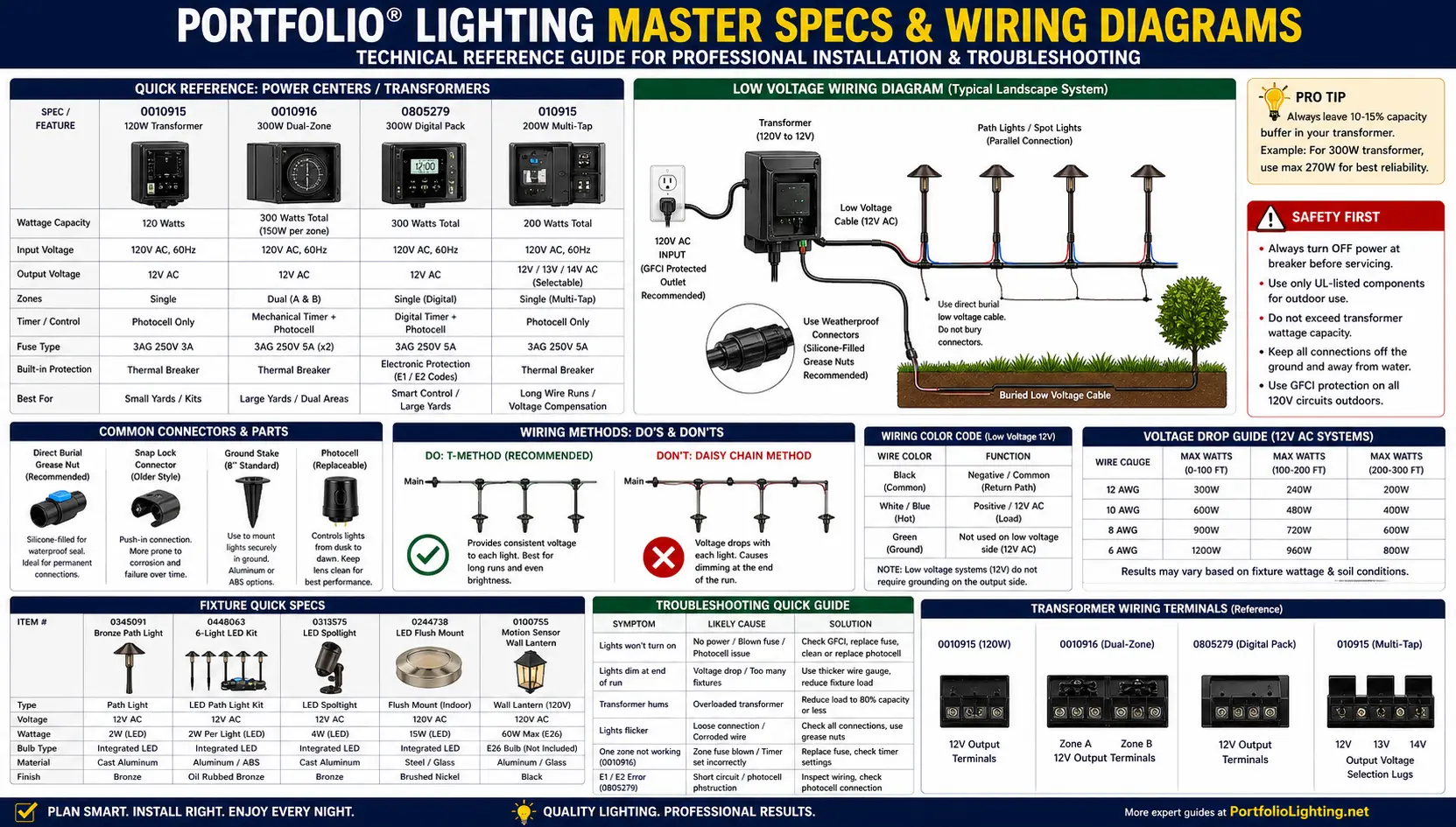
Quick Answer: How to Use the Portfolio Technical Archive
Find the item number first, then match the symptom to the model module below. For transformers, check load wattage, fuse condition, timer function, photocell status, and low-voltage line shorts. For fixtures, check bulb base, socket condition, stake threads, snap-lock connectors, moisture seals, and LED driver output.
If the label is missing, start with Portfolio lighting model number lookup and Portfolio lighting manuals.
For a broader view of available fixtures and systems, see the Portfolio lighting catalog.
If the model is no longer sold, check discontinued Portfolio lighting for replacement strategy and compatible alternatives.
If you want to compare how newer lighting hardware actually performs after installation, including heat buildup, standby power use, repairability, and smart-control behavior, explore the real-world lighting hardware performance archive.
When I built this archive, I made it for you to start with the model number, even if it’s incomplete. In my experience, even partial numbers can point you in the right direction if you compare them carefully.
I’ve tested this by searching multiple variations of the same number, and I’ve found matches that wouldn’t show up otherwise. That’s something I’ve learned to do whenever the label isn’t clear.
Close is often good enough to get started.
Portfolio Model Lookup Logic Summary
| What You Have | What To Check | Best Next Step |
|---|---|---|
| Model number only | Look for exact and partial-number matches | Use the model jump grid |
| Broken fixture part | Compare compatible parts by category | Use the cross-reference table |
| Dead transformer or controller | Check fuse, photocell, output, and timer | Use transformer troubleshooting links |
| Missing manual | Search by item number variations | Check the search term cloud |
Quick-Jump Model Grid
Use this grid to jump directly to a Portfolio model module. Each module includes a hook, common problem, exact fix, technical secret, and a symptom table.
Portfolio model pages often fail users because they stop at generic advice: “replace the bulb,” “check the transformer,” or “buy a new fixture.” This archive goes deeper. It organizes common Portfolio items by the parts and failure patterns homeowners actually search for: blown fuses, timer failures, cracked stakes, short circuits, E1/E2 errors, photocell corrosion, LED driver failure, and moisture behind lenses.
Keep one rule in mind: a repeated failure is a clue. A fuse that blows twice, a transformer that keeps resetting, or a connector that corrodes again is not just a bad part—it is usually a load, wiring, moisture, heat, or compatibility problem.
For a complete breakdown of transformer wiring, troubleshooting, voltage taps, and replacement options, see the Portfolio lighting transformer master guide.
For detailed breakdowns of models 284369, TC001, and 284357, see the full manuals and parts guide.
For a structured breakdown of models, parts, and repair paths, see the Portfolio Lighting model library and repair index .
My approach is to match the symptom before replacing anything. I’ve handled systems where the same model had completely different issues depending on how it was used.
When I put my meter on a transformer and saw voltage drop under load, I knew the issue wasn’t the label—it was how the system was behaving. That’s when I started focusing more on symptoms than part numbers.
Symptoms will commonly tell you more than the model number. So use the search bar above to find relevant pages if needed.
Many of the older Portfolio models listed here don’t have direct replacements, which is where Origin21 starts to show up. I break that down in the Portfolio to Origin21 compatibility guide.
For long-term ownership analysis beyond technical specifications, visit the 2026 Fixture Repairability Benchmark Archive comparing which lighting systems are realistically repairable after years of outdoor or indoor use.
Portfolio Item 0010915 — 120W Transformer
The hook: Item 0010915 is the workhorse transformer from many 2010–2015 style Portfolio landscape lighting kits.
Common problem: The transformer shuts off under load and does not click back on immediately. The internal thermal protection can trip from heat or overload and may not reset until the unit cools.
Upgrade: Replace 50W MR16 halogens with 5W LED equivalents. A six-light halogen run can use around 300W, while six 5W LEDs use about 30W.
| Symptom | Likely Cause | Exact Fix |
|---|---|---|
| Transformer shuts off and later works again | Thermal protection tripped | Unplug for 20 minutes, reduce wattage, inspect overloaded halogens. |
| Hums loudly under load | Near or above safe capacity | Calculate watts and keep load below roughly 80% of rating. |
| Lights dim at end of run | Voltage drop on low-voltage cable | Use thicker wire, split the run, or redesign layout. |
Helpful related guides: Portfolio lighting transformer troubleshooting, landscape lighting voltage drop, and Portfolio lighting transformer replacement.
Technical archives are most useful when they separate confirmed records from uncertain matches. Many discontinued Portfolio Lighting products were sold under multiple numbers, which makes old manuals, labels, and retail listings difficult to connect. For models that are not fully documented yet, use the Portfolio Lighting Lost Models Archive to compare verified, likely, partial, and owner-confirmation records in one place.
I’ve encountered a lot of transformer issues, and in my experience, they’re rarely completely dead. I’ve tested units that shut down due to overload or short circuits, even though they appeared failed.
When I measured output at the terminals and saw voltage spike then drop, I knew something downstream was causing the issue. Once I fixed the wiring, the transformer came back to life.
Transformers usually fail for a reason and those reason could be a variety of issues.
Portfolio Item 0010916 — 300W Transformer
The hook: Item 0010916 is a heavier-duty 300W transformer often used for larger yards or dual-zone style layouts.
Timer bypass fix: Set the transformer to manual-on or constant-on mode if available, then plug it into an outdoor-rated digital plug-in timer.
| Symptom | Likely Cause | Exact Fix |
|---|---|---|
| Timer no longer switches | Broken mechanical timer pegs | Bypass with an outdoor-rated digital timer if transformer can remain on. |
| No output after overload | Blown 3AG fuse or overload | Replace only with matching 3AG 250V 5A glass fuse and reduce load. |
| Transformer hums loudly | High wattage load | Keep load under about 80% capacity and inspect for shorted cable. |
Helpful related guides: replacement terminal blocks and transformer lugs, landscape lighting transformer guide, and Portfolio transformer tripping breaker.
For multi-tap wiring and voltage selection, see 200W multi-tap transformer wiring guide.
Portfolio Model 010915: Fuse Blowing & Power Issues
Model 010915 is commonly associated with fuse-related failures, especially after overload conditions or moisture exposure. If the system suddenly stops working, the internal fuse is often the first component to check.
- Check for blown 3AG 250V 5A glass fuse
- Inspect for overloaded light strings or fixtures
- Look for water intrusion near connections
If the fuse keeps blowing, review safe load limits using the holiday lighting power calculator.
Portfolio Item 0345091 — Bronze Path Light
The hook: Item 0345091 is a classic cast-aluminum bronze path light and one of the most recognizable Portfolio yard fixtures.
Better-than-metal fix: Use a short 1/2-inch NPT threaded PVC riser as a replacement neck where the geometry allows it.
| Symptom | Likely Cause | Exact Fix |
|---|---|---|
| Light head leans or falls over | Threaded neck snapped | Replace stake/neck or retrofit with 1/2-inch NPT threaded PVC riser. |
| Bulb will not fit | Wrong base type | Match G4 or T5 wedge base style to socket. |
| Intermittent light | Loose wedge bulb or corroded socket | Clean socket contacts, replace bulb, and check connector splice. |
Helpful related guides: Portfolio landscape lighting, parts and accessories, and bulb replacement.
I’ve worked on path light systems where fixtures stopped working one by one. In my experience, it’s often not the light itself but the connector or stake connection.
I’ve physically pulled connectors apart and seen corrosion inside that wasn’t visible from the outside. That’s something I always check now before replacing any fixture.
For similar landscape fixture systems, see model 0312384 replacement parts for compatible stakes, bulbs, and components.
Portfolio Item 0805279 — 300W Digital Power Pack
The hook: Item 0805279 is a digital interface power pack. It is flexible, but E1 and E2 error codes confuse many homeowners.
- E1: usually points to a short in the low-voltage line or excessive load.
- E2: often points to photocell obstruction or sensor connection problems.
- Photocell connector: check the 2-pin photocell connector for green corrosion, loose seating, or moisture.
| Symptom | Likely Cause | Exact Fix |
|---|---|---|
| E1 on display | Shorted low-voltage cable or overload | Disconnect field wires, test transformer output, then reconnect zones one at a time. |
| E2 on display | Photocell blocked or corroded | Clean lens, relocate away from artificial light, inspect 2-pin connector. |
| Works manually but not dusk-to-dawn | Photocell logic issue | Test in covered darkness, clean connector, replace photocell if removable. |
Helpful related guides: transformer troubleshooting and landscape lights not working after rain.
For full error code explanations and repair steps, see 0805279 power pack manual and troubleshooting.
For another transformer reference, see model 121408 transformer manual for wiring and setup guidance.
If your system is not working properly, compare symptoms with SL-200-12 troubleshooting for common transformer and wiring issues.
Portfolio Item 0092288 — 45W Low Voltage Kit
The hook: Item 0092288 is the entry-level starter set. Voltage drop shows up quickly because the transformer is small.
Daisy chain vs. T-method: In a daisy chain, each fixture is fed one after another. In a T-method, the transformer feeds the middle of the run, splitting current in two directions and helping lights stay more even.
| Symptom | Likely Cause | Exact Fix |
|---|---|---|
| End lights are dim | Voltage drop | Convert daisy chain to T-method or shorten the run. |
| All lights dim | Transformer overload or poor connection | Measure total watts, inspect splices, reduce fixture load. |
| One fixture out | Bad connector or bulb | Check splice, bulb base, and socket contacts. |
Helpful related guides: Portfolio low voltage lighting, low voltage landscape lighting, and voltage drop calculator.
Some Portfolio Problems Require Model-Specific Troubleshooting
Generic troubleshooting works for simple issues, but older Portfolio fixtures often need model-specific checks. A low-voltage fixture may need lens, socket, and connector inspection; a motion light may need sensor range, Lux, and manual override testing; and a solar fixture may need battery, switch, and panel diagnostics. Use the Portfolio Lighting Model 7133C replacement parts guide, Portfolio DualBrite PF-4300-BK motion light manual, and Portfolio Lighting Model SLL12BK solar light parts guide when the basic troubleshooting checklist does not explain the failure.
Portfolio Item 0100755 — Motion Sensor Wall Lantern
The hook: Item 0100755 is a standard Portfolio porch or exterior wall lantern with motion sensor logic.
Dual-Brite logic: Many motion lanterns use low-light accent mode for 3 hours, 6 hours, or dusk-to-dawn. If set incorrectly, the lantern can look broken when it is following the selected mode.
| Symptom | Likely Cause | Exact Fix |
|---|---|---|
| Light stays on all day | Photocell blocked, mode setting, or sensor fault | Clean photocell, reset mode, verify daylight reaches sensor. |
| Flickers at night | Loose connection, incompatible bulb, or sensor cycling | Turn off breaker, inspect wiring, use compatible bulb type. |
| Motion mode not working | Dual-Brite or sensitivity setting | Cycle through 3-hour, 6-hour, and dusk-to-dawn settings. |
Helpful related guides: installation and instructions, outdoor junction box requirements, and Portfolio LED lights flickering.
Portfolio Item 0448063 — 6-Path Light Kit
The hook: Item 0448063 is the oil-rubbed bronze LED path light set with convenient snap-lock connectors.
Upgrade fix: Replace failed snap-lock connectors with outdoor-rated silicone-filled grease nuts or listed low-voltage direct-burial connectors.
| Symptom | Likely Cause | Exact Fix |
|---|---|---|
| One path light out | Failed snap-lock connector | Cut out connector and replace with silicone-filled low-voltage connector. |
| Light flickers when wire moves | Poor pierce contact | Replace connector and inspect cable nicking. |
| Multiple lights fail after rain | Water intrusion at splices | Replace suspect connectors with direct-burial waterproof splices. |
Helpful related guides: low voltage wire connectors, landscape lights not working after rain, and Portfolio landscape lighting.
For a broader specification index of Portfolio models, see the Portfolio lighting model specs guide.
Portfolio Item 0244738 — LED Flush Mount
The hook: Item 0244738 is an indoor kitchen, hallway, or utility LED flush mount where the LED board may still be good but the driver fails.
Technical driver note: A generic replacement must match input voltage, output DC voltage range, output current, wattage, dimming type, connector type, and space inside the fixture.
| Symptom | Likely Cause | Exact Fix |
|---|---|---|
| Fixture dead | Failed LED driver or no line voltage | Verify power first, then match driver specs exactly if replacing. |
| Flickers or flashes | Driver failure or dimmer incompatibility | Test on standard switch, verify dimmer compatibility, replace driver or fixture. |
| LED board dim but not out | Driver output degradation | Replace matching driver only if fixture can be safely serviced. |
Helpful related guides: Portfolio integrated LED lighting, Portfolio LED lighting, and installation and instructions.
Portfolio Model 0345091: Landscape Fixture System & Parts
Model 0345091 is a common low-voltage landscape lighting system using replaceable bulbs, threaded stakes, and standard connectors. Most issues are related to connectors, bulbs, or stake damage.
- Uses 1/2" NPT threaded stakes
- Compatible with T5 / G4 wedge base bulbs
- Common issue: loose or corroded connectors
For system-wide troubleshooting, see Portfolio lighting troubleshooting.
Portfolio Model 0448063: Landscape Lighting System Overview
Model 0448063 shares many components with other Portfolio landscape systems, including interchangeable stakes, bulbs, and connectors. It is often used in pathway and accent lighting layouts.
- Compatible with standard low-voltage wiring systems
- Uses replaceable wedge base bulbs
- Common issue: uneven brightness from long wire runs
For layout and system design, see Portfolio landscape lighting guide.
Portfolio Model 0092288: Bulb Compatibility & Replacement
Model 0092288 is primarily associated with bulb compatibility across multiple Portfolio lighting systems. Choosing the correct replacement bulb is critical for brightness, color temperature, and system performance.
- Uses T5 or G4 12V wedge base bulbs
- LED upgrades reduce load and increase lifespan
- Common issue: incorrect bulb type causing dim or flickering lights
For replacement guidance, see bulb replacement guide.
Portfolio Item 0313575 — LED Spotlight
The hook: Item 0313575 is a high-output directional LED landscape spotlight used for trees, walls, flags, and architectural accents.
Fix: Clean the lens channel and O-ring, remove grit, dry the inside completely, then apply a very thin layer of plumbers' grease before reseating the lens.
| Symptom | Likely Cause | Exact Fix |
|---|---|---|
| Lens fogs after rain | Dirty or dry O-ring | Clean O-ring, dry fixture, apply thin plumbers' grease, reseal. |
| Beam looks weak | Moisture film or lens haze | Clean lens and inspect for water intrusion. |
| Fixture fails after water entry | Driver or LED damage | Replace fixture if electronics have corroded. |
Helpful related guides: Portfolio landscape lighting, landscape lights not working after rain, and Portfolio lights not working after rain.
Portfolio Item 010915 — 200W Multi-Tap Transformer
The hook: Item 010915 is the pro-style 200W multi-tap transformer with multiple voltage lugs such as 12V, 13V, and 14V.
Technical secret: Move a long run from the 12V lug to the 13V or 14V lug only after measuring voltage at the far fixture under load.
| Symptom | Likely Cause | Exact Fix |
|---|---|---|
| Far lights dim | Voltage drop on long run | Measure voltage under load and move only that run to 13V or 14V if needed. |
| First lights burn out early | Overvoltage from high tap | Move short run back to 12V or split the layout. |
| Transformer overloaded | Too many watts across all taps | Keep total system load under safe transformer capacity. |
Helpful related guides: landscape lighting voltage drop and voltage drop calculator.
For more transformer documentation, see Portfolio outdoor transformer manuals.
For low-voltage outdoor systems, compare your model with Portfolio landscape lighting and landscape lighting replacement parts.
Archived Portfolio Transformer Model References
These model pages belong in the technical archive because they help preserve details that are often missing from old labels, discontinued manuals, and replacement listings.
Archive the Portfolio model EE4859BK transformer documentation for users trying to identify older power packs.
Add the Portfolio model 999928302 transformer reference for label-based lookup and replacement research.
Include the Portfolio SL-100-12 transformer documentation for 100-watt low-voltage systems.
Point repair-focused visitors to the Portfolio LTF300WH transformer diagnostic guide when the issue is performance, heat, or shutdown behavior.
Use the Portfolio 0066580 manual and parts archive for model-specific parts identification.
Hidden Transformer Reset Rules
- Unplug the transformer for 20 minutes before assuming it is dead.
- Remove part of the load before testing again.
- Disconnect field wires and test transformer output alone if a short is suspected.
- Never bypass internal protection or install larger fuses than specified.
- If it trips repeatedly, find the overload, short, water intrusion, or failed component.
Use how to test a landscape lighting transformer for step-by-step diagnosis.
Portfolio Technical Archive Problem/Fix Summary Table
| Model | Most Common Symptom | Likely Cause | Exact Fix |
|---|---|---|---|
| 0010915 | Shuts off and later returns | Thermal protection | Unplug 20 minutes and reduce load. |
| 0010916 | Timer failure | Broken mechanical timer pegs | Bypass with outdoor-rated digital timer. |
| 0345091 | Head snaps at stake | Broken threaded neck | Replace stake/neck or use 1/2-inch NPT PVC riser. |
| 0805279 | E1 or E2 error | Short, overload, or photocell issue | Inspect line, load, and 2-pin photocell connector. |
| 0092288 | End lights dim | Voltage drop | Use T-method wiring or shorter runs. |
| 0100755 | Stays on or flickers | Dual-Brite or sensor issue | Reset mode and inspect photocell/sensor area. |
| 0448063 | One path light out | Snap-lock connector failure | Replace with silicone-filled grease nut. |
| 0244738 | Flush mount flickers or dies | LED driver failure | Match driver output exactly or replace fixture. |
| 0313575 | Foggy spotlight lens | O-ring seal leak | Clean O-ring and apply thin plumbers' grease. |
| 010915 | Long run dim | Voltage drop | Measure voltage and move to 13V/14V lug if appropriate. |
Compatibility matters more than exact match.
I’ve used cross-reference tables to match parts when the original was no longer available. In my experience, many components are interchangeable if you match specs correctly.
I’ve compared connectors, bulbs, and fuses side by side and found compatible replacements that worked just as well. That’s something I rely on when dealing with discontinued models.
Common Portfolio Model Search Variations
If you are using the site search bar, try the exact model number, the item number, and common versions without leading zeros.
For additional archived models, see model 0688503 manual and parts for compatibility and replacement information.
Search variations: Item #0805279, Portfolio 0805279, 0805279, 805279, Portfolio 0805279 manual, Portfolio power pack 0805279, Item #0010916, 0010916, 10916, Portfolio 0010916 manual, Item #010915, 010915, 10915, Portfolio 010915 manual.
For a deeper breakdown of DL and SL fixtures specifically, see the DL and SL series technical specs page, where I’ve mapped specs, output, and real-world failure patterns.
For Malibu-specific transformer identification, digital display troubleshooting, fixture-family matching, and discontinued replacement-part research, continue to the Malibu Lighting Model Library and Replacement Parts Guide.
For additional legacy low-voltage lighting research, visit the Malibu Lighting Model Library Top 40 Parts Lookup, covering ML-series transformers, LX path lights, 8100 digital power packs and commonly failed replacement components still searched by homeowners today.
Portfolio Part Cross-Reference Table
| Model | Transformer / Power Part | Bulb or LED Type | Connector / Stake Issue | Shared Troubleshooting Path |
|---|---|---|---|---|
| 0010915 | 120W transformer | MR16 halogen or LED retrofit loads | Terminal lugs and output screws | Thermal reset, load calculation, voltage drop |
| 0010916 | 300W transformer | Multiple fixture load types | 3AG 250V 5A glass fuse | Timer bypass, fuse replacement, overload diagnosis |
| 0345091 | Uses external transformer | G4 or T5 wedge compatibility | Threaded neck and stake failure | Bulb base, socket corrosion, stake repair |
| 0805279 | 300W digital power pack | Multiple fixture load types | 2-pin photocell connector | E1/E2 errors, photocell corrosion, line shorts |
| 0092288 | 45W starter transformer | Low-watt kit fixtures | Starter-kit connector splices | Daisy-chain dimming and T-method wiring |
| 0100755 | 120V hardwired fixture | Fixture-specific lamp or sensor logic | Wall box and motion sensor wiring | Dual-Brite settings, flicker, photocell behavior |
| 0448063 | Uses external transformer | Oil-rubbed bronze LED path fixtures | Snap-lock connector failure | Grease nut upgrade and waterproof splicing |
| 0244738 | Internal LED driver | Integrated LED board | Driver connector and fixture housing | Driver input/output matching |
| 0313575 | Uses external transformer | Integrated LED spotlight | Lens O-ring seal | Moisture intrusion and lens cleaning |
| 010915 | 200W multi-tap transformer | Multiple fixture load types | 12V/13V/14V lugs | Voltage measurement and tap selection |
For additional replacement options, see Portfolio lighting parts and accessories for bulbs, stakes, transformers, and connectors.
The Portfolio technical archive should separate retail outdoor lighting documents from Cooper architectural LED catalog logic. For downlight families, power modules, retrofit kits, dimming drivers, reflector finishes, and ERM/LDRT-style replacement paths, send visitors to the Portfolio architectural LED catalog guide.
Many older Portfolio manuals reference electrical practices without explaining the code article behind them. For a clearer understanding of how today's National Electrical Code applies to low-voltage lighting systems, read our complete NEC 411 vs. NEC 725 guide.
How These Portfolio Models Connect
Many Portfolio model numbers share parts, symptoms, or troubleshooting steps. Transformer models often overlap through fuses, photocells, timers, and output taps, while landscape fixture models often overlap through bulbs, stakes, connectors, and low-voltage wiring.
Use the model sections above together instead of treating each number as completely separate. If one model does not match your exact fixture, the related model links can help you find a shared part family or similar troubleshooting path.
Portfolio Lighting Part Cross-Reference Table
Some Portfolio lighting models share common replacement parts. Use this table to compare stakes, bulbs, fuses, photocells, and connectors before ordering parts.
| Part Category | Compatible Models | Specs / Replacement Part |
|---|---|---|
| Replacement Stakes | 0345091, 0448063, 0313575 | 1/2" NPT threaded heavy duty stake |
| Wedge Base Bulbs | 0345091, 0092288, 0448063 | T5 / G4 12V low voltage wedge |
| Glass Fuses | 0010916, 010915 | 3AG 250V 5A fast-acting glass fuse |
| Photocells | 0805279, 0010916 certain versions | 2-pin plug-in dusk-to-dawn sensor |
| Connectors | All landscape models | Silicone-filled waterproof grease nuts |
My recommendation is to treat repeated failures as a warning sign. I’ve seen fuses blow multiple times or connectors corrode again and again because the root problem was never fixed.
Repeat failures always mean something deeper.
What I’ve learned is that recurring issues usually point to load, moisture, or wiring problems. Once I started fixing the cause instead of replacing parts, the system stayed reliable long term.
The Best LED Landscape Lighting Fixtures Benchmark Guide expands the technical archive with real-world measurements for driver heat, repairability, standby drain, and transformer compatibility across residential outdoor lighting systems.
Older commercial Portfolio records often list housing, reflector, engine, driver, dimming, and emergency codes on separate specification sheets. A search for only the visible trim number may therefore miss the documents needed to repair the fixture. The Portfolio commercial lighting archive and compatibility guide explains how to organize those separate codes into one fixture record and determine which technical document controls each replacement decision.
Exact Model Technical Archive Additions
The technical archive should include more than wiring diagrams and manuals. Exact model pages are valuable because they preserve how discontinued Portfolio products actually fail and how owners can still repair them.
The archive now includes the SS9C-P5-BKT-CPK1 technical repair page, the 0378225 connector diagnostics page, the 0157561 flood light repair guide, the 0062582 model manual and parts page, the 0805200 transformer technical guide, and the 7404280540 replacement compatibility page.
These model pages help turn the archive into a true repair database instead of a simple document list.
Recently Added Portfolio Fixture Model Guides
Identifying discontinued Portfolio fixtures and sourcing replacement parts is much harder when no documentation exists online. The model-specific guides below cover the most-searched discontinued Portfolio fixture item numbers — each page provides specs, parts identification, troubleshooting by symptom, and compatible replacement options for that specific model.
If you are working with outdoor wall lanterns, deck lights, or fixtures with internal circuit boards that have no available manual, these pages are the most complete resources available. Each guide also links to the broader Portfolio replacement parts library, the model number lookup, and the discontinued Portfolio lighting hub.
📋 New Fixture Model Pages — Parts, Troubleshooting & Replacement
Dedicated guides for five discontinued Portfolio fixture models — the most specific and actionable resources available for these item numbers anywhere online.
For the full list of discontinued Portfolio model guides including transformer-specific pages, use the discontinued Portfolio lighting hub or the model number lookup to find the guide that matches your specific item number.
Portfolio Technical Archive FAQ
What is the fastest way to identify a Portfolio lighting part?
Start with the item number, wattage label, bulb base, transformer rating, finish, and connector type. Appearance alone is not enough because many Portfolio fixtures share similar housings.
Why does my Portfolio transformer shut off and not come back on?
It may have tripped internal thermal protection, blown a fuse, detected a short, or become overloaded. Unplug it for 20 minutes, reduce the load, and inspect the low-voltage cable before assuming the transformer is dead.
Can I bypass a failed Portfolio transformer timer?
Sometimes. If the transformer can be left in manual-on mode, an outdoor-rated digital plug-in timer can control the whole unit. Do not bypass fuses, grounding, or GFCI protection.
Can snap-lock connectors be replaced?
Yes. Failed snap-lock or pierce-style connectors can often be replaced with silicone-filled grease nuts or listed low-voltage direct-burial connectors.
Can a Portfolio LED driver be replaced?
Sometimes, but the replacement driver must match the original input voltage, output voltage range, current, wattage, dimming type, connector style, and heat limits.
For a full diagnostic workflow, use Portfolio lighting troubleshooting to identify wiring, transformer, timer, and fixture problems.
More Portfolio Technical Resources
Model Number Lookup
Use this first when you do not know which Portfolio item number you have.
Model number lookupTransformer Troubleshooting
Diagnose low-voltage power packs, overloads, reset failures, and line shorts.
Transformer troubleshootingParts and Accessories
Find replacement stakes, bulbs, connectors, lenses, lugs, and hardware.
Parts and accessoriesModel-Level Records Inside the Portfolio Technical Archive
A technical archive becomes much more useful when it connects broad discontinued Portfolio documentation to individual fixture repair records. Many homeowners do not just need a model number; they need to understand which part failed, whether the fixture is still serviceable and whether the original manual can be reconstructed from field evidence.
The 016107 WHCM432R8 lens documentation shows how lens shape, gasket depth and moisture protection affect repair decisions, while the 0311569 kit parts record explains how older Portfolio kits can hide several replacement-part paths under one model family.
The archive should also help visitors understand shade, diffuser and mounting failures. The 17945-000 shade replacement record focuses on fitter size and shade retention, while the 230132-145P parts record explains how connector failure and low-voltage wiring problems can be mistaken for fixture failure.
For models where the original paperwork is difficult to find, the FY09-003 0048184 manual record, 18907-000 manual and parts record, 25966-3 manual record and 2851294 manual record show how transformer labels, bulb markings, fixture geometry and connector inspection can rebuild missing technical information.
Portfolio Technical Archive Safety Note
This archive is an independent troubleshooting resource for Portfolio lighting owners. Model numbers, parts, fuse sizes, and symptoms should always be verified against the label and original manufacturer manual for the exact product in hand.
Disconnect power before servicing any transformer, power pack, wall lantern, hardwired fixture, LED driver, terminal block, or junction box. For 120V wiring, water-damaged equipment, repeated breaker trips, or overheated parts, use a licensed electrician.