
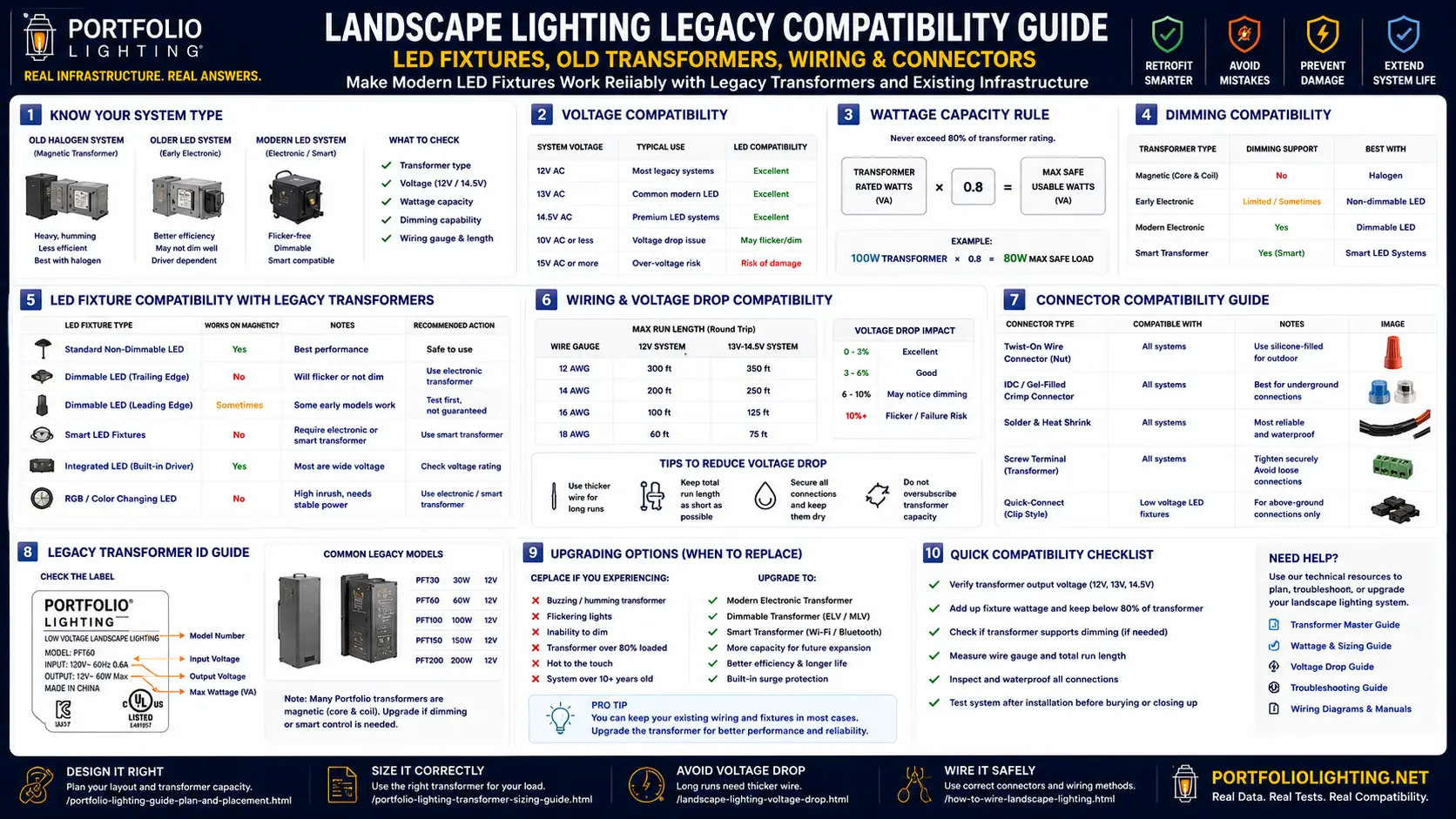
Pre-2018 Transformer Era Guide: What You Have and What It Can Do
Portfolio landscape transformers manufactured before 2018 fall into three distinct eras with different LED compatibility profiles. Identifying which era your transformer belongs to is the essential first step in any LED upgrade planning — and it takes less than two minutes with the transformer label in front of you.
⚠ Pre-2010 Magnetic Transformers
- Heavy toroidal or EI-core magnetic design
- Single 12V output tap — no multi-tap
- Electromechanical timer — no digital display
- Often 150W–300W rated capacity
- May have 20–40W minimum load requirement
- LED compatible electrically — minimum load is the key risk
- No smart control integration without a separate smart relay
- Replace if timer has failed — not just for LED compatibility
⚡ 2010–2017 Electronic Transformers
- Lighter electronic switching design
- Multi-tap output: 12V, 13V, 14V terminals
- Digital timer with photocell sensor
- 100W–600W capacity range
- Generally no minimum load requirement
- Strong LED compatibility — best legacy option
- Portfolio 0805279 is this era — fully LED compatible
- Zone terminals allow flexible LED fixture distribution
✓ 2018+ Modern Transformers
- Designed with LED in mind from the start
- No minimum load requirement
- Multi-tap with LED-optimized voltage regulation
- Smart-ready: app, WiFi, or smart hub compatible models exist
- Portfolio 0010915 is this era
- Full compatibility with all 31 benchmarked fixtures
- No compatibility concerns in normal LED upgrade
The most critical distinction: pre-2010 magnetic transformers may have a minimum load requirement that becomes problematic when all halogen fixtures are replaced with low-wattage LEDs. If total LED load drops below the transformer's minimum, you may see flickering or voltage instability across the whole system. The Portfolio Transformer Master Guide provides specific minimum load data for each Portfolio transformer model. For the Portfolio 0805279 specifically, see the 0805279 manual and troubleshooting guide.
Legacy Wattage Math: Why LED Conversion Usually Frees Up Transformer Capacity
The most common concern about upgrading a legacy landscape system to LED is transformer capacity. In practice, LED conversion almost always reduces total system wattage dramatically — often enough to accommodate significantly more LED fixtures than the original halogen system had.
The Halogen-to-LED Wattage Reality
Standard halogen landscape fixtures consumed 10W, 20W, or 35W per fixture. Modern LED replacements producing equivalent output consume 3W, 5W, or 8W — a 65–85% wattage reduction. This means:
- 10 halogen path lights at 20W each = 200W total load
- Same 10 positions with LED at 5W each = 50W total load
- A 150W transformer that was overloaded with halogens now has 100W of spare capacity — room for 20 additional 5W LED fixtures
This capacity liberation is why most LED upgrades to legacy Portfolio systems do not require transformer replacement. The Portfolio Transformer Wattage Guide provides the calculation framework for your specific system. The Transformer Sizing Guide covers scenarios where the legacy transformer genuinely does need upgrading.
Halogen-to-LED Wattage Conversion Quick Reference
16-Gauge Legacy Wire and Modern LED Fixtures: What You Actually Need to Know
16-gauge wire buried in most pre-2015 residential landscape systems was sized for halogen loads at 12V AC with relatively high current draw. LED conversion changes the current equation dramatically — in your favor.
Why LED Reduces Voltage Drop on Existing Wire
Voltage drop is driven by current (amps), not wattage directly. A 20W halogen at 12V draws approximately 1.67A. A 5W LED replacement at 12V draws approximately 0.42A — a 75% current reduction. Since voltage drop equals current times wire resistance, the same 16-gauge run that dropped 1.5V for the halogen drops only 0.38V for the LED replacement. Legacy 16-gauge wire that was borderline with halogen loads typically becomes comfortably adequate with LED replacements. Use the Voltage Drop Calculator and the Voltage Tap Calculator to verify your specific run length and load.
Two Scenarios Where 16-Gauge Wire Creates LED Problems
- Adding new LED fixtures to an existing run (not replacing existing): Adding 10 new 5W LED fixtures to a zone that previously ran 5 halogen fixtures increases total zone current. Calculate total new zone wattage and verify voltage drop for the full new load. The Voltage Drop Fixture Impact Guide covers this calculation with specific fixture-by-fixture data.
- Very long runs exceeding 150 feet: Even with low-wattage LED fixtures, 150+ feet of 16-gauge wire at full zone load can produce voltage drop that stresses LED drivers and reduces brightness. Upgrade to 14-gauge on these runs, or use the transformer's 13V or 14V tap to compensate. See the Landscape Lighting Wire Gauge Guide for run-length limits by gauge and load.
Connector Type Compatibility: The Problem Nobody Warns You About Before You Buy
The physical connector that attaches a fixture to the landscape cable is often the most disruptive compatibility issue in a legacy-to-LED upgrade. No amount of wattage math resolves a connector mismatch — you find out about it when you open the box in the yard with the fixture in your hand.
Portfolio Proprietary Snap Connector
Used on most pre-2018 Portfolio landscape fixtures. A push-in snap design where the fixture lead terminates in a molded plastic plug that clicks into a cable-mounted receiver. Portfolio fixtures connect together in seconds without tools. Third-party LED fixtures do not use this standard — their leads cannot connect to Portfolio snap receivers without modification. This is the connector in the majority of legacy Portfolio systems.
Requires adapter or splice for third-party LEDUniversal Bullet Connector (Industry Standard)
Used on third-party LED landscape fixtures from Kichler, Hinkley, WAC, and most modern brands. Two bullet-shaped copper terminals that push together — one on each cable wire, one on each fixture lead. Universal across brands. If your legacy system uses bullet connectors rather than Portfolio snap connectors, third-party LED fixtures connect directly with no adaptation needed.
Direct compatibility with all third-party LEDLever-Lock / Push-Wire Connectors (2018+ systems)
Modern landscape systems increasingly use lever-operated connectors (Wago-style) that accept stripped wire ends without tools. Third-party LED fixtures connect by inserting the stripped fixture lead directly into the lever-lock receiver. These are the easiest legacy connectors for LED upgrades — strip and insert, no adapters.
Direct compatibility — strip and insertDirect Splice with Waterproof Wire Nut
The universal fallback that works regardless of connector type. Cut the existing connector from the cable, strip both cable wire and new LED fixture lead, and join them with a waterproof wire nut rated for direct burial (Ideal 63 series, King Innovation Dryconn, or equivalent). Works with any legacy connector type on any cable. Permanent — requires cutting the existing wiring.
Universal — works with any legacy systemAdapting Portfolio Snap for Third-Party LED Fixtures — Two Options
- Snap-to-bullet adapter (recommended — reversible): King Innovation and Blazing Products make adapters that insert into the Portfolio snap receiver on one end and present a bullet connector for the third-party LED fixture on the other. Preserves the existing cable wiring without cutting. Allows future fixture swaps without re-splicing. Available at most electrical suppliers and online.
- Direct wire splice with waterproof wire nut (permanent — always available): Cut the Portfolio snap receiver from the cable, strip both wire ends, splice the LED fixture lead with a waterproof direct-burial wire nut. Requires no specialty parts — any hardware store carries the correct wire nuts. The Low Voltage Wire Connectors Guide covers the correct specification for direct-burial landscape wire splicing.
For connector type identification help including photographs of each Portfolio connector generation, see Will Other Lighting Brands Work With Portfolio Connectors? and the Portfolio Lighting Compatibility Guide.
Full Fixture Legacy Compatibility Matrix: All 31 Benchmarked Models
Compatibility ratings for each benchmarked fixture against pre-2018 Portfolio 12V AC transformers, 16-gauge legacy wiring, and Portfolio snap connector systems. This is the only published fixture-by-fixture compatibility matrix for these models against legacy landscape infrastructure.
| Fixture / Device | Type | Pre-2018 12V Transformer | 16-Gauge Wire | Portfolio Snap Connector | Key Notes |
|---|---|---|---|---|---|
| Portfolio 0805279 Transformer | Transformer | Native | Yes | Native | This IS the legacy system |
| Portfolio 0010915 Transformer | Transformer | N/A | Yes | Native | 2018+ — replaces pre-2018 transformers |
| Kichler Tenon (12V AC variants) | 12V LV Fixture | Yes | Yes | Adapter/splice | 12V AC models connect to legacy transformer; snap adapter needed |
| WAC dweLED Brocade (12V variants) | 12V LV Fixture | Yes | Yes | Adapter/splice | 12V models work; snap connector requires adapter |
| Hinkley Clear Lantern Series | 120V Lantern | No | N/A | N/A | 120V line voltage — requires separate circuit |
| Savoy House Lancaster Wall | 120V Wall | No | N/A | N/A | 120V only — not for 12V landscape systems |
| Kichler Hatteras Bay | 120V Pendant | No | N/A | N/A | 120V line voltage only |
| WAC dweLED Longboard | 120V Linear | No | N/A | N/A | 120V only |
| Modern Forms Alabaster Sconce | 120V Wall | No | N/A | N/A | 120V AC-LED — separate circuit required |
| HomeGnome Travertine / Morsale Travertine / Morsale Marble | 120V Indoor | No | N/A | N/A | Indoor 120V fixtures — not applicable to landscape systems |
| Savoy Judi / Capital Leland / Maxim Cora / Generation Hanks / Alora Furrow | 120V Indoor | No | N/A | N/A | Indoor 120V only |
| Philips WiZ A19 (in E26-lamped 120V fixture) | Smart Bulb E26 | Conditional | Yes (if 12V LV socket) | Adapter/splice | Smart features are WiFi-controlled independently of the legacy timer; transformer provides power switching only |
| AiDot Linkind Matter / U-tec Bright (E26) | Smart Bulb E26 | Conditional | Yes | Adapter/splice | Same as WiZ — smart control is independent of transformer timer/photocell |
| Lutron Diva Smart Dimmer | 120V Dimmer | No | N/A | N/A | 120V dimmer — cannot be used on 12V landscape transformer output. See Dimming Compatibility Guide |
| Lutron Caséta Bridge | Smart Hub | Conditional | N/A | N/A | Can control a smart transformer controller layer over legacy 12V wiring — requires compatible smart transformer relay |
| Ketra Tunable Platform | Smart Arch. | No | N/A | N/A | Proprietary power and control — full infrastructure replacement required |
| Zafferano Pina Pro / Hay Pao / Visual Comfort Avedon | Cordless | Yes — independent | N/A | N/A | Battery-powered — zero infrastructure dependency. Add to any outdoor area regardless of existing system |
| Brightech Celia / O'Bright Dune / Kuzco Folio 9 | Cordless | Yes — independent | N/A | N/A | Battery-powered — completely independent of landscape infrastructure |
| Sea Gull Hudson Street | 120V Outdoor | No | N/A | N/A | 120V line voltage only |
The Minimum Load Problem: When LED Is Too Efficient for Your Old Transformer
This is the compatibility problem that most LED upgrade guides completely miss — and it only affects the oldest magnetic landscape transformers. Understanding it before conversion prevents a frustrating flickering failure across the entire system after a complete LED replacement.
Some pre-2010 magnetic landscape transformers require a minimum load — a minimum wattage connected to the output — to function correctly. Below this minimum, the transformer's internal regulation becomes unstable, producing voltage fluctuation, flickering at all fixture locations, or complete failure to start. This threshold was typically 20–40W.
The minimum load requirement was never a problem with halogen landscape lighting — 10 fixtures at 20W each = 200W, far above any minimum threshold. But a 10-fixture LED system at 5W each = 50W total, which can fall below a 40W minimum load on pre-2010 transformers.
How to Test for the Minimum Load Problem
- After converting to LED, if all fixtures flicker simultaneously (not just one or two), minimum load may be the cause.
- Temporarily connect a 25W incandescent bulb across the transformer's output terminals. If flickering stops immediately, minimum load is confirmed.
- Solutions: keep one slightly higher-wattage LED fixture on the zone; add a small inline resistive load rated for outdoor use; or replace the pre-2010 transformer with a modern electronic unit that has no minimum load requirement. For transformer replacement guidance, see How to Replace a Landscape Lighting Transformer and the Portfolio Transformer Alternatives guide.
Smart LED Fixtures on Legacy Systems: What Works and What Definitely Does Not
Adding smart LED features to a legacy transformer system is possible — but the architecture matters enormously. The wrong approach damages hardware; the right approach adds full smart functionality without touching any buried wiring.
Smart Bulbs in 120V E26-Lamped Fixtures — Works Independently
If your legacy landscape includes E26-lamped outdoor fixtures powered at 120V from a separate house circuit (not from the 12V landscape transformer), you can install smart bulbs directly. WiZ, AiDot Linkind Matter, or U-tec Bright A19 bulbs connect to your home WiFi and operate independently of the legacy transformer's timer. The transformer controls the 12V landscape run; the smart bulb is controlled by your phone. These systems are completely independent and do not conflict.
Smart Transformer Controllers — The Correct Approach for 12V Smart Control
The cleanest solution for adding smart control to a legacy 12V landscape system is a smart transformer controller — a device that replaces or supplements the existing transformer's timer and photocell with WiFi, app, or hub control while keeping all existing 12V wiring and fixtures. See the Legacy Transformer AI Retrofitting Guide for compatible controller options and the Portfolio Lighting Hybrid Smart Upgrade Guide for full planning guidance.
What Absolutely Does Not Work — 120V Smart Dimmers on 12V Circuits
Lutron Caséta dimmers, Diva Smart Dimmers, and all residential 120V smart dimmers are designed for line-voltage circuits. Connecting a 120V smart dimmer to a 12V landscape transformer output will damage the dimmer immediately and may damage connected fixtures. This is the most common and most expensive mistake in DIY landscape lighting smart upgrades. For smart dimming of 12V landscape circuits, a smart transformer with built-in dimming capability is the correct approach. The full technical breakdown is in the Smart Lighting Dimming Compatibility Guide.
Matter / Thread Smart Fixtures — Independent Smart Layer Over Legacy Power
Matter/Thread-based smart landscape fixtures connect to your home's Thread mesh network and smart hub for control — completely independently of the 12V transformer's timer. The legacy transformer provides power on/off switching; the smart home system provides scheduling, voice, and app control. The two layers operate independently without conflict. See the Matter and Thread Connectivity Guide for full integration planning.
Step-by-Step Legacy-to-LED Upgrade Procedure
Follow these steps in order. Each step addresses one compatibility layer. Most upgrades complete without buying a new transformer, new wire, or any specialized tools beyond a multimeter.
Identify Your Transformer — Model, Era, Rated Wattage
Find the transformer label (inside the access door or on the back panel). Record model number, rated wattage, and any minimum load specification. If model number is unclear, use the Portfolio Model Number Lookup. Check the manual at Portfolio Lighting Manuals for minimum load specification if you have a pre-2010 magnetic unit.
Count All Existing Fixtures and Their Current Wattages
Walk every zone and record each fixture's current bulb wattage. Sum the total per zone and overall. Compare to 80% of transformer rated wattage. If your current system is already overloaded (above 80%), LED conversion will fix the overload — your LED total will almost certainly be well below 80% of transformer capacity.
Calculate New LED Wattage Per Zone
For each fixture, identify the LED replacement wattage (typically 3–8W for fixtures that previously ran 10–35W halogen). Calculate new total per zone and verify it is below 80% of transformer rated wattage. Verify total is above any minimum load requirement for pre-2010 transformers. Use the Transformer Wattage Guide for this calculation.
Identify Connector Type at Each Fixture Location
Remove one existing fixture and examine the connection to the landscape cable. Portfolio snap (proprietary molded plug), bullet (two copper pins), lever-lock (plastic lever), or direct splice (wire nuts only). Purchase appropriate snap-to-bullet adapters before beginning fixture replacement if your system uses Portfolio snap receivers. Source from King Innovation, Blazing Products, or your local electrical supplier.
Replace Fixtures Zone by Zone — Test After Each Zone
Replace all fixtures on one zone, energize, and test before moving to the next. Verify: all fixtures illuminate, no flickering during operation, voltage at the farthest fixture reads at least 10.8V. Address any issues before proceeding. See the Portfolio Landscape Lighting Troubleshooting guide and Landscape Lighting Troubleshooting guide if issues arise.
Adjust Transformer Voltage Tap After Full LED Conversion
Measure voltage at the farthest fixture on each zone after complete LED conversion. If voltage reads above 12.8V, reduce the zone to the 12V tap. If voltage reads below 10.8V, increase to the 13V tap. LED drivers are sensitive to both over-voltage and under-voltage — accurate tap selection after conversion is essential for optimal performance and driver longevity. Use the Voltage Tap Calculator for specific guidance.
Related Guides and Resources
- Full 2026 Hardware Benchmark Database
- Voltage Drop Fixture Impact Guide
- Smart Lighting Dimming Compatibility Guide
- LED Driver Heat Guide
- Cordless Lamp Battery Guide
- Portfolio Transformer Master Guide
- Portfolio Transformer Troubleshooting
- Portfolio 0805279 Manual and Troubleshooting
- Portfolio Transformer Wattage Guide
- Portfolio Transformer Sizing Guide
- Portfolio Transformer Alternatives
- Portfolio Lighting Compatibility Guide
- Landscape Lighting Wire Gauge Guide
- Landscape Lighting Voltage Drop Calculator
- Voltage Tap Calculator
- Low Voltage Wire Connectors Guide
- Will Other Brands Work With Portfolio Connectors?
- Legacy Transformer AI Retrofitting
- Portfolio Hybrid Smart Upgrade Guide
- Matter and Thread Connectivity Guide
- How to Replace a Landscape Lighting Transformer
- Replacement for Portfolio Landscape Lighting
- Landscape Lighting Troubleshooting Hub
- Portfolio Landscape Lighting Troubleshooting
Legacy LED Compatibility FAQ
Can I add new LED landscape lights to my old Portfolio transformer?
Yes — in most cases. Modern 12V AC LED landscape fixtures are electrically compatible with pre-2018 Portfolio 12V AC transformers because they share the same 12V AC power standard. Three practical hurdles: transformer wattage (LED uses 70–80% less than halogen, so most legacy transformers have substantial spare capacity after conversion); 16-gauge wire (compatible and actually performs better with LED due to lower current draw); and connector type (Portfolio proprietary snap connectors require a snap-to-bullet adapter or direct splice for third-party LED fixtures). Smart LED features operate independently of the legacy timer and photocell — no conflict, but no integration without a separate smart transformer controller.
Will modern LED landscape fixtures work with old 16-gauge landscape wire?
Yes — 16-gauge legacy wire is electrically compatible with modern LED fixtures and actually performs better with LED due to the 70–80% current reduction compared to halogen. A run that was borderline with halogen loads typically has comfortable voltage margin after LED conversion. Voltage drop only becomes an issue when adding significant new LED fixture loads to an existing run rather than replacing halogen with equivalent LED. Measure voltage at the farthest fixture after conversion — above 10.8V is safe operating territory for all modern LED drivers benchmarked in the 2026 database.
Do Portfolio landscape lighting connectors work with new LED fixtures?
The Portfolio proprietary snap connector is not compatible with most modern third-party LED landscape fixtures, which use universal bullet connectors or raw wire leads. Two solutions: a snap-to-bullet adapter (King Innovation and Blazing Products make these) inserts into the Portfolio snap receiver and presents a bullet interface for the new LED fixture — reversible, no cutting required. Or cut the snap receiver from the cable and splice the LED fixture lead directly with a waterproof direct-burial wire nut — permanent, requires no specialty parts from any hardware store.
What is the minimum load requirement for old landscape transformers?
Some pre-2010 magnetic landscape transformers require a minimum connected load — typically 20–40W — to produce stable output voltage. This was never an issue with halogen fixtures but becomes a problem when converting entirely to low-wattage LEDs (typically 3–5W each). If total LED load falls below the transformer's minimum, all fixtures flicker simultaneously. Test by connecting a 25W incandescent bulb across the output terminals — if flickering stops, minimum load is the cause. Fix by maintaining one slightly higher-wattage LED fixture on the zone, adding an inline resistive dummy load, or replacing the pre-2010 transformer with a modern electronic unit that has no minimum load requirement.
Can I add smart LED landscape lighting to my existing old transformer system?
Yes — with the right approach. Smart bulbs in 120V E26-lamped outdoor fixtures operate independently of the 12V landscape transformer through your home WiFi — no conflict. Smart transformer controllers can add app control and scheduling to the legacy 12V system without replacing buried wiring. 120V smart dimmers (Lutron Caséta, Diva) cannot be connected to 12V landscape transformer output circuits — doing so will damage the dimmer and potentially damage fixtures. For smart dimming of 12V landscape circuits, a smart transformer with built-in dimming capability is required. See the Smart Lighting Dimming Compatibility Guide for full details.
How do I know if my old landscape transformer can handle new LED fixtures?
Check the transformer's rated wattage on its label and calculate your planned total LED fixture wattage. Keep total LED load below 80% of transformer rated wattage. When replacing halogen with LED at typical replacement ratios (20W halogen → 5W LED), the wattage reduction is 75% — a 150W transformer that was overloaded at 200W halogen load can comfortably handle 50W LED load. If the transformer is pre-2010, also verify total LED load is above any minimum load requirement (typically 20–40W for older magnetic units). Use the Portfolio Transformer Wattage Guide for your specific model's calculations.
Legacy Compatibility Rating Disclaimer
Compatibility ratings in this guide are field-planning assessments based on electrical specifications, connector type analysis, transformer era characteristics, and 25 years of residential landscape lighting installation experience. They are not manufacturer-certified compatibility statements. Actual compatibility in specific installations varies based on transformer age and condition, wire condition, connection quality, specific fixture driver design, and installation environment. Always measure voltage at the farthest fixture after any system change and consult the Portfolio Transformer Troubleshooting Guide if unexpected behavior occurs. Consult a licensed low-voltage electrical contractor for systems outside residential DIY scope.